









About Drink the Ocean
Drink the Ocean game: a clicker you play through a straw
Clickers are meant to be absurd and to take ages. Drinking is, as the name implies, a huge part of Drink the Ocean. It wrings every last drop out of that premise. It’s a first-person clicker, but one that’s a little more hands-on than most. You know how there are games where the whole point is to make the numbers go up? The OCEAN DRUNK meter is found at the top of the screen and is represented by a percentage.
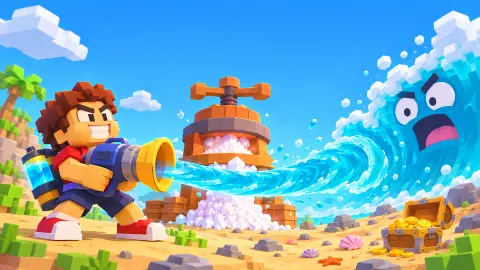
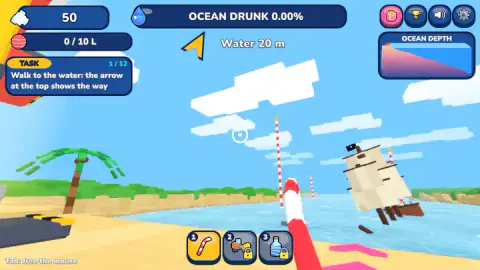
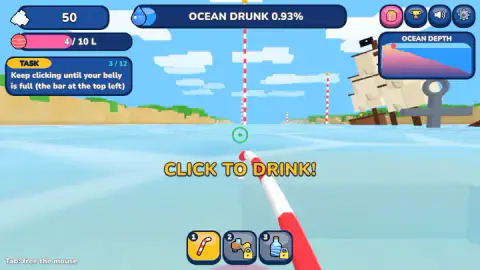
The world designed in a Minecraft style, where it is very blocky. The environment is pretty simple, everything consists of square blocks except the straw. A grey anchor sits a stone’s throw from a sunken pirate ship. We assume there is some sort of purpose that ties the striped posts together, but we couldn't tell you what it is. We played the game’s opening with a keyboard and mouse setup without issue.
Drinking: five sips to a full belly
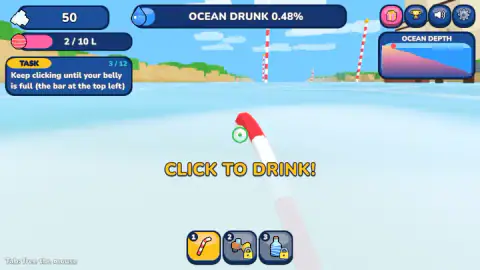
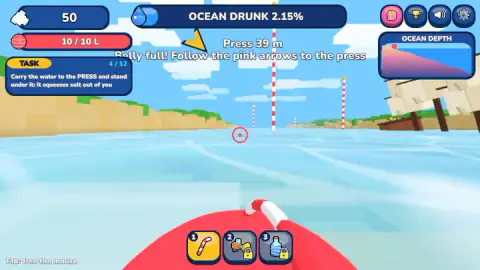
As far as the gameplay is concerned, you are going to be using your left click a whole lot. Because the reticle turns from white to green when pointed at a valid drinking spot, there’s this visual cue that triggers your press of the left mouse button. At any point that you’re holding a full belly, it turns red. While this seems easy you have to hit the button every time you want to sip and can’t hold it down. This will lead to excessive clicking, but happily there is little punishment for doing so.
A bar in the top left of your screen will start to fill up as you gradually drink up. As you can only carry ten litres at a time, you’ll need to be constantly on the move to keep the press well stocked. It can be oddly cathartic just clicking on the water and watching the numbers go up.
The OCEAN DRUNK meter and where the salt comes from
There was no way to earn anything because you didn’t get any actual salt from the sips. But with water, water, everywhere, but not a drop to sell, fresh salt is the currency of the day. The salt can be reinvested to make the process more efficient, the core mechanic of any good incremental clicker game. Upon filling the belly for the first time, we'd progressed through just 2.15% of the content. Like some of the most successful clicking games, the actual clicking becomes less effective after the initial sip. After all, people love it when numbers go up. Can you stomach drinking the sea over and over again for some incremental progress, and can you actually remember where the hidden press was?
Where is the press in Drink the Ocean
You find lots of water that you can drink, and your belly is full… but then, if you can’t get back to the press, you are in trouble! Your destination will change with each task to keep things moving, and thankfully a handy arrow will guide you to where you need to go.
First of all, it was very unclear as to where we were supposed to go, because the arrow appeared to point back behind us. You strafe with the A and D keys, not turn, and your mouse movements directly aim your viewpoint. It did lead to more than one occasion where we had next to no idea where to go or how to get where we were going. It is frustrating knowing how far the goal is, and having no clue how to get anywhere near it.
We never got punished for failing to perform a task, but it can be annoying to keep failing all the time. You might have better luck if you point the mouse in the direction you're headed. You'll spend a lot of time clicking, wandering, searching, and clicking some more.
Drink the Ocean upgrades and what comes later
Sadly, we didn't get to fully finish the tutorial. Disappointingly, that’s the bulk of the ‘story’ done and dusted, most of which is garnered from the game’s own description. That pitch alone suggests you will be encountering shipwrecks, relics of the past and a sunken city as you drain through the deep blue depths.
There’s a shop that allows for upgrades to be purchased. At first, you can only carry up to five sips at a time, but as you get deeper into the ocean, you can unlock a bigger belly as required. You’ll certainly be needing this if you want to find out what’s at the bottom of this ocean.
Apparently you pull the plug, start over anew, move to a new ocean with a new cast of cola, lemonade, slime or lava. In addition to the main loop, there are achievements to collect, Sky Duck boons to unlock, and an arsenal of straws to build up. When beginning, players will see three options, two of which are locked. Then there’s a mouth vacuum which lets you suck in parts of the sea you no longer require. It also remains a very grind intensive game and progress is marked largely by getting more salt to buy bigger bellies to allow you to more efficiently generate more salt.
Drink the Ocean controls
Navigation control is with the WASD keys on the keyboard, aim and click the mouse to drink. You can move left and right with the A and D keys, jump using spacebar, and make tool choices using the number keys. The controls are not complicated, and can be picked up very quickly.
Is Drink the Ocean free and unblocked
The game is available for free, mind you, so you can give it a go without it costing you anything aside from your time. Sometimes you just want to play one of the world's oddest clicker games in your browser without any fancy plugins, addons, or other third-party paraphenalia. It can also be played online for free here, and is well worth checking out if you've yet to do so.
Who made Drink the Ocean
This game was developed and published by Pinidi Studio. The game, however, only recently released on November 9 and has a lot of growing to do. Shortly after the game’s release, there was an update. To be fair, the game update wasn’t officially out when this was tested so it might change a few things. Finally, it’s worth noting here that the game is available in a host of languages. But don’t be fooled: despite having a similar name, the Roblox games are very different.
Screenshots
How to play Drink the Ocean
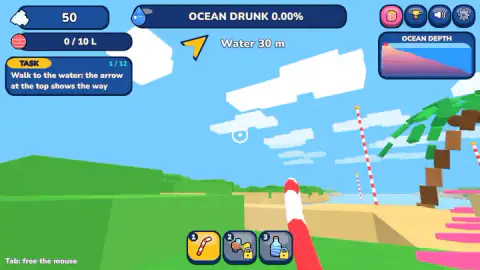
You will be thrown straight into the tutorial, and progress by meeting objectives which will guide you though. For instance, we can take a look at what appears to be a substantial tutorial with twelve separate tasks. When you get to gameplay, the next objective is maybe 20 metres ahead in a straight line. If you decide to wade or walk, an arrow on the top of your screen directs you which way to go and the distance required in travelling it. It's still pretty clear what needs doing but in the early stages, it is more of a matter of actually reading tasks rather than just following the arrows.
The more you click, the more your bar fills up. A goal is marked at a particular point on the beach and your job is to get the water to the press. It just might make a salt mine out of you. The tutorial does a great job of explaining what you need to do (to a point).
Controls
| W A S D | Move; in our run A and D stepped sideways |
|---|---|
| Mouse | Look around (Tab frees the cursor, as the on-screen hint says) |
| Left click | Drink one sip through the straw while the crosshair is green |
| Space, 1-2-3, T, E, P | Jump, switch tools, go home, open the duck's gifts and settings, according to the game's instructions |
| Hold the DRINK button | The phone control, according to the listing's instructions |
Features
- First-person and blocky: you walk a beach and drink the sea through a red and white straw
- Each click is one sip of 2 litres; the starting belly holds 10
- An OCEAN DRUNK meter at the top shows how much of the sea is gone; one full belly moved it to 2.15%
- Salt, the currency, comes from standing under the press, not from drinking
- A twelve-step tutorial, a direction arrow with a distance in metres and pink arrows on the ground
- Upgrades, extra tools, a Sky Duck with boons and new oceans of cola, lemonade, slime or lava, according to the game's description
Game details
- Developer
- Pinidi Studio
- Release date
- November 2026
- Last updated
- November 10, 2026
- Added here
- November 2026
- Technology
- HTML5 (WebGL, 3D)
- Platforms
- Browser (desktop, mouse and keyboard)
- Classification
- 3D , Arcade , Clicker , Simulation
- Saved progress
- Saving, when available, is managed by this game. Mava cannot confirm your level.
FAQ
How do you play Drink the Ocean?
Walk to the water, aim at it and left click to drink through the straw. Each click is a sip of 2 litres. When the belly bar at the top left is full, walk to the press and stand under it to turn the water into salt, which the game's instructions say you spend on upgrades at the blue SHOP pad.
Can you hold the mouse button to drink in Drink the Ocean?
On a computer, in our run, no. A long press of a second and a half added 2 litres, the same as a single click, so filling the starting belly of 10 litres takes five clicks. The listing's instructions say phones use a DRINK button that you hold.
Why does the crosshair change colour in Drink the Ocean?
It tells you what a click will do. It was white on the sand, turned green over the water, when the game shows CLICK TO DRINK, and went red once the belly was full and there was nothing more to drink.
Where is the press in Drink the Ocean?
Away from the drinking spot: when our belly filled, the game put it a little over thirty metres off. Follow the pink arrows and the arrow at the top of the screen. If that arrow points down, the press is behind you, so turn round with the mouse before walking forward.
Does drinking give you salt in Drink the Ocean?
No. Drinking raises the OCEAN DRUNK meter, but our salt stayed at the starting 50 through a full belly of 10 litres. Salt comes from standing under the press with water in your belly.
How much of the ocean does one belly drink?
At the starting size, a full belly of 10 litres took the OCEAN DRUNK meter from 0 to 2.15%. That is roughly one fiftieth of the sea, which is why the game's description puts so much weight on a bigger belly and better tools.
Who made Drink the Ocean?
Drink the Ocean is credited to Pinidi Studio and was published on 9 November 2026. It plays in the browser on computers, and the game's listing gives phones and tablets too.