






About Build an Aquapark
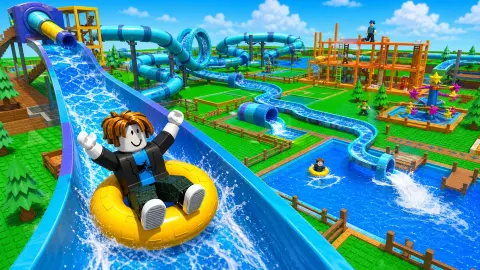
Most building games give you a blank grid and leave you to it. Build an Aquapark starts with a shopping trip. You stand on a lawn of plastic studs with 300 coins in your pocket, in front of a striped market stall labelled Buy blocks, and your water park is whatever you can afford to carry to the river.
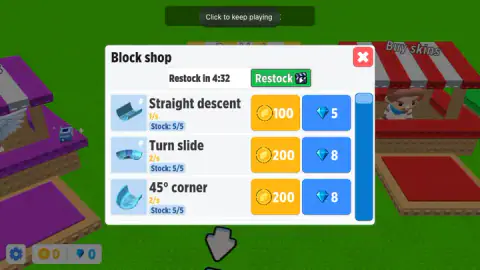
That first budget is tight on purpose. A straight descent costs 100 coins and a curve costs 200, so the opening money buys exactly two pieces and nothing more. The tutorial walks you through spending all of it, then through fitting both pieces to the water's edge, and only then shows you the deck where your park is meant to grow.
The game is by Square Dino LLC.6 out of 5 from 2,877 players. We played it through the full tutorial, from the first coin spent to the moment the game asked us to call a boat. We did not play past that point, and we say below where our run ends and the listing takes over.
What you buy at the stalls
The park sits behind a small street of stalls. Buy blocks sells slide pieces. Buy skins, the red one, sells looks for your character; we did not open it. A purple Buy boosters stall sells ways to move faster.
The block shop is the one that matters early. Under each piece is a small orange figure: 1/s for the straight descent, 2/s for both curves. The curves cost twice as much and carry twice the figure, which reads as money earned per second.
We did not play long enough to prove it. On the deck, though, a sign labelled Income kept climbing while we played, from 100 at the start to 330 by the end. We never walked onto it, so whether that is money waiting to be collected is something we could not check.
The booster stall is a price list for speed. The cheapest item, Boots of Swift, is paid for by watching an ad rather than with money. A Jetpack costs 100 gems and a Flying Carpet 150.
Further down come a skateboard, a pair of wings and a two-wheeled scooter, up to two and a half times your walking speed. We never earned a gem, so all of that stayed behind glass for us.
Building mode: a river, a deck and a red line
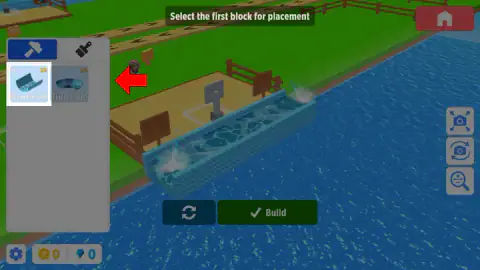
Building happens from above, beside a river, with the wooden deck behind you. The left panel has two tabs. The hammer places pieces. The brush paints them, and it stays locked with the note Painting unlocks at player level 3, at 10 gems a coat.
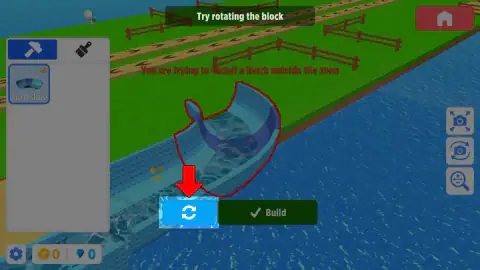
The rule the tutorial teaches is that every piece has to sit inside your zone. Our curve first appeared hanging over the water at the wrong angle, outlined in red, with Try rotating the block at the top of the screen. A few presses of the rotate button and the outline went green. After both pieces were down, little riders were already drifting through the curve and floating past on rings in the river.
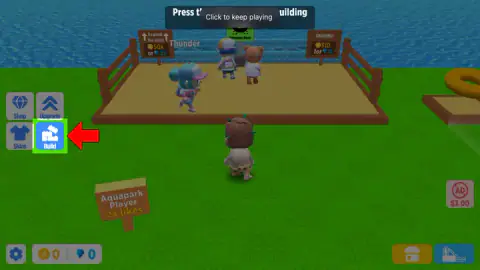
Three camera buttons on the right frame, rotate and zoom the view. Once a piece is down, a trash button appears next to Build.
Real water slides are built from pieces too
The shop-and-snap idea is closer to real life than it looks. A big water slide is not made in one go. Manufacturers build it as dozens of separate flume sections, the open or closed channels the water runs down, usually moulded from fibreglass, and a local contractor bolts them together on site, following the maker's plan. The finished run rests on a frame of steel girders.
Each section ends in a flange, a flat rim that is bolted to the next one. HowStuffWorks explains how the joint is kept smooth: one end of a section has a raised lip, the other a sunken step, and the lip of one rests on the step of the next, so a rider slides over the seam instead of catching on it. Patents for slide builders describe a bead of silicone between the flanges to stop leaks.
That is why Build an Aquapark's pieces have names like straight descent, turn slide and 45° corner. They are the same building blocks a real park orders: straights to gain speed, curves to change direction, corners to fit the slide into the space you have. The red outline is the game's version of a site limit. A real slide has to fit the land the park owns, and here a piece has to fit the zone you have paid for.
What comes after the tutorial, by the game's listing
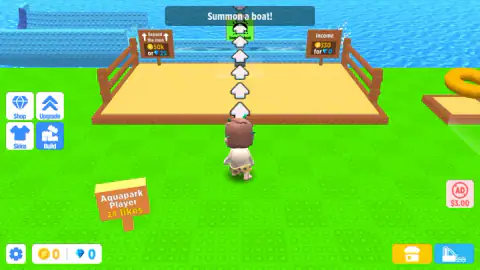
Our run ended at Summon a boat!, with white arrows leading across the deck to a green Summon boat pad by the water. We did not press it, so everything beyond this point is from the game's listing, not from our own play.
The listing says you jump on a water ring and ride your slide at full speed, keep buying parts, upgrade the slide with better pieces and aim for longer and faster tracks. That fits what the tutorial sets up: a deck with room to expand, a sign that tracks likes for your park, which went from 14 to 24 while we played, and other characters with player-style names such as SynthWanderer and VenomFang moving around the park. We cannot tell you whether they are real players.
Who Build an Aquapark is for
It suits younger players and anyone who likes tidy building without pressure. Nothing chases you, prices are shown before you pay, and the red-or-green outline does the thinking about whether a piece fits. Players who want a full theme park manager with visitors and finances will find it narrow: in the part we played, the park is one slide and the money is one budget. Expect a lot of buttons and plenty of ad breaks.
Square Dino's other build-and-earn games include Build a Road, where you buy blocks, walls and ramps to make an obstacle course, Railroad Magnate, which grows a train network from one line, and Army Base, where you run a training camp for recruits. More are in strategy games.
Screenshots
Taken by opening the game ourselves and letting it run — not supplied by the publisher, and not the same picture every other site shows.
How to play Build an Aquapark
- Open the block shop. Walk up to the yellow Buy blocks stall and press the green Open button. The button also carries the E key.
- Buy your first pieces. Each piece has a coin price and a gem price. With 300 coins you can take one straight descent and one turn slide.
- Enter building mode. Press the blue Build button on the left. The view swings to the river and a panel lists the pieces you own.
- Place, turn, confirm. Pick a piece in the hammer tab. If its outline glows red, press the rotate button until it turns green, then press Build. Leave with the red house button at the top right.
Tips from our run:
- Read the outline before you press anything. Red means part of the piece sits outside your building zone, and the game says so in red letters across the screen. In our run a few presses of the rotate button brought a curve back inside.
- Do not panic about stock. Each piece in the shop shows a count out of five. When one runs low, a timer of about five minutes refills it, and the green Restock button with the clapperboard does it at once.
- Buy in the order the red arrow shows. It points at the straight first and the curve second, which is the only way the opening 300 coins cover both.
- Watch the signs on the deck. One says Expand the zone for 50,000 coins or 25 gems, which tells you how far the early budget is from the first big upgrade.
- Expect breaks. The game puts 2 sec to AD in the middle of the screen before an ad, and in the tutorial that happened often, sometimes during a purchase.
Controls
| Click or tap the on-screen buttons | Open stalls, buy pieces, enter and leave building mode. The Open button at each stall also shows the E key |
|---|---|
| Hammer tab, then a piece in the building panel | Picks the slide piece you want to place |
| Rotate button (two circular arrows) | Turns the piece. A red outline means it sits outside the zone; green means it fits |
| Build button | Fixes the piece in place |
| Red house button, top right | Leaves building mode and returns you to your character |
| Camera buttons on the right | Frame, rotate and zoom the view while you build |
Features
- A market of stalls: blocks, skins and movement boosters, each opened from a big Open button
- Slide pieces cost coins or gems: a straight descent is 100 coins, a turn or a 45-degree corner 200
- Each piece has limited stock that refills on a timer of about five minutes, or straight away from the Restock button
- A building mode with a river, a deck, a rotate button and a red-or-green outline that tells you if a piece fits
- Movement boosters from speed x1.2 boots to a x2.5 scooter, mostly priced in gems
- Painting your slides unlocks at player level 3
- By Square Dino LLC
Game details
- Developer
- Square Dino LLC
- Release date
- February 2026
- Last updated
- October 15, 2026
- Added here
- December 2025
- Technology
- HTML5 (WebGL, 3D)
- Platforms
- Browser (desktop, mouse), Browser (mobile & tablet, touch)
- Classification
- Arcade , Simulation , Strategy
- Download size
- 15.1 MB
- Ad requests
- 2 (few)
- Has a save
- Yes
- Saved progress
- Saving, when available, is managed by this game. Mava cannot confirm your level.
Measured by opening the game ourselves on 2026-09-11, not taken from the feed. Twelve seconds on a phone-sized screen, with ad requests counted and blocked rather than loaded.
FAQ
How do you play Build an Aquapark?
You start beside a deck by a river with 300 coins. Open the Buy blocks stall, buy slide pieces such as a straight descent or a turn, then press the Build button to enter building mode. Pick a piece, rotate it until its outline turns green, and press Build to fix it in place.
How much do slide pieces cost in Build an Aquapark?
In the block shop a straight descent costs 100 coins or 5 gems, and a turn slide or a 45-degree corner costs 200 coins or 8 gems. Your starting 300 coins buy exactly one straight and one curve. Each piece has a stock of five that refills on a timer.
Why does Build an Aquapark say I am trying to install a block outside the zone?
Every piece has to sit inside your building zone by the river. When part of it hangs outside, the outline turns red and the game asks you to try rotating the block. Press the round arrows button until the outline turns green, then press Build.
What do the movement boosters do in Build an Aquapark?
They make your character walk faster around the park. The stall lists Boots of Swift at speed x1.2, unlocked by watching an ad, a Jetpack at x1.5 for 100 gems and a Flying Carpet at x1.8 for 150 gems, with faster items further down up to x2.5.
Where is the boat in Build an Aquapark?
After your first two pieces the tutorial says Summon a boat, and white arrows run across the wooden deck to a green Summon boat pad at the far end by the water. We stopped at that point, so what the boat brings is not something we saw.
When can you paint slides in Build an Aquapark?
The brush tab in building mode stays locked until player level 3, and painting is priced at 10 gems. Before that only the hammer tab, which places pieces, is available.
Who made Build an Aquapark?
Build an Aquapark is by Square Dino LLC, according to its page. The same studio has also made build-and-earn browser games such as Build a Road and Railroad Magnate.
Can you play Build an Aquapark on a phone?
Yes. It is listed for desktop, Android and iOS browsers, and every action in the tutorial is a button you can tap. We played with a mouse.