



About Fun Town Parking
Most parking games hang a countdown over your head. The number falls, the bay gets further away, and the moment it hits zero you have failed. This one opens its level board and says, in plain capitals, that there is no time limit.
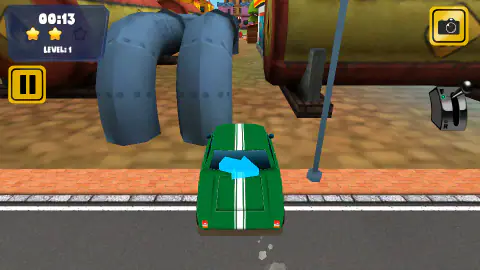
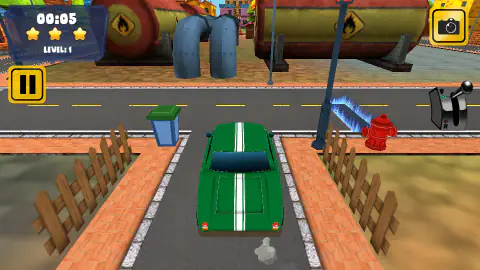
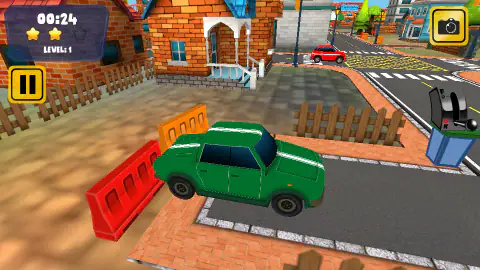
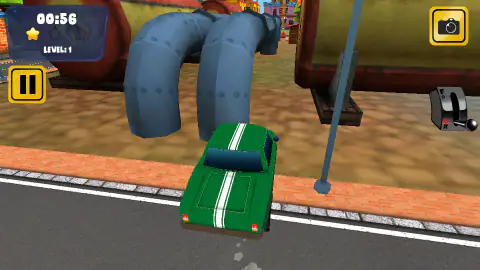
That is true, and it is also not the whole story. The clock in the top-left corner counts up, not down, and nothing happens when it passes any particular number. What happens is quieter. Above the words LEVEL: 1 there are three stars, and they go out while you drive. Five seconds into a level all three were still lit for us. Thirteen seconds in, one had gone dark. By fifty-six, there was a single star left.
So the game is not racing you. It is rating you, continuously, and the rating is the thing you are spending. Nothing beeps, nothing flashes red, and if you are watching the car rather than the corner you will not notice a star leave.
The other decision that shapes the whole game sits on the opposite side of the screen: a gear lever, drawn as a real one, with F above and R below. Most browser driving games treat reverse as whatever happens when you hold the brake long enough. Here it is a separate act. You press Shift, the knob drops, the green lamp beside F goes out and a red one lights beside R, and now the throttle sends you backwards. You have to decide which way you are going before you go.
The game is credited to Studd, whose other work is already here, and it was published in January 2025.
Our own session was not a triumph. We never finished the first level: the one end screen we reached read GAME OVER and FAILED, with a level score of zero and a total score to match. What follows is what the attempt taught us, and a straight list of what it did not.
Parking is geometry, and the lever is the whole lesson
Here is the thing nobody tells you in a driving game, because most driving games do not model it: a car does not turn around its middle. The front wheels steer and the back wheels do not, which means the back wheels always cut inside the line the front wheels take. Draw a line through the rear axle and extend it sideways, and the point the whole car is pivoting around sits somewhere on that line. Everything about parking comes out of that one fact.
It is why the back of a bus swings wide on a tight corner, and it is why driving instructors make you reverse into a bay rather than drive into it nose-first. Going in forwards, the end of the car you cannot steer arrives first, and once it is in, it is in: the only thing you can still move is the nose. Going in backwards, the steered wheels are the ones left outside, so a small turn of the wheel swings the car's tail exactly where you want it, and you can keep correcting right up to the moment you stop. The same geometry is why a parallel space on a street is reversed into and driven out of forwards, never the other way around.
Now look at what this game puts in front of you. Not a wide car park with painted lines, but a driveway between two wooden fences barely wider than the car, approached from a road running across it. That is a bay you cannot swing into. You have to get the car square to the gap before you commit, and squaring up means going back and forth — forward to set the angle, reverse to take it in.
Which is where the lever stops being a toy. Shift, knob down, red lamp. Steer, throttle, stop. Shift, knob up, green lamp. On a keyboard that is a deliberate two-handed act, and the game makes you perform it every time you change your mind. Patience is not a virtue being tested here. It is a control scheme.
Normal, Time Trial, and how far we actually got
The mode signs come before anything else: NORMAL first, TIME TRIAL second, and a third we read as FREE ROAM. We only went through the first one, so the other two are blanks we are not going to fill in with guesses. It is reasonable to expect a mode called time trial to put a real countdown on you, but reasonable is not the same as seen.
The normal mode's own board is more forthcoming. Ten numbered boxes, the first open with three empty star outlines under it, the rest padlocked, so the levels unlock in order. Underneath, in small type, the board carried a car-life count and the words about there being no time limit. We read that board once and never got back to it with anything unlocked, so treat the car lives as something the game told us rather than something we watched work.
Before the level itself there is a control panel that lists the lot: the two sets of movement keys, Shift for the gear, C for the camera, M for mute, P for pause, R for reset. It is the reason this page can be specific about the keys. It showed up twice during our session, once while the game was still loading.
What we never reached: level two, or any level after it. A score above zero. The time trial, the third mode, and the easy and hard difficulties. We also never caught the camera key doing anything we could photograph, which is why the controls list above says so rather than inventing a chase view and a bonnet view.
There is an honest conclusion in that. This is a parking game that will fail you, and it will do it on the first level, in a town built out of soft cartoon shapes that makes it look like it will not. The gentle art style is doing a lot of work. Behind it is a car with a real pivot point, a street narrower than it looks, and a rating that starts at three and only goes one way.
More driving, and more parking
Turbo Racer Extreme is the same studio pointed in the opposite direction: a six-lane highway, a throttle you hold down, and points for passing close rather than for stopping neatly. For the manoeuvre itself, Car Parking 3D is the straight version — a gate barrier, a line of cones and a green bay, with ten levels on its first page. Precision Parking Pro is the strict one, set in a container port, and it does keep a collisions counter where this game shows you nothing. And Car And Truck Parking Game starts, like this one, with a level that is not a car park at all. The rest are in driving games.
Screenshots
How to play Fun Town Parking
- Pick a mode, then a level, then a difficulty. Three wooden signs come first, the normal one in the middle. Then a board of ten numbered boxes, the first open and the rest padlocked. Then a choice of EASY, NORMAL or HARD, which the driving screen carries as a label in the corner.
- Check the lever before you touch the throttle. The knob sits at F with a green lamp when you start. Shift drops it to R and lights the red one. Getting this wrong is how you reverse into the fence you were trying to avoid.
- Follow the blue arrow. It floats over the roof of the car and points at the next part of the route. It is the only navigation the game gives you.
- Steer with A and D, or the arrow keys, and go gently. The streets are narrower than the car makes them look, and the kerbs are high enough to catch a wheel.
- Press R rather than wrestling. The reset puts you back at the start of the level cleanly. Driving yourself out of a wedge costs more time, and time is what the stars are made of.
What the session taught us:
- Full throttle and full lock at the same time is how you end up on the pavement. One of our shots has the car at an angle across the brick, nose in the kerb, with most of the clock already gone. A car that is stopped is costing you a star just as surely as a car that is lost.
- The scenery is not scenery. Red and orange plastic barriers shove out of line when you hit them, and in one of our captures an orange one is lying flat where we put it. We saw nothing on screen counting the damage, which does not mean nothing is counting it.
- There is no score on the driving screen at all. The corner shows the clock, the stars and the level. Whatever is being scored is settled at the end, not in front of you.
- The street furniture is placed to be in your way. A wheelie bin on one side of a driveway and a fire hydrant on the other is the width of the gap you have to fit through.
- Reset early. The clock keeps running while you think, and thinking is free only until the next star goes.
Controls
| W / A / S / D | Drive. W and S work the throttle, A and D turn the wheel. The game lists these on its own control panel before a level |
|---|---|
| Arrow keys | The same four jobs, for anyone who would rather keep one hand on the keyboard |
| Shift | Changes gear between forward and reverse. The lever on the right of the screen shows which you are in: knob up at F with a green lamp, knob down at R with a red one |
| C | Switches the camera view, as the control panel says. A camera button sits in the top-right corner too. We never got a clean before-and-after, so we cannot tell you what it switches to |
| R | Resets the level. Faster than driving back out of a mistake, and the clock starts again |
| P, or the pause button top left | Pauses. The two yellow bars in the corner do the same thing |
| M | Mutes and unmutes |
Features
- A gear lever on screen rather than an automatic: forward and reverse are a deliberate choice you make with Shift, and a green or red lamp tells you which one you are in
- Three stars above the level number that go out one by one as the clock climbs — five seconds in we still had all three, just under a minute in we were down to one
- A clock that counts up instead of down, under a level board that says NO TIME LIMIT in plain capitals
- Ten numbered levels in the normal mode, nine of them locked behind padlocks until you clear the one before
- Three difficulties offered before the level starts, marked EASY, NORMAL and HARD
- A cartoon town to bump into: wooden fences, wheelie bins, a fire hydrant, street lamps and red and orange plastic barriers that shove out of line when you catch them
- Made by Studd
Game details
- Developer
- Studd
- Release date
- January 2025
- Last updated
- August 10, 2026
- Added here
- April 2025
- Technology
- HTML5 (Unity WebGL)
- Platforms
- Browser (desktop)
- Classification
- Driving , Simulation
- Saved progress
- Saving, when available, is managed by this game. Mava cannot confirm your level.
FAQ
What is Fun Town Parking?
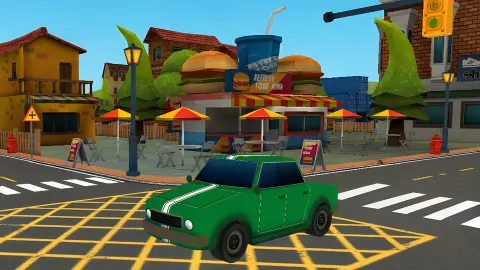
It is a free browser parking game set in a cartoon town, made by the studio Studd. You drive a green car along narrow streets and into marked spaces without flattening the scenery, working through numbered levels one at a time. It runs in the browser with no download, and it is played with the keyboard.
How do you play Fun Town Parking?
With W, A, S and D, or the arrow keys, for the throttle and the steering. Shift swaps between forward and reverse, and the lever drawn on the right of the screen shows which gear you are in. A blue arrow floats over the car to point you towards the next bit of the route, and R puts you back at the start of the level if you wedge yourself somewhere.
Is there a time limit in Fun Town Parking?
The level board says there is not, and nothing we saw contradicts it. The clock on the driving screen counts up rather than down, so it is a stopwatch, not a fuse. What time does cost you is stars: there are three above the level number and they go out as the clock climbs.
What do the three stars mean?
They are the rating for the level you are on, and they burn down with the clock. In our captures the clock at five seconds still showed all three lit, thirteen seconds showed two, and fifty-six seconds showed only one. We never completed a level, so we cannot tell you what a three-star finish is worth afterwards.
How many levels does Fun Town Parking have?
Ten in the normal mode. The level board lays them out as numbered boxes, with the first unlocked and the other nine wearing padlocks, and the driving screen counts them as one of ten. We never cleared the first one, so everything past it is still shut to us.
What modes are in Fun Town Parking?
Three wooden signs appear before you pick a level. The first is NORMAL, which is the one we played, the second is TIME TRIAL, and the third we read as FREE ROAM. We only ever went through the first door, so what the other two change is something we cannot honestly describe.
Why does the game make you change gear?
Because reversing is most of parking, and a game that puts reverse on the same key as braking cannot tell the two apart. Here reverse is a decision: you press Shift, the lever drops from F to R, the green lamp goes out and a red one lights. It is a small thing that changes how you plan a manoeuvre, because you have to commit to a direction before you touch the throttle.
Who made Fun Town Parking and when?
It is credited to Studd, who also made Turbo Racer Extreme, Gunner Pursuit and Agent Sniper City, all of which are in our catalogue. The game was published in January 2025 with an update in August 2026. Those are the platform's own dates for the game's page, which is the most reliable record we found.