





About Precision Parking Pro
Most parking games show you the bay before anything else and let you think about it. Precision Parking Pro starts a clock first. By the time you have read the screen, a few seconds of a six-minute countdown are already gone, and a second number sits next to it, waiting: Collisions.
That pairing is the whole game. One number tells you to hurry, the other tells you to be careful, and you cannot fully obey both. A level is a short negotiation between them, carried out with a car that has a real reverse gear and a lever on screen to prove it.
We played Precision Parking Pro on a desktop, with a keyboard and a mouse, for one level. We should be honest about how that went: we never reached the bay. In about two minutes and forty seconds on the clock our car moved only a few lengths, and the Collisions counter stayed at zero mostly because we hardly went anywhere. Everything below comes from that level and our screenshots of it. What we did not reach is listed near the end.
The game is credited to Breymantech. It was published in November 2025.
The garage comes before the car park
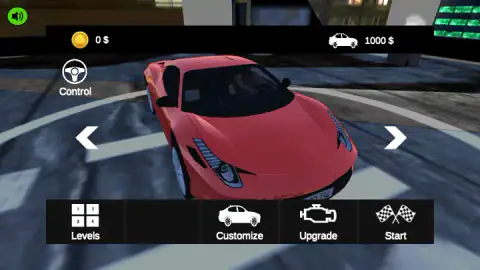
Precision Parking Pro opens in a garage rather than on a level select. A red two-seat sports car turns on a round platform, with arrows on both sides to browse other cars. Above it are two numbers: a coin counter that read 0 $ when we arrived, and a car icon next to 1000 $. We did not find out what that second figure is, whether the price of the car on show or something else, so we will not guess.
The bar along the bottom holds Levels, Customize, Upgrade and Start, and a Control button with a steering-wheel icon sits at the top left. That is a lot of menu for a parking game. It also tells you the shape of the game: you park to earn money, and money goes back into the car. The game's listing says the same, promising rewards, new cars to unlock and a climb from rookie driver to parking professional.
Since we earned nothing, we cannot tell you what an upgrade does to how the car parks, or what customizing it changes beyond the look.
A car park made of shipping containers
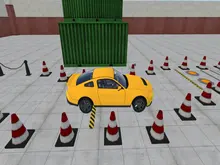
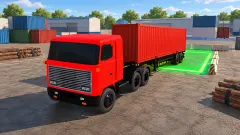
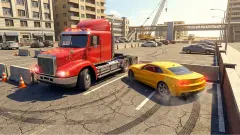
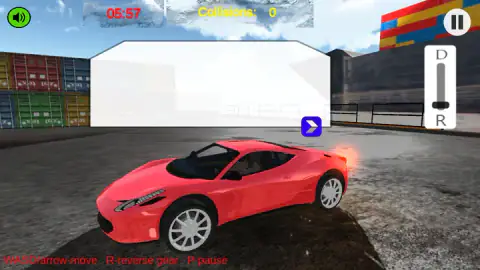
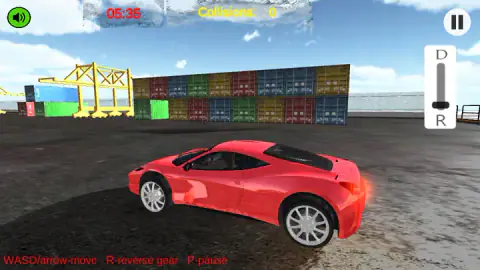
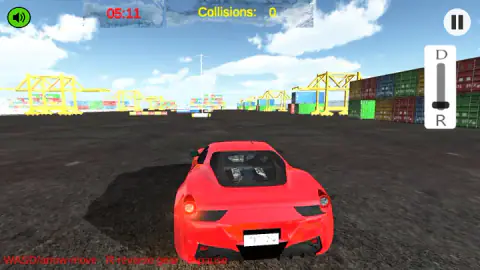
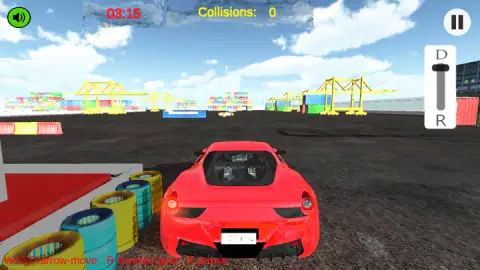
The level we played is not a city street. It is a container port. Walls of stacked boxes in red, blue, green and yellow line the yard, tall yellow cranes stand behind them, and the ground is dark asphalt. Closer to the car there are walls of stacked tyres in yellow and blue, and low barriers striped red and white.
We saw the car two ways. At first the camera sat to the side, so the car filled the frame in profile against the containers. Later it sat behind the car, low, looking down the yard past the cranes. The second view is the useful one for driving, since you can see the gap ahead.
The game's listing also speaks of tight city alleys and multi-level garages. We only saw the port, so we cannot say how many levels use it.
Every box in the yard is a ruler
The setting turns out to be a good one for a parking game, because every box in it is the same width. Shipping containers were standardised so that any crane, ship, train or truck could lift any box, and the international rules written in the late 1960s fixed their width at 8 feet, about 2.44 metres. Almost every container in the world is that wide.
That happens to be the width of a parking space. In the United Kingdom the recommended standard bay is 2.4 metres wide. In the United States the minimum is usually a little wider, between about 2.6 and 2.7 metres.
So when you are lining up in this yard, the end of any container tells you roughly how much room a real bay would give you. If a gap between two stacks looks narrower than the end of a box, it is narrower than a car park space, and a car that fits there is being parked with real precision.
The two numbers at the top
The clock is red and sits at the top left of centre. It counts down in real time: in our level about 162 seconds came off it over about 154 seconds of play, which is the same speed allowing for the moments between our screenshots. When we first saw it, it read 5:57, so a level starts at roughly six minutes.
That sounds generous for one parking space, and it may be. But it also tells you what kind of game this is. The time is there for a careful driver who reverses, straightens up and tries again, not for a speed run.
The Collisions counter, in yellow beside the clock, read zero in every screenshot we took. We cannot tell you whether a bump costs time, money or the level, because we never touched anything. What we can say is that the game counts every one in full view, so a clean run is something it notices.
What we did not see
We did not reach the parking bay, so we never saw a level end, a reward, a star rating or a second level. We did not see the city alleys or the multi-level garages that the game's listing describes. We earned no money, so the Upgrade and Customize screens stayed unopened. We heard no sound for a crash, a success or a failure, because none happened.
We also only played on a computer. The game is listed for Android and iOS too, and places it among its touchscreen games, but we did not try those.
Who it is for
Precision Parking Pro suits players who like slow, deliberate driving more than racing: people who enjoy reversing into a tight space as a puzzle with a steering wheel. The six-minute clock leaves room to think, and the Collisions counter rewards patience.
It is less suited to anyone who wants instant action. Our level opened with a panel to dismiss, a gear lever to understand and a car that does exactly what you tell it, which is not always what you meant. Younger players may need a few tries before the car goes where they point it.
More parking games to try
If you want the same race against a clock with a heavier vehicle, Bus Parking hands you a bus and a clock across 39 levels. Car Parking Driving Game also puts a gear lever on screen. Parking Master: Urban Challenges turns each collision into extra seconds, and Car Parking 3D keeps things short with cones and a marked bay. For more, browse the driving games.
Screenshots
Taken by opening the game ourselves and letting it run — not supplied by the publisher, and not the same picture every other site shows.
How to play Precision Parking Pro
- In the garage, press Start at the bottom right. The other buttons on that bar are Levels, Customize and Upgrade.
- When the level loads, start driving. Use W, A, S, D or the arrow keys to accelerate, brake and steer.
- Press R for reverse gear. The lever on the right of the screen shows where you are: D at the top, R at the bottom.
- Reach the parking bay before the clock at the top runs out, and keep the Collisions counter as low as you can.
- Press P, or the round button at the top right, to pause.
What one unfinished level taught us:
- The clock does not wait for you. When the level opened, a large translucent panel with a blue arrow button covered the top of the screen, and the clock was already counting down behind it. Clear it and start moving.
- Short taps are not driving. We spent most of our time pressing a key for a second at a time and checking the screen. Between 4:48 and 3:36 on the clock the car barely changed position. Hold the key long enough to see where the car wants to go.
- Look at the lever before you blame the steering. The gear slider sat near R at the start of our level and at D later on. If the car does not go the way you expect, the lever is the first thing to check.
- The help line never goes away. The red text at the bottom left, "WASD/arrow-move R-reverse gear P-pause", stays on screen through the whole level.
Controls
| W / A / S / D or arrow keys | Drive and steer, as the on-screen line in every level says |
|---|---|
| R | Reverse gear |
| P | Pause; there is also a pause button at the top right |
| Gear slider on the right | A vertical lever with D at the top and R at the bottom |
| Garage arrows and buttons | Browse cars and open Levels, Customize, Upgrade or Start |
Features
- A garage menu with four doors out of it, Levels, Customize, Upgrade and Start, plus a Control button
- A countdown clock at the top of every level, running in real time from about six minutes
- A Collisions counter beside the clock, so every bump is kept on the record
- A vertical gear lever on screen, D at the top and R at the bottom
- A first level in a container port, with stacked boxes, yellow cranes, tyre walls and striped barriers
- Two camera angles in our run, from the side and from behind the car
- A money counter in the garage that starts at zero
Game details
- Developer
- Breymantech
- Release date
- November 2025
- Last updated
- August 10, 2026
- Added here
- September 2025
- Technology
- HTML5 (3D)
- Platforms
- Browser (desktop)
- Classification
- Arcade , Driving , Simulation
- Saved progress
- Saving, when available, is managed by this game. Mava cannot confirm your level.
FAQ
How do you play Precision Parking Pro?
Press Start in the garage to load a level, then drive with W, A, S, D or the arrow keys. R puts the car in reverse and P pauses. The aim is to reach the parking bay before the clock at the top of the screen runs out, without adding to the Collisions counter beside it.
What are the controls in Precision Parking Pro?
The game prints them at the bottom left of every level. W, A, S, D or the arrow keys move the car, R selects reverse and P pauses. On the right of the screen there is also a vertical gear lever with D at the top and R at the bottom.
How long do you have to park in Precision Parking Pro?
The level we played gave us about six minutes. The clock counts down in real time at the top of the screen, and it keeps running behind the opening panel, so it is worth starting to drive straight away.
Does hitting things matter in Precision Parking Pro?
Every level shows a Collisions counter next to the clock, so the game keeps count of every bump. Ours stayed at zero, and we never finished a level, so we cannot say how much a collision costs you.
Can you buy and upgrade cars in Precision Parking Pro?
The garage menu has Customize and Upgrade buttons, arrows to browse cars and a money counter that starts at zero. The game's listing says you earn rewards and unlock new cars. We did not earn any money in our run, so we did not see a purchase.
Can you play Precision Parking Pro on a phone?
It is listed for Android and iOS as well as desktop browsers and filed among touchscreen games. We only played it on a computer with a keyboard and mouse.
Who made Precision Parking Pro?
The game is credited to Breymantech. The game was listed in November 2025, last updated in August 2026.