


About Car Parking Driving Game
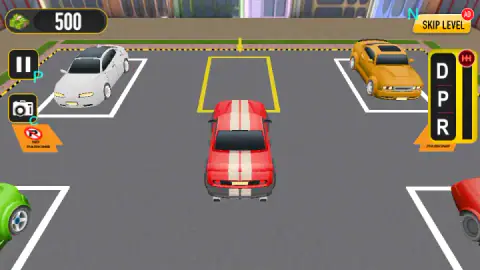
Most browser parking games hand you four arrow keys and call that a car. Car Parking Driving Game adds one thing a driver would recognise: a gear lever. It stands on the right edge of the screen, a tall yellow panel with three letters on it, and before the first level the game stops to tell you what they mean. D is Drive. P is Park. R is Reverse.
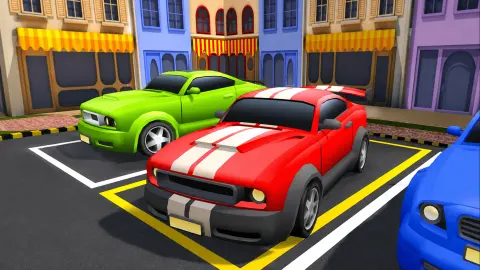
The job itself is plain. You sit behind a red car with two white stripes, in a car park with other cars already in their places. One bay is painted yellow and has a yellow arrow hanging over it. You put the car in that bay. When you do, the level ends, money lands in your account and the next car park loads.
The game is credited to Horizon Games. It was published in August 2026, so it is new and has not been played by many people yet.
Our own session was short, and you should know its limits before reading on. In roughly four minutes at a desktop keyboard we went through the menus, finished the first level and reached the second, where we did not manage to park. We never steered round a corner or reversed. What follows is what was on our screen; anything we took from the game's instructions is marked as such.
The two car parks we saw
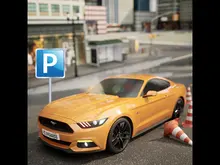
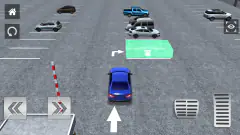
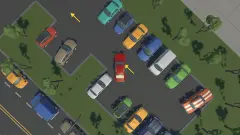
The first level is as gentle as a parking level can be. Your car faces the yellow bay from a few lengths away, with nothing in between. A white car is parked in a bay to the left of it and an orange one to the right, and two more cars sit in the bays behind you. Orange No Parking signs lie flat on the ground at the edges. You drive forward and stop. It teaches the lever and the yellow paint, and nothing else.
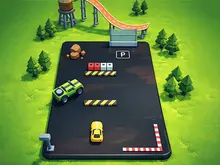
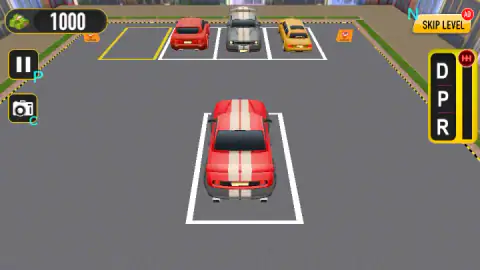
The second level asks for real driving. The car starts in a white bay near the bottom of the screen. Across an open stretch of tarmac is a row of four bays: three hold a red car, a grey one with stripes and a yellow one, and the fourth, at the left end, is yellow and empty. To reach it you have to pull out, turn left and line up next to a parked car. That is the first moment the game needs steering, and probably the reverse gear too.
We did not get there. Our car stayed in its starting bay for the rest of the session, and we cannot tell you whether that was the lever, the pause bar or our own hands. So we have nothing to report on what happens when you touch another car, and we will not guess.
Money, cars and the Skip Level button
The main menu shows a stack of green banknotes with a number beside it. Ours read 500 before we had done anything, and 1,000 once the second level was on screen. One level, 500.
The game's description says the rewards unlock new vehicles. We spent nothing, so we have no prices to give you.
Skip Level sits in the top right corner during every level and carries a red AD badge: it offers to jump the level in exchange for watching an advert. We pressed it once on the second level. A notice told us no ads were available, and the same car park was waiting when we closed it. Parking the car is the reliable way forward.
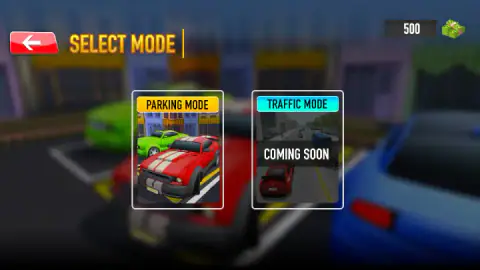
The mode screen also promises a Traffic Mode, with a picture of a car on a road among other vehicles. It was marked Coming Soon when we played, so for now this is a parking game and nothing more.
The lever is nearly a real one
The three letters come from automatic cars. According to Wikipedia, most of them lay out the selector as P, R, N, D, L: Park, Reverse, Neutral, Drive, Low. In the United States that order is not left to taste; a federal safety standard sets the sequence of positions.
Park is more than a brake. In a real gearbox, Wikipedia explains, selecting Park drops a metal catch called a parking pawl that locks the shaft leaving the transmission, so the driven wheels cannot turn.
The game keeps the letters and changes the order. Its lever reads D, P, R from top to bottom, with no Neutral, which puts Park in the middle. In practice that means every change between forwards and backwards passes through the position where the car stands still. For a game about stopping in exactly the right place, that is a sensible thing to have under your finger.
Who it is for
It suits players who like slow, careful driving and a clear target. There is no race, no rival and, on the two levels we saw, no clock on the screen.
It is thin for anyone who wants an open city or traffic to weave through. That part is still a promise on the menu.
More parking games to try
Car Parking 3D is the nearest thing we have: a blue saloon, a gate barrier, cones and a green bay. Bus Parking does the same job with eleven metres of bus and a clock. Arrow Parking turns parking into a route puzzle where you lay arrows and the car drives itself, and Bus Parking Out is a colour-matching puzzle set in a car park. The rest are under driving games.
Screenshots
Taken by opening the game ourselves and letting it run — not supplied by the publisher, and not the same picture every other site shows.
How to play Car Parking Driving Game
- Press Play, then choose Parking Mode. It is the only mode you can open. A level screen and a car screen follow; we took the first level and the red car the game hands you.
- Click through the tutorial. The screen goes dark, the lever lights up with its three labels, and the words "Click To Continue..." wait at the bottom left.
- Find the yellow bay. It is the only yellow rectangle in the lot, and the arrow above it helps when parked cars hide the paint.
- Hold W or the up arrow to drive. The game's instructions give A and D to steer and S to brake.
- Stop inside the yellow lines and put the lever in P.
Things we learned by doing it:
- Short presses are enough. On the first level the yellow bay is straight ahead. We held W for about a second and a half and stopped short, then gave it a little more. The car is not fast, and the bay is not far.
- Try Park when you are in. Our first level finished just after we clicked the P on the lever with the car at the bay. We cannot swear the click was what did it, since the car may simply have rolled far enough, but it costs nothing to do.
- White bays do not count. The second level starts with your car neatly inside a white bay. We lost time there because it looked parked. The target was the yellow bay in the far row.
- If the picture stops, click the game. A "Click to keep playing" bar appeared several times when we had not touched anything for a few seconds. One click on the game brings it back.
- The small blue letters are reminders. A P sits beside the pause button, a C beside the camera and an N beside Skip Level. The instructions confirm C for the camera.
Controls
| W or Up arrow | Accelerate; holding W is what moved our car towards the bay |
|---|---|
| A / D or Left / Right arrows | Steer left and right, according to the game's instructions |
| S or Down arrow | Brake, according to the game's instructions |
| Click D, P or R on the lever (right edge of the screen) | Selects Drive, Park or Reverse |
| C or the camera button | Changes the camera view, according to the game's instructions |
| Pause button (marked with a P) | Pauses the level |
Features
- A gear lever on screen with three positions, Drive, Park and Reverse, explained in a short tutorial before the first level
- One target per level, a bay painted yellow with a yellow arrow hanging over it; every other bay is white
- Cash for finishing: our balance went from 500 to 1,000 after the first level
- Two modes on the menu, Parking Mode and Traffic Mode; Traffic Mode is marked Coming Soon
- Parked cars around the target and orange No Parking signs on the ground
- A camera button and a Skip Level button that asks for an advert
- Made by Horizon Games
Game details
- Developer
- Horizon Games
- Release date
- August 2026
- Last updated
- August 24, 2026
- Added here
- July 2026
- Technology
- HTML5 (WebGL)
- Platforms
- Browser (desktop, keyboard and mouse), Browser (mobile & tablet, touch)
- Classification
- 3D , Arcade , Driving , Simulation
- Download size
- 19.1 MB
- Ad requests
- 2 (few)
- Has a save
- Yes
- Saved progress
- Saving, when available, is managed by this game. Mava cannot confirm your level.
Measured by opening the game ourselves on 2026-09-11, not taken from the feed. Twelve seconds on a phone-sized screen, with ad requests counted and blocked rather than loaded.
FAQ
How do you play Car Parking Driving Game?
You drive a red car across a small car park and stop it inside the bay painted yellow. W or the up arrow accelerates, and a lever on the right of the screen switches between Drive, Park and Reverse. The game's instructions add A and D to steer, S to brake and C to change the camera.
What does the D, P, R lever do in Car Parking Driving Game?
It is the gearbox. D is Drive, for going forwards; R is Reverse; P is Park, for standing still. A tutorial labels the three positions before the first level. In our run the first level ended right after we rolled up to the yellow bay and clicked P, so it is worth trying Park once you are inside the lines.
Which parking space do you have to use?
The yellow one. Each lot we saw had a single bay outlined in yellow with a yellow arrow floating above it, and all the other bays were white. On the second level the car starts inside a white bay, which looks like a finished job but is only the starting position.
How do you earn money in Car Parking Driving Game?
By finishing levels. We started with 500 on the main menu and had 1,000 when the second level loaded, so the first level paid 500. The game's description says rewards unlock new vehicles; we did not spend any money, so we cannot give prices.
Is Traffic Mode available in Car Parking Driving Game?
Not when we played, on 6 October 2026. The mode screen shows two cards, Parking Mode and Traffic Mode, and the second one is covered by the words Coming Soon. Parking Mode is the whole game for now.
What does the Skip Level button do?
It sits in the top right corner with a small AD badge, which means it wants you to watch an advert in exchange for skipping the level. When we pressed it, a notice said no ads were available and we stayed on the same level. We would not plan around it.
Who made Car Parking Driving Game?
It is credited to Horizon Games. It was published on 23 August 2026. It is listed for PC, Android and iOS in landscape; we played it on a desktop computer with keyboard and mouse.