




About Real Parking Game
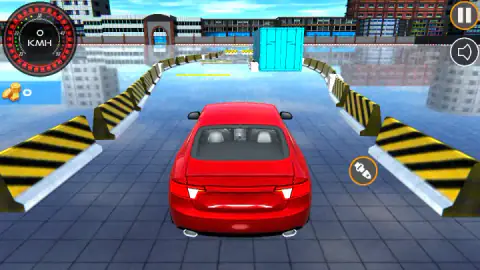
We spent almost two minutes of Real Parking Game with the accelerator down and the needle on 0. There was no message and no warning. The red car just sat between two lines of yellow and black barriers, looking ready to go.
The answer was a small grey circle with an orange ring, sitting on the tiles to the right of the car. It shows a seat belt. Click the seat belt first, and W works. Leave it, and W did nothing in any of our attempts, so we would treat it as a rule of the game, though we only have one session to go on. The listing's list of controls does not mention it, and no screen we saw explains it.
That is the first thing to know about this game, and it sets the tone for the rest. It wants you to slow down and do things in order. The menus are generous and the first road is short, but one bump ends the attempt, and the car does not lose speed when you lift your foot.
Real Parking Game comes from StakeStudio, listed since February 2026. We should say up front how far we got: the first level, five attempts, not beaten. What follows is what those attempts taught us, not a guide to the whole game.
Why the car stays at 0, and why that is not a bug
Our record from the session is clear enough to rely on. Eleven times we pressed the accelerator with the icon showing, for as long as two seconds, and the dial stayed on 0. Five times the car did move, and each time we had clicked the icon before it. The icon was gone by then, and it came back as soon as we pressed RETRY.
So the game is making you do what a driving instructor would. Learners in the UK are taught a routine called the cockpit drill before they turn the key: doors, seat, steering, seat belt, mirrors. Real Parking Game keeps one of those five steps and makes it a condition of moving at all.
It is a nice idea, and a poor welcome, because nothing tells you. If you are reading this because you assumed the game was broken, you are in good company. We assumed the same, and we also tried Enter, the arrows and clicking around the screen.
Nineteen KMH is much too fast here
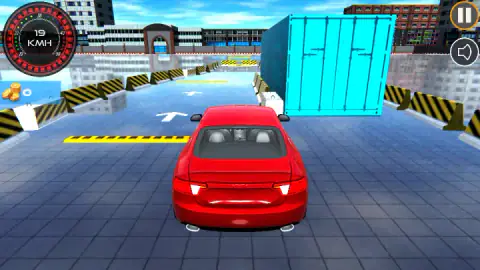
The dial is marked up to 50, which makes 19 sound modest. It is about four times walking pace, and in this game it is a crash waiting a few seconds down the road. Every time we held W for a second or more, the dial climbed that far, and we met the container soon after.
The reason is the way the car rolls. It does not slow down much when you lift off. Three short presses put us on 3 KMH, and the needle had not moved several seconds later. After a longer press we saw 18, then 17 two seconds on. So speed is something you add and then have to take away, not something that fades by itself.
That changes how to drive. Treat W as a series of small decisions, and think about S before you need it. Real parking is done at walking pace because there is no room for correction at any other speed, and the same holds here.
How our five attempts ended
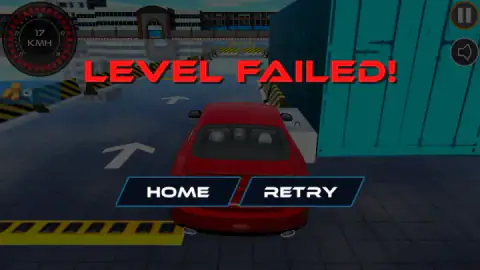
Four of them ended on the container, at between 17 and 19 KMH. It stands on the right, with a concrete block at its foot and a line of barriers leading up to it. White arrows painted on the road point straight ahead, which does not help. The road to its left looks open.
The fifth ended the other way. We held S for about a second and a half, reached 8 KMH backwards, and hit the barrier behind the start. LEVEL FAILED appeared straight away. So low speed does not save you, and there is no damage bar to wear down.
What we did not manage is steering. We tried it clearly only once, pressing D and W together, which turns towards the container rather than away from it, and we hit it. Our plan for the next go, untested, is the belt, three short presses of W, and then left well before the container.
What the menus promise
The garage opens with your car turning slowly in view, plus OPTIONS, MONEY and START. The next screen has white arrows on each side and BACK, SELECTED and PLAY along the bottom, which suggests other cars you can pick. The game's description also promises a garage of cars to unlock. We only ever drove the red one, and we did not open MONEY or OPTIONS.
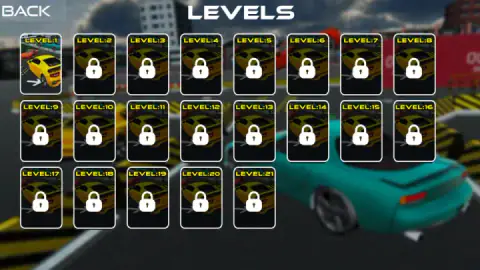
The LEVELS grid has 21 cards, and 20 of them carry a padlock when you start. That is worth knowing, because the game's description talks about dozens of levels and this screen shows fewer. The coin counter under the speedometer stayed at 0 for our whole session, and the coin counter in the garage did too. We cannot tell you what earns coins, or what they buy.
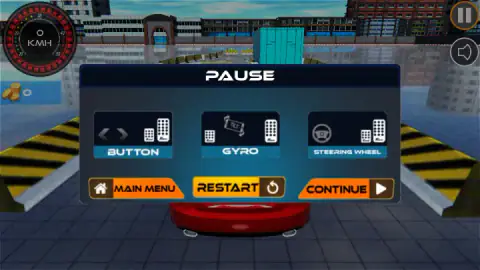
There was no clock on screen on level 1, and no traffic. The pause menu also shows three panels, BUTTON, GYRO and STEERING WHEEL, each with pedals drawn on it. We did not try them, and on our computer no pedals appeared on the road. The name box did not come back after we reloaded the page.
Who it is for
It suits a patient player who enjoys getting something exactly right, and who does not mind starting again. Each retry is quick, and the first road takes only a few seconds to drive. A younger player can follow it once someone has shown them the seat belt, though the instant failure may wear on them.
It is not a racing game, even though the first level looks like a circuit from behind the wheel. If you want speed, it will punish you for it. And we cannot yet tell you how hard it gets, because all we have seen is one short road.
Other parking games to compare
If you want the same idea with a more forgiving rule, Parking Master: Urban Challenges adds seconds to your time for each collision instead of ending the attempt. Precision Parking Pro is also set among shipping containers, with a countdown and a collisions counter. Car Parking 3D takes a blue saloon past a gate barrier and cones into a marked bay, and Fun Town Parking does the same job in a cartoon town. More in our driving games.
Screenshots
Taken by opening the game ourselves and letting it run — not supplied by the publisher, and not the same picture every other site shows.
How to play Real Parking Game
- Get to the road. Press SUBMIT in the NAME box (we left its row of Xs as it was). Then press START, then PLAY under your car, then the PARK THE CAR card, then LEVEL:1.
- Click the seat-belt icon. It sits beside the road, to the right of the car. Do this before anything else, on every attempt.
- Press W in short bursts. The speedometer is at the top left. Keep the number small.
- Get round whatever is in the way. On level 1 that is a blue shipping container on the right of the road, a few seconds from the start.
- Reach the end of the road. The card says PARK THE CAR, and the game's listing describes a parking place at the end of each course. We could see yellow and black markings far past the container, but we never got there.
Tips from our run:
- Check for the belt after every Retry. It returns each time, and pressing W with it on screen wasted most of our session.
- Do not press and hold from a standstill. About a second and a half on W was enough to carry us into the container.
- Do not count on backing up to make room. The barrier behind the start is close, and we hit it in reverse.
- Do not make your taps too tiny. With the belt off the screen, three very quick taps of W left us on 0, while three slightly longer ones got us rolling.
- Ignore the small flicker on the dial as a level starts. We saw up to 4 KMH while the car settled, and it does not mean the accelerator is working.
Controls
| Click the seat-belt icon | Clears the round icon beside the road. In our run the car only moved after this, and the icon came back after every Retry |
|---|---|
| W | Accelerates. Three short presses gave us 3 KMH, and a hold of about a second and a half gave 18 or 19 |
| S | Reverses. A hold of a second and a half reached 8 KMH and ended on the barrier behind the start |
| A / D or left / right arrows | Steer, according to the listing's control list. We did not manage to confirm steering in our run |
| Up / down arrows | Accelerate and brake or reverse, according to the listing's control list. We only pressed them before fastening the belt |
| Pause button (top right) | Opens PAUSE, with BUTTON, GYRO and STEERING WHEEL panels, plus MAIN MENU, RESTART and CONTINUE |
| On a phone or tablet | The game's listing gives an on-screen joystick, a gas button and a brake button. We played on a computer and did not see them |
Features
- A seat-belt icon beside the road that has to be clicked before the car would move for us
- A LEVELS grid of 21 cards, with only LEVEL:1 open at the start
- One bump ends the attempt: LEVEL FAILED, with HOME and RETRY
- A car that keeps rolling at almost the same speed after you lift off the accelerator
- A speedometer in KMH with a dial marked up to 50, and a coin counter underneath it
- BUTTON, GYRO and STEERING WHEEL panels in the pause menu
- A NAME box the first time you open the game, then a garage with OPTIONS, MONEY and START
Game details
- Developer
- StakeStudio
- Release date
- February 2026
- Last updated
- October 1, 2026
- Added here
- December 2025
- Technology
- HTML5 (3D)
- Platforms
- Browser (desktop, keyboard), Browser (mobile & tablet, touch)
- Saved progress
- Saving, when available, is managed by this game. Mava cannot confirm your level.
FAQ
Why won't my car move in Real Parking Game?
Look for a small round icon with an orange ring beside the road: a seat belt. In our session the accelerator did nothing while that icon was showing, and all five times the car moved we had clicked it first. It comes back after every Retry, so click it at the start of each attempt.
What are the controls for Real Parking Game on a keyboard?
The game's listing gives W or the up arrow to accelerate, S or the down arrow to brake or reverse, and A and D or the left and right arrows to steer. We confirmed W and S. We could not confirm steering, because we only got one clear attempt at it, and that one ended on the container.
How do you beat level 1 of Real Parking Game?
We did not beat it. In about ten minutes we failed it five times, four of them on the blue container that sits on the right of the road. The road looks open on its left. Our untested plan is to click the seat belt, creep forward on short presses of W and steer left of the container.
Why does Real Parking Game say Level Failed?
Because you hit something. It happened to us when we touched the blue container at 17 to 19 KMH, and when we reversed into the barrier behind the start at 8 KMH. There was no damage bar or second chance: the attempt ended on the first bump, with HOME and RETRY on the screen.
How many levels does Real Parking Game have?
The LEVELS screen shows 21 cards on a single grid, numbered LEVEL:1 to LEVEL:21. At the start only the first is open, and the other 20 carry a padlock. We never got past level 1, so we cannot say what the later levels ask for, or whether more are added later.
How do you slow down in Real Parking Game?
Lifting off the accelerator barely slows the car. We saw 3 KMH hold for several seconds after three short presses, and 18 KMH only fell to 17 in the two seconds after a longer one. S or the down arrow is listed as brake and reverse, so plan to use it early, because a bump ends the attempt.
Can you play Real Parking Game on a phone?
It is listed for Android and iOS as well as PC, in landscape, with an on-screen joystick and gas and brake buttons. The pause menu also shows panels called BUTTON, GYRO and STEERING WHEEL, and the GYRO one has a tilt picture. We played on a computer, so we have not tried any of them.
Who made Real Parking Game?
The game is credited to StakeStudio, and it was released in February 2026 and last updated in October 2026. It when we checked on 31 October 2026. The page lists English as its only language.