

About Parking Master: Urban Challenges
Most parking games punish the first touch. In Bus Parking, brushing a single barrel ends the run, and in Car Parking 3D a line of cones does the same job. Parking Master: Urban Challenges takes a different view of mistakes. A panel on the left of the screen states it in one sentence: for each accident, five seconds are added to the total time.
That one rule changes what kind of game it is. You are not trying to survive a course; you are trying to post a time. A scrape is a cost you can weigh, not the end of the attempt. Drive a 3D car through a car park full of other vehicles, follow the yellow arrows on the tarmac to the space, and get there as fast and as cleanly as you can.
The game is credited to Victor Gromov. It was published in November 2024 and updated in August 2026. It is listed for PC only, and everything about it assumes a keyboard.
Our own session was short, and you should know that before reading on. We had roughly four minutes with it and spent them in one car park. We pulled the car out of its bay, drove it into the side of a parked ambulance, and never found our way to the target space. So this page tells you what the screen showed and what the game's instructions say, and it marks which is which.
A crash costs five seconds, not the level
This is the design decision worth understanding. In a game where one touch means failure, the right way to play is slow and timid, because speed has no reward. In a game that only counts time, the right way is to rush, because nothing stops you. Adding a fixed penalty per accident puts the two in the same currency. You can ask a real question on every corner: is the tight line worth the risk of five seconds?
It also makes the game kinder to beginners. You can finish a level badly and still finish it. We did not finish ours, but that was our steering, not a fail screen.
Two honest gaps. We saw no penalty message when we hit the ambulance, so we cannot tell you how the game announces it. And no clock was visible on screen while we drove, so you may only learn your time at the end of the level.
Three views of the same car park
The camera matters more here than in most driving games, because parking is about the corners of the car you cannot see.
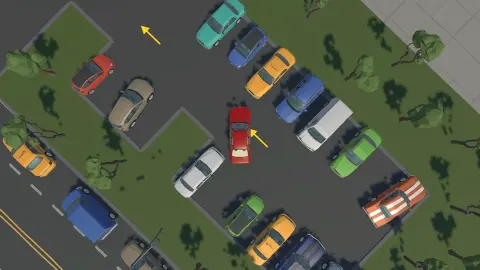
We saw three views. One looks straight down, with the car filling the middle of the screen between its two white lines. It is the best view for lining up in a bay and the worst for knowing what is ahead. One sits higher and off to one side, showing the car, the ambulance and a long yellow arrow running away across the tarmac. The third is low and outside the car park, looking in through the bars of an iron fence past a brick gatepost. That one shows the most: a row of blue cars, a yellow taxi, a booth at the far end, and the car side-on in the middle of it.
The panel on screen says V switches the camera. The written instructions say M. We did not manage to pin a view to a key during our session, so we report both and suggest you trust the panel first.
The same disagreement applies to the menu. The panel names the tilde and the backtick, which share a key on many keyboards; the instructions name E as well.
Parking is a test before it is a game
The premise works because nearly everyone who drives has been examined on it. Wikipedia's article on parallel parking calls it a required part of most driving tests and one of the most stressful and difficult skills for new drivers to learn, and notes that about a third of American states have dropped it from theirs.
The bays we saw here are the easier kind, side by side with white lines between them, not a gap along a kerb. The difficulty comes from what stands in the lane on the way.
Timing a car through a tight course is a real discipline too. In autocross, as Wikipedia describes it, drivers run one car at a time against the clock on a course marked by traffic cones, at speeds no higher than ordinary road driving. Parking Master borrows that idea and moves it to a car park: a short route, a clock, and a price for touching things. It is a game with a small 3D car, not a driving lesson, and nothing in it is tied to a real car maker or a real city.
Who it is for
It suits players who like slow, exact driving and want to improve a time, and it is forgiving enough for someone who has never played a parking game. The game's listing also shows a daily leaderboard on the game's page.
It is not a racing game, and it is not for phones. If you want an open city to roam, look elsewhere; what we saw was one enclosed car park and one car.
More games to try next
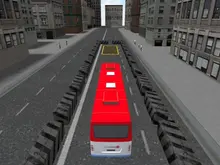
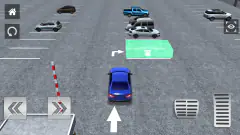
Car Parking 3D is the nearest thing we have, with a green marked bay and cones that end the attempt. Bus Parking asks for the same patience with a much longer vehicle. Arrow Parking turns the car park into a puzzle with no steering at all, and Drifting Car Master is for when you would rather slide than line up. The rest are under driving games.
Screenshots
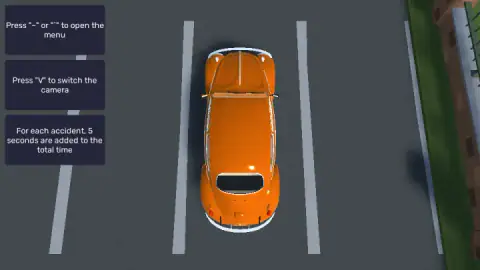
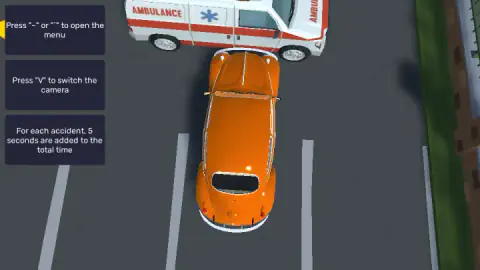
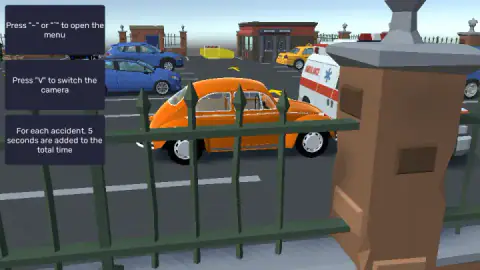
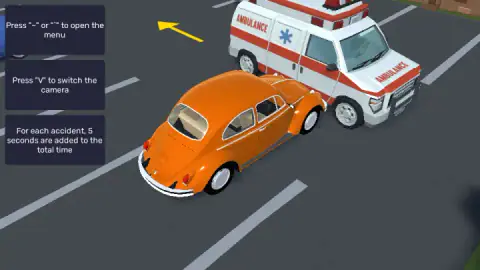
Taken by opening the game ourselves and letting it run — not supplied by the publisher, and not the same picture every other site shows.
How to play Parking Master: Urban Challenges
- Read the panels on the left before you move. They are the game's whole tutorial: the driving keys, the menu key, the camera key and the penalty rule.
- Drive with W, A, S and D. The game's instructions add the arrow keys as an alternative and Space as a handbrake.
- Follow the yellow arrows painted on the ground. They point the way to the space you have to reach.
- Avoid everything else. Each accident costs five seconds.
- Park in the marked area. The instructions say finishing a level saves your progress and opens the next one.
What we learned the hard way:
- Look before you press W. Our car started in a bay with an ambulance parked across the lane a short way ahead. We accelerated straight into it. The arrow was pointing somewhere else entirely.
- The driving hint disappears. At the start there were four panels and the top one named the driving keys. Later only three were left. If you forget the keys, they will not be on screen to remind you.
- Change the view early. From straight above you can see your bay lines and little else. The low and angled views showed us the rest of the car park, including a yellow marker at the far end that the arrows seemed to lead to.
- A hit is not the end. After our collision nothing reset. The car stayed nose to the ambulance and the level went on.
Controls
| W, A, S, D | Drive and steer the car, as the first on-screen panel says |
|---|---|
| Arrow keys | The game's instructions list them as an alternative to W, A, S, D; we used the letters |
| Space | Handbrake, according to the game's instructions |
| V | Switches the camera, according to the panel on screen (the written instructions say M) |
| ~ or ` | Opens the menu, according to the panel on screen (the written instructions say E or ~) |
Features
- A time penalty in place of a fail screen: each accident adds 5 seconds to your total
- Yellow arrows painted on the tarmac that lead you to the space
- At least three camera views: straight down, raised at an angle, and low from behind the fence
- A car park with other vehicles already in it, including blue cars, a yellow taxi and an ambulance
- Levels that open one after another, with progress saved when you finish one, according to the instructions
- No clock on screen while driving in anything we saw
- Made by Victor Gromov, desktop only
Game details
- Developer
- Victor Gromov
- Release date
- November 2024
- Last updated
- August 10, 2026
- Added here
- March 2025
- Technology
- HTML5 (Unity WebGL)
- Platforms
- Browser (desktop, keyboard)
- Classification
- 3D , Driving , Simulation , Strategy
- Saved progress
- Saving, when available, is managed by this game. Mava cannot confirm your level.
FAQ
How do you play Parking Master: Urban Challenges?
You drive a car through a car park to a marked space, following yellow arrows painted on the ground. W, A, S and D move and steer. The aim is to get there quickly and without hitting anything, because each accident adds five seconds to your total time.
What happens when you crash in Parking Master: Urban Challenges?
The level does not end. A panel on screen states that five seconds are added to your total time for each accident. We drove into the side of a parked ambulance in our session and the game carried on, with no fail screen and no restart.
How do you change the camera in Parking Master: Urban Challenges?
The panel inside the game says to press V. The written instructions that come with the game say M instead. We saw three views during our session, one straight down, one raised at an angle and one low behind a fence, but we could not tie each to a key, so try V first and M second.
How many levels does Parking Master: Urban Challenges have?
We cannot say. The game's instructions state that levels unlock in order and that progress is saved when a level is completed, but our session was short and stayed on the first car park. We will not quote a number we did not see.
Can you play Parking Master: Urban Challenges on a phone?
The game is listed for PC only, in landscape, and its controls are all keyboard keys. We played it on a desktop computer. Plan on a keyboard.
Is there a timer in Parking Master: Urban Challenges?
Your result is a time, and accidents add to it, but no clock was on screen in any of the moments we recorded while driving. Count on the time being shown at the end of a level, which we did not reach.
Who made Parking Master: Urban Challenges?
It is credited to Victor Gromov. It was published in November 2024 and was last updated in August 2026. It is not related to other games and apps that use the words Parking Master in their names.