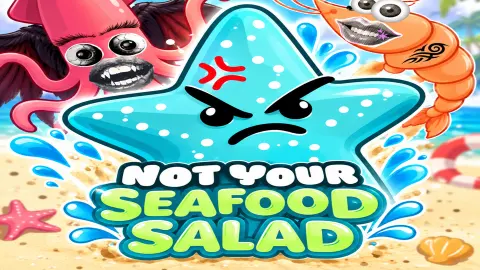






About Not Your Seafood Salad
We played Not Your Seafood Salad for four minutes and never pressed an attack button. The water pistol strapped to our starfish's arm fired the whole time anyway, and the only thing our hands ever decided was where the starfish stood.
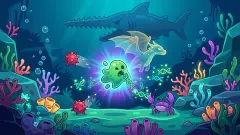
The screen is a stretch of pale sand with the sea crowding in from one side. Grey snails crawl across it, peach hermit crabs after them, and in the second wave a fish wearing swimming fins arrived carrying a weapon of its own. A countdown runs in a wooden tub at the top, around forty seconds of it, with the wave number in a grey pill underneath. Survive the count and the beach vanishes.
What replaces it is the part that matters. A shop slides in, four or five dark cards on it, each an upgrade priced in seaweed — the glowing green tufts you have been walking over all wave. Take one, pay a few leaves for a fresh hand, or walk past and start the next wave. That screen is where a run is won or thrown away, and it is what makes this a game rather than an exercise in dodging.
It is credited to Pottery Bridge Studio and has been available since 17 September 2026, with an update at the end of that month.
That listing is also the only trace of the game anywhere. The studio's page carries two titles, this one and something called Graveyard Escape, and we could find no site, no store page and no other portal carrying either of them.
One more thing before the instructions, because it shapes everything below: our run did not finish. We reached the fourth wave of five, and then the screen turned into a card reading DEFEAT, our starfish lying under it with crosses for eyes.
You never press fire, and that is the genre, not a missing button
A game where the weapon fires itself sounds broken until you know what it is copying.
The shape belongs to a young genre with a datable origin. Vampire Survivors arrived on Steam in early access in December 2021 and reached version 1.0 on 20 October 2022, made by one man, Luca Galante, working under the name poncle. The following March it won Best Game and Game Design at the BAFTA Games Awards, beating the year's biggest budgets with a game whose entire control scheme was a direction.
Its idea was to take the aiming away. If the weapon handles itself, every decision left to you is about position — how close you let the crowd get, which way you break when it closes, whether a pickup is worth three seconds in the open. People call the result a bullet heaven, the mirror image of the bullet hell games where the screen fills with shots coming at you rather than leaving you.
You can watch that logic work here. Our starfish threw out white sparks while the only keys we held down were movement keys, and small red damage numbers kept popping up over the snails we had walked past. Nothing we did aimed anything. The skill on offer is in the walking, and in the shop afterwards.
Every card in the third shop wanted something back
This is where the game stops being a copy of anything.
In a typical survivor-like the upgrades are gifts: more damage, more speed, more health, pick one of three. Here they bargain. These were the four on offer when our third shop opened, all of them priced at 60 leaves:
- Wiggly Mutant Eye — critical chance up 4 and mutation up 5, maximum health down 2
- Pointy Swordfish Nose — critical chance up 4, maximum health down 2
- Shrimp Ammo — attack speed up 5, dodge chance down 2
- Tentacle Finger — damage up 2, armour down 1
Every one of them carried a minus. That turns a shopping trip into an argument with yourself: a starfish with extra critical chance and less health is a different animal from one with more armour and a slower gun, and by the fourth wave you are living with whichever you chose.
They are not all like that, which is what makes it a choice rather than a tax. The card we bought, a sea sponge at 64 leaves, was a straight gain of four health and one armour, and the shop before it had offered seven health and six life steal for 82. The good cards exist. They cost more, and the game is happy to let you take a cheap bad one instead.
What a defeat on wave four looks like
We want to be plain about how far we got, because it is short.
Our best wave was the fourth. The health bar read 14/14, the leaf count had been emptied into the sponge, and the sand underfoot had become something closer to an island, water along the top of the screen and down the right-hand side. Then the run ended. The card that came up said DEFEAT, listed our statistics down one side — damage, speed, regeneration, life steal, all on or near zero — and offered two buttons: GIVE UP, and REVENGE with a small blue video badge on it.
That was the third and last advert the game put in front of us, and like the two before it, optional. A booster pack before the match, an upgrade card in the shop, a second chance after dying: three offers in four minutes, each sitting beside a free alternative. We turned down all three and the game never pushed.
What we cannot tell you is what killed us. The defeat card names no cause, and the last thing on screen before it was an ordinary moment near the waterline. Whether the sea is a hazard, whether a crab got through, or whether the wave simply ran out, we do not know. Nor do we know what the large red X marks on the sand are for, or what the second bar under the health counts — only that the number beside it went from 0 to 1 when the bar filled.
Where to go next
If the automatic weapon is the part you want to keep, Animals vs Zombies runs on the same bargain: you walk, pick things up and let the fighting happen by itself. Animal Evolution Simulator takes the other half of this game, the growing-into-something-stronger half, and makes it the whole point. For a quieter sea, Pocket Universe has you raising an island out of it a hexagon at a time. And John is a Lifeguard is the funnier footnote: a game about a lifeguard that never once goes near a beach. The rest are in adventure games.
Screenshots
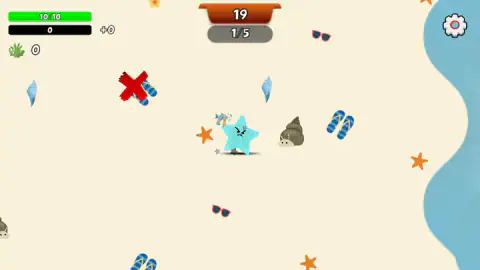
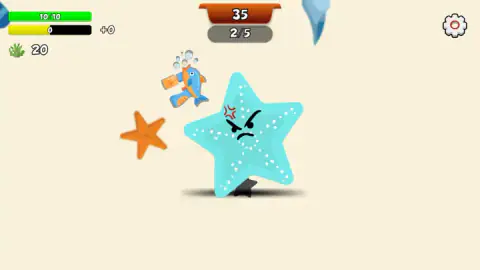
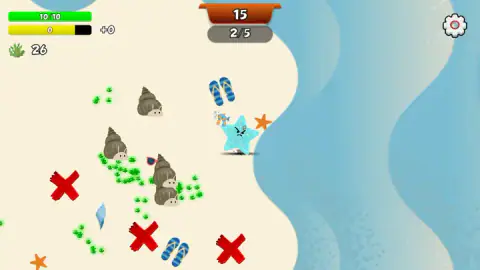
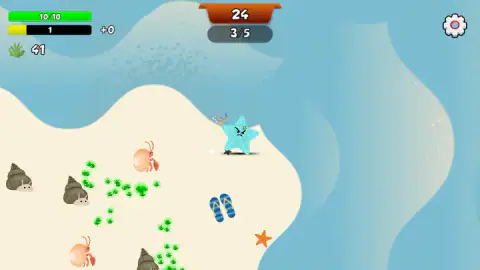
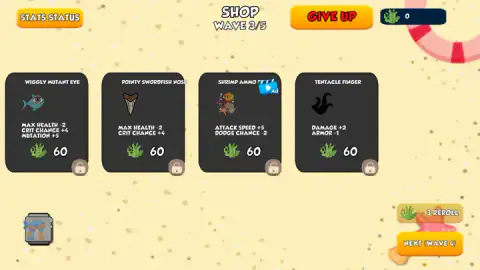
Taken by opening the game ourselves and letting it run — not supplied by the publisher, and not the same picture every other site shows.
How to play Not Your Seafood Salad
- Pick a hero and a weapon. The opening screen offers two modes, WARM UP and ADVENTURE. WARM UP leads to a grid of ten characters — Angry, Moody, Broken and the rest down one side, Shielder, Wanderer and the others down the other — with most of them greyed out and a message pointing you at the shop. Angry starts with 10 health. Three weapons sit underneath: Bubble Gun, Starfish and Bow.
- Turn down the booster pack, or do not. Before the match starts a card offers three buffs, each a 50% chance of something useful. Taking them means watching a video; the button beside it says JUST PLAY and costs nothing. We pressed JUST PLAY.
- Move, and only move. WASD on a keyboard, the mouse held down as a joystick, a thumb stick on a phone. There is no fire key, no aim, no dodge roll. The gear in the top-right corner is the only button on screen while a wave is running.
- Walk over the seaweed. The glowing green tufts are money. Our count climbed to 20 by the end of the first wave and 41 by the middle of the third, and it is the only thing you collect that you can spend.
- Spend it between waves, then press NEXT WAVE. Nothing makes you buy. Nothing stops you rerolling the cards either, as long as you can pay for it.
What four minutes and one defeat taught us:
- A padlock on a card is a price tag, not locked content. Every card in the third shop showed one, and the reason was simply that our leaf counter read 0 — we had just spent everything.
- Rerolling gets dearer as you go. One leaf in the first shop, two in the second, three in the third. Early rerolls are nearly free and late ones are not.
- Buying max health shows up instantly. We bought a card worth four extra health and the bar at the top went from 10/10 to 14/14 for the rest of the run.
- Clicking things mid-wave does nothing. We tried the bars, the counters and the scenery. During a wave the game listens to movement and to nothing else.
- It is a very quiet game. One sound played when it opened and we heard nothing after it — no chime for a pickup, no sting for taking a hit, nothing for the defeat.
Controls
| W A S D | Moves the starfish around the beach. During a wave this is the only control that does anything |
|---|---|
| Mouse held down | Works as a joystick while a wave is running - the starfish follows the direction you pull |
| Thumb stick | The phone and tablet control, in the same place a joystick would be |
| Shop cards | Clicking a card you can afford buys it on the spot and the stat changes show up on your bar immediately |
| REROLL button | Deals a fresh set of cards for a few leaves. The price went up by one every wave - one, then two, then three |
| NEXT WAVE button | Closes the shop and starts the next wave. Nothing forces you to spend first |
| Gear (top right, during a wave) | The only button on screen while you are playing. There is no pause control next to it |
Features
- A run is five waves, each one a countdown of roughly forty seconds in a wooden tub at the top of the screen
- A weapon that fires by itself, so your hands only ever decide where the starfish stands
- A shop between every wave holding four or five upgrade cards, with a reroll that costs one more leaf each time you reach it
- Upgrade cards that take as well as give: of the four we were offered in the third shop, every one carried a minus next to its plus
- Green seaweed scattered across the sand as the only currency, counted next to a sprig icon in the corner
- A grid of ten characters and three starting weapons, most of them locked at the beginning, plus a second mode called ADVENTURE
- Three places where the game offers you an advert, all of them skippable - we turned down all three and the run carried on
- It has been available since September 2026
Game details
- Developer
- Pottery Bridge Studio
- Release date
- September 2026
- Last updated
- October 17, 2026
- Added here
- September 2026
- Technology
- HTML5 (Unity WebGL)
- Platforms
- Browser (desktop), Browser (mobile & tablet, touch)
- Download size
- 50.2 MB
- Ad requests
- 2 (few)
- Has a save
- Yes
- Saved progress
- Saving, when available, is managed by this game. Mava cannot confirm your level.
Measured by opening the game ourselves on 2026-09-11, not taken from the feed. Twelve seconds on a phone-sized screen, with ad requests counted and blocked rather than loaded.
FAQ
How do you play Not Your Seafood Salad?
You pick a sea creature and a weapon, then move it around a beach while waves of snails, hermit crabs and fish come at you. Movement is the only control during a wave - WASD, the mouse used as a joystick, or a thumb stick on a phone - because your weapon fires on its own. Between waves a shop opens where you spend the seaweed you picked up on upgrade cards.
Why is there no attack button in Not Your Seafood Salad?
Because the game is built so that there is nothing to aim. Our starfish carried a water pistol that fired from the first second to the last while we only ever held movement keys, and damage numbers kept appearing over the snails. That is how the survivor-like genre works; you choose where to stand and what to buy, and the shooting looks after itself.
What is the green seaweed for in Not Your Seafood Salad?
It is the money. Tufts of it glow on the sand, the counter next to the sprig icon in the corner goes up as you walk over them, and the shop between waves prices everything in it. In our run the count reached 64 and bought one card, which left us with nothing and a padlock on every card in the next shop.
How many waves are there in Not Your Seafood Salad?
Five, counted off in a grey pill under the timer - 1/5, then 2/5, and so on. We did not see the end of one, because our run stopped on the fourth wave, so whether clearing all five finishes the game or simply opens something longer is not something we can tell you honestly.
What do the upgrade cards do in Not Your Seafood Salad?
They change your stats, and most of them change two at once in opposite directions. The four cards offered to us in the third shop all cost 60 leaves and all carried a cost as well - more critical hits for less maximum health, faster shooting for less dodge, more damage for less armour. A card we bought earlier was a straight gain, so the bad bargains are a choice and not a rule.
Who made Not Your Seafood Salad?
Pottery Bridge Studio. The game is credited to them and links to a developer page carrying two titles, this one and a game called Graveyard Escape. No studio name appears anywhere on screen while you play, and we could find no site, store page or other listing for the studio outside the game's own listing.
Does Not Your Seafood Salad have ads?
It offers them rather than forcing them. We were shown three in four minutes - a booster pack before the match, one upgrade card in the shop, and a REVENGE button on the defeat screen - and each one sat next to a plain alternative that cost nothing. We declined all three and the game carried on without complaint.
Can you play Not Your Seafood Salad on a phone?
It is listed for desktop, mobile and tablet, and the on-screen control for phones is a thumb stick in the corner. Since movement is the only input the game asks for during a wave, it is a design that should fit a thumb well. We played on a desktop, so we can describe the controls but not how they feel under a finger.