









About Dungeon Shop Rush
Every hero in Dungeon Shop Rush wants one thing, and the order card says exactly which. A Warrior wants a sword. A Rogue wants a red potion. The hard part is the clock: the first shift lasts one minute, the patience bars drain fast, and some orders carry a small purple Enchanted tag that sends you to a second station before you can hand anything over.
The screen is a counter with six wares on a shelf beneath it, two heroes at the counter, a queue preview on the left and the Preparation Station on the right. Daily goals sit in a side panel, and a combo bar at the top has three milestones, from x2 to x6.
The game is credited to Ksivok Games and was published in mid-October 2026, with an update in early November. We played its first shift on a computer with a mouse, read the whole five-step tutorial and failed the shift with no coins. That is a short look, and this page sticks to what that minute shows. Upgrades, contracts, renovations and the leaderboard come from the developer's description, and we say so where they appear.
The station has one slot, and a wrong craft sits in it
The Preparation Station is a single slot. Drop a ware on it and the panel turns into a progress bar with two buttons, Finish Now and Cancel Enchant. When the bar fills, the item moves to Output with the line "Drag to a hero" and a Discard Output button underneath.
That is where our shift went wrong. The Mage at the counter wanted an enchanted Scroll, and a Health Potion landed on the station instead. The shelf count for potions dropped from three to two, the station crafted a glowing heart potion in 3.5 seconds, and no order at the counter carried the Enchanted tag for it. It sat in Output until the clock ran out.
So the station has a cost beyond its wait. The enchant took a potion off the shelf, and the panel shows no second slot for the item the Mage actually wanted. If you drop the wrong ware, the buttons on offer are Cancel Enchant while it is still crafting and Discard Output once it is done. We did not press either, so we cannot say what each one gives back.
Finish Now: 12 coins to save three seconds
While an item is crafting, the green Finish Now button carries a coin price. Ours read 12, for a potion that finishes in seconds anyway. The first shift's goal is 57 coins, and the results screen says half of that is a pass.
Put those together and Finish Now is priced at more than a third of what you need to clear shift 1. You can serve the other hero at the counter during those few seconds instead. In a one-minute shift the button makes sense only if the hero waiting for the enchanted item is about to walk out, and even then it competes with the pass mark.
Patience, wrong items and the end of the clock
Each hero's bar starts green and drains through yellow to red. The tutorial is plain about the consequence: if the bar empties, they leave unhappy, and the results screen keeps a row for Customers missed. By 0:19 the Rogue who wanted a Health Potion was no longer at the counter, and no customer had been served.
Give a hero the wrong ware and a red WRONG ITEM label appears over their card. In our shift the label stayed over the hero's card and the coin and customer counters did not move. The order icon is worth a second look, especially when the Mage wants a Scroll and the next card shows a Scroll with the Enchanted tag.
The phase label next to the shift number read "Trading Time" for most of the minute. At zero it read Rush Hour. We did not see when it changes or what it changes, only that the label is there.
The shelf runs out, and daily goals pay more than the shift
The shelf starts uneven. Swords, Shields and Health Potions have three each; Mana Potions, Scrolls and Daggers have two. The enchant above took one potion off the shelf, and the developer says you tap an empty item to restock it. In our minute, Mages asked for a Scroll twice, once enchanted and once plain, which is already every Scroll on the shelf.
Outside the shift, the main menu lists three daily goals with coin rewards. Serving customers, playing shifts with a contract and restocking were worth 40, 50 and 30 on our first day. Together they are worth more than twice the first shift's goal, and a countdown shows when they reset. Restocking is itself one of the goals, so refilling the shelf during a shift is not wasted time.
The same menu shows the next reputation level, which unlocks a Ranger hero with a Hunting Bow, and three doors we did not open: Upgrade Shop, Renovations and Collection. The developer describes upgrades for counters, shelves and restocks, contracts that change a shift's rules, and a Best shift leaderboard. When our shift failed, the results screen offered Retry Shift and Upgrade Shop, and the ad layer appeared on top of it.
More shop games with impatient customers
Potion Kitchen is the closest cousin: a potion counter where each customer's order is a riddle and patience still runs down. Monster Card Shop puts you at the till counting change, and My SweetStreet Shop has you carry sweets to customers in a 3D store. More in our strategy games.
Screenshots
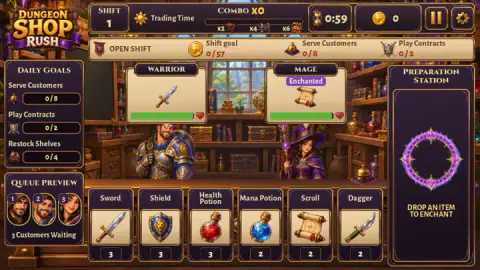
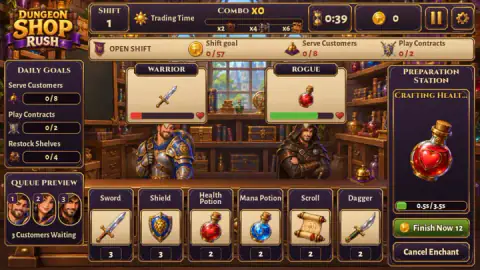
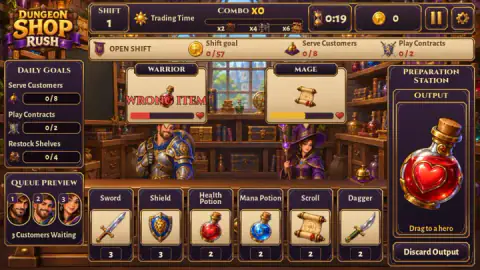
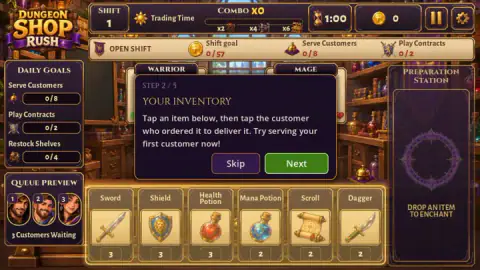
Taken by opening the game ourselves and letting it run — not supplied by the publisher, and not the same picture every other site shows.
How to play Dungeon Shop Rush
- Press Play Shift on the main menu. The tutorial explains the counter in five steps.
- Read the order card above each hero, and the patience bar under it.
- Drag the matching item from the shelf onto that hero, or tap the item and then the hero.
- For an Enchanted order, drop an ordinary copy on the Preparation Station, wait, then drag the Output to the hero.
- Earn half the coin goal before the clock reaches zero to pass the shift.
Tips from our shift:
- Check the tag before you touch the station. Only an order marked Enchanted needs it.
- Watch the bars, not the clock. The first Warrior's bar went from nearly full to red in twenty seconds.
- Leave Finish Now alone early on. It is priced in coins, and the goal is counted in coins.
- Look at the stock numbers. Scrolls, Mana Potions and Daggers start with only two each.
Controls
| Drag an item from the shelf onto a hero | Deliver it; the tutorial also teaches tapping the item, then the hero |
|---|---|
| Drag an item onto the Preparation Station | Start enchanting it; the result appears under Output after a short wait |
| Drag the Output onto a hero | Deliver the enchanted item |
| Cancel Enchant / Discard Output | Buttons shown during and after a craft; we did not press them |
| Esc or the pause button | Pause the shift (Esc according to the developer) |
Features
- The first shift lasts one minute, with a coin goal, a customer target and a contract counter at the top
- Heroes show their order and a patience bar that runs from green through yellow to red
- Orders tagged Enchanted need an item run through the Preparation Station first; a potion took 3.5 seconds
- The station has a single slot, and a finished result waits in Output with a Drag to a hero prompt
- The shelf starts with three swords, shields and health potions, but only two of each other ware
- Daily goals carry coin rewards and reset on a visible countdown
- The developer lists upgrades, renovations, contracts, collections and a Best shift leaderboard
Game details
- Developer
- Ksivok Games
- Release date
- October 2026
- Last updated
- November 6, 2026
- Added here
- October 2026
- Technology
- HTML5 (2D)
- Platforms
- Browser (desktop, mouse)
- Classification
- Adventure , Arcade , Simulation , Strategy
- Saved progress
- Saving, when available, is managed by this game. Mava cannot confirm your level.
FAQ
How do you pass a shift in Dungeon Shop Rush?
Earn at least half of the shift's coin goal before the clock runs out; the first shift lasts one minute and asks for 57 coins, so roughly 29 is a pass. The developer says the full goal gives three stars, and the results screen suggests upgrades if you fall short.
How does enchanting work in Dungeon Shop Rush?
Orders with a purple Enchanted tag need the Preparation Station. Drag an ordinary copy of the item onto it, wait for the bar to fill, then drag the result from Output to the hero. A Health Potion took 3.5 seconds in our shift.
Should I use Finish Now in Dungeon Shop Rush?
Not in the first shifts. In our run it was priced at 12 coins to skip the rest of a 3.5 second craft, in a shift whose pass mark is about 29 coins. Waiting the few seconds while you serve another hero costs nothing.
What happens if you give a hero the wrong item in Dungeon Shop Rush?
A red WRONG ITEM label appears over the hero and the order is not completed. Nothing was added to the coin or customer counters in our shift.
What are the daily goals in Dungeon Shop Rush?
On our first day they were a customer goal worth 40 coins, a contract goal worth 50 and a restock goal worth 30. A countdown on the main menu shows when new goals arrive.
Who made Dungeon Shop Rush?
Dungeon Shop Rush is credited to Ksivok Games. It was added in mid-October 2026 and updated in early November.