










About LumberJack Simulator 3D
Most logging games on the web open with a number that climbs. Logs cut, coins banked, cabins bought, each one ticking upward while you watch. LumberJack Simulator 3D opens with a number that is supposed to fall, and it starts at 4,136.
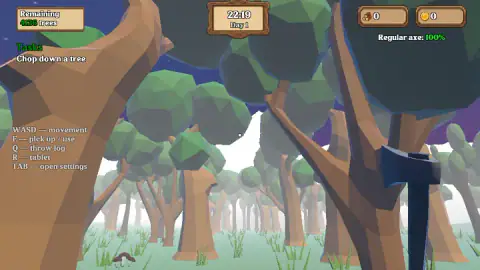
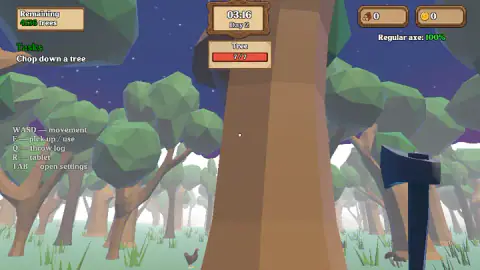
That figure sits in a wooden plaque in the top left corner under the word Remaining, and directly beneath it is the only instruction the game gives you: Chop down a tree. There is no level select, no splash screen, no tutorial box to dismiss. You are standing in a low-poly forest at twenty past ten at night, holding a dark blue axe, and a counter is waiting for you to start.
We should say how far we got before anything else, because it changes how you read the rest. We played for a few minutes on a desktop and we did not fell a single tree. The remaining-trees plaque read the same figure on our first screen and our last. The log badge and the coin badge both finished on zero, exactly where they began. What we did see is a game that explains itself on screen better than most, a forest that genuinely turns from night into morning while you stand in it, and a felling bar that is more interesting than it looks.
It is by Medalion Inc, published in August 2026.
The corner of the screen is the design document
You can read this game's whole ambition off its first frame, before you touch a key.
There is a task, singular, in plain words. There is a remaining count in the thousands. There is a clock with a day number, which means time is a resource and not decoration. There is a log count and, separately, a coin count. There is an axe condition, qualified as regular. And there is a key for a tablet, sitting in the list between throwing a log and opening the settings.
Every one of those is a promise about a game much larger than the one minute in front of you. We only ever played the first rung of it, and we are not going to describe rungs we did not climb. But the furniture is honest about what it is for: a counter that goes down, money that goes up, a tool that wears out and a screen you carry around with you.
The one thing we can confirm about the long game is that it intends you to come back. Part way through our session a line reading Game saved appeared under the clock, unprompted, while we were standing in a clearing doing nothing in particular. Four thousand trees and an autosave are the same statement made twice.
Why a real lumberjack cuts a wedge before cutting the tree down
Here is the detail the game draws and almost nobody explains, and once you know it you will see it in the bark of every trunk you work on.
A tree is not cut through from one side to the other. The first cut is a notch, a wedge taken out of the side the tree is meant to fall towards, going in roughly a fifth to a third of the trunk's width. That is the pale wedge of bare wood you can see appearing in the dark bark in our own captures. The notch does not weaken the tree so much as aim it.
The second cut, the back cut, comes in from the opposite side, slightly higher than the floor of the notch. And here is the part that sounds wrong: the cutter deliberately stops short. A strip of uncut wood is left standing between the back cut and the notch, and it has a name. It is the hinge, and it is the only thing steering several tonnes of timber on its way down. Cut through the hinge and the tree stops being aimed and starts being a falling object. Felling is not about removing wood. It is about removing exactly the right wood and leaving the rest.
Then comes the part that explains why the game makes you carry things. A felled trunk does not get moved anywhere whole. It gets cut into shorter lengths where it lies, a job called bucking, because weight rises with length and a full stem is unmanageable long before it is heavy. Wood only becomes portable once it has been chopped twice: once to bring it down, once to break it up.
So when LumberJack Simulator 3D sends you back and forth with pieces rather than letting you drag a whole tree somewhere, that is not padding. That is the actual shape of the job. The game simplifies the felling itself into a bar that fills, which is fair enough, but the thing it keeps is the thing real logging is organised around: wood is heavy, and the forest is a long way from wherever you want the wood to be.
There is a nice coda to this. The traditional unit for stacked firewood is the cord: a pile four feet high, four feet deep and eight feet long. That is a strange shape until you realise why it exists. Round logs cannot be measured by pouring them into anything, so the trade invented a stack regular enough to be measured by eye. Every game that gives you a tidy log counter in the corner of the screen is descended from somebody counting a woodpile in a yard.
What we never reached
We got as far as the first task and no further, so this is an account of the game's first five minutes.
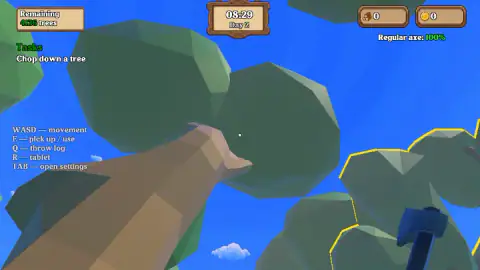
We never saw a tree come down. We never saw what a log looks like in your hands, or what the throw-log key does with one, or what is on the tablet. We never found a price for anything. The coin badge stayed on zero, so we cannot tell you what anything costs or what the first thing worth buying is. There is a log cabin standing in a clearing some way off, visible over the treetops when the sun came up, and we never reached that either.
What we can tell you is that the barrier was ours, not the game's. The instructions were on screen the whole time and they were correct. If you walk close enough and hold the key, the bar appears and the wood starts coming off the trunk, and everything after that is a game we would like to see.
More forests, more axes
If the appeal here is the chopping rather than the walking, Idle Lumberjack 3D is the direct opposite number: same forest, same trees, except it does the swinging for you and asks you to spend instead. Lumbering At Sea keeps the axe and throws out the standing still, turning the whole thing into a run across tropical islands. For the survival end of the same woods, Woods of Nevia: Forest Survival adds wolves to the chopping, and Craftsman Land is the one that cares most about what you build with the wood once you have it. The rest live in strategy games.
Screenshots
How to play LumberJack Simulator 3D
- Read the left-hand column, because it stays there. The game prints its key list down the side of the screen and never hides it: movement, action, throw log, tablet, settings. Most games flash that once and take it away. This one leaves it up, which is a small kindness.
- Walk up to a tree. Not near one. Up to one. The whole forest is trees, so it is easy to believe you are in position when you are a step and a half short.
- Hold the action key against the trunk. It is listed as pick up / use, and it is held rather than tapped. When it takes, a red bar headed Tree appears above the trunk and pale wedge-shaped cuts start showing in the bark where the axe has been going in.
- Keep an eye on the clock while you work. The carved sign at the top of the screen shows a time and a day number, and the time moves fast enough that you will cross midnight during your first attempt.
What our session taught us:
- Distance is the whole beginner problem. We spent most of our time holding the action key at trees we were not quite touching. Nothing on screen tells you off for it, which is why it takes a while to spot. If the red Tree bar is not showing, you are not in range.
- The key list going away is your progress report. Ours never did. A game that keeps the beginner's card on screen is a game that does not think you are past the beginner's task yet.
- The word Regular is doing a lot of work. The axe readout says Regular axe: 100%, in green. A tool described as regular is a tool that has better versions somewhere, and a condition shown as a percentage is a condition that is meant to drop. Ours never moved, which only means we never did enough work to wear it.
- Logs and coins are counted separately. Two badges, two icons, both on zero. That separation says the loop has two halves: cutting wood is one job, turning it into money is another.
Controls
| W, A, S and D | Walking. The game prints the whole key list down the left side of the screen and leaves it there, and movement is the first line on it |
|---|---|
| E (hold) | Listed on screen as pick up / use. It is the action key: you hold it against a tree to work on it, and it is also what the on-screen task is waiting for |
| Q | Listed on screen as throw log. We never had a log to throw, so we cannot tell you how far it goes |
| R | Listed on screen as tablet. We never opened it, so what the tablet shows is an open question on this page |
| TAB | Listed on screen as open settings. The only menu the game advertises while you are playing |
| Mouse | Looking around, in the usual first-person way. A click in the middle of the frame is also what dismisses the pause notice when the tab loses focus |
Features
- A first-person forest with an axe in your hands, rather than an idle screen that chops for you
- One task on screen at a time, written in plain words: Chop down a tree
- A remaining-trees counter that starts at 4,136, which is the game telling you how long it thinks you will stay
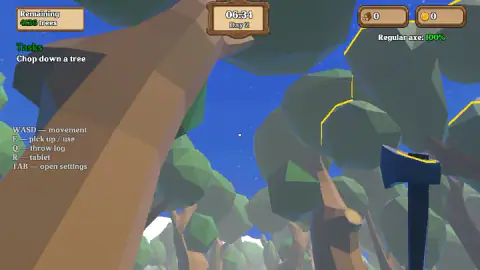
- A real day-night cycle: our session started at 22:19 under stars and reached full blue sky before it ended
- The clock runs fast, roughly half an hour of forest time for every few seconds of yours
- Separate badges for logs and for coins, so the game distinguishes what you are carrying from what you have earned
- An axe condition readout that says Regular axe, which is a word doing a lot of quiet work
- It was published in August 2026
Game details
- Developer
- Medalion Inc
- Release date
- August 2026
- Added here
- June 2026
- Technology
- HTML5 (WebGL)
- Platforms
- Browser (desktop), Browser (mobile & tablet, touch)
- Classification
- 3D , Simulation , Strategy
- Saved progress
- Saving, when available, is managed by this game. Mava cannot confirm your level.
FAQ
What are the controls in LumberJack Simulator 3D?
The game prints them down the left side of the screen and never takes them away: WASD to move, E to pick up or use, Q to throw a log, R for the tablet and TAB for settings. The mouse looks around. E is the one that matters, because it is the key the opening task is waiting for, and it is held rather than tapped.
How do you chop down a tree in LumberJack Simulator 3D?
You walk right up to a trunk and hold the action key against it. Getting close enough is the part people miss: standing near a tree is not the same as being in range of it, and our own session stalled on exactly that. When you are lined up, a red bar headed Tree appears above the trunk and pale wedge-shaped cuts start to show in the bark.
How many trees are there in LumberJack Simulator 3D?
The plaque in the top left corner read 4,136 remaining when we started, and it is counting down rather than up. Whether that is the whole map or the target for one save we cannot say, because we never got the number to move. Either way it is a statement of scale: this is not a game designed to be finished in one sitting.
What does the Tree bar with 7/7 mean?
It is the per-tree progress bar, and it appears above the trunk you are working on. It read seven of seven every single time we saw it, so we genuinely do not know whether it fills as you chop or empties as the tree gives way. We would rather tell you that than guess which direction it runs.
Does LumberJack Simulator 3D save your progress?
Yes. A line reading Game saved appeared under the clock during our session, without us asking for it and without pausing anything. So the day counter and whatever you have banked are meant to survive you closing the tab, which fits a game that opens with four thousand trees to get through.
Is there a day and night cycle in LumberJack Simulator 3D?
There is, and it is quick. We started at 22:19 on Day 1 under a dark sky with stars, watched the clock roll past midnight into Day 2, and were standing in flat blue daylight by the time we stopped. Working backwards from our session, a full day and night takes something like five minutes of real time.
Who made LumberJack Simulator 3D?
Medalion Inc, publishing, and it was published on 6 August 2026. It runs in a browser tab at a widescreen size with no download, which is a reasonable trick for a 3D forest you can walk around in.
Can you play LumberJack Simulator 3D on a phone?
It is listed as working on phones and tablets as well as desktops. Our own session was on a desktop with a keyboard, and the key list the game puts on screen is a keyboard list, so we cannot tell you what the touch controls look like or how well walking and aiming translate to a thumb. If you are trying it for the first time, a desktop is the safer bet.