



About DreamBlox
Most free games make you earn the first coin. This one hands over a hundred of them before you have taken a step, on a card that also tells you what tomorrow is worth: two hundred.
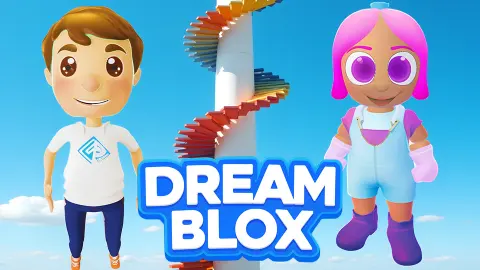
That card is the second thing DreamBlox shows you. The first is a choice of character, a boy or a girl with pink hair, and after that a single box headed ENTER YOUR NICKNAME, with (up to 10 characters) underneath it and a round yellow play button below. We pressed play with the box empty. The park loaded anyway. There was no email field, no password, no date of birth and nothing to confirm, which for a game filed under kids is worth saying plainly.
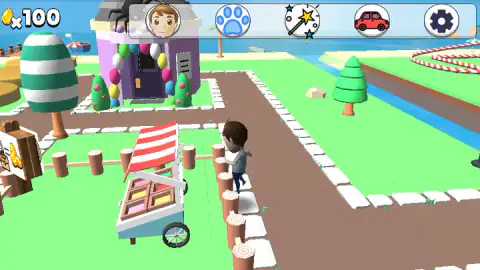
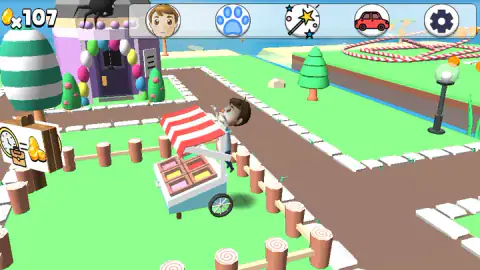
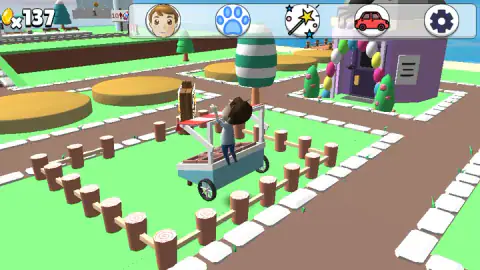
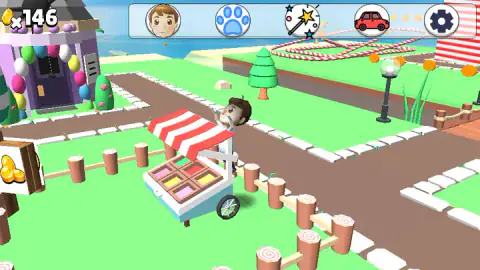
What loads is a seaside park in flat colours. White paving slabs cut across bright green lawns, fenced off by rows of short log posts. A purple shop stands smothered in balloons. A green-and-white striped egg grows out of the grass at the height of a tree, log slices in the path have pink swirls cut into them, and a red-and-white track loops over the water in the distance like a bent candy cane. In the middle of it is a blocky boy in a white shirt, pushing a white cart with a striped awning and a glass case of pink and yellow cakes. Across the top of the screen sit five round buttons: his own face, a blue paw print, a wand trailing a star, a red car, a gear. That is the whole interface.
Our account is short, so here it is up front. We played for about four minutes on a desktop on 19 October 2026, almost all of it in one corner beside that cart. The coin counter climbed past 160 while we were there. We never got a shop open, never met a pet, never saw another player, and no advert ever played. What follows is what the park did in front of us, and what the card on the first screen is actually for.
A park that pays you while you stand in it
The counter is the one thing in DreamBlox that never stops. It read 100 on our first frame in the park and 163 on our last, and in between it climbed in ones and twos, continuously, in the time it takes to read a sentence — while we stood beside the same cart pressing dead keys.
We cannot tell you what feeds it, and a guess would be worth less than that admission. There are coins floating over the road in the distance, so a game where you run through them is plausible, but we never ran through one and watched the number jump. Money arrived steadily without us earning it in any way we could identify, which is unusual enough to notice. In most games with a counter in the corner, the counter is the scoreboard. Here it behaves more like a tap somebody left running.
The park advertises the same idea. At the edge of the lawn, half off the side of the screen, stands a wooden board with a heap of gold coins painted on it; another further along carries a number. We clicked both and the park carried on as it was.
Which leaves what the money buys, and here we have nothing. The paw print, the wand and the red car are presumably the doors to pets, accessories and vehicles, which is what the studio says they are. None opened for us, and we finished richer than we started with nothing to show for it.
"Tomorrow x200": what the card on the first screen is doing
A daily reward is not a prize for playing well. It is a prize for coming back, and the card says so out loud: the amount is attached to the day, not to anything you do. Today is worth one hundred. Tomorrow is worth two hundred. Nothing you can do in the park changes either number.
Turn it around and the reasoning is plain. A free game earns nothing from somebody who opens it once, so the figure a studio actually watches is how many players come back the next day — and the cheapest thing you can put in front of them is a reward that gets bigger the longer the run goes on. That is why these ladders climb rather than pay a flat rate, and why the next rung is always printed where you can see it. The card is not telling you what you won. It is telling you what you will miss.
The part most games add, and the part DreamBlox does not show you on day one, is the reset: on most ladders, skipping a day drops you back to the bottom rung. That is what turns a bonus into a streak, and a streak into a habit. We only ever saw the first card, so we cannot tell you whether this one resets, and it did not say.
Be fair about the stakes, though. This ladder is made of play money: nobody asked us for an email address to claim it, nobody asked for a card, and no advert stood between us and the coins. And since the counter climbs on its own anyway, the hundred coins are not really the point of the card. The habit is.
What a child is handing over, and what they are not
For a parent doing the five-minute check before handing over a tab:
Before play, the game asks for one thing: a name of up to ten characters. No email address, no password, no birthday, no sign-in button for an outside account. It reads as a display label rather than a login, and it is not even compulsory: we pressed play with the box empty.
Nothing asked us for money. We never got a shop open, so we cannot tell you what is for sale inside one or whether any of it costs real money rather than coins. The studio says coins buy accessories and pets, and that a school teaches the pets tricks. That is the studio describing its own game, and none of it is anything we got to see.
No advert played while we were there. The only interruption in four minutes was a black strip across the bottom of the frame reading "Click to keep playing", which appeared when the tab lost focus and cleared with a click.
The reading load is almost nothing. The words on screen are DAILY REWARD, TOMORROW, ENTER YOUR NICKNAME and a counter; a child who cannot read any of them still knows what a stack of gold coins means. Published in English and Russian.
On the multiplayer question, we cannot help you. It is listed as a multiplayer game. In our session the park was empty of other characters from first frame to last, and we found no chat box. That is not the same as there being none, and we would rather say so than guess.
More quiet places for younger players
My Town Home: Family Playhouse is the closest thing we have to this one: a house instead of a park, no score, no failure, and nothing to do but poke at things until a story turns up. Wonder Vending Machine takes the opposite view of coins and makes you count them out exactly, which is a useful hour for anyone who has just watched a counter climb for free. Mandala Meadow and Sticker Art Book Puzzle both swap the open world for a single calm task with a finish line. The rest of the shelf is in games for kids.
Screenshots
How to play DreamBlox
- Pick your character. Two faces on the opening card: a boy on the left, a girl with pink hair on the right.
- Name yourself, or do not. The box takes up to ten characters. Leaving it blank and pressing the yellow play button underneath worked for us.
- Take the daily reward. A panel drops in with a stack of gold coins, X100 across it and TOMORROW X200 underneath. Those hundred coins are your opening balance, and the counter in the top corner agrees.
- Use the mouse. Click the cart, click the painted board of coins at the edge of the lawn, click the buttons along the top. Those are the things that answered us.
- Watch the counter. It goes up by itself, so there is no hurry and nothing to lose.
What our session taught us:
- The keyboard is not the way in. We pressed A and Enter over and over and the park ignored every one of them. There is no stick, no arrow pad and no on-screen button to steer with either: the five round icons at the top are all there is.
- Click objects, not grass. A click on open ground did nothing we could see. A click on the cart, on the coin board or on the top bar changed what was on screen.
- The corner you land in is not the map. Look past the nickname card while it is still up and there is a road with a crossing painted on it, street lamps and flat yellow discs set into the path; look over the fence while you play and there are grey buildings, benches and a beach. We reached none of it.
- A coin hangs over that distant road. It is the only one we ever spotted, and far too distant to reach.
Controls
| Mouse click | Everything we got out of this game came from a click: on the food cart, on the wooden board of coins by the fence, and on the round buttons along the top |
|---|---|
| Keyboard | Nothing. We pressed A and Enter again and again across four minutes and the park never once reacted. This is a game for a mouse or a fingertip |
| Nickname box, up to 10 characters | The only thing the game asks you for before it starts. We left it empty and it let us through anyway |
| Round yellow play button | Sits under the nickname box. Starts the game, filled box or not |
| Face button, first along the top | A portrait of the character you picked. We never got it open, so we cannot tell you what is behind it |
| Paw button, second | A blue paw print. This is where the studio's pets would live; no animal appeared anywhere in our session |
| Wand button, third | A wand trailing one yellow star and several blue ones. Accessories, by the studio's own description, though no window opened for us |
| Car button, fourth | A small red car. We never saw a vehicle anywhere in the park and never got this one open either |
| Gear button, fifth | Settings, in the usual corner. It and the four buttons beside it are the entire interface |
Features
- The whole of what the game asks for is one box: a nickname of up to ten characters, and the play button let us in with it empty
- A daily reward card opens the game with 100 coins on it and advertises 200 for tomorrow
- The coin counter climbed from 100 to past 160 over our four minutes, a coin or two at a time
- Five round buttons across the top and nothing else: a portrait, a paw print, a wand, a red car and a gear
- A flat-coloured seaside park of balloon-covered shops, candy-cane track and log-post fences, with a food cart that travels with you
- No advert played while we were there; the only interruption was a black strip reading "Click to keep playing"
- It was published in October 2025 and was last updated in August 2026
Game details
- Developer
- Marusya.Games
- Release date
- October 2025
- Last updated
- August 10, 2026
- Added here
- August 2025
- Technology
- HTML5 (3D)
- Platforms
- Browser (desktop), Browser (mobile & tablet, touch)
- Classification
- Casual , Kids , Multiplayer , Simulation
- Saved progress
- Saving, when available, is managed by this game. Mava cannot confirm your level.
FAQ
How do you play DreamBlox?
You choose one of two characters, type a nickname of up to ten characters or skip it, and press the round yellow play button. A daily reward card then hands you 100 coins and you are in the park. From there it is a mouse game: clicks on the food cart, on the painted coin board by the fence and on the five round buttons along the top are what the game answered for us. The keyboard did nothing at all.
Do you need an account or an email to play DreamBlox?
No. The game never asked us for an email address, a password or a date of birth, and there was no sign-in button anywhere. The one thing it wants is a nickname of up to ten characters, which reads as a display name rather than a login, and even that is optional: we pressed play with the box empty and the park loaded.
Where do the coins in DreamBlox come from?
The first hundred come from the daily reward card that appears before you play. After that the counter climbs on its own, a coin or two at a time, and it kept climbing while we stayed in one corner of the park. There are coins hanging in the air over the road in the distance, so picking them up may well add to it, but we never ran through one and watched the number jump.
Is DreamBlox really multiplayer?
It is listed as a multiplayer game and the studio describes it as one. We cannot confirm it. In four minutes we never saw another character in the park, found no chat box and found nobody to use one on. If you are checking whether a child could be spoken to by a stranger here, that is the honest state of our evidence: we looked and the park was empty.
Are there pets in DreamBlox?
The studio says there are, and that coins buy them along with accessories, and that a special school teaches them tricks. We saw none of it. There is a blue paw print among the five buttons along the top of the screen, which is presumably the way in, but no animal appeared anywhere in our session and we never got the window open.
Does DreamBlox have ads or things to buy?
No advert played in the four minutes we spent there, and nothing asked us for money. The only interruption we met was a black strip across the bottom reading "Click to keep playing", which went away with a click. We never got a shop open, so we cannot tell you what is for sale inside or whether any of it costs real money rather than coins.
Who made DreamBlox and when?
A studio publishing as Marusya.Games. It was published in October 2025 and was last updated in August 2026. That first date is when it was listed, which is not necessarily when it was first released. It is published in English and Russian and runs in a widescreen browser frame.
Can you play DreamBlox on a phone?
Yes. It is listed as working on mobile and tablet as well as desktop, it is built for landscape, and since the keyboard did nothing for us and every response came from a click, a fingertip should serve just as well as a mouse. Our own session was on a desktop, so we cannot tell you how the five small buttons along the top scale down.