




About Sky Kingdoms: Castle Siege
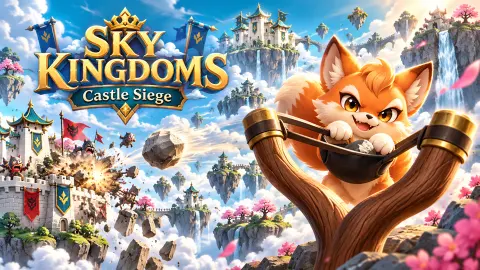
Most slingshot games put the slingshot and the target on the same strip of ground, side on, so your eye can trace the arc before you let go. Sky Kingdoms: Castle Siege takes that ground away. The slingshot stands on one floating island, the castle on another, and between them is nothing but sky and drifting cherry blossom.
That gap is the whole game. A short shot does not bounce off the foot of the wall; it drops into the clouds. And because the world is fully 3D, the camera can sit anywhere: behind the slingshot, high over both islands, or round the far side of the castle looking back. Before you can aim well, you have to learn to look.
The game is by Joric147. It was published in late September 2026. We spent our session on the opening level, Sakura Gate, and never cleared it. This page is honest about why.
Three stars, five familiars
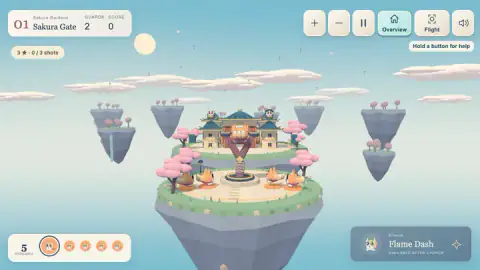
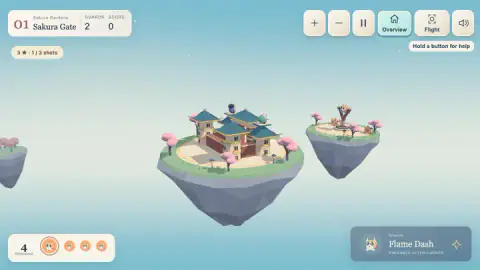
Two counters sit at the top left, and they do not say the same thing. The star line reads 3 ★ · 0 / 3 shots. The bar at the bottom says 5 remaining, with five Kitsune portraits.
So on the first level you have five tries to win, but only three to win perfectly. That leaves room to miss twice and still finish, and it tells you what the game wants: not one lucky shot, but a plan. After our single launch, both counters moved together, to one shot used and four familiars left.
The game's description says stars unlock new levels and are never spent, which matters. A sloppy clear still opens the next level, so a hard one does not have to block you. You can come back for the third star later.
Flame Dash and the weak support
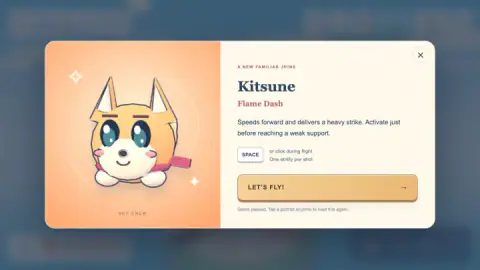
Every familiar carries one trick, and the card that introduces it tells you how to use it. Kitsune's is Flame Dash: it speeds forward and delivers a heavy strike, and the card says to fire it just before reaching a weak support.
That last phrase reads like the real rule of the game. It suggests you are not meant to hit the guards head-on so much as to break whatever is holding them up. On Sakura Gate the two guards sit on the upper roofs of a gatehouse, one pale and one dark, with walls and posts beneath them. We never reached them, so we cannot say how much a single dash brings down.
Timing matters because the ability is spent the moment you use it. Fire it while the familiar is still far from the castle and the burst is wasted on open sky. The card puts the limit in four words: one ability per shot.
According to the game's description, Kitsune is the first of 12 familiars, and later ones split into several projectiles, throw chain lightning or drop down into a courtyard. We met only Kitsune.
A camera you have to manage
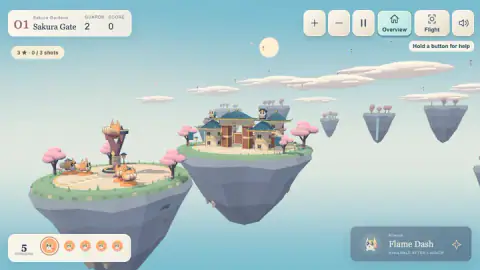
The top-right corner holds more buttons than the slingshot needs: zoom in, zoom out, pause, Overview, Flight and sound. A small note under them says to hold a button for help.
Overview is the wide shot, from behind the slingshot with the castle island floating ahead. In that view you can drag anywhere outside the slingshot to turn the scene. In one of our captures we had swung so far that we were looking at the gatehouse from behind, with our own island small in the distance. Flight, according to the game's description, follows the familiar through the air instead.
This is the part that is not obvious at the start. The same gesture, a drag, both aims the shot and turns the world. Where your finger lands decides which one you get.
Why a fox, and why fire
The first familiar is not just any fox. Kitsune is the Japanese word for fox, and in Japanese folklore foxes are clever shape-shifters and the messengers of Inari, the Shinto spirit of rice. Fox statues guard Inari shrines across Japan, and many of them wear a red bib, much like the red scarf on the game's Kitsune.
Folklore also gives foxes their own fire. Kitsunebi, or fox fire, is the name for the mysterious lights said to float over fields at night when foxes are about. Whether or not the name was chosen on purpose, a fox whose one move is a burst of flame fits that old story neatly.
The rest of the first level follows the same theme: a gatehouse with curved, tiled roofs, pink cherry trees on both islands, and a region called Sakura Gardens. Sakura is the Japanese cherry blossom.
How far we got
We played the first level for about four minutes and did not win it. Most of that time went on learning the controls the hard way: several drags that only turned the camera, then one launch pulled the wrong way that sailed off past the edge of the island. When we stopped, the header still read two guards and a score of zero.
So we cannot tell you what a cleared level looks like, how many points a guard is worth, or how the costumes and the kingdom map work. What we can say is that the controls are explained on screen, we saw no clock on any shot, and the hint about pulling down appears as soon as you need it.
More games where you knock things down
If you like flinging something at a stack and watching it fall, Knock Down is a flat, simpler slingshot game aimed at bottles. Spill & Knock Down swaps the slingshot for dropped balls and tipping glasses. For a castle siege with two players and a catapult, try Castel Wars. More are in our puzzle games.
Screenshots
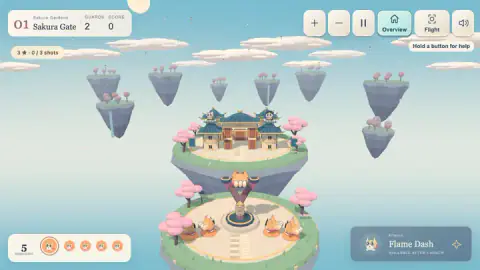
Taken by opening the game ourselves and letting it run — not supplied by the publisher, and not the same picture every other site shows.
How to play Sky Kingdoms: Castle Siege
- Meet the familiar. The game pauses on a card for Kitsune, a round orange fox in a red scarf, and explains its ability. Press the long orange button underneath to close it.
- Read the top-left corner. The header names the region and the level, and counts the guards still standing. On Sakura Gate it reads two.
- Pull down and back. Grab the familiar sitting in the slingshot and drag it down, away from the castle, then release.
- Fire the ability once. While the familiar is in the air, press Space or click. Each shot gets one use.
- Clear every guard. The level is won when the guard count reaches zero, and the fewer shots it takes, the more stars you earn.
Tips from our run:
- Start the drag on the familiar, not near it. Our first several drags began on the grass beside the slingshot. Each one simply swung the camera round the islands, and the shot counter never moved.
- Pull away from the target. On the one launch we got off, we dragged up and towards the castle, and the familiar flew off to the side into open sky. Only then did the hint appear: pull the familiar down, then release.
- Watch the bottom-right panel. It reads "available after launch" while the familiar waits, and switches to Space or click once it is flying. That switch is your cue.
- Re-read a card any time. Tapping a portrait in the bar at the bottom left pauses the game and brings that familiar's card back. We used it mid-level to check what Flame Dash was for.
Controls
| Drag the familiar in the slingshot down and back, then release | Launches it towards the castle island |
|---|---|
| Space or click while the familiar is flying | Fires its ability, once per shot (Kitsune's is Flame Dash) |
| Drag the background | Turns the camera around the islands |
| + and − buttons | Zoom in and out |
| Overview / Flight buttons | Switch between the wide view and a camera that follows the shot |
| Tap a portrait in the bottom-left bar | Pauses the game and shows that familiar's card again |
Features
- The slingshot and the castle sit on two separate floating islands, with open sky between them
- Each level shows how many guards are left; knock them all out to win
- Five familiars in the bar on the first level, but three stars only if you finish within three shots
- Every familiar carries one ability that works once per shot, after launch; Kitsune's Flame Dash is a forward burst for breaking a weak support
- A full 3D camera you can turn, zoom, and switch between an overview and a follow-the-shot view
- The first level, Sakura Gate, opens the Sakura Gardens region, with a tiled gatehouse among cherry trees
Game details
- Developer
- Joric147
- Release date
- September 2026
- Last updated
- September 24, 2026
- Added here
- September 2026
- Technology
- HTML5 (WebGL, 3D)
- Platforms
- Browser (desktop, mouse), Browser (mobile & tablet, touch)
- Classification
- Puzzle
- Saved progress
- Saving, when available, is managed by this game. Mava cannot confirm your level.
FAQ
How do you play Sky Kingdoms Castle Siege?
Drag the familiar sitting in the slingshot down and back, aim, and let go to fling it across the gap at the castle island. While it is in the air, press Space or click once to fire its ability. You win a level by knocking out every guard, and the counter at the top left shows how many are left.
How do you get three stars in Sky Kingdoms Castle Siege?
Use fewer shots. On the first level the star line reads three stars for clearing the guards within three shots, while the bar below holds five familiars. The game's description says stars unlock new levels and are never spent, so a two-star clear still moves you forward.
What does Flame Dash do?
Flame Dash is the ability of Kitsune, the first familiar you meet. Its card says it speeds forward and delivers a heavy strike, and that it should be fired just before reaching a weak support. It works once per shot, and only after the familiar has left the slingshot.
Why does dragging only turn the camera?
Because the drag started on the background rather than on the familiar in the slingshot. Any drag that misses the familiar rotates the view around the islands. Start the drag on the familiar itself and pull down, away from the castle.
How many levels does Sky Kingdoms Castle Siege have?
The game's description promises 48 levels across 12 sky regions, with 12 familiars to unlock. We played the opening level, Sakura Gate in the Sakura Gardens region, and cannot confirm the full count ourselves.
Who made Sky Kingdoms Castle Siege?
It is by Joric147. It was published on 23 September 2026.
Can you play Sky Kingdoms Castle Siege on a phone?
The game is listed as playable on phones and tablets, and its instructions say you tap during flight to fire the ability. We played it on a computer with a mouse and did not test it on a touch screen.