


About Sketchy Levels
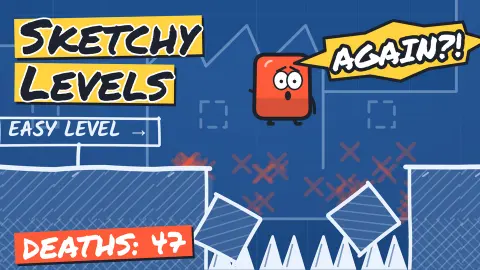
The first order in Sketchy Levels is three words long, and it is a lie. The header says "Just walk right." We did, and a low stump stopped us. Hop over it and a stretch of floor that looked as solid as the rest gives way.
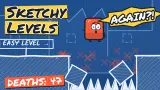
We spent about ten minutes on that one page and died 13 times. We never touched the flag, and the counter never moved from LV 1/200. So this is not a guide to all 200 levels. It is an account of how the game treats you on the first one, and that turned out to be the part worth describing.
Most trap platformers want you to feel tricked. This one keeps a record of it. Each death adds a stroke to a tally in the margin, and the page slowly fills with comments, scribbles and advice, as if someone were marking your exercise book.
The developer is Sketchy Studio. The game was published on 27 October 2026.
The floor mends itself, and the mark stays
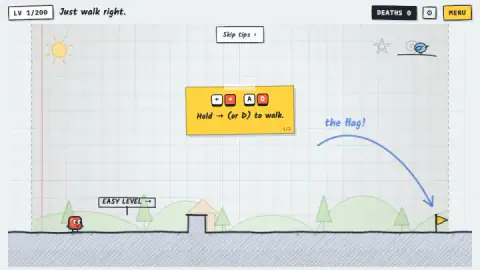
The trap is simple, and the tutorial sets it up with a straight face. The third card says "Now reach the flag." and then "What could possibly go wrong?" A large blue arrow, labelled "the flag!", curves over the ground as if to say the way is clear.
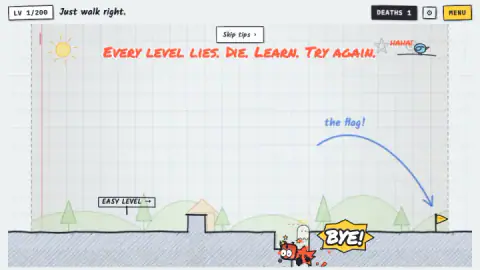
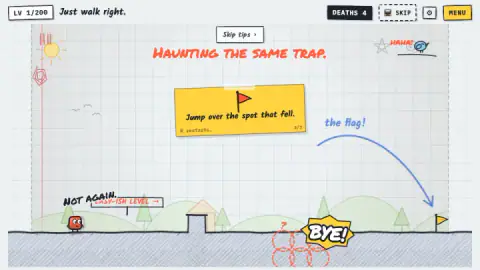
Then the ground drops. In the shot of our first death, a square-sided pit has opened in the line, with the red square at the bottom, a small ghost with a halo above it and a yellow burst saying BYE!
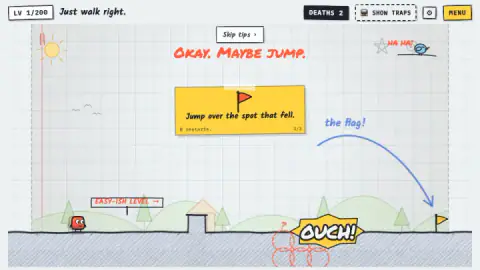
The next try starts with the floor whole again. Soon the card changes to "Jump over the spot that fell.", and red dashed circles with a question mark appear below the ground where it broke. The game still does not make the jump for you, but it has stopped hiding the problem.
Press R to restart, says the card. We never needed to, because death restarts the level by itself.
The page keeps score, and its mood changes
What surprised us most was how much the page changed while the level stayed the same:
| After this many deaths | What we saw |
|---|---|
| 1 | "Every level lies. Die. Learn. Try again." and a bird shouting HAHA! |
| 2 | "Okay. Maybe jump." and a SHOW TRAPS button |
| 4 | "Haunting the same trap." and SHOW TRAPS replaced by SKIP |
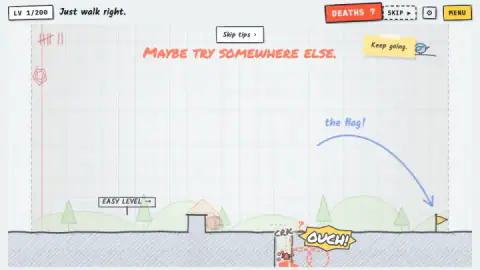
| 6 | A sticky note over the bird: "Keep going." |
| 7 | "Maybe try somewhere else." |
| 10 | "Don't give up!" and the badge "Regular customer" |
The red tally is bundled in fives, like marks on a cell wall. A new red scribble joined the margin at deaths 4, 8 and 12, which looks too regular to be chance. The square gets lines of its own, in rough black capitals: "NOT AGAIN." and "RUDE." and "FINE."
Blue handwriting also starts writing itself on the left of the page. We only caught it unfinished, at "This spot" and "You really lik", so we cannot tell you how those sentences end. Pale copies of the square drift through the scene as well. They looked to us like echoes of earlier tries, but that is our reading, not something the game says.
The change in tone is the clever part. The bird laughs while you are new. By the time you have died often enough to be annoyed, a note has been stuck over it, telling you to carry on.
Thirteen deaths, and what we would change
Our session is a poor example of how to play, and we would rather say so. We moved in short bursts and kept stopping. Our last shots show the square back against the stump, the counter at 13, and "Don't give up!" stuck to the page.
Next time we would do three things. We would take the stump and the pit in one continuous walk. We would hold Space over the pit rather than tapping it, as the card suggests. And we would start the jump before the first red circle, aiming beyond the last one. None of that is tested.
We also left the help alone. SHOW TRAPS and SKIP sit at the top of the screen from early on, and the first two versions we saw carried a small screen icon. We did not press them, so we cannot say what they do or what they cost.
The joke is older than the browser game
Killing players with things that look harmless has a long history. Syobon Action, a free game by the Japanese developer Chiku, came out in 2007 and was built on objects that look innocent and kill you in ways you cannot foresee. The word masocore, popularized in 2008, describes this strain of deliberately harsh games, and such games often give you endless lives so you can try again with little friction.
That last point explains how Sketchy Levels works. We saw no lives to lose and no penalty beyond another stroke in the margin. When a retry is that cheap, dying stops being a punishment and becomes the way you look around.
What we did not get to see
Level 2, for a start. The game's description promises 10 worlds with bosses, a level editor, a daily trap, secret erasers, outfits and a global leaderboard, and none of that appeared in our run. We did not open the menu or the settings gear. The listing was updated the day after we played, so details may have changed.
It suits people who can laugh at losing. Much of the humor is written on the page, so it helps to be a confident reader. Nothing we saw was gory: death is a cartoon burst and a small ghost. If repeated failure makes you close the tab, the SKIP button may be worth a look.
More trap platformers
Pixel Path is a shorter trap platformer about reaching a portal. Troll Rider moves the same bad faith onto a downhill bike. There are more in our puzzle games.
Screenshots
Taken by opening the game ourselves and letting it run — not supplied by the publisher, and not the same picture every other site shows.
How to play Sketchy Levels
- Hold the Right Arrow. The first tip card also offers D. You are the red square at the left of the page.
- Hop the stump with Space. The second card says a tap gives a small hop and holding jumps higher.
- Watch the floor. On the first level, a section opens partway to the flag. You will probably find it by falling in.
- Learn from the fall. You are back at the start before the OUCH bubble has faded, and the spot is now marked.
- Reach the yellow flag. The game's description says the flag or a curled page corner ends a level. We saw neither happen.
Tips from our run:
- Do not trust the first sign. It says EASY LEVEL. After one death, it says EASY-ISH LEVEL.
- Do not hold the key and wait. Holding right alone left us parked against the stump, again and again, while nothing happened.
- Do not stop after the stump. We kept pausing there, then jumped from a standstill. A walking start should carry you further, though we cannot prove it.
- Read the circles as a zone. They cover about three squares of ground, so a small hop looks too short.
Controls
| Right Arrow | Walks right while held. The first tip card also names the Left Arrow, A and D; we used only the Right Arrow |
|---|---|
| Space | Jumps. The second tip card says a tap is a small hop and holding it jumps higher, and that Up and W work too |
| R | Restarts the level, according to the tip card; we did not press it, because a death puts you back at the start anyway |
| P | Pauses, according to the listing's controls list; we did not try it |
| Left and right sides of a touch screen | Move and jump, according to the listing's controls list; we did not try touch |
Features
- A level counter that reads LV 1/200 from the first screen, above the order Just walk right
- A red tally in the page margin that gains one stroke for every death
- A sign that changes from EASY LEVEL to EASY-ISH LEVEL after your first death
- A section of floor that gives way, then returns whole with red dashed circles marking the place
- Help that arrives by stages: a SHOW TRAPS button, then a SKIP button
- A blue bird that laughs at early deaths, then sticky notes reading Keep going and Don't give up
- A badge called Regular customer, which we earned on our tenth death
Game details
- Developer
- Sketchy Studio
- Release date
- October 2026
- Last updated
- October 30, 2026
- Added here
- October 2026
- Technology
- HTML5
- Platforms
- Browser (desktop, keyboard), Browser (mobile & tablet, touch, landscape or portrait)
- Saved progress
- Saving, when available, is managed by this game. Mava cannot confirm your level.
FAQ
How do you play Sketchy Levels?
You walk a red square to a yellow flag on a sheet of squared paper. Hold the Right Arrow to walk and press Space to jump. The game's description says every level hides a trap, so expect to die on the way and use what you saw on the next try.
How do you beat level 1 of Sketchy Levels?
We did not beat it, so this is advice from losing. Hop over the low stump, keep walking right and jump before the place where the floor gave way, which the game later marks with red dashed circles. Holding Space should give a higher jump, according to the tip card. Aim to land beyond the last circle.
Why does the floor fall in Sketchy Levels?
That is the trap on the first level. The ground looks like one solid line, then a section opens under you. After you restart, the floor is whole again, but red circles and a question mark show where it broke.
What does Show Traps do in Sketchy Levels?
The game's own description says it reveals the traps, but we never pressed it. The button appeared after our second death. After our fourth death, a SKIP button had taken its place.
Can you skip a level in Sketchy Levels?
A SKIP button appeared at the top of the screen after our fourth death on level 1. We did not press it, so we cannot say what it asks of you. The game's description says stuck players can skip.
How many levels does Sketchy Levels have?
The counter on screen reads LV 1/200, so 200 is the number the game itself shows. Its description adds 10 worlds with bosses. We only saw level 1, so we cannot confirm the worlds or the bosses.
Can you play Sketchy Levels on a phone?
It is listed for Android and iOS, in landscape and portrait, with one side of the screen to move and the other to jump. We played on a computer with a keyboard and did not try touch.
Who made Sketchy Levels?
The developer is named as Sketchy Studio. It was published on 27 October 2026.