





About Happy Fluffy Cubes
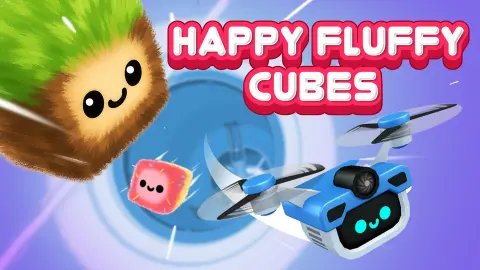
Most runners show you the road. Happy Fluffy Cubes shows you a hole. You look straight down a tunnel, a small fuzzy cube with a face sits in the dead centre of the screen, and everything else comes to it: rings, metal plates, flames, sheets of ice.
That head-on view changes what you watch. In a side-on runner you watch your character. Here the cube never leaves the middle of the picture, so there is nothing to learn from it except that it smiles and now and then blinks. What you watch is the gate behind it, which starts as a small circle and swells until it fills the window.
We played it on a desktop for about four minutes and got two runs out of it. The first reached 11 on the counter and ended soon after. The second stood at 9 when we stopped. That is the opening of the game and no more, and this page says so wherever it matters.
The game's listing credits Dream Forge. It has been available since December 2025.
Five colours in eleven counts
The tunnel is cut into stretches, and each has its own colour and its own way of getting in your way. This is every stretch we saw, with the number the counter showed at the time.
| Counter | Tunnel | What was in the way |
|---|---|---|
| 0 | Orange | A dark ring with a striped hazard panel and three warning triangles |
| 1, first run | Ice blue | Sheets of ice across the whole screen, hiding the cube |
| 1, second run | Grey | A round dark plate with a slot across the middle, bolted to two arms |
| 3 | Purple | Streaks of fire crossing the tunnel, and two coins beside the cube |
| 6 | Grey | A thin upright bar behind the cube, with a red glow on either side |
| 7 and 8 | White | A wide dark ring studded with bolts |
| 9 | Red | A burst of flame from the centre, and one large coin to the right |
| 11 | White | An open stretch with dark rock at its edges |
Two things follow from that list. The game changes scenery fast, so no stretch lasts long enough to get used to. And the order is not the same every time, because the two runs had already parted ways by a count of 1. Learning the tunnel by heart looks like a poor plan. Learning each colour's hazard looks like a better one.
The ice is the stretch to be ready for. Everywhere else you can see the cube and the gap. In the ice we could see neither.
The counter climbed without much steering
Here is the part we cannot explain, so we will only report it.
In the first run we held the up arrow for a second and a half at a time, again and again, with one press of left and one of down. The counter went from 0 to 11, and the run ended a little later. We did not catch what we hit.
In the second run we did far less. After the opening seconds it got single clicks and a few short taps on the right arrow. The counter still climbed to 9, and the cube was still flying when we stopped.
So a run that was barely steered got nearly as far as one that was steered all the time. Either the early gates are generous, or small touches are all the cube needs. We cannot tell you which. We also cannot tell you which input does the steering, because the view follows the cube, and a key that moves it would look much the same as a key that does nothing.
What we would do with that: start gently. Make one small move, watch how the nearest ring shifts around the cube, and build from there. The listing's own description, hold and move up or down, is the place to begin with a mouse or a finger.
Coins, gems, a ticket and an empty egg
The top left corner carries three small counters above the big one. The first is coins. Ours went from 0 to 1 during the first run and was still on 1 when the second began, so coins belong to you and not to the run.
The second counter shows a green gem and read 0 throughout. The third has a pink, ticket-shaped icon and read 1 from the first frame to the last. Nothing in a run told us what either is for.
In the top right corner there is a spotted egg with the word EMPTY under it. It never changed. The listing speaks of chests bought with coins, eggs found inside them and new cubes hatching from the eggs. With a single coin to our name we opened none of that, so the egg slot is the only trace of it we can vouch for.
Why the gate seems to jump at the last moment
There is a real piece of optics behind the game's one trick. How big a thing looks depends on how far away it is: halve the distance and it looks twice as wide. A ring far down the tunnel can halve its distance many times over and still look small. The last halving takes it from half the screen to all of it in an instant.
That is why the gates feel as if they speed up when they do not have to. It is also why the first tip above matters. The moment to pick your line is while the ring is still a small circle around the cube, because by the time it looks urgent there is very little time left to act on it.
What four minutes did not show us
Anything beyond a count of 11. We do not know how long the tunnel is, whether it ends, or what the counter is counting exactly.
We did not get a clear look at what ends a run or at the screen that follows it. We never saw the menus, a shop, a chest or a second cube. The listing mentions lasers and saws; we met fire, ice, plates, bars and rings. We did not try a phone, and no sound was noted during the session.
Who it is for
Players who like a short reflex test with nothing to read. The whole screen is one cube and one gate, and a run is short. The look is gentle: a smiling fuzzy cube, cartoon fire, a version label reading v1.7.1b in the corner and little else.
Anyone who wants to see a level end, or to plan a route, will not find that here on the evidence of our runs. And the listing calls it a portrait game, though on a desktop it filled a wide window with no borders.
More things to fly through
Geometry Arrow is the closest relative we have: hold to climb, let go to dive, through a cave of spikes. Horizon: Flight Into the Light is a glider weaving between white towers at a calmer pace. Slope City 2 and Roll Sky Ball 3D swap the tunnel for a narrow track and the cube for a ball. The rest are under arcade games.
Screenshots
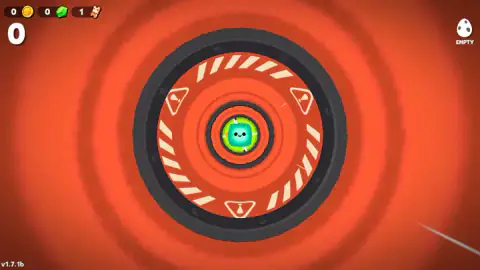

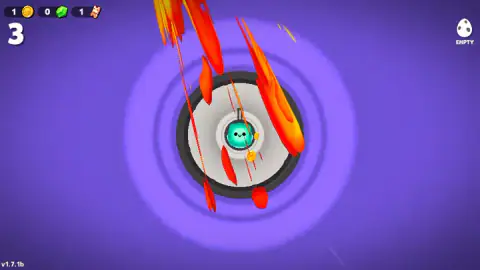
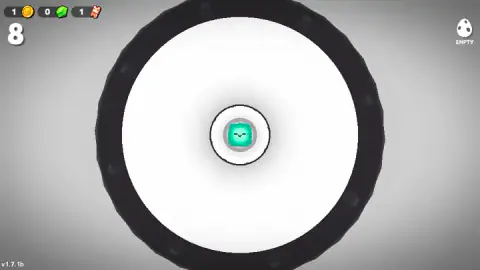
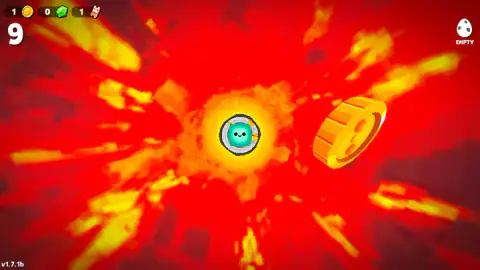
Taken by opening the game ourselves and letting it run — not supplied by the publisher, and not the same picture every other site shows.
How to play Happy Fluffy Cubes
- Sit through the loading screen, a white cube tumbling among snowflakes above a green bar.
- You start at 0 in an orange tunnel, behind a dark ring with cream hazard stripes and three warning triangles.
- Keep the cube clear of whatever arrives next. The listing describes holding and moving up or down; we used the arrow keys and clicks, with the results described further down.
- Follow the large number in the top left corner. It is the count for this run, and it is the only score on screen.
- When a run ends, the next one starts again at 0. The coins you picked up stay.
What two runs taught us:
- Read the small ring, not the big one. The next gate is already drawn inside the one you are passing. At the start a second dark ring sits nested within the hazard ring, and a lime one within that.
- A new colour means a new hazard. Purple came with fire. Grey came with metal plates and bars. Ice blue came with sheets that covered the whole view, cube included.
- The first gate repeats, the second did not. Both runs opened on the same orange ring. At a count of 1 the first run was already in the ice, and the second was facing a grey plate.
- Flying near a coin is not collecting it. At a count of 3 two coins floated right beside the cube, and the coin counter did not move.
Controls
| Hold and move up or down (mouse or finger) | The control the game's listing describes; we did not play this way, so it is the listing's word |
|---|---|
| Up arrow, held | What we held through most of our first run, which reached 11; we could not tell what it changed |
| Single clicks and short taps on the right arrow | All we gave the second run after its opening seconds; the counter still climbed to 9 |
Features
- A tunnel seen head-on, with a small teal cube that stays in the centre of the screen while the gates come to it
- One large counter in the top left corner that starts every run at 0; ours reached 11
- Stretches in five colours, each with its own hazard, among them fire on purple and sheets of ice on blue
- An opening that repeats, the same orange hazard ring at 0, and a stretch after it that did not
- Coins that stay with you when a run ends, plus separate counters for green gems and a ticket-shaped item
- An egg slot in the top right corner that read EMPTY for our whole session
- A portrait game by its listing that filled a wide desktop window from edge to edge
Game details
- Developer
- Dream Forge
- Release date
- December 2025
- Added here
- October 2025
- Technology
- HTML5
- Platforms
- Browser (desktop)
- Saved progress
- Saving, when available, is managed by this game. Mava cannot confirm your level.
FAQ
What is Happy Fluffy Cubes?
It is a tunnel runner by Dream Forge in which you look straight down the tunnel. A small fuzzy cube with a face stays in the middle of the screen while rings, plates, flames and sheets of ice come towards it, and a counter in the top left corner climbs for as long as the run lasts.
How do you control the cube in Happy Fluffy Cubes?
The game's listing describes holding the screen and moving up or down. We played on a desktop with the arrow keys and single clicks, and we could not work out which of them steered, because the view keeps the cube in the centre of every frame. Our first run reached 11 with the up arrow held and our second reached 9 on little more than clicks.
What does the big number in the top left of Happy Fluffy Cubes mean?
It is the count for the current run. It starts at 0 behind an orange hazard ring and goes up as you get further down the tunnel; ours read 11 at its highest. The game never labels it, and coins have a separate, smaller counter above it.
Do you keep your coins when you crash in Happy Fluffy Cubes?
Yes, in our session. We picked up one coin during the first run, and when the second run began the big counter was back at 0 while the coin counter still read 1.
What is the egg marked EMPTY in Happy Fluffy Cubes?
It is an icon of a spotted egg in the top right corner with the word EMPTY under it, and it stayed that way through both of our runs. The game's listing speaks of eggs that hatch into new cubes. We did not find an egg or see one hatch, so we cannot tell you how the slot is filled.
Is Happy Fluffy Cubes suitable for kids?
Nothing we saw would trouble a child. The hero is a smiling fuzzy cube that blinks, the hazards are cartoon fire, ice and metal, and there was no text to read during a run. It does ask for quick reactions, and we saw only the runs themselves, not the menus or any shop.
Can you play Happy Fluffy Cubes on a phone?
It is listed for PC, Android and iOS as a portrait game. We played only on a desktop, where the tunnel filled a wide window from edge to edge, so the phone is the listing's word and not ours.
Who made Happy Fluffy Cubes?
The game's listing credits Dream Forge. The game was published in December 2025.