


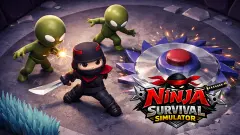





About Ninja Dash: Cozy Tactic Puzzle
The name says dash. The game disagrees. Open a board in Ninja Dash: Cozy Tactic Puzzle and nothing happens: the red figures stand where they stand, the grass stays still, and the number in the top right corner does not move. We clicked around the opening board for a long stretch, several captures apart, and it sat there unchanged. This is a turn-based puzzle wearing the clothes of an action game.
The number in that corner is the point of the whole thing. It is labelled Total moves, it reads 100 when the first board opens, and the first real action takes it to 99. It goes down, not up. You are not being scored on how much you do; you are being given a small allowance and asked to spend it well. On the numbered levels the allowance gets brutal. The first grass level showed exactly 1 left once our ninja was standing on it.
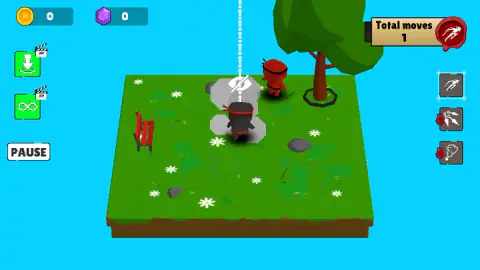
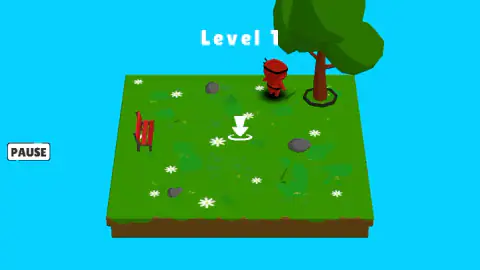
A board begins before it begins. Your ninja is not on it yet: there is a white arrow hanging over an empty circle in the grass, and that is where he goes. Put him there and he drops in down a dotted line, landing in a small puff, with a crossed-out eye floating above his head. Everything after that comes from three buttons stacked down the right edge, drawn as a running figure, a thrown blade and a curl of smoke.
Ninja Dash is by RDVIndieGames. It has been available since October 2024 and updated in August 2026.
Total moves counts down, and that is the whole design
Most browser puzzles with a number in the corner are counting your score upward, or counting a clock down. This one is counting your allowance. The opening board starts at 100. One action later it reads 99, and it stayed at 99 through everything else we tried on that board, because none of it counted as a move.
That single design choice changes how you sit in front of the game. There is no advantage in being quick, because the board does not act while you think — it has no timer at all, and the red figures do not patrol in real time. The pressure is arithmetic, not nerves. You either have enough moves left to solve the shape in front of you, or you do not, and that is known before you start, not discovered at the end.
It also explains why the levels are so small. The first grass board is a few paces across: a bench, some rocks, a tree in a ring, a scatter of daisies, a red ninja. With a budget of one, that board has exactly one correct answer, and your job is to see it rather than to find it by trial. Clearing it drew a card reading mission success with three gold stars and paid 10 coins and 1 gem, with a green button offering to double that in exchange for watching an ad.
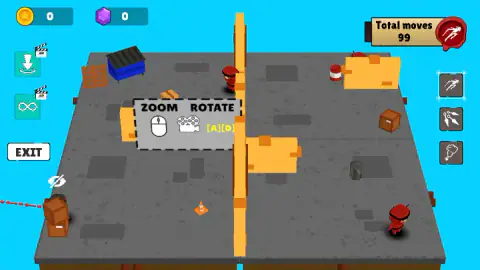
The reverse is true too: a big board with a generous budget is a looser, vaguer game. The opening stone yard let us wander for a hundred moves, and we left it through EXIT without finishing it.
Why turning the camera is part of the puzzle, not a comfort
The first thing Ninja Dash teaches is not how to move. It is how to look. A card appears in the middle of the screen reading ZOOM ROTATE, with a mouse, a camera and the letters A and D — and it came back four separate times in our session, which tells you how much the game wants you to have that in your hands.
Here is why it matters. These boards are drawn from one corner, in the flat three-quarter view that board games use, and in that view height hides ground. On the opening yard a tall orange post runs the full depth of the board and splits it in two, with stacked crates and a skip sitting between the camera and the far half. A figure behind that post is a figure you cannot plan around. Turn ninety degrees and the post is no longer in the way; the crates that blocked your view are now beside the gap rather than in front of it.
That turns the camera into a planning tool rather than a comfort. In a top-down puzzle the whole board is handed to you and the only question is what to do with it. Here, reading the board is itself a step: which squares are empty, what is behind the tree, whether the gap you were counting on exists. A move spent on a wrong guess is gone. Turning costs nothing.
The quiet part is the historically accurate part
The ninja of films dashes. The shinobi of the surviving manuals mostly watched. The Bansenshūkai, the best-known Japanese compilation on the subject, was put together in 1676 and is credited to Fujibayashi Yasutake, who gathered what the families of the Iga and Kōga regions knew, after the civil wars were over, as a record of a trade already fading. What it records leans heavily toward infiltration, scouting and getting in and out unseen, rather than toward fighting.
A game built on a move budget and a crossed-out eye is closer to that than any number of rooftop chases. The black outfit, by the way, is the part with the weakest evidence: the historian Stephen Turnbull has argued that the all-black ninja we picture comes from the stage, where kabuki's kuroko assistants wore black to signal that the audience should treat them as invisible. It is a widely repeated attribution rather than a documented fact about what anyone wore, and we flag it as such.
What we saw, and what we did not
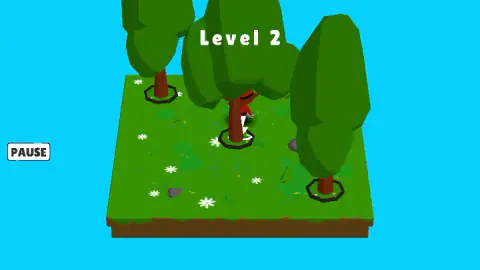
We played one session in a desktop browser. We placed a ninja, left the opening yard without finishing it, cleared the first grass level with three stars, then got as far as Level 2 and spent an embarrassing stretch there stuck behind the pause card.
So there is a good deal we cannot tell you. We never watched a red figure be removed from a board, so we will not claim what finishes a level beyond what the win card told us. We did not learn what each of the three right-hand buttons does, what the crossed-out eye changes, or what the two green ad buttons give you. We never opened the shop, spent a coin, finished a daily task, or scrolled the level grid past the first nine tiles, so we cannot say how many levels exist.
More puzzles that wait for you
Schoolboy: Escape from Parents! is the closest neighbour we have: a stealth puzzle in a two-floor house where a boy has to slip out while his father keeps checking on him, and where being seen is the whole failure state. Lanternward is pure think-before-you-act logic, lighting a night street with lanterns that must not face each other. The Fill asks you to draw one line through every grey square exactly once, with no clock and no lives, which is the same pleasure as a tight move budget. Hexa Block Puzzle hands you exactly as many hexagons as there are holes, so like a move allowance, nothing in the tray is spare. More boards to solve at your own pace are in the puzzle category.
Screenshots
How to play Ninja Dash: Cozy Tactic Puzzle
- Wait for the board. Each level is one small square of ground — grass with a bench and daisies, or grey stone with crates — seen from a corner, with red ninja figures already standing on it.
- Place your ninja. A white arrow marks the circle where he lands. Click it, and he drops in.
- Turn the board before you act. A and D swing the camera round, the mouse wheel zooms, and on a touch screen you swipe and pinch.
- Spend your moves through the three buttons on the right edge. Watch Total moves in the top right go down as you do.
- Clear the board and a card appears with up to three stars and your reward. NEXT goes on, RESTART replays, MENU returns to the grid of levels.
Tips from our session:
- The pause card does not have a resume button. It offers EXIT and RESTART, and both of those throw away the board you were working on. To get back to your level, press the small red X in the card's corner. We lost minutes to this before we saw it.
- Clicking the scenery is free, and useless. We clicked crates, a skip, a fence post and a traffic cone on the opening board. The counter never moved. Only real actions cost you, so there is no penalty for poking about, and no reward either.
- Take the camera round first. On a board seen from one fixed corner, the near objects are drawn over the far ones. A quarter turn is cheaper than a wasted move.
- The small boards are the tight ones. A hundred moves on the opening yard is generous. A level that hands you one or two is a riddle with a single answer, and restarting costs nothing.
Controls
| Left mouse button | Act — pick your ninja's landing square, or press one of the three buttons down the right edge |
|---|---|
| A and D, or the mouse wheel | Turn the camera around the board and zoom in or out, as the game's own ZOOM ROTATE card shows |
| Hold the right mouse button and move the mouse | Turn your ninja on the spot, according to the game's written instructions; we did not confirm it |
| Swipe left or right, pinch | Turn and zoom the camera on a touch screen, according to the game's written instructions |
| PAUSE button, left edge | Stop the level. The card that appears closes with the small red X in its corner |
Features
- A move counter in the top right labelled Total moves, which reads 100 on the opening board and goes down one at a time
- Nothing happens while you think: on the opening board the figures stayed put through several clicks and the counter held at 99
- You place your ninja before the level begins, on a circle marked by a white arrow, and he drops in down a dotted line
- Three action buttons down the right edge, drawn as a running figure, a thrown blade and a puff of smoke
- A camera you can turn and zoom with the keyboard, the wheel or a pinch, on boards built so that scenery hides scenery
- A level panel of nine numbered tiles, each with three empty stars, and arrows beside it to page through more
- Coins and gems that both start at zero, a 50-coin daily bonus, three daily tasks, and a doubling offer tied to an ad after a win
Game details
- Developer
- RDVIndieGames
- Release date
- October 2024
- Last updated
- August 10, 2026
- Added here
- March 2025
- Technology
- HTML5 (3D)
- Platforms
- Browser (desktop), Browser (mobile & tablet, touch)
- Saved progress
- Saving, when available, is managed by this game. Mava cannot confirm your level.
FAQ
What is Ninja Dash: Cozy Tactic Puzzle?
It is a free browser puzzle game by the studio RDVIndieGames, listed in October 2024. You place a black-clad ninja on a small three-dimensional board of grass or stone, then spend a limited number of moves against red ninja figures standing around it.
Is Ninja Dash a reflex game or a turn-based puzzle?
It is a puzzle, despite the name. The board waits for you: across several captures of the opening board, taken a number of clicks apart, nothing moved and the move counter stayed where it was. You can leave the screen alone and think, and nothing on it will take advantage of that.
What does Total moves mean in Ninja Dash?
It is the budget you have left on that board, shown in the top right corner. The opening board starts at 100 and drops to 99 after one action. The numbered levels are far tighter: the first grass level showed a single move left once our ninja was standing on it.
How do you rotate the camera in Ninja Dash?
With the A and D keys or the mouse wheel on a computer, and by swiping left or right or pinching on a touch screen. The game puts a card on screen showing a mouse and the two keys, and it brought that card back four separate times in our session.
The pause card will not go away. What do I press?
Press the small red X in the corner of the card. The two large buttons on the card are EXIT and RESTART, and neither of them means resume: one leaves the level and the other starts it again from the beginning. We lost a good part of our session to that card before spotting the X.
Does Ninja Dash: Cozy Tactic Puzzle have ads?
Yes, and they are offered rather than forced in what we saw. Two green buttons with a film-clapper badge sit on the left edge during a level, and the card you get for clearing one offers to double the reward with an ad. Between levels the game showed its own message reading that it had skipped the ad this time.
How many levels does Ninja Dash have?
We cannot give a total. The level panel shows nine numbered tiles at a time, each with three empty stars, and there are up and down arrows beside the grid to page through more. We cleared the first one, which paid 10 coins and 1 gem, and saw Level 2 as a board.
Can you play Ninja Dash on a phone?
It is listed for phones and tablets as well as computers, and the game's own instructions describe on-screen buttons for the ninja plus swipe and pinch for the camera. We played it in a desktop browser, so we cannot describe how the touch controls feel in practice.