







About JUMPER
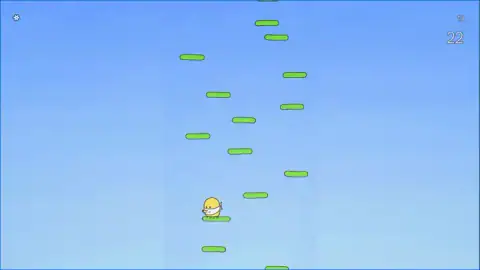
In JUMPER, you never jump. It is a browser climbing game by Arseniy Pyataev, released in July 2025. A small yellow egg with a white band tied around its face bounces on its own. You only steer it left and right. Each green platform you land on sends the egg up again, and the higher you climb, the higher your score.
Your first goal is written on the start screen: "Level 1 · Score 500 points". We played for about ten minutes on a computer and fell at least six times. Our best was 211 points, less than half the goal. So this page can teach you the first 211 points well. It cannot tell you what comes after 500.
If you searched for "jumper game", here is a quick check. This is not the download where you pay what you want. It is not the first-person puzzle game. It is not the game where a power bar sets how far you jump. This JUMPER plays in a light column in the middle of the screen, and it has no jump key. Vertical climbing games like this one go back to Doodle Jump (Lima Sky, 2009). JUMPER has no link to it.
Read the start screen once, because it goes away
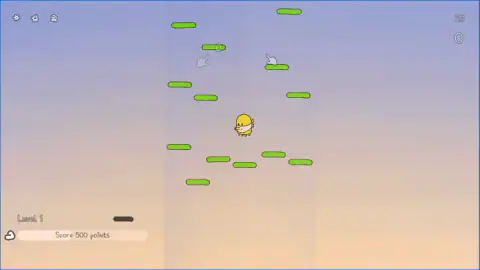
The start screen of a climb, with your score at 0, shows three things:
- the "Level 1 · Score 500 points" bar,
- two see-through hands on the platforms (the only tutorial we saw),
- two small pale icons next to the gear in the top left.
Once the climb gets going, they are gone. In one climb they had already vanished while the score was still 0, and only the gear stayed. The 500 bar does not follow you up, so read it at the start. We did not open the gear or the other icons, so we can't say what they do.
The platforms at the start were always in the same places, even when the background changed. We saw three backgrounds: light blue sky, a sunset, and purple. The color changed from one climb to the next, never during a climb. So the color does not show how high you are. Tip: learn the first few platforms. They are the only part we know repeats.
Two numbers tell you if you are beating your record
The top right always shows two numbers. Here is how they looked in our climbs:
- 61 above 33. Our best was 61, and this climb was at 33. We still had 28 points to go.
- 142 above 142. Both numbers matched, so we were setting a new record.
- 211 above 0. We had pressed Retry. The climb reset, but the record of 211 stayed.
So check the small number when you start. That is the score to beat. When the big number catches up, you are climbing higher than ever before.
Stay in the light column and aim for green
All the platforms appear inside a light stripe down the middle. It is about one third of the screen wide. The sides stay empty. Moving out there will not bring you to a platform, so keep your eyes on the column.
The egg can sit close to the edge of the column. We saw it near the left edge in two climbs. We did not test whether it goes past the edge or comes back on the other side.
In our 211-point climb, brown platforms began to show up from about 100 points. They are already cracked into two halves before you reach them. We saw them at 100, 142, 201 and 210 points. In that climb, the egg passed beside one and kept climbing. We don't know what a brown platform does if you land on it. So the safe choice is simple: aim for the green ones.
Fell? Choose Retry or Continue
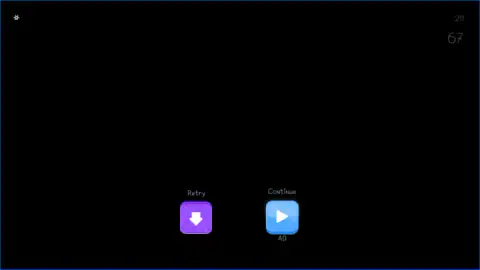
When the egg runs out of platforms, it is alone on the screen. Two buttons appear, and then the screen turns black.
- Retry (purple, with an arrow). It starts a new climb from 0 and keeps your best score. Two times, a full-screen ad played before the new climb started.
- Continue (blue, with a play triangle and "AD" under it). It offers to let you keep going if you watch an ad. Once, a sign said "Oops! No ads available right now", with a "Continue playing" button.
We tried Continue several times. We never saw it put the egg back where it fell. So if you want a clean new start, press Retry. If you try Continue, check where the egg ends up.
More quick arcade games
If short tries and beating your own score are what you like, try Rooftop Run, Geometry Vibes or Geometry Arrow. You can find more in our arcade games.
Screenshots
How to play JUMPER
- Look at the bottom left of the start screen. The sign says "Level 1" and "Score 500 points". That is your goal.
- Look at the top right. The small number is your best score so far. Remember it.
- Hold A to move left or D to move right. You press nothing to go up. The egg bounces off each green platform, and the big number goes up.
- Watch the big number under the small one. It counts this climb. When both match, you are setting a new record.
- If the egg falls, a black screen shows two buttons. Press Retry to start a new climb from 0.
Tips from our session
- We tested A and D, always held down. The game's description says the arrow keys work too. It also says a click on the left or right half works. We did not try those.
- Enter and Space did nothing for jumping. Don't waste time looking for a jump key.
- Sometimes the action stopped and a "Click to keep playing" sign appeared. One click in the play area started it again.
Controls
| A / D | Move left / move right. We tested these and always held them down. |
|---|---|
| Left / Right arrow | Move left / move right, according to the game's description. We did not test them. |
| Click the left or right half | Move to that side on a computer, according to the game's description. We did not test it. |
| Tap the left or right half (phone) | Move to that side on a phone, according to the game's description. We did not test it. |
| Enter / Space | These did not make the egg jump. There is no jump key, because the bounce is automatic. |
Features
- There is no jump button. The egg bounces on its own, and you only steer it left and right.
- The start screen sets the goal for Level 1: 500 points.
- Two numbers sit in the top right. The small one is your best score and the big one is your climb right now.
- All the platforms sit in a light column in the middle, about one third of the screen wide.
- Brown platforms that are already split in two show up between the green ones. In our best run, they appeared from about 100 points.
- When you fall, you can pick Retry to start again from 0 or Continue, which offers an ad.
- Our best in a ten-minute session was 211 points, less than half of the Level 1 goal.
Game details
- Developer
- Arseniy Pyataev
- Release date
- July 2025
- Added here
- June 2025
- Technology
- HTML5 (2D)
- Platforms
- Browser (desktop)
- Classification
- Arcade
- Saved progress
- Saving, when available, is managed by this game. Mava cannot confirm your level.
FAQ
What is the JUMPER game?
JUMPER is a free climbing game for the browser, made by Arseniy Pyataev and released in July 2025. A yellow egg bounces up green platforms on its own, and you steer it left and right. Your score grows as you climb, and Level 1 asks for 500 points.
How do you jump in JUMPER?
You don't. The egg bounces by itself every time it lands on a platform. Your only job is to move it left or right so it lands on the next one. Enter and Space do not make it jump.
How many points do you need for Level 1 in JUMPER?
The start screen says Level 1 needs 500 points. The sign only shows before the climb starts, so read it then. Our best in a ten-minute session was 211.
What happens after 500 points in JUMPER?
We don't know yet. We did not reach 500 in our session, so we never saw a Level 2. The game's description mentions skins, achievements and bonuses, but we did not see any of them.
What does the Continue button with AD do in JUMPER?
It offers to let you keep going if you watch an ad. We never saw it put the egg back where it fell. Once, the game showed 'Oops! No ads available right now' instead.
Can you play JUMPER on a phone?
The game's description says you tap the left or right half of the screen to move. We only played on a computer, so we have not checked how it feels on a phone. The play area is a tall, narrow column.
Is JUMPER free to play?
Yes, it is free to play on mavagames.com. Ads can show up. Continue offers one, and twice a full-screen ad played after we pressed Retry. We saw nothing to buy in our session, but we did not open every menu.