

About Robby Superhero Obby
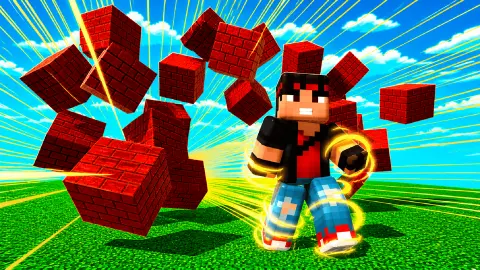
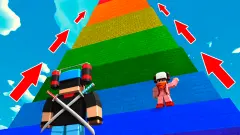
An obstacle course normally starts with something you can jump: a gap, a step, a low block. Robby Superhero Obby starts with a brick wall several times the height of your runner, and no way round it. The first lesson is that jumping is not the main tool here.
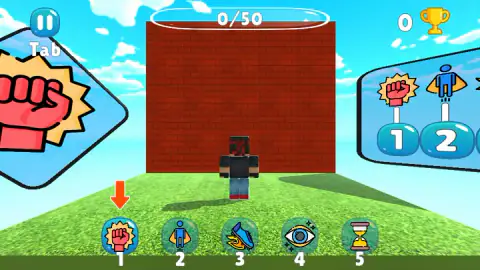
The main tool is a row of five powers on the number keys. The game tells you so three times before you take a step. A sign with a fist stands on the left, a board on the right lists the five icons over their numbers, and the same five are buttons along the bottom of the screen.
The game is credited to Eva Games. It has been available since May 2026.
We played one short session on a desktop, about four minutes, and we have to be plain about it: we saw the start and nothing after it. We reached the foot of that first wall and did not get past it. This page reports the opening and says clearly where our knowledge stops.
Five icons, and what we can say about them
The five buttons carry small pictures, in this order: a fist inside a burst, a blue figure with a cape, a boot with flames, an eye with sparkles and an hourglass.
It is tempting to translate those into abilities. We are not going to. We clicked the fist button once, and the next thing on screen was a card asking whether we wanted to continue. We never saw a power do its job, so the honest list is a list of pictures.
One detail may matter. In two of our screenshots the numbers under the buttons are not all the same colour: 1 and 2 are white, 3 is tinted green and 4 and 5 are grey. In a third, taken at the wall, all five are white. That could be the game marking which powers are ready. We cannot confirm it.
Two worlds, and a second set of powers
The menu offers two worlds from the first minute, and neither was locked for us. Each has a green Play button and a blue New Game button under its picture. We pressed Play on World 1. We did not press New Game, so we can only point out that the two buttons exist, which suggests that a world keeps your place.
The pictures are worth a look before you choose. World 1 shows the brick wall and the fist. World 2 shows a round grey disc, green arrows on the ground and a board with five icons that are not the same five. So the game holds more powers than one level shows you, and the second world is where the others live.
What the screen tells you
The screen is sparse. At the top left is the pause button. At the top centre a long pill reads 0/50. At the top right there is a gold trophy with a number, which was 0 for us.
We do not know what the fifty are. The counter did not move, and nothing on screen explained it. The trophy says the game keeps a tally of something you win, and that is as far as we can take it.
The main menu has more: buttons for skins and settings, a gem counter, a gift box, and a round button showing a gem beside a film clapperboard, which is how games of this kind usually mark a reward for watching an advert. We did not press any of them.
A card reading Continue? covered the level during our session, with a single green OK button. Pressing OK put us back where we had been standing. We could not tell what caused it.
What "obby" means
Obby is short for obstacle course. The word grew up among players of block-building sandbox games, where people made courses for each other, and it has since become the name of a genre: a 3D track in the sky, a small character, and a string of things to get over.
The usual obby is a test of jumping. This one keeps the look, the floating platform under a blue sky and the block runner, and moves the question. With a wall that tall as the opening obstacle, the puzzle is which power to use, and the jump comes second.
What we did not see
Almost everything. We did not see the wall break, a power at work, a fall, a checkpoint, a trophy won, or any part of the course beyond the first platform. We did not open World 2, the skins or the settings.
So we cannot tell you how long the game is, how hard it gets or what the skins cost. If you play further than we did, you will know more than this page does.
Who it is for
Players who like obstacle courses but want something to think about between jumps. The opening is gentle: the game shows the keys on a card, repeats them on a board and points an arrow at the first answer.
If you want pure jumping with nothing to learn, a plainer course will suit you better. And if you play on a keyboard, expect to keep one hand on the number row.
More courses to run
Robby +1 To Speed Per Second has the same block runner and swaps powers for speed that builds every second. School Escape Obby is a timed course that starts in a classroom with the clock already running. Break a Tower: Obby goes the other way, down a tower one floor at a time, and Build and Fly Obby has you bolt together a machine and see how far it flies. The rest are under arcade games.
Screenshots
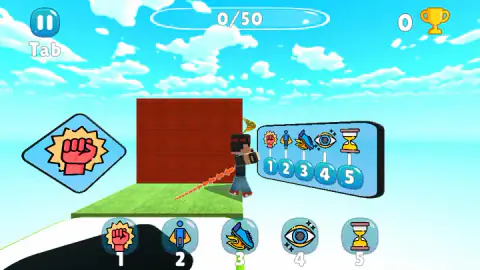
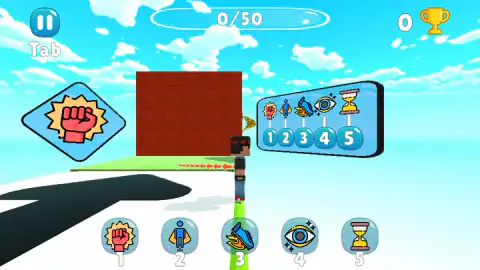
Taken by opening the game ourselves and letting it run — not supplied by the publisher, and not the same picture every other site shows.
How to play Robby Superhero Obby
- On the main menu press Play. A panel offers World 1 and World 2. Press Play under the one you want.
- Read the controls card and press OK.
- Walk with W, A, S and D. Jump with Space. Turn the camera with the mouse.
- At an obstacle, press the number key of the power you need, or its round button at the bottom of the screen.
What our session taught us:
- Look for the orange arrow. When we stood at the foot of the wall, an arrow appeared above button 1 and that button lit up. The game shows you which power fits.
- The signs are instructions. The big fist beside the wall is the same icon as power 1. If the course keeps doing this, each sign names the power for the obstacle next to it.
- Walk right up to it. The arrow was not there when we stood further back on the starting pad. It showed once the wall filled the middle of the screen.
- Tab pauses. The word is printed under the pause button, top left.
Controls
| W, A, S, D | Move the character, as the controls card says before the level starts |
|---|---|
| Space | Jump, according to the same card |
| Mouse | Turns the camera; the card draws a mouse, and the game's instructions name the right button |
| 1, 2, 3, 4, 5 | One power each; the same five are round buttons along the bottom of the screen |
| Tab | Pause; the word is printed under the pause button at the top left |
| OK button | Closes the controls card, and the Continue card when it comes up |
Features
- Two worlds on the menu, each with its own Play and New Game buttons
- Five powers per world, shown as numbered icons, with a different set of five on the World 2 picture
- A first obstacle that cannot be jumped, a brick wall several times the height of the character
- An orange arrow that points at the right power button when you stand at that wall
- A counter at the top of the screen that reads 0/50 at the start, and a trophy count beside it
- A standing board next to the start that repeats which key holds which power
Game details
- Developer
- Eva Games
- Release date
- May 2026
- Last updated
- August 10, 2026
- Added here
- March 2026
- Technology
- HTML5 (3D)
- Platforms
- Browser (desktop, keyboard and mouse), Browser (mobile & tablet)
- Classification
- Arcade
- Saved progress
- Saving, when available, is managed by this game. Mava cannot confirm your level.
FAQ
How do you play Robby Superhero Obby?
You run a block character through a 3D obstacle course. W, A, S and D move, Space jumps and the mouse turns the camera. Five powers sit on the keys 1 to 5, and the course is built so that some obstacles need one of them. The first is a brick wall right at the start.
What are the controls in Robby Superhero Obby?
The game shows them on a card before the first level. Move is W, A, S, D. Jump is Space. Camera rotation is the mouse. The powers are the number keys 1 to 5, and Tab is printed under the pause button. Press OK to close the card.
How do you get past the first wall in Robby Superhero Obby?
The game points at power 1, the fist. A large fist sign stands beside the wall, and when our character stood at the foot of it an orange arrow appeared over button 1. We did not get to see the wall come down in our short session, so that is the game's hint and not our result.
How many worlds does Robby Superhero Obby have?
Two, World 1 and World 2, both on the menu from the start. Each has a Play button and a New Game button. We played the opening of World 1 only. The picture for World 2 shows five power icons that are not the five from World 1.
What does 0/50 mean in Robby Superhero Obby?
It is a counter at the top centre of the screen, and it read 0/50 for the whole of our session. The game did not say what it counts and we did not get far enough to make it move, so we cannot tell you what the fifty are.
Why does a Continue? card appear in Robby Superhero Obby?
During our session a card reading Continue? with a green OK button covered the level. Pressing OK brought the game back, with the character where we had left it. We could not work out what set it off.
Can you play Robby Superhero Obby on a phone?
It is listed for PC, Android and iOS, in landscape. The five powers are also buttons on the screen, so they do not need a keyboard. Our own time with it was on a desktop, so the phone side is the listing's word and not ours.
Who made Robby Superhero Obby?
The game's listing credits it to Eva Games. It was published on 12 May 2026 and last updated on 10 August 2026.