

About School Escape Obby
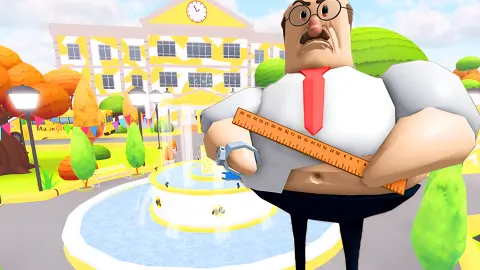
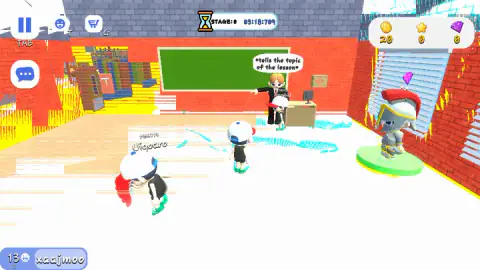
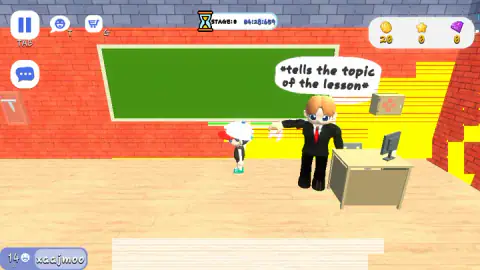
The first thing School Escape Obby shows you is a lesson. A teacher in a black suit and red tie stands at a green board with his arm out, and a speech bubble over his head reads "*tells the topic of the lesson*". It looks like a scene you are meant to wait through. It is not. Look up: the clock at the top of the screen is already running.
That clock is the game. An obby is an obstacle course, a word that began among Roblox players as a short form of exactly that and has since become the name of a genre. This one is set in a school, the aim is to get out, and your result is a time. Everything in the first room that is not the exit costs you seconds.
The game is credited to a developer listed as Daniel, who put it up there on 23 June 2025 and last updated in August 2026.
You should know how far this page goes. We played for about four minutes with a keyboard and mouse, and we spent all of it in that classroom. The stage counter read STAGE:0 from the first second to the last. So this is an honest account of the opening room and the screen around it, not a guide to the course.
The classroom is stage 0, and the clock does not care
The top of the screen carries an hourglass, the word STAGE with a number, and a timer split into minutes, seconds and thousandths. In our session the timer went from 03:18 to 06:08 while the stage number stayed at zero.
That zero matters. The classroom is not the first obstacle. It is the room before the first obstacle, and the game counts it against you anyway. In a race decided by thousandths, three minutes spent prodding a teacher is the whole race.
It is also why the room is dressed the way it is. There is a desk with a monitor, a bookshelf, a board, a man giving a lesson. All of it suggests a puzzle. None of it answered us. The only thing in the room that looks like part of a course is on the right: a wall of slats with daylight and steps behind it.
We did not get through it. That is the limit of what we can tell you about the route.
What is on the screen
The corners hold more than the clock.
| Where | What it shows | What we know |
|---|---|---|
| Top left | Pause button marked TAB | Tab is the pause key |
| Top left | A face icon marked T and a cart marked G | Not opened |
| Left edge | A chat bubble button | Not opened |
| Top right | Coins, stars, purple gems | 20, 0 and 0, start to finish |
| Bottom left | Your name, with a number beside it | The number changed as we played |
The name is handed to you. Ours was a string of random letters, and nobody asked us to type one.
By the window there is a figure you might take for another player: a knight in a silver helmet with a red crest, standing on a green disc with a purple gem floating over it. It did not move while we were there. Given the gem and the cart button, it may be an outfit on show, but we did not confirm that.
We were not alone in the room. Other small characters in caps walked about with names and numbers over their heads. We cannot say whether they were people or characters run by the game.
What we cannot tell you yet
Almost everything past the classroom door. We did not cross an obstacle, fall, reach a checkpoint or finish a stage, so we do not know how many stages there are or what happens when you miss a jump.
We did not earn or spend anything. The coin counter read 20 when we arrived and 20 when we left.
We did not open the cart, the face icon or the chat. And we played on a desktop only: the game is offered for phones and tablets with on-screen controls, which we did not try.
More school escapes and obstacle courses
If the setting is what brought you here, Escape School Duel and +1 SPEED: Escape School are two more runs out of a school building. Schoolboy Escape: Runaway swaps the stopwatch for sneaking past parents. For another game that carries the obby name, there is Build and Fly Obby. The rest of the shelf is in kids games.
Screenshots
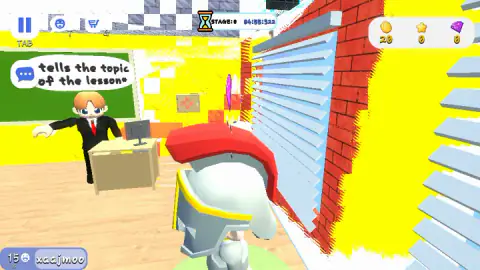
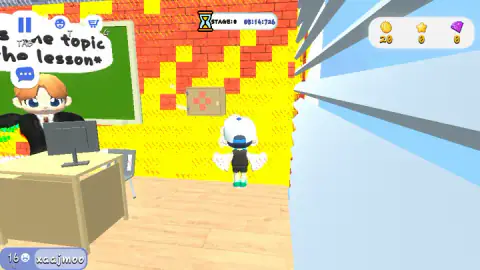
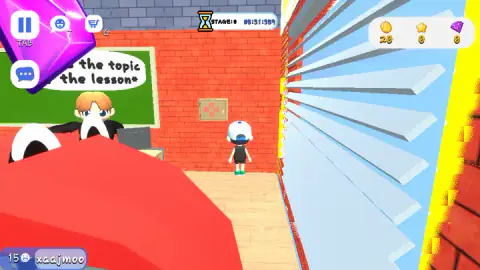
Taken by opening the game ourselves and letting it run — not supplied by the publisher, and not the same picture every other site shows.
How to play School Escape Obby
- Move with W, A, S and D. The view sits behind your character, a small figure in a white cap.
- Ignore the lesson. The teacher does not need anything from you, and the clock does not pause for him.
- Find the way out of the room. Past the slatted opening on the right side of the classroom there are pale steps climbing away. That is the direction to try.
- Jump with Space once the floor stops being a floor. The game's instructions also give E for objects and F for pushing.
- Pause with Tab if you need to stop.
What we picked up while playing:
- The teacher is scenery. We stood beside him and pressed E, then F, then clicked on him. His bubble read the same thing every time.
- So is the red-cross cabinet. A small box with a red cross pattern hangs on the back wall and looks like something to open. E, F and several clicks later, it had not opened.
- The clock had a head start. By our first step in the classroom it already read more than three minutes.
- Hold the key down. We crossed the room by holding W or D for a second or more at a time.
Controls
| W A S D | Move the character; W and D are the two we used to cross the classroom |
|---|---|
| Space | Jump, according to the game's instructions; we did not get far enough to need it |
| E or mouse click | Interact with objects, according to the instructions; it did nothing on the teacher or the wall cabinet |
| F | Push, according to the instructions; it did nothing on the teacher |
| Tab | Pause; the pause button on screen carries the TAB label |
| Shift | Shows the mouse cursor, according to the instructions |
Features
- A stage counter that starts at 0, in the classroom, before any obstacle
- A clock at the top that counts up in minutes, seconds and thousandths and does not wait for you
- Three counters in the corner: coins, stars and purple gems; we started with 20 coins
- A third-person 3D view of a small character in a cap
- Other named characters walking around the same classroom
- On-screen buttons for pause, an emote face, a shopping cart and chat
Game details
- Developer
- Daniel
- Release date
- June 2025
- Last updated
- August 10, 2026
- Added here
- June 2025
- Technology
- HTML5 (WebGL)
- Platforms
- Browser (desktop, keyboard & mouse), Browser (mobile & tablet, touch)
- Saved progress
- Saving, when available, is managed by this game. Mava cannot confirm your level.
FAQ
How do you play School Escape Obby?
You steer a small character in third person with W, A, S and D and try to get out of a school against a clock. The run opens in a classroom at stage 0 with the timer already counting. The game's instructions add Space to jump, E or a mouse click to interact, F to push and Tab to pause.
What is the goal in School Escape Obby?
To escape the school in as little time as you can. A clock at the top counts up in minutes, seconds and thousandths, next to a stage counter. We did not finish a stage, so we cannot describe the end of the course or what a finished run pays.
How do you get out of the first classroom in School Escape Obby?
Not by talking to the teacher. We pressed E and F beside him and clicked on him, and his speech bubble never changed. The same went for the small cabinet with a red cross on the wall. The room has a slatted opening on its right side with pale steps beyond it, and that is where we would go first. We ran out of time before getting through.
Does the timer stop during the lesson in School Escape Obby?
No. The clock was past three minutes when we took our first step and past six when we stopped, and we had not left the classroom. There is no lesson to sit through: the teacher's bubble is scenery and the time you spend looking at it counts against you.
What do the coins, stars and gems do in School Escape Obby?
They are three counters in the top right corner. We began with 20 coins, 0 stars and 0 gems, and none of them changed while we stayed in the classroom. A cart button sits at the top of the screen, but we did not open it, so we cannot give prices or say what each currency buys.
Is School Escape Obby multiplayer?
There were other characters in our classroom with names and numbers over their heads, and the screen has a chat button. We did not chat with anyone or race anyone, so we cannot tell you whether those characters were people or run by the game.
Who made School Escape Obby?
The game is credited to a developer listed as Daniel. It was published on 23 June 2025 and last updated on 10 August 2026. The game's listing offers it for PC, Android and iOS in landscape; we played it on a desktop with a keyboard and mouse.