


About +1 SPEED: Escape School
Most obstacle courses hand you a fixed character and ask you to get better at the jumps. This one changes the character instead. A red counter in the top left corner says SPEED, it read 5 when we started, and four minutes later it read 47. We had not finished a level, bought anything or opened a single menu. We had mostly walked.
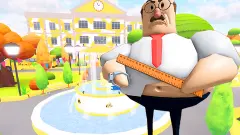
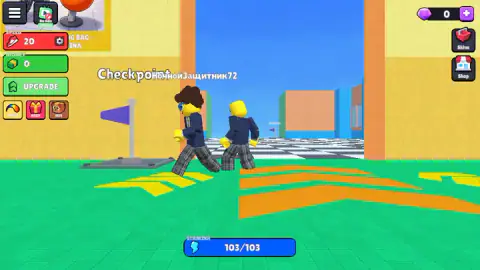
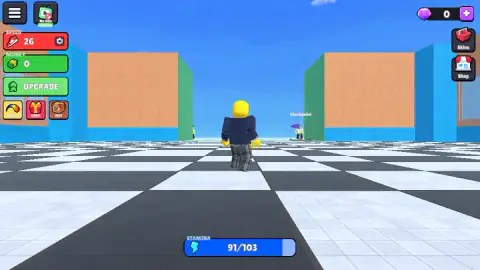
That is the idea behind the "+1" in the title. You are a block figure in a school uniform, standing in a hall with a green floor. Orange arrows on the floor point at a doorway. Beyond it is a wide chequered track under an open sky, with a purple Checkpoint flag in the distance. You run for the flag, and the number goes up.
It is by Alexander Grishin. This one was published on 16 March 2026.
We should be plain about how little of it we saw. We played about four minutes. We ran the first stretch of track twice, were knocked down once, and spent the rest of the time in the starting hall. We did not finish a level, meet a moving platform or get out of the school. This page tells you what the screen showed and marks the rest as untested.
The speed counter climbs wherever you go
The game's own instructions say you earn +1 speed for each section you complete. What we saw was looser than that. The counter moved all the time we were moving.
On the first run down the track it went from 20 to 30. It was at 33 when we were knocked down. Back in the hall, walking between the pedestals and into a wall, it went on from 37 to 47.
Our reading is that speed is paid for distance covered, wherever you cover it. That is a deduction from the numbers on screen. We did not stand still for a minute to see whether the counter stops, and we did not use the treadmill the instructions describe.
It matters for how the game feels. A first run is slow because you are slow, not because the course is long. Every failed attempt still leaves you a little quicker for the next one.
Stamina is the second number, and it runs the other way
Speed only goes up. The blue bar goes down. It was full in the hall, read 91 a short way down the track and 90 a little further on. On the WASTED screen it was full again.
So the bar seems to drain while you run a course and refill when you are sent back. We never emptied it, and we cannot tell you what happens at zero.
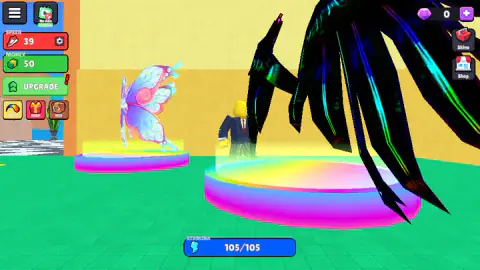
The top of the bar moved as well. It was 103 for the first part of the session and 105 by the end. In between, we had walked through the hall, where blue lightning bolts float just above the floor. A poster on the wall shows a figure hitting a punching bag under the words "HIT THE PUNCHING BAG - BOOST STAMINA", with a bolt and a +1 beside it. We think the bolts on the floor did the same job in a smaller way, one point each. We did not see the number change bolt by bolt.
WASTED, and the people in white shirts
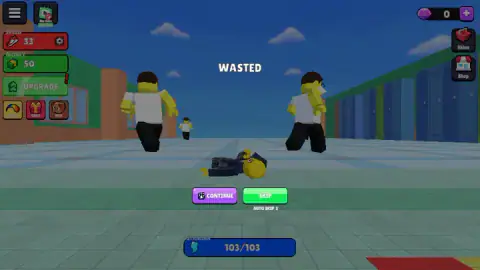
The one time our run ended, the screen showed our character flat on the floor, a row of school lockers to one side, and the word WASTED above. Two figures in white shirts and dark trousers stood over it.
We had seen them a few seconds earlier, four of them, spread across the track ahead of the flag. The game's description speaks of a teacher to avoid. Our reading is that these are the ones who stop you, and that the way past is around them. We did not see the moment of contact, so that stays a reading.
Under the two buttons there was a line saying AUTO SKIP 3. It looks like a countdown that chooses SKIP for you if you do nothing. We pressed CONTINUE before it ran out, and we do not know what SKIP does differently.
Money, gems and the wings on the pedestals
The green counter under the speed is MONEY. Ours stayed at 0 until the second run, when it jumped to 50 somewhere on the track. We did not see what paid it. At the same moment a red exclamation mark appeared on the UPGRADE button, which we take as the game saying there was now something we could afford. We did not open it.
A second currency, a purple gem, sits in the top right corner with a plus button next to it. It stayed at 0. Under it are Skins and Shop. On the left there are three small buttons, two of them labelled Daily and Pets.
The hall also works as a shop window. Pairs of wings stand on glowing rainbow pedestals, one pink and shaped like a butterfly, one large and black. Other runners with name tags over their heads pass through wearing them. We stepped onto a pedestal and nothing was offered to us in that moment, so we cannot tell you what the wings cost or whether they do more than decorate.
Train first, then run: the idea is from 1902
"Obby" is short for obstacle course, and the obstacle course as we know it has an author. Georges Hébert was a French naval officer. On 8 May 1902 he was stationed near Saint-Pierre, in Martinique, when Mount Pelée erupted, and he helped coordinate the rescue of some 700 people.
He came away convinced that fitness had to be useful, and summed it up as "be strong to be helpful". The training system he built, the natural method, sent people running, climbing and jumping over a set route. Out of it came the military obstacle course the French call the parcours du combattant, the soldier's course. Decades later, that word parcours, with a k in place of the c, gave parkour its name.
This game follows Hébert's order of things more closely than most. There is a place to train, which the game's posters and instructions fill with a punching bag and a treadmill, and there is a course to run. You get stronger in one so that you last longer in the other.
What we did not reach
We did not finish a level or see the school's exit. We met none of the moving platforms, traps or lava the description lists. We did not jump, turn the camera, use the treadmill or the punching bag, or open Upgrade, Skins, Shop or Pets. We saw no leaderboard. We did not test a phone.
Who it suits
Players who like a number that only goes up, and who do not mind running the same opening stretch several times while it does. Falling costs you a walk and nothing else, so it is gentle on younger players. If you want tight platforming from the first minute, the slow early character will test your patience.
More speed games and more obbies
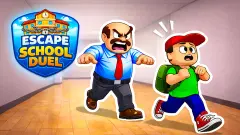
The same developer made +1 Speed: Escape Prison, which swaps the school hall for a cell block. Keyboard Escape: +1 Speed | Sweets uses the same plus-one counting on a giant keyboard. For another school to get out of, with a second player if you have one, try Escape School Duel. And Your Obby Size is an obby where what changes is how big you are. The rest are under adventure games.
Screenshots
Taken by opening the game ourselves and letting it run — not supplied by the publisher, and not the same picture every other site shows.
How to play +1 SPEED: Escape School
- Close the first window. The game opens on a Daily rewards panel. A red X in its top right corner shuts it.
- Find the arrows. The hall floor has orange and yellow arrows painted on it. They point at a doorway with an orange frame, next to the first Checkpoint flag.
- Hold W. The character runs through the doorway onto the chequered floor. The next flag is straight ahead, small at first.
- Watch the blue bar. Stamina sits at the bottom of the screen. Ours began at 103 out of 103 and started dropping once we were on the track.
- Deal with WASTED. When the run ends you get two buttons, CONTINUE and SKIP. We pressed CONTINUE and found ourselves back in the hall, by the first flag.
What our session taught us:
- Nothing is taken away when you fall. Our speed and our money were both intact after the knock-down. The price of a mistake was the walk back.
- The hall is not a waiting room. Our counter rose there too, by ten points in the last minute, without touching the track.
- Look ahead for white shirts. Figures in white shirts stood in a line across the track on our second run. Shortly after, we were on the floor with two of them next to us.
- Do not wait for sound. We heard one sound in the whole session, when the game opened. The counters tell you more than the speakers do.
Controls
| W (hold) | Runs the character forward, out of the hall and down the track; the only key we used at length |
|---|---|
| A, S, D and the arrow keys | The other movement directions according to the game's instructions |
| Space | Jump, according to the game's instructions; not tried by us |
| Right mouse button (drag) | Turns the camera according to the game's instructions; not tried by us |
| CONTINUE or SKIP (on the WASTED screen) | The two ways out of a knock-down; we pressed CONTINUE and were back in the hall |
| UPGRADE, Skins, Shop (screen edges) | Panels we did not open |
Features
- A speed counter in the top left corner that went from 5 to 47 in four minutes of moving about
- A stamina bar that starts at 103 and drains while you run the track
- Purple Checkpoint flags, one in the starting hall and more along the chequered track
- White-shirted figures standing across the track, and a WASTED screen when the run ends
- A starting hall with training posters, blue bolts on the floor and wings displayed on rainbow pedestals
- Two currencies, money and gems, plus Skins, Shop, Pets and a daily reward
- Made by Alexander Grishin
Game details
- Developer
- Alexander Grishin
- Release date
- March 2026
- Last updated
- August 10, 2026
- Added here
- January 2026
- Technology
- HTML5 (WebGL)
- Platforms
- Browser (desktop, keyboard and mouse), Browser (mobile & tablet)
- Saved progress
- Saving, when available, is managed by this game. Mava cannot confirm your level.
FAQ
How do you play +1 SPEED: Escape School?
Close the Daily rewards window, then hold W to run out of the starting hall onto the chequered track, heading for the next purple Checkpoint flag. A speed counter in the top left corner rises as you move, and a blue stamina bar at the bottom drains while you run. The game's instructions add Space to jump and the right mouse button to turn the camera.
What does WASTED mean in +1 SPEED: Escape School?
It is the screen you get when your run is stopped. Ours appeared on the track with two white-shirted figures standing over our character. It offers a purple CONTINUE button and a green SKIP button with a short countdown under it. We pressed CONTINUE and were back in the starting hall.
Do you lose your speed when you get caught?
We did not. Our counter read 33 on the WASTED screen and 37 a little later in the hall, and the 50 money we had picked up was still there. That is one knock-down in one short session, so take it as what we saw, not as a rule for the whole game.
What is stamina for in +1 SPEED: Escape School?
It is the blue bar at the bottom of the screen. Ours started at 103 out of 103 and dropped to 90 while we ran the track, then showed full again once we had been sent back. A poster in the hall says hitting the punching bag boosts it. We did not run it down to zero on purpose, so we cannot tell you what an empty bar does.
How do you get faster in +1 SPEED: Escape School?
By moving. Our speed counter climbed from 5 to 47 in about four minutes, and it kept rising while we walked around the starting hall. The game's instructions also mention a treadmill in the hall and an Upgrades button that spends money on speed. We used neither.
Who made +1 SPEED: Escape School?
Alexander Grishin, a developer and also made +1 Speed: Escape Prison. The school game was published on 16 March 2026.
Can you play +1 SPEED: Escape School on a phone?
It is listed for PC, Android and iOS, and the game's instructions describe on-screen controls with a swipe on the right side to turn the camera. We played on a computer with the keyboard and did not test a phone ourselves.