

About Your Obby Size
Most obstacle courses in a browser hand you one body and ask you to make it fit. The gaps are as wide as they are, the corridors as narrow as they are, and the only thing you change is your timing. Your Obby Size moves one of those dials over to you. On the right edge of the screen there is a slider with a plus and a minus, and the number on it is how big you are.
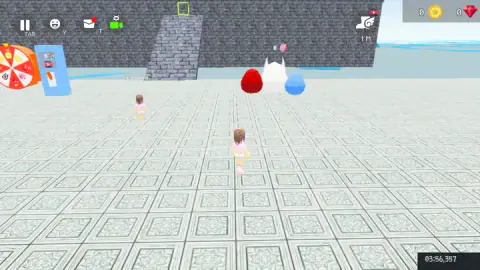
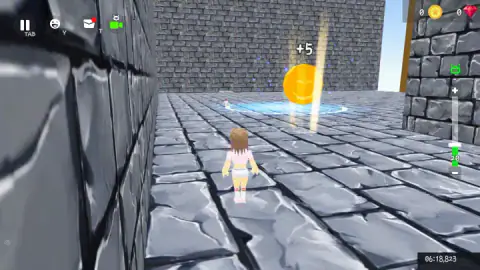
That slider is the whole idea, and it is easy to miss. The first screen is a quiet tiled plaza with a prize wheel, three giant eggs in red, white and blue, and a stone stair climbing a brick wall towards a small green frame. Nothing tells you to look at your size. You find out when the course narrows into stone corridors and the number reads 20.
The game is made by KreizLand, a studio with a small line of obby games and a larger one of car crash sandboxes. It was published in June 2025, with an update in August 2026. It runs in 3D in the browser, with a third-person camera that follows your runner from behind.
We played its first stage for about four minutes, fell twice and never reached the end of it. What follows is what we saw, and where we only have the game's own instructions, we say so.
Your size is a number on the side of the screen
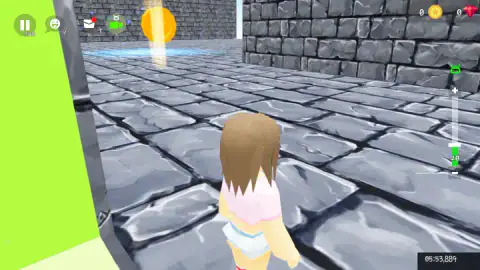
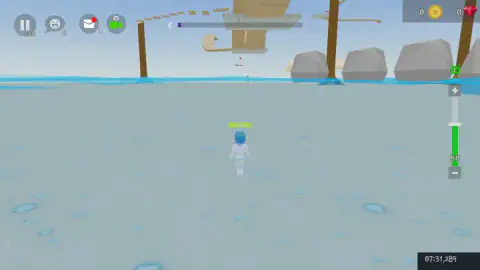
The slider has a plus at the top, a minus at the bottom and a green fill that rises with the number. A small green robot icon sits above it. In the stone corridors the number read 20, and the fill was low. When we came out onto open water a few minutes later, it read 50.
We did not press Q or E in our session, so we did not change it on purpose. The change happened along the way, in the same stretch where we ran through several +5 coins. That makes the coins the likeliest cause, but it is a guess, and we would rather tell you that than dress it up as a rule.
Why size matters in a course like this is easy to picture. A small runner fits through a gap between walls. A large one has longer legs and covers more ground with each step. The course mixes both kinds of place, tight corridors first and open water with long plank paths after them, so the right size for one section is the wrong size for the next.
After our second fall, the runner in front of the camera had changed too. It came back with blue hair instead of brown, and a green bar reading 100 floated over its head. We do not know what the 100 measures. It appeared once, on the frozen floor by the water, and our session ended there.
The coins that say +5
The corridors are lined with gold coins, each standing on a ring of blue light on the floor. They are hard to miss, because each one shines a beam straight up. Walk through one and a white +5 floats above it.
The counters at the top right show a gold coin and a red gem, and both read 0 in every screen we saw, before and after the coins. So the +5 is not going into either of those. Our best reading is the one above: it goes into your size. The game's own description talks about trophies, secret paths and skins; we never saw any of them on screen, so we leave them out.
The plaza at the start has more of the same mystery. A prize wheel stands on the left with a blue panel beside it, and a winged boot with the label 1 M sits in the top corner with a small video badge on it. That badge is the usual sign of a reward you get for watching an ad. We did not open any of them.
Falling: Skip stage or Continue
A fall ends in a dark screen with the word FAILURE in the middle. Under it are a large green Skip stage button and a smaller Continue link.
The skip button carries a small clapperboard icon. On web games that icon usually means the button plays a video ad before it works. Continue is the free choice, and it is the one we took both times.
Where it puts you back is not always the same. Our first fall happened close to the start, and Continue left us in the plaza again. Our second fall came out on the water, past the corridors, and Continue put us down on a frozen floor right by the water rather than at the beginning. In other words, the stage seems to remember how far you got.
The clock in the bottom right corner did not care either way. It kept counting through both falls without resetting, so it measures your whole session, not the current attempt.
What an obby is
Obby is short for obstacle course. The word grew up on large online sandbox platforms, where players build courses for each other: a line of platforms over a drop, a run of moving blocks, a climb with nothing to catch you. The conventions came with it. A course is cut into stages, a fall sends you back to the last checkpoint, and a paid or ad-funded button lets you skip the stage that beat you.
Your Obby Size is a standalone game in that style, and it keeps all three. The stage bar, the checkpoint return and the skip button are straight from the genre. The size slider is the part it adds.
Other figures share the course with you, each with a name tag over its head. One called Crushy stood in the plaza, and others turned up in the corridors. We could not tell whether they were people playing at the same time, and we did not meet any of them on a narrow path.
How far we got
About four minutes, all of it on the first stage. We crossed the plaza, climbed into the stone corridors, picked up coins, reached the open water with its plank path towards a tall tower, and fell there for the second time. The stage bar at the top, marked 1, had barely started to fill.
So we have not seen the end of a stage, a second stage, the lava the description warns about, a trophy or a new skin. We also never played it on a phone. What the first stage does show is the idea itself: tight corridors first, then open water with long plank paths, two places that ask for different bodies.
More games by KreizLand
Your Obby Escape and Your Obby Parkour are the studio's other obby games, from the same line as this one. For something different from the same team, Car Crash Sandbox swaps the runner for cars. Another parkour run in 3D, with a prison break as the story, is Barry Prison: Parkour Escape. More are filed under adventure games.
Screenshots
Taken by opening the game ourselves and letting it run — not supplied by the publisher, and not the same picture every other site shows.
How to play Your Obby Size
- Leave the plaza. Walk with W A S D. The way on is the stone stair in the brick wall, straight ahead from where you appear.
- Run the course. Jump with Space across gaps and along narrow paths. The bar at the top of the screen, marked with the stage number, appears to fill as you go.
- Change your size. The game's instructions say Q shrinks you and E grows you. The slider at the right shows the result as a number.
- Collect the coins. Gold coins stand on glowing blue rings. Walk through one and it flashes +5.
- When you fall, choose Continue to try again, or Skip stage to jump to the next one.
Tips from our run
- Look at the slider before every narrow section. It is small, it sits at the edge of the screen and it is the one thing this game adds to the genre.
- Corridors with walls on both sides hide what is coming. The instructions say Shift brings the mouse cursor back and holding the right button turns the camera, which is worth trying before a blind corner.
- Do not judge your progress by the coin counter. Ours stayed at 0 the whole time, even right after a +5.
- Expect an ad break now and then. A short countdown appeared once in the middle of the stage, and the platform showed a notice after our first fall.
Controls
| W A S D | Move your runner (W walked us forward in our run) |
|---|---|
| Space | Jump, according to the game's instructions |
| Q / E | Shrink or grow your runner, according to the game's instructions |
| Tab | Pause (the pause button in the corner is labelled TAB) |
| Shift | Shows the mouse cursor, according to the game's instructions |
| Mouse wheel / hold right mouse button | Zoom the camera / turn it while the cursor is visible, according to the game's instructions |
| On-screen buttons | Phones and tablets use the game's own touch controls, according to the game's listing |
Features
- Your size is a number on a slider at the right edge of the screen; ours read 20 in the stone corridors and 50 by the water
- Gold coins sit on glowing blue rings and each one flashes "+5" as you run through it
- A fall ends in a FAILURE screen with two choices, Skip stage or Continue
- Continue does not always send you to the start; after our second fall it put us back on a frozen floor next to the water
- A clock in the bottom corner keeps counting through every fall
- The start plaza has a prize wheel, three giant eggs and a stone stair to the course
- Made by KreizLand, who also made Your Obby Escape and Your Obby Parkour
Game details
- Developer
- KreizLand
- Release date
- June 2025
- Last updated
- August 10, 2026
- Added here
- June 2025
- Technology
- HTML5 (3D, WebGL)
- Platforms
- Browser (desktop, keyboard and mouse), Browser (mobile & tablet, touch)
- Classification
- Arcade
- Saved progress
- Saving, when available, is managed by this game. Mava cannot confirm your level.
FAQ
How do you play Your Obby Size?
Walk with W A S D, jump with Space and work your way along an obstacle course in 3D, one stage at a time. What sets it apart is a size slider at the right of the screen, which the game's instructions say you change with Q and E. If you fall, a FAILURE screen lets you continue or skip the stage.
What does the size bar do in Your Obby Size?
It shows how big your runner is as a number between a plus and a minus button. In our session it read 20 through narrow stone corridors and 50 when we reached open water. The game's instructions say Q and E change it; we did not test those keys ourselves.
What happens when you fail in Your Obby Size?
The screen darkens and shows FAILURE with two options: a green Skip stage button and a Continue link. The skip button carries a small clapperboard icon, which on web games usually means a video ad. Continue let us carry on, and after our second fall it brought us back near where we fell, not to the start.
What are the +5 coins in Your Obby Size?
Gold coins stand on glowing blue rings along the corridors and show +5 when you pass through them. Oddly, the coin counter at the top of the screen still read 0 afterwards. Our size number went from 20 to 50 in the same stretch, so the coins may feed your size, but we could not confirm it.
What is an obby?
Obby is short for obstacle course. The word comes from player-made courses on large online sandbox platforms, where you jump from platform to platform, stage after stage, and start again from the last checkpoint when you fall. Your Obby Size is a standalone browser game in that style.
Who made Your Obby Size?
It also made Your Obby Escape and Your Obby Parkour, plus several car crash sandboxes.
Can you play Your Obby Size on a phone?
It is listed for PC, Android and iOS, in both landscape and portrait, and says phones use the game's own on-screen controls. We played it on a computer with the keyboard, so we cannot tell you how the touch controls feel.