



About Cool Tuning - Paint the Car
Every car in the showroom is white. Not the first one only — all of them. A coupe on the stand in front of you, a saloon behind it, a hatchback behind that, and a row of them trailing off towards a long shed with a dozen roller doors, and the whole line is the same flat factory white under a dark blue sky. Nobody says anything about it. The screen just says Buying a car, puts a price over the one you are looking at, and waits.
That is the premise working before a word of explanation. A blank car is not a car yet. It is a surface.
The money is the other thing the game explains by showing rather than telling. We arrived with 7,500 in the top-right corner and the coupe on the stand was tagged at 5,000. One press of the wide button underneath, and the corner read 2,500. The button itself changed too, which turns out to be the most useful thing in the room: it stopped saying BUY and started saying SELECT.
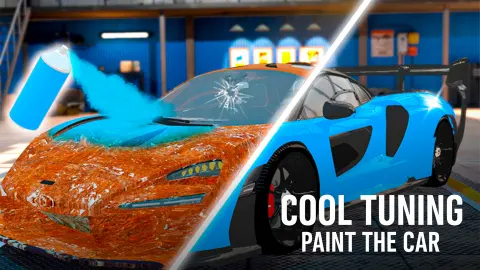
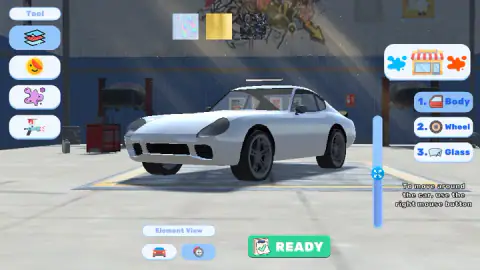
Behind the showroom is the part the title is about. A workshop with dark blue walls, two vehicle lifts, a red tool chest and a shaft of sun falling across a graffitied wall, and your white car standing in the middle of it. Four tools run down the left edge under the word Tool. Three material samples hang across the top. On the right the car is broken into three things you are allowed to touch, numbered: 1. Body, 2. Wheel, 3. Glass. A green READY closes the job.
The game is credited to Welwise Studio, which has fourteen titles on the same platform.
Our own session ran four minutes. In it we bought a car, opened the workshop, started a race and put the car on the grass. We never got a colour onto anything, and the rest of this page is careful about the difference between what we saw and what we only assume.
The button under the car is the whole showroom in one word
Most car games put a price on a card and leave you to do the subtraction. This one answers the question in the button, and the showroom stops being a menu and becomes a quick read.
There are three states and we have all three in pictures. BUY in blue, beside a little red money pouch with a gold dollar on it, is the one you want: the car is for sale and you have enough. BUY in red is the same button with the same pouch and the same word, recoloured, and it means the car is beyond you right now — the two we found at this setting were tagged well above what we were carrying. SELECT, which drops the pouch icon entirely and sits there in plain blue, means the car is already in your garage and pressing it just takes it out.
The third state doubles as a receipt. Same car, same price tag, same camera angle, and the only differences between the moment before our purchase and the moment after are the number in the corner and the word on the button. No animation, no confirmation box, no congratulation. You pressed, you paid, it is yours.
Every car on the lot is white, and that is not laziness
Here is the part that makes this game quietly accurate about its subject.
White is not a neutral choice in the car world. It is the choice. In the annual surveys of what colour new cars actually leave factories, white has come first worldwide every year since 2011, and it has spent most of that run at around a third of everything built. There is no colour on earth more ordinary to see in a car park. So a showroom where every vehicle is white is not an unfinished showroom. It is a very recognisable one.
Now look at what the workshop offers you instead, because it is the opposite end of the same trade. The samples on the wall are an iridescent pearl that shifts through rainbow colours as the light moves across it, a sheet of brushed gold, and a dark woven carbon shot through with bright blue veins. None of those three is a paint you mix and spray. All three are the kind of finish that exists as film — a thin printed sheet laid over the panel.
Which explains the one piece of tool design that otherwise looks odd: the tool at the top of the column, selected before you touch anything, is not a brush. It is a stack of sheets. The spray gun is at the bottom.
That ordering matches how the real thing works. Paint from a gun is permanent and you live with it. Film goes on top of the paint already there, protects it while it sits, and peels off when you want the car back as it was — which is exactly why plain white stock is the right thing to start from. The showroom and the workshop are two halves of one honest idea about how cars change colour, and a game aimed at nine-year-olds got the order of operations right.
The track, and how far we actually got
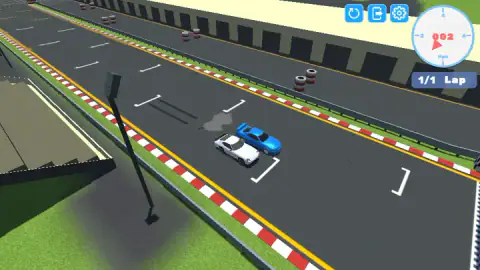
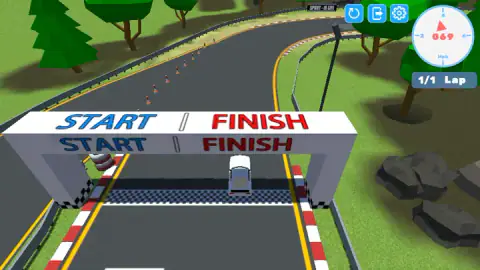
Outside there is a circuit, and it is small in a way that is easy to miss. The chip in the corner reads 1/1 Lap and never changes, and the gantry you drive under is lettered START on one half and FINISH on the other, on the same concrete beam. One arch, one lap, both jobs.
The gauge in the corner does two things at once. There is a round dial with a red needle and tick marks on the rim, and in the middle of it a three-digit number in red with Mph underneath. The needle gives you the feel at a glance, the digits give you the fact, and the digits are what you should read.
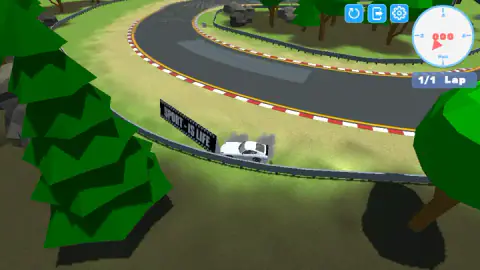
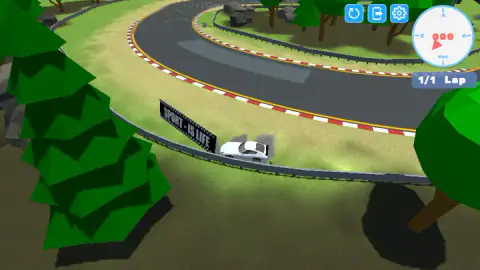
Our race lasted about a minute. A blue car ran alongside us off the line with a puff of grey smoke between the two of us, we got the dial up to 69 under the start gantry, and then we lost the first proper corner and put the car on the grass under a black billboard reading SPORT - IS LIFE. It stayed there. We have two pictures of that moment taken twenty-one seconds apart and the car has not moved a pixel between them; the only thing that changes is the dust thinning out over the roof.
When we got back to the showroom, the money in the corner was exactly what it had been before the race. We cannot tell you what a finished lap pays, because we did not finish one.
More games by Welwise Studio
The same studio made Build Your Dream Car, which starts where this one leaves off: you assemble the car, then take it drag racing. If it was the spray gun that caught your eye, Spray Paint - Coloring Games is built around choosing the right tool for the shape you are filling. For the driving half, Drag Racing Club and Drifting Car Master are about getting a car down a piece of road rather than about its colour. We have not taken any of those four as far as we would like, so treat them as signposts rather than verdicts. The rest of the shelf is in driving games.
Screenshots
How to play Cool Tuning - Paint the Car
- In the showroom, use the arrows drawn either side of the button to walk along the row of cars. The price tag floats over whichever one is in front of you.
- Press the wide button underneath to buy it. Read the button before you press: it tells you whether you can.
- In the workshop, pick a tool from the left column, a material from the samples along the top, and a part from the numbered list on the right.
- Turn the car with the right mouse button. The game prints this instruction itself, in small white letters under the parts list, and it is the only instruction it gives you anywhere.
- Press the green READY when the job is done.
What we only learned by being there:
- The button is a traffic light. Blue BUY means affordable. Red BUY means not. SELECT means you already own this one. Read the colour and you never waste a press.
- A red BUY is completely inert. We pressed one twice. Nothing happened — not a flash, not a shake, not a message telling you that you are short.
- Use the arrows on the screen, not the ones on your keyboard. In the showroom the drawn arrows moved us along the row and the keyboard arrows produced nothing we could point at in a picture.
- On the track, the up arrow is the one that matters. Our first look at the race showed 2 on the dial; after one long hold it showed 69.
- Stay on the asphalt. Once we were off it we were off it for good, and the dial sat on zero while we tried everything.
Controls
| Left click on the on-screen arrows in the showroom | Walks you along the row of cars. The price tag over the car and the picture both change |
|---|---|
| Left click on the wide button under the car | Buys the selected car when it reads BUY in blue, and picks it when it reads SELECT. When it reads BUY in red you cannot afford it, and pressing it does nothing at all |
| Left click on a tool, a part or a material in the paint bay | Selects it. The four tools run down the left edge, the three parts are listed on the right as Body, Wheel and Glass, and the three material samples sit across the top |
| Right mouse button in the paint bay | Turns the car so you can reach the other side. The game prints this instruction on the screen itself, in small white letters under the parts list |
| Up arrow on the track | Accelerates. Our first picture of the race shows 2 on the dial and the next one, after a long hold, shows 69 |
| Left and right arrows on the track | Steering, by every cue the game gives. We could not prove it: once we were off the asphalt the car stopped answering to anything we pressed |
| Keyboard arrows in the showroom | Nothing we could confirm. We pressed them and the picture did not change, so use the arrows drawn on the screen instead |
Features
- Every car on the lot is white. Not one coupe, saloon or hatchback in the row has any other colour on it, which is the premise doing its work before a word of explanation
- A showroom button with three states: BUY in blue when you can afford it, BUY in red when you cannot, and SELECT once the car is yours
- The money is exact and visible. We started on 7,500, bought a car tagged 5,000, and the counter read 2,500 on the next frame
- Four tools down the left of the paint bay: a stack of film, a sticker, a paint splat and a spray gun, with the film at the top of the list
- Three material samples along the top wall, and all three are finishes you would buy as film rather than mix as paint: an iridescent pearl, brushed gold, and a dark carbon weave veined with blue
- The car splits into three paintable parts, numbered on the right: Body, Wheel and Glass
- Outside there is a track with a single lap on it, one gantry lettered START on one half and FINISH on the other, and a dial that gives you a needle and a three-digit number at the same time
Game details
- Developer
- Welwise Studio
- Release date
- November 2025
- Last updated
- October 24, 2026
- Added here
- September 2025
- Technology
- HTML5 (3D)
- Platforms
- Browser (desktop), Browser (mobile & tablet, touch)
- Classification
- Driving , Simulation
- Saved progress
- Saving, when available, is managed by this game. Mava cannot confirm your level.
FAQ
What kind of game is Cool Tuning - Paint the Car?
It is a free browser game about customising cars rather than driving them. You pick a car out of a showroom where every vehicle is plain white, take it into a workshop, and work on it with film, stickers and a spray gun. There is also a track attached, with a one-lap race on it, but the workshop is clearly the main room in the building.
How do you paint the car in Cool Tuning - Paint the Car?
The workshop gives you four tools down the left edge, three material samples across the top and three parts on the right, numbered Body, Wheel and Glass. You choose a tool, a material and a part, and the car in the middle is what you work on; the game tells you on screen to turn it with the right mouse button. We have to be straight that in our session we clicked tools, samples and parts and the car stayed exactly the same white in every picture we took, so we cannot describe the moment the colour lands.
How much money do you start with in Cool Tuning - Paint the Car?
We started with 7,500 in the showroom. The first car on the stand was tagged at 5,000, and after we pressed the button under it the counter in the top right read 2,500. The other cars we scrolled to were tagged 7,500 and 8,000, so the opening car is the cheap one and the rest of the row is out of reach until you earn more.
Why is every car white in Cool Tuning - Paint the Car?
Because the game is selling you a blank surface, not a finished car. It is also the most ordinary choice a real showroom could make: white has been the most common colour on new cars worldwide every year since 2011, running at roughly a third of them in the annual industry colour surveys. Starting you on the world's default colour makes getting rid of it the whole point of the game.
What do the BUY and SELECT buttons mean in Cool Tuning - Paint the Car?
The wide button under the car is a traffic light with three settings. BUY in blue means you can afford this one. BUY in red means you cannot, and we pressed a red one twice without a single thing on the screen changing. SELECT, with no money icon beside it, means the car is already yours and you are simply choosing it.
Is there a race in Cool Tuning - Paint the Car?
Yes. We reached a track with grass, conifers and tyre barriers, a gantry lettered START on one half and FINISH on the other, and a blue car running alongside ours. The chip in the corner read 1/1 Lap the whole time, so the race is a single lap. We never completed it, and when we came back to the showroom our money was exactly where we had left it.
How do you drive in Cool Tuning - Paint the Car?
Holding the up arrow is what gets you moving: our first picture of the race shows 2 on the speed dial and the next one, taken after a long hold, shows 69. The left and right arrows are the obvious steering, but we cannot swear to them, because we left the asphalt early and the car then sat in the same spot for twenty-one seconds without answering anything we pressed.
Who made Cool Tuning - Paint the Car and when did it come out?
It is credited to Welwise Studio, which has fourteen games on the same platform. The listing gives November 2025 for the release and August 2026 for the most recent update. It is free, it runs in the browser with nothing to install, and it is listed for desktop, mobile and tablet.