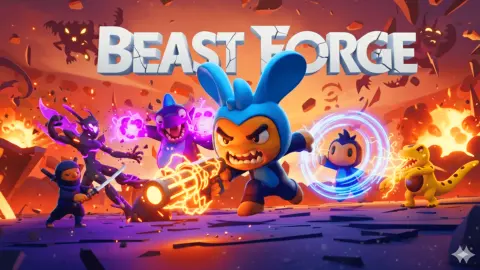








About BeastForge Rival
In most card games you take turns. You lay something down, then you wait while the other side thinks. BeastForge Rival does away with the waiting. Both of you play at once, the clock never stops, and the only thing that limits how fast you can throw cards onto the board is a bar that refills at its own pace.
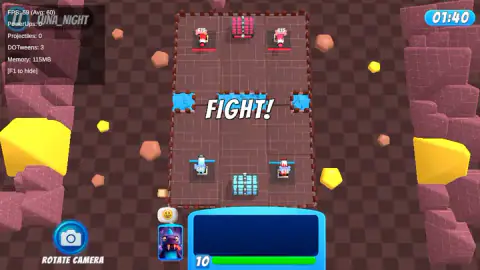
The board is a small 3D arena seen from above. Your half is at the bottom, the rival's at the top, and a strip of water runs across the middle with two gaps in it. On each side stand two guard towers, little armed figures that each start on 615 health, with a chest behind them. You do not move anything yourself. You choose a card, drag it onto a tile, and the creature or spell does the rest. The skill is in what you send, where, and when.
The game is by Blinks32, the developer listed for it. It was published in May 2025, was last updated in August 2026.
What the cards cost, and what that means for your bar
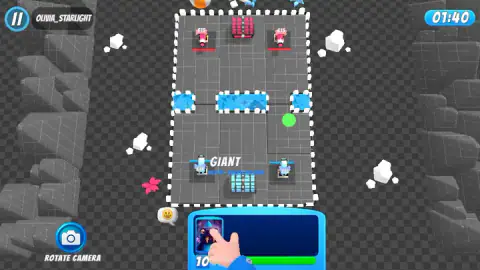
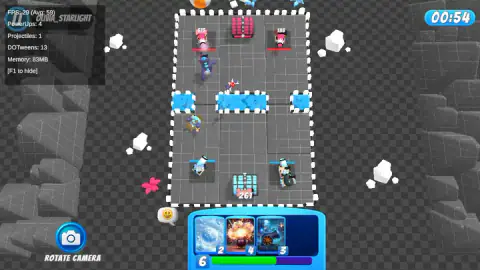
The cards we drew most often were a frosty snowball, an explosion, a cannon and a small blue creature, costing 2, 4, 3 and 4. A purple monster sat in the waiting slot for long stretches, and the tutorial at the start had us drop a big unit labelled GIANT in front of our own guards.
Those prices set the rhythm. A full bar of 10 buys two or three cards, then you are back to waiting. In the middle of our first match the counter read 6 and then 5, which is the normal state of a busy game: you are always a little short. The interesting choice is not which card is best but which card is enough. Answering a rival's 4-cost attack with your 2-cost card leaves you two points ahead for the next push.
A loss that was not about the guards
Our session lasted about ten minutes on a desktop, and in that time we played three matches and lost all three. That is worth telling straight, because the game does not make every loss obvious.
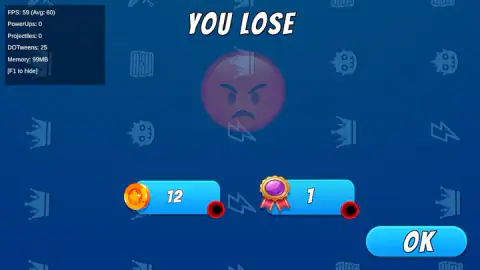
The first match is the strange one. With five seconds left on the clock, both enemy guard squares were empty, and the result screen still read YOU LOSE. We could not see from the board what decided it. If you meet the same thing, the chests and whatever the rival did to your own side are the likely places to look, but we cannot confirm the rule.
The second and third matches went less well for us. In the third, on the brown arena, our guards were still on 555 and 550 with under a minute left, and the rival's two were untouched on 615. We were not losing much ground. We were simply not doing damage.
What you earn after a match
Every match ends on a result screen. Ours showed 12 coins and 1 medal after the first defeat, then a separate REWARDS screen with a card showing a cartoon bee and the line "Power-up permanently unlocked". So the game hands out new cards even when you lose, at least early on.
We did not see what coins are spent on, or how many power-ups there are in all. The game's listing promises 20 units, upgrades, daily challenges and skins. We saw five or six of the units and none of the rest, so take those numbers as the listing's, not ours.
The genre in one idea: spending at the same speed
Real-time card duels sit between two older kinds of game. From collectible card games they take the hand of cards and the cost on each one. From tower defense they take the lanes, the towers and the units that walk on their own once placed. What makes the mix work is that both players draw on the same slow, steady refill. Neither of you can play faster than the bar allows, so a match is really a contest of who spends better.
That is why the clock here is so short. At 100 seconds, there is no time to build up a perfect hand. You are always deciding with what is in front of you, which is the whole appeal of the genre in a browser game you can play in a few minutes.
Who it is for
BeastForge Rival suits players who like short, busy matches and do not mind losing a few while they learn what each card does. There is nothing to read and the tutorial hand shows the one action you need. It is not a game for anyone who wants to plan quietly between moves: the clock and the rival never wait for you.
If you like the idea of spending energy on units, Clash of Armour does it with tanks on a floating island, and Age of Tanks Warriors: TD War turns it into a lane battle over 14 waves. Medieval Battle 2P takes the opposite approach, with every order given before the fight starts, and AOD - Art Of Defense is classic tower defense on an island in the clouds. There are more games like these in strategy games.
Screenshots
Taken by opening the game ourselves and letting it run — not supplied by the publisher, and not the same picture every other site shows.
How to play BeastForge Rival
- Start a match. The arena loads with FIGHT! across the middle and a clock in the top right reading 01:40.
- Look at the tray at the bottom. It holds three or four cards, each with its cost in the corner, and one more card waits just to the left of it.
- Drag a card onto an open tile of the arena. Its cost comes out of the number under the tray, and the unit starts moving and fighting by itself.
- Watch the bar refill. It holds 10 at most and climbs back while you wait.
- Go after the rival's guards before the 100 seconds run out. A result screen then shows the win or loss, and what you earned.
Tips from our matches
- A full bar is wasted time. In several of our screenshots the counter sat on 10 with four playable cards in the tray. Once the bar is full, it stops filling, so every second you hold back is energy you will never get.
- Check that the card left the tray. More than once we dragged a card, let go, and found it still in the tray with nothing new on the board. Keep an eye on the tray, not just the arena.
- The gaps in the water are the roads. The water is split into three pools, so units cross through the two openings between them. A single strong push down one side can work fast: in our first match one enemy guard was down from 615 to 135 within the opening 20 seconds.
- Losing still pays. Our first defeat earned coins and a medal, and unlocked a power-up. Early losses are not wasted.
Controls
| Drag a card from the tray onto the arena (mouse or touch) | Spends its cost from the bar under the tray and puts the unit or spell on that tile |
|---|---|
| ROTATE CAMERA button (bottom left) | Changes the camera angle, going by its name; we did not need it |
| Pause button (top left) | Pauses the match |
| OK on the result screen | Closes the result and moves on to the rewards |
Features
- Matches against a named rival on a 100-second clock that counts down from 01:40
- Two guard towers on each side, each starting on 615 health, with a chest behind them
- A strip of water across the middle with two gaps, so attacks funnel down the sides
- A tray of up to four cards costing 2 to 4, plus the next card waiting beside it
- A bar that tops out at 10 and refills on its own while you play
- At least two arenas: grey stone and brown rock with yellow crystals
- Coins and medals after every match, and a power-up card that stays unlocked
Game details
- Developer
- Blinks32
- Release date
- May 2025
- Last updated
- August 10, 2026
- Added here
- May 2025
- Technology
- HTML5 (3D)
- Platforms
- Browser (desktop, mouse), Browser (mobile & tablet, touch)
- Classification
- Strategy
- Saved progress
- Saving, when available, is managed by this game. Mava cannot confirm your level.
FAQ
How do you play BeastForge Rival?
Drag a card from the tray at the bottom of the screen and drop it on an open tile of the arena. The card's cost comes out of the bar under the tray, which refills by itself up to 10, and the unit then walks and fights on its own. The aim, as the game's listing puts it, is to destroy the rival's towers on the far side of the water before the 100-second clock runs out.
How long is a match in BeastForge Rival?
The clock starts at 01:40, so a match lasts 100 seconds at most. All three of our matches ended within that time. The game's listing talks about battles of three to five minutes, but we never saw a match run past the first clock.
What is the number under the cards in BeastForge Rival?
It is your energy, called elixir in the game's instructions. It starts each match on 10, which is also the most it can hold, and every card you play subtracts its cost. The cards we drew cost 2, 3 and 4, so a full bar covers two or three of them.
How much health do the towers have in BeastForge Rival?
Each side has two guard towers, and in every match we played they started on 615 health each. In our first match we had one enemy guard down to 135 within the first 20 seconds, which shows how quickly a single push can work.
What do you get for losing a match in BeastForge Rival?
Something, at least early on. Our first loss paid 12 coins and 1 medal, and straight after it a REWARDS screen gave us a bee card marked as a power-up permanently unlocked.
Are the opponents in BeastForge Rival real players?
We cannot say. Each rival appears with a player-style name, such as OLIVIA_STARLIGHT or LUNA_NIGHT, and the game's listing describes real-time online duels with computer opponents filling in when no one is waiting. Nothing on screen told us which kind we faced.
Who made BeastForge Rival?
BeastForge Rival is by Blinks32, the developer listed for it. It was published on 22 May 2025 and was last updated in August 2026.