

About Far Island: Tactical Warfare
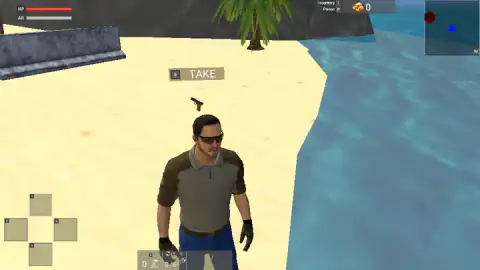
Most shooters put a gun in your hands before the first screen has finished loading. Far Island: Tactical Warfare puts you on a beach with nothing. The man you control stands on the sand with his arms at his sides, and the pistol is on the ground a few steps away, under a small sign that says TAKE.
That one detail tells you what kind of game this wants to be. It is not a corridor with targets. It is an island you walk across, seen from behind your character's shoulders, with a map in the corner and a single red mark on it. The publisher's summary is simple: find enemy bases, clear them, then keep them when the enemy comes back.
We have to be plain about our own session, though. We played for about four minutes and spent all of it on that first beach. We saw no enemy, fired no shot and reached no base. What follows is a close look at the opening and the screen you will be reading for the rest of the game, plus what the publisher says comes after, marked as such.
Far Island: Tactical Warfare is by 3S Games. It was published on 3 February 2026.
What we played: four minutes on one beach
Our session was short and it did not go far. Roughly the first two and a half minutes went on the pistol. We stood beside it, pressed E, turned the camera, pressed E again. The sign never went away and the gun never left the sand.
Then we gave up on it and ran. The beach is wide and pale, with the sea on one side and dark rock on the other. A palm tree stands in front of the rock, and a grey concrete barrier lies on the sand to the left of where you start. For a few seconds there was nothing on screen but sand and the back of a khaki shirt.
The last part of the session we spent at the foot of a cliff. The camera tipped up until most of the picture was grey stone, palm leaves and blue sky. We pushed forward, then sideways, and the session ended there.
So there is a lot we cannot tell you. We did not open the store, the inventory or the full map. We did not see what a base looks like, how the enemy shoots, or how much a capture pays. Our gold stayed at 0 and our health bar stayed full, both for the same reason: nothing happened to us.
Reading the screen before the shooting starts
Even without a fight, the screen says a good deal about what the game expects from you.
The top left has the two bars, HP in red and AR in grey. The top right has a stack of gold bars with a number beside it, and next to that the minimap. The red hexagon changed position on the minimap as we turned, while the blue triangle kept pointing up. That means the map turns with you, and whatever is at the top of it is whatever is in front of you.
The bottom left has four squares arranged like the arms of a cross, numbered 1 to 4. The publisher's instructions give those same four keys for switching weapon, and list assault rifles, sniper rifles and machine guns among the things to buy. Four squares means four things carried at once, and choosing them is the first decision the store will ask of you.
The bottom middle has two small counters. One shows a plain 0 beside a small icon. The other reads 0/6 beside an icon shaped like a grenade. The instructions mention grenades of more than one type and turrets you can set down after taking a base, so those counters look like the places where the two are tallied. Both read zero when you land.
The grey block on the beach is real road engineering
The first man-made thing you see on the island is a low concrete barrier with a wide foot and a narrow top. It has the outline of a Jersey barrier, one of the most common pieces of concrete in the world.
It was not designed for war. It was developed in the 1950s at the Stevens Institute of Technology in New Jersey to keep cars on a motorway from crossing into the oncoming lanes. The sloped foot is the clever part: a tyre that touches it rides up the slope and the car is steered back the way it came. The standard block is 32 inches tall, which is about 81 cm.
Armies borrowed it later for a different reason. A row of heavy blocks set in a zigzag forces any vehicle to slow down before a gate, and a block that stops a car also stops a good deal else. That is why it turns up outside bases and checkpoints, and why it belongs on this beach. In a game about holding ground, a waist-high block of concrete is the first hint of where the fortified places begin, and the first thing you could crouch behind once somebody starts shooting.
Who it suits
Someone who likes to walk into a fight rather than be dropped into one, and who is happy to read a minimap. The opening is slow, and it gives no arrow, no voice and no pop-up apart from the sign over the pistol. If you want targets within ten seconds, this start will test your patience. If you like the quiet minute before a mission, it is here.
More shooting games on Mava Games
For a shooter that starts with the weapon already in your hands, Masked Forces goes straight into armed missions, alone or with other players. Armed Forces.io is another one with a mode menu and a scoreboard. If the outdoors was the draw and the soldiers were not, Wild Hunting Clash trades the bases for a forest and a scope. More are filed under shooting games.
Screenshots
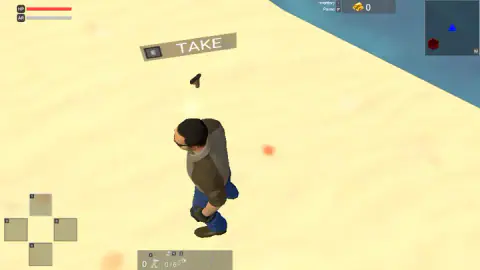
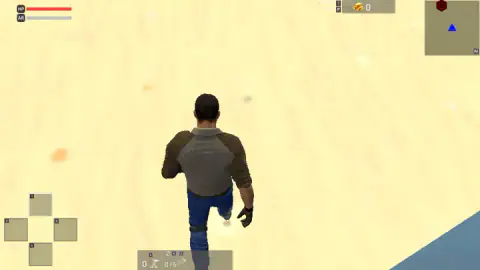
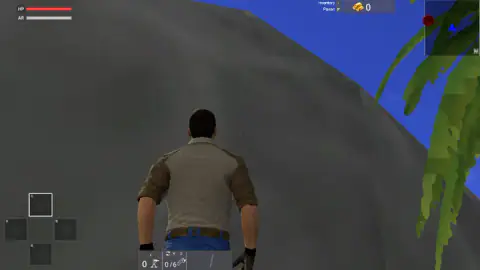
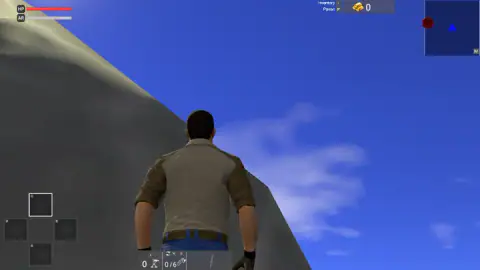
Taken by opening the game ourselves and letting it run — not supplied by the publisher, and not the same picture every other site shows.
How to play Far Island: Tactical Warfare
- You land on a beach, unarmed. Look for the pistol on the sand a little way in front of you.
- Walk to it. A label appears with the letter E and the word TAKE. Press E.
- Check the minimap at the top right. The blue triangle is you. The red hexagon is where the game wants you to go.
- Move with W, A, S and D. According to the game's instructions, the left mouse button fires and the right one aims.
- The publisher says a base is yours once every enemy inside it is down, and that the enemy then tries to take it back.
Things we would have liked to know first:
- Do not leave the beach without the pistol. We did. The label was on screen, we pressed E, and the four weapon squares at the bottom left were still empty when we walked off. Get close enough that the square marked 1 fills before you move on.
- The straight line to the red hexagon may be a wall. We walked towards the mark and ended up with our nose against a grey rock face that we could not climb or get round in the time we had. The island has cliffs. Follow the sand, not the compass.
- The letters on the screen are the manual. E sits next to TAKE, I next to Inventory, P next to Pause, M on the corner of the minimap. If you forget a key, it is probably printed somewhere in front of you.
- AR is not ammunition. It is the grey bar under your health, and it starts full. It reads like armour: a second bar that would go before the red one does. We were never hit, so we did not see either bar move.
Controls
| W, A, S, D | Move, according to the game's instructions |
|---|---|
| E | Interact; the screen shows it beside the word TAKE over the pistol on the beach |
| 1, 2, 3, 4 | Switch weapon; the four numbered squares at the bottom left of the screen |
| Left mouse button / Right mouse button | Fire and aim, according to the game's instructions |
| Shift / Space | Run or swim down, and jump or swim up, according to the game's instructions |
| R / Q / H | Reload, roll, and holster or draw the weapon, according to the game's instructions |
| T / G / V | Place a turret, throw a grenade, and change grenade type, according to the game's instructions |
| I / P / M | Inventory, pause and map; all three letters are printed on the screen |
| Tab | Change the camera, according to the game's instructions |
Features
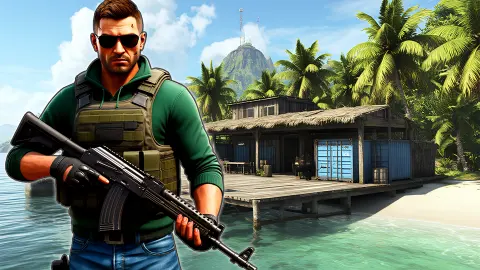
- A third-person view from behind a man in a khaki shirt, jeans, gloves and sunglasses
- A start with no weapon in hand, and a pistol on the sand marked TAKE
- Two bars at the top left, HP and AR, both full when you land
- A minimap with you as a blue triangle and one red hexagon to walk towards
- Four numbered weapon squares that begin empty, and a gold counter that begins at 0
- A counter that reads 0/6 beside a grenade-shaped icon
- Made by 3S Games, playable in twelve languages on landscape screens
Game details
- Developer
- 3S Games
- Release date
- February 2026
- Last updated
- June 19, 2026
- Added here
- November 2025
- Technology
- HTML5 (3D)
- Platforms
- Browser (desktop, keyboard & mouse), Browser (mobile & tablet)
- Saved progress
- Saving, when available, is managed by this game. Mava cannot confirm your level.
FAQ
How do you play Far Island: Tactical Warfare?
You start on a beach with empty hands. Walk up to the pistol lying on the sand and press E when the word TAKE appears over it, then head for the red hexagon on the minimap. According to the game's instructions you move with W, A, S and D, fire with the left mouse button and aim with the right, and the goal is to clear enemy bases and then defend them.
How do you pick up the gun at the start of Far Island: Tactical Warfare?
The game shows a label over the pistol with the letter E and the word TAKE, so E is the key. In our session the label stayed on screen and our weapon squares stayed empty, and we never worked out why. Standing right on top of the pistol before pressing E is the first thing we would try next time.
What are the controls in Far Island: Tactical Warfare?
The screen itself prints E for picking things up, I for the inventory, P for pause, M for the map and 1 to 4 for the weapon squares. The game's instructions add W, A, S, D to move, Shift to run, Space to jump, the mouse buttons to fire and aim, R to reload, T for a turret, G for a grenade, V to change grenade type, Q to roll, H to holster and Tab to change the camera.
How do you win in Far Island: Tactical Warfare?
According to the publisher, you take an enemy base by removing every enemy inside it and then hold it when they come back, and you are paid for both. We did not reach a base in our session, so we cannot confirm how a capture looks or what it pays. Our gold counter read 0 from start to finish.
Is Far Island: Tactical Warfare part of a famous shooter series?
No. It is a browser game by 3S Games published, and it is not connected to any console or PC franchise. What it shares with bigger island shooters is the general idea: an open island, enemy bases marked on a map, and a store for weapons.
Who made Far Island: Tactical Warfare?
The developer is 3S Games. The game was published on 3 February 2026 and last updated in June 2026.
Can you play Far Island: Tactical Warfare on a phone?
It is listed for mobile as well as PC, in landscape. We played with a keyboard and mouse, and every hint we saw on screen was a keyboard letter, so we cannot tell you how the touch version handles.
Is Far Island: Tactical Warfare free?
Yes. It runs in the browser with nothing to download and no account. The game has its own gold, shown by a stack of gold bars at the top of the screen, which the publisher says is earned in battle and spent in the store.