



About ZAP Card Game
Most card games in a browser end when the first hand is empty. Somebody goes out, a banner says you won or lost, and the next deal starts from nothing. ZAP keeps a running score instead. Each time a player goes out, they collect the value of every card still in the other hands, and the game is not over until someone reaches 250 points.
That one rule changes how a hand feels. Going out first is still the goal, but what you are left holding when someone else goes out matters too. A hand full of high numbers and +2 cards is not just a losing hand; it is a big gift to whoever beat you.
The ZAP game on this page is by Games Hub Studio, a maker of card, board and sports classics. It was published in May 2025. We sat down at a table of two, played most of a hand, and then set up a table of three. This page sticks to what we saw.
Playing to 250 points
The welcome page of the tutorial gives the whole scoring system in three lines. The winner's score is the value of the other players' cards. Number cards are worth the digit printed on them. First to 250 wins the game.
The tutorial page on action cards adds the price of a Draw Two: 20 points. That is more than twice the value of a 9, the highest number card we held. So the cards that help you most during a hand are also the ones that cost the most if you are caught with them.
In practice, this means a game of ZAP is several hands long. A single win against one opponent who still holds a few small numbers might be worth only a handful of points. We did not reach the end of a hand, so we cannot tell you how many it usually takes to get to 250. Both star counters, one beside each player's name, read zero the whole time we played.
The two diamonds beside the pile
To the right of the pile sit two small diamonds, and both are worth knowing about before you start.
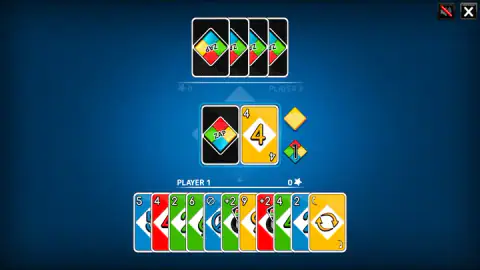
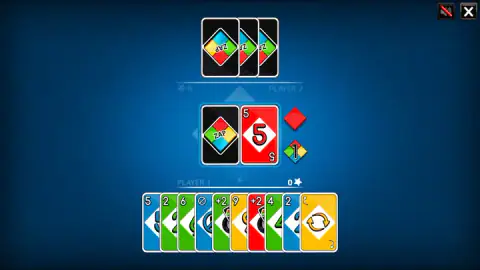
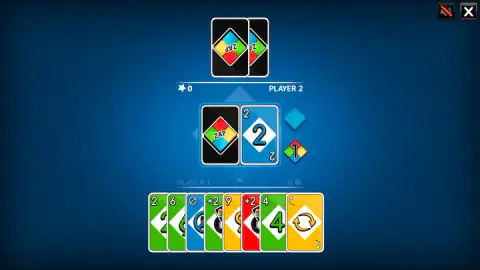
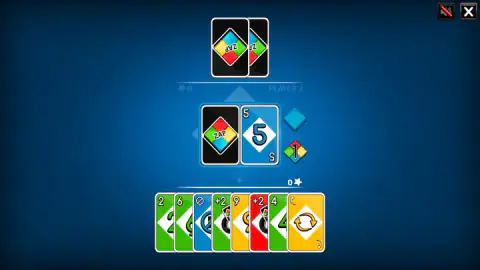
The upper one is plain and takes the colour of the card on top. It was yellow over a yellow 4, red over a red 5, and blue over a blue 2. It repeats what the pile already shows, so it is easy to ignore, but it is the place to look when you are unsure which colour is live.
The lower one is split into the four card colours and carries a 1. It was there from the moment the cards were dealt, long before anyone was close to a single card. That is the call button. You do not shout anything in ZAP; you tap it.
A table for two, three or four
The menu offers three sizes of table, and the layout changes with the choice. At two, your opponent sits across the top of the screen. At three, we saw PLAYER 2 placed down the left side and PLAYER 3 down the right, with you at the bottom as before.
Whatever the size, only one seat is yours. The other players take their turns by themselves, and the menus we saw offered no online mode and no way to share one screen. The feed lists ZAP as a multiplayer game, but in our sessions it was always us against the computer.
Besides the number cards and the +2, our hand held two cards we never got to play: a blue card with a no-entry sign and a yellow card with two circling arrows. In this family of games those symbols usually mean skip the next player and reverse the direction of play, but we did not see either one used, so take that as a reading rather than a rule.
Where the rules come from: Crazy Eights
ZAP belongs to the oldest branch of this family, the shedding games, where the aim is to empty your hand by matching the card on top. The best-known traditional one is Crazy Eights, played with an ordinary deck. As the rules collected at pagat.com describe it, a game between two players starts with seven cards each, the same deal ZAP gives you. An eight can be played on anything to change the suit.
The game travels under many names. Germans play it as Mau-Mau, the Dutch as Pesten, and English players also know it as Switch or Swedish Rummy.
The scoring is where ZAP turns the old game around. In the traditional rules, the cards left in your hand count against you as penalty points, and an eight costs you 50. In ZAP the same sum goes to the winner instead. It adds up the same way, but you play it differently: you are not just trying to avoid a bad score, you are trying to stop someone else from building a good one.
How far we got
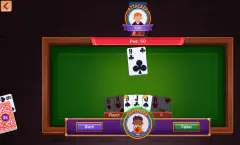
We played most of one hand at a table of two. The computer started fast: our hand had grown from seven cards to eleven before we had played one, partly thanks to a blue +2.
We then matched the pile three times, by number and then by colour, and the computer was down to its last two cards when we left that hand unfinished. Later we set up a table of three and read the tutorial again, but stopped before the deal.
So we have not seen the end of a hand, the screen that shows the points, or a whole game to 250. What we can say is that the table is clear, the rules are explained before the first card, and nothing hurries you.
More card games
Games Hub Studio also made Slides And Climbs, its take on the old board game of snakes and ladders. If you want the same kind of table with a different deck, Four Colors is a close cousin that we have played several times. More are in our puzzle games.
Screenshots
Taken by opening the game ourselves and letting it run — not supplied by the publisher, and not the same picture every other site shows.
How to play ZAP Card Game
- Choose how many sit down. After the play button, three coloured diamonds stand for tables of two, three and four: green, yellow and red. Your own seat is always the one at the bottom.
- Learn the scoring first. The tutorial opens with how points work, then shows the action cards. Flip through it with the right-hand arrow, or jump to the deal with the double one.
- Match the pile. You start with seven cards. Tap one that matches the top card by colour or by number.
- Draw when stuck. If nothing fits, tap the black ZAP deck to the left of the pile.
- Call your last card. The game's instructions say to tap the diamond with a 1 when you are down to one card, or pick up two penalty cards.
Tips from our table:
- Number beats colour when you need to switch. With a yellow 4 on the pile, we put down a red 4, and the computer answered in red. A matching number is the only way to change colour that we saw.
- Count the backs at the top. You cannot see the computer's cards, but you can count them. Ours went from seven to two while we were still holding eight, which tells you how quickly one opponent can get away.
- Get rid of the expensive cards early. A +2 is worth 20 points to whoever goes out, more than any number card. Play it while it still hurts someone else.
- Take your time. There is no clock on your turn. The pile sat on the same yellow 4 for well over a minute while we studied our hand, and nothing happened until we played.
Controls
| Click or tap a card in your hand | Plays it on the pile if it matches the top card by colour or by number |
|---|---|
| Click or tap the black ZAP deck | Draws a card when nothing in your hand fits |
| Click or tap the diamond with a 1 | Calls your last card, according to the game's instructions |
| Single arrow / double arrow (tutorial) | Turns the tutorial page, or skips straight to the table |
| Speaker button (top right) | Mutes the sound |
Features
- A table of two, three or four, picked on a menu of three coloured diamonds; every seat except yours is the computer
- Seven cards each, dealt one at a time onto the table before the first turn
- A game is played to 250 points, and the winner of each hand scores the value of the cards the others are still holding
- Number cards count their digit and a +2 counts 20, so a hand caught full of action cards costs the most
- A small diamond beside the pile repeats the colour that must be played next
- A four-coloured diamond with a 1 waits next to the pile from the first deal, for calling your last card
- No clock on your turn; the table waited for us for well over a minute
Game details
- Developer
- Games Hub Studio
- Release date
- May 2025
- Last updated
- August 10, 2026
- Added here
- June 2025
- Technology
- HTML5 (2D)
- Platforms
- Browser (desktop, mouse), Browser (mobile & tablet, touch)
- Classification
- Puzzle
- Saved progress
- Saving, when available, is managed by this game. Mava cannot confirm your level.
FAQ
How do you play the ZAP game?
You and one to three computer players each get seven cards. On your turn you tap a card that matches the top of the pile by colour or by number; if nothing fits, you tap the black ZAP deck to draw. The first player to empty their hand wins the hand.
How do you win a game of ZAP?
Emptying your hand wins one hand, but the game itself goes on until someone reaches 250 points. The winner of each hand scores the value of the cards left with the other players. Number cards are worth their digit and a +2 is worth 20 points.
What is the 1 button in ZAP?
It is the small diamond in four colours with a 1 on it, sitting next to the pile. The game's instructions say to press it when you have one card left, or take two penalty cards. It is on screen from the very first deal, so you never have to look for it.
What does a +2 card do in ZAP?
The tutorial says a Draw Two forces the next player to pick up two cards and lose their turn. We felt it early in our first hand, when a blue +2 from the computer took our hand from seven cards to nine. Left in your hand at the end, it costs 20 points.
Can you play ZAP with friends?
Not on the menus we saw. You choose two, three or four players, but you are always Player 1 and every other seat plays by itself. There was no online mode and no way to pass one screen around.
Is ZAP the same as Crazy Eights?
It belongs to the same family of shedding games, where you match the top card and race to empty your hand. Crazy Eights uses an ordinary deck and lets an eight change the suit; ZAP uses its own four-colour deck with action cards. The scoring also runs the other way, as the winner collects the points rather than the losers paying them.
Who made ZAP?
ZAP is made by Games Hub Studio. It was published in May 2025.
Can you play ZAP on a phone?
The game is listed as playable on phones and tablets, and every action is a single tap on a card, the deck or a button. We played it on a computer with a mouse and did not test it on a touch screen ourselves.