



About Cute Shapes
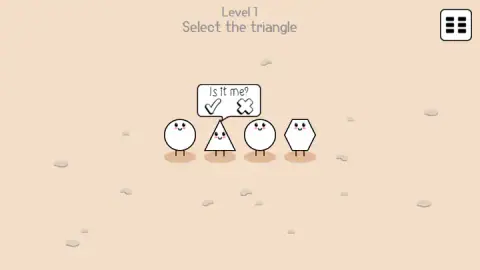
Most spot-the-odd-one games take your first click as your final answer. Cute Shapes does not. Click a figure and it does not light up green or red. It looks back at you and asks a question in a speech bubble: Is it me? Under the question sit a tick and a cross, and nothing counts until you press one.
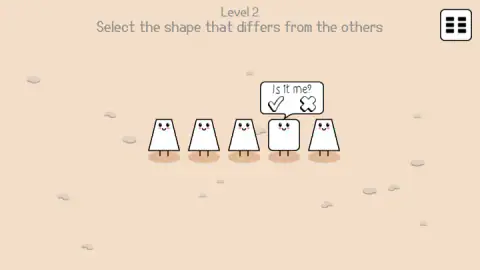
What we did not know until we played it a second time is that every figure asks. On level 2 our pointer landed on one of the four identical trapezoids instead of the square we were aiming for, and the trapezoid put up the same bubble, with the same tick, in the same friendly handwriting. The question is not a hint. It is the game checking that you meant it.
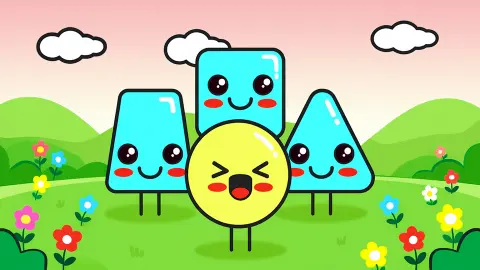
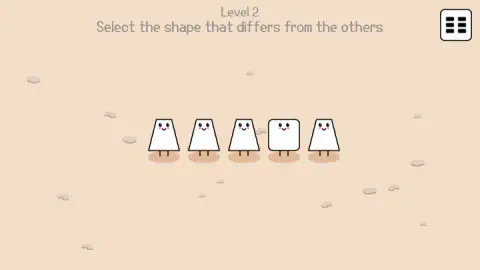
The cast is four or five white shapes with eyes, pink cheeks and two stick legs each, standing on a beige floor scattered with pebbles. A line of text at the top says what to look for. Nothing else is on screen but one small button in the corner.
The game is credited to TeaRRRex.
Here is how far we got, because it shapes everything below. We have played it twice, ten minutes each sitting. Level 1 fell in under a minute both times. Level 2 never fell at all.
The bubble asks every shape, even the wrong one
This is the part the game does not explain and the part worth knowing before you start. The developer's own instructions walk through three steps and stop at clicking the shape, as though the click were the answer. It is not. The bubble always comes first, and it comes for whatever figure your pointer is on.
That changes how the game feels. In a normal odd-one-out puzzle your hand is the risk: a slip costs a life or a streak. Here a slip costs one press of the cross. You can wander along the row, let each figure ask its question and decide at your own speed. For a game pitched at small children, that forgiveness is the whole design.
There is very little else on screen. The level number and the task are at the top, and one button marked with a grid sits in the corner. We did not open it, so we will not tell you what is behind it. The same grid turns up on the win card beside a round arrow and the play triangle; by their looks the arrow replays the level and the grid leads to a list of levels, but those are readings of the icons. The play triangle is the only one of the three we pressed.
No score is kept anywhere: no clock, no star count, no row of hearts. The win card dims the level behind it to grey, drops a shower of coloured confetti and leaves the task readable along the top.
Level 2 kept its answer from us, twice
The second level lines up five figures. Four are trapezoids, narrow at the top and wide at the bottom. The fourth from the left is a square with rounded corners. The task asks for the shape that differs from the others, and the square is the only candidate anyone could see.
We clicked the square and the bubble opened. We pressed the tick and the bubble closed. No confetti, no card, no message of any kind. We tried the cross, which closed it as well. We tried a trapezoid, which asked its own question. We tried Enter. By the end of the second sitting the screen was pixel for pixel what it had been eight minutes earlier: five figures, one bubble, the same question.
What we can rule out is a penalty. Nothing we did on level 2 cost us anything, took anything away or sent us back to the start.
What we cannot rule out is a level that wants something we never noticed. The game's own description says a shape can differ in form, size, emotion, sound or some other feature. One short sound plays as the game opens, and after it we heard nothing at all in either session. If an answer is ever hidden in a noise, it would have gone straight past us.
One thing we still have not tested is a wrong answer on purpose. We never confirmed a figure we believed to be wrong, so we cannot tell you what the game does when you do.
Why the odd shape jumps out at you
Look at level 2 and you find the square before you have finished reading the task. That is not you being clever. It is how eyes work, and it has a name.
In 1980 the psychologists Anne Treisman and Garry Gelade described what happens when one item in a group differs from the rest in a single basic feature, such as its shape or its colour. The odd item pops out. You do not check the figures one by one. You see all of them at once and the different one calls for attention by itself. Their striking finding was that adding more items barely slows you down: one square among four trapezoids, or among forty, takes about the same time.
Things change when the odd item is defined by two features at once. Then the eye goes through the group item by item and every extra figure costs time. A square among trapezoids is the easy kind. A slightly smaller trapezoid among trapezoids that blink would be the slow kind. We did not get far enough to say which way this game leans.
The shapes carry a small story too. In the United States and Canada the four on level 2 are trapezoids. In Britain the same shape is a trapezium. The two words were swapped in a mathematical dictionary of 1795 and the mix-up never fully cleared. Both come from a Greek word for a little table, which is a fair description of four figures standing on their legs.
Cute shapes as a first geometry lesson
The look and the pace suit young children. The figures are large, friendly and easy to tell apart. Nothing hurries you. The question in the bubble turns every answer into a short conversation, and it forgives a hand that lands on the wrong figure.
The condition is reading. Every level is a sentence in English, and level 2 already uses the word "differs". A child who cannot read yet needs an adult alongside, which is no bad way to play it: the shape names come up as you go. Triangle, circle, hexagon, square, and whatever your family calls the one with the sloping sides.
Older players after a hard observation test should know what we know: two levels, one unsolved after two sittings, and no score to chase.
More games for sharp eyes
If the looking is what you like, Find The Dog hides small dogs in busy black-and-white drawings, and Find the Frog - Hidden Objects tucks frogs into themed scenes. Find the rule asks you to work out the pattern behind a row of numbers, and Word Finder turns the search to letters. The rest are under kids games.
Screenshots
Taken by opening the game ourselves and letting it run — not supplied by the publisher, and not the same picture every other site shows.
How to play Cute Shapes
- Read the task. It sits at the top of the screen under the level number. Level 1 says "Select the triangle". Level 2 says "Select the shape that differs from the others".
- Click the shape you think it is. A speech bubble opens above that figure with the words "Is it me?", a tick on the left and a cross on the right.
- Press the tick to confirm. The cross closes the bubble and leaves the level as it was. Clicking a different figure moves the bubble over to that one instead, so only one shape is ever asking.
- Move on from the win card. A right answer brings confetti and a white card that reads "You win!" with "Right answer." under it. The play triangle on that card took us to level 2.
What twenty minutes taught us:
- Expect the first tick to do nothing. On both of our sessions the first tick on level 1 closed the bubble and left the level standing. The card came on the second round: shape, tick, shape. Our two ticks landed on different parts of the icon each time and the outcome was the same, so this is not a careless hand. Simply do it again before you doubt your answer.
- Clicking the shape again is not confirming. Each new click on a figure only reopens its bubble. We went round that loop on level 2 for a long time. The answer is given inside the bubble, nowhere else.
- The bubble is not a clue. Right shape or wrong shape, it asks the same question. If you were hoping the game would nod before you commit, it will not.
- The keyboard is not part of this. We tried the arrow keys, the space bar and Enter at different moments. Nothing on screen moved. This is a game for one hand on a mouse.
- A closed eye is not a clue either, as far as we saw. The figures blink, one at a time, while you think. We caught two different trapezoids with their eyes shut at unrelated moments, both times on a level with nothing to do with faces.
Controls
| Click on a shape | Opens a speech bubble above it that asks "Is it me?" — any shape asks it, right or wrong |
|---|---|
| Tick in the bubble | Confirms that shape as your answer; on level 1 this is how we reached the win card |
| Cross in the bubble | Closes the bubble so you can pick another shape |
| Click a different shape | The bubble moves to the new figure; only one shape asks at a time |
| Play triangle (win card) | Goes on to the next level |
| Grid button (top right) | Always on screen; we did not open it |
| Keyboard | Nothing we could see. The arrow keys, the space bar and Enter did not change the screen |
Features
- One written task per level, shown at the top of the screen in plain words
- White shapes with eyes, pink cheeks and stick legs that blink one at a time while you think
- A speech bubble that asks "Is it me?" before any answer counts, so a slip of the hand costs nothing
- The same bubble over a wrong shape as over the right one, so it tells you nothing you did not already know
- A first level that asks for a triangle among circles and a hexagon
- A second level with four trapezoids and one square
- No timer, no score and no lives on the two levels we saw
- One sound as the game opens and silence after it
- Made by TeaRRRex
Game details
- Developer
- TeaRRRex
- Release date
- December 2025
- Last updated
- August 10, 2026
- Added here
- October 2025
- Technology
- HTML5 (2D)
- Platforms
- Browser (desktop, mouse), Browser (mobile & tablet)
- Classification
- Casual , Educational , Kids , Puzzle
- Saved progress
- Saving, when available, is managed by this game. Mava cannot confirm your level.
FAQ
How do you play Cute Shapes?
Read the task at the top of the screen, then click the shape that fits it. A speech bubble opens above that shape and asks "Is it me?". Press the tick to confirm or the cross to back out and choose again. Clicking a different figure moves the bubble to it.
Does the speech bubble mean you picked the right shape?
No. We clicked one of the four identical trapezoids on level 2 by accident and it asked "Is it me?" exactly like the square we were aiming at. The bubble only means the game registered which figure you are pointing at. The answer is still yours to make.
What is the answer to level 1 of Cute Shapes?
Level 1 says "Select the triangle". There are four figures in a row: a circle, a triangle, another circle and a hexagon. Click the triangle, second from the left, and press the tick in its bubble. Expect to do it twice: on both of our sessions the first tick closed the bubble and left the level standing.
What is the answer to level 2 of Cute Shapes?
Level 2 says "Select the shape that differs from the others" and shows four trapezoids and one square, fourth from the left. We chose the square and pressed the tick, the bubble closed, and the level did not end. We have now failed to clear level 2 in two separate sittings, so we cannot give you a confirmed answer.
How many levels does Cute Shapes have?
We do not know. The game's own description gives no number, and we only ever saw levels 1 and 2. There is a grid button in the top right corner that we did not open.
Does Cute Shapes have a timer, a score or sound?
No timer and no score on the two levels we played: the screen shows the level number, the task, the shapes and one button, and we sat on level 2 for about nine minutes without anything counting down or sending us back. One short sound plays as the game opens, and after it we heard nothing at all in either session.
Who made Cute Shapes?
It is credited to TeaRRRex. It was published on 22 December 2025 and last updated on 10 August 2026.
Can you play Cute Shapes on a phone?
It is listed for PC, Android and iOS, in landscape. We played on a computer with a mouse and did not test a phone ourselves.