


About Word Finder
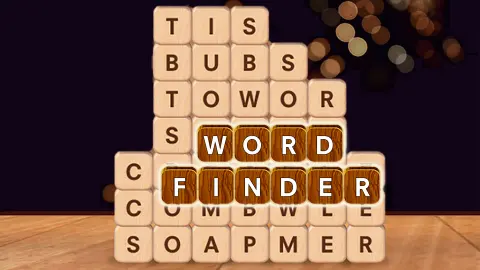
Most word search puzzles hide their words in noise. A grid of random letters, a list down the side, and most of what you look at is filler. Word Finder has no filler at all. Every wooden tile on the table belongs to one of the hidden words, and when you find a word, its tiles leave and the tiles above drop into the gap.
That drop is the whole game. A word you cannot see at the start often does not exist yet: it is built by letters falling into place after you take another word away. So the question in each level is not only which words are there, but which one to take first.
Above the tiles, rows of dark dots show how many words are left and how long each one is. Fill them all and the level is done. From the second level on, a theme is printed over the board, and it tells you what kind of word you are looking for.
Word Finder is made by Anna Inc. It was published in February 2026 and updated in August.
Thirteen tiles, three words and nothing left over
The tutorial level is worth looking at closely, because it shows the trick the whole game runs on.
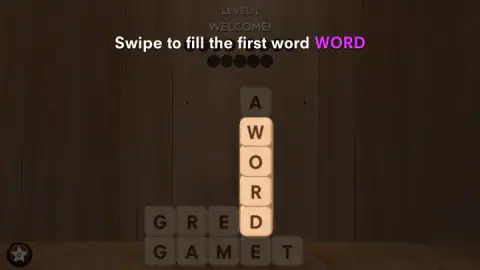
It opens with a column of five tiles, an A sitting on top of W, O, R and D, rising out of two rows that read GRED and GAMET. The game asks for WORD first, straight down the column. When WORD goes, the A at the top has nothing under it and drops into the space where the D was. The rows now read GREA and GAMET.
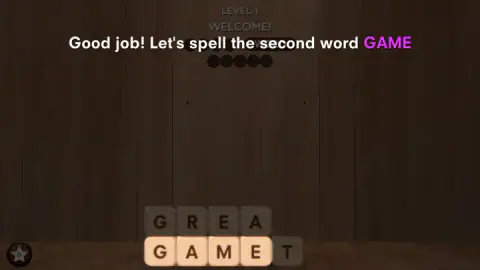
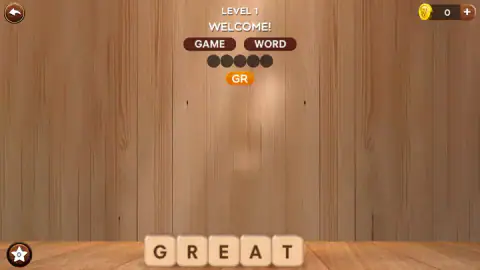
The second word is GAME, along the bottom row. A Good job message asks for it by name, a GOOD flashes on screen when you get it, and the G, R, E and A above fall onto the bottom row, next to a T that never moved. The table now holds one line: GREAT, the third and last word.
Nobody hid GREAT. The level was built so that a stray letter from the top of a column ends up as the fourth letter of the final word. That is what makes Word Finder different from a printed word search, and why order matters: here the tutorial chooses it for you, and from level 2 on, it does not.
Level 2: the BODY PARTS board
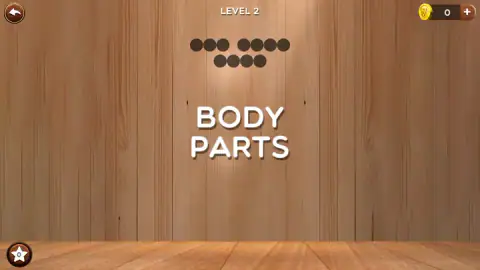
Level 2 opens with its theme in large letters, BODY PARTS, and then lays out eleven tiles: a column of E, A and E standing on a Y, and two rows underneath that read HYAD and HEND. The dots ask for one three-letter word and two four-letter words.
We did not solve it in our run. We went looking for HEAD and HAND, the first body parts anyone would try, and neither is there in a straight line. Partway in, the screen dimmed, the star counter in the bottom corner went up to 1, and a large arrow pointed at the star, the game's way of offering help. We left it alone.
Looking at the board again afterwards, the answer is in the order. Read down the column from its third tile and you get EYE, with the last E being the second letter of HEND. Take EYE out first, and the E and A above it should fall into the two gaps, turning the rows into HEAD and HAND. We did not get to test it, but it is the same fall that turned GREA into GREAT in the first level, and it uses every tile on the table.
Where word search comes from, and what Word Finder changes
Word search puzzles are older than home computers. They are usually credited to Norman E. Gibat, who printed one in the Selenby Digest, a small paper in Norman, Oklahoma, in 1968. From there the format spread into newspapers and puzzle books, usually with a theme and a list of words to find printed next to the grid.
Word Finder keeps the theme and drops the list. BODY PARTS tells you the subject but not the words, so you work from the dots and the letters you have.
The bigger change is that the board moves. In a printed word search, the letters never change and the work is scanning: most of the grid is filler, and the words sit in straight lines among it. In Word Finder nothing is filler and the table changes after every find, so the work becomes planning. You are not only spotting words, you are deciding which one to remove so that the next one can form.
What we did not see
We cleared the tutorial level and spent the rest of our session on level 2 without finding a word, so this page covers two levels. We cannot say how many levels there are or how long the words get.
The coin counter at the top right stayed at 0 throughout, and we did not tap the plus button next to it, so we cannot say what coins are earned for or spent on. We also never pressed the star button. The game's description talks about more than 6,000 levels, helpers it calls a spyglass, a light bulb and a shuffle, and rewards for extra words. We saw none of that in two levels, so take it as the description's claim, not ours.
Who it is for
Word Finder suits players who like a slow puzzle with no clock: you can look at a board for as long as you like and swipe only when you are sure. The first words are short and common, which makes it a friendly spelling game for children, while the falling tiles give adults a planning problem on top.
Despite its name, it is not a tool that finds words for Scrabble or Wordle. It is a puzzle in which you do the finding.
More word games
The same studio makes Word Cross, a word game in which you swipe letters to fill a crossword grid, and Words Story, a typing word game that its description sets around a prisoner planning his escape. If you prefer a ring of letters to a falling stack, Word Blossom has you drag across a circle to fill a small crossword, and Hidden Words Challenge does the same over 22 levels with no clues and no timer. Other boards where the order of your moves decides the result are gathered in our puzzle games.
Screenshots
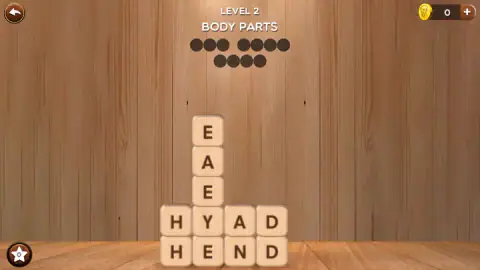
Taken by opening the game ourselves and letting it run — not supplied by the publisher, and not the same picture every other site shows.
How to play Word Finder
- The first level is a tutorial. A message says Swipe to fill the first word WORD, and a hand with an arrow shows the path down a column of tiles.
- Put your finger or mouse on the first letter of a word and drag through the touching tiles to the last letter. An orange bubble above the board spells out the letters you are on as you go.
- When the word is right, its tiles fly up into its row of dots, and the tiles above fall to fill the space.
- Find every word and the board is empty. The game moves you on to the next level.
Tips from our run:
- Count the tiles against the dots. In both levels we played, the dots added up exactly to the tiles on the table. No letter is spare, so if a letter would be left stranded by the word you are about to take, look again.
- Read the dot rows as word lengths. In level 2, groups of three, four and four dots meant one short word and two longer ones. Combined with the theme, that narrows the search fast.
- Take the word that frees the others. When the obvious words are not in a line, look for the one whose removal would let the letters above it drop into place.
- Swipe in one movement, first letter to last. The tutorial took us several attempts before our swipes counted. The orange bubble is the quickest way to see what the game thinks you are spelling.
- There is no clock. We saw no timer and no move counter, so there is no penalty for staring at a board before you touch it.
Controls
| Swipe or drag across the tiles | Spells a word from its first letter to its last; an orange bubble shows the letters you are on |
|---|---|
| Star button (bottom left) | A helper with its own counter, which the game pointed us to in level 2; we did not press it |
| Coin counter with plus (top right) | Shows your coins; it stayed at 0 in our game and we did not tap the plus |
| Back arrow (top left) | Leaves the level |
Features
- Every tile on the table is part of a hidden word, with no filler letters, so a level ends with an empty table
- Found words leave the board and the tiles above them fall, which builds new words that were not there before
- Rows of dots above the board show how many words are left and how many letters each one has
- From level 2, each board has a theme, such as BODY PARTS, that tells you what kind of word to look for
- A first level that walks you through three words, WORD, GAME and GREAT, one swipe at a time
- No timer and no move limit in the two levels we played
- Made by Anna Inc, whose other word games include Word Cross and Words Story
Game details
- Developer
- Anna Inc
- Release date
- February 2026
- Last updated
- August 17, 2026
- Added here
- December 2025
- Technology
- HTML5 (2D)
- Platforms
- Browser (desktop, mouse), Browser (mobile & tablet, touch)
- Classification
- Educational , Kids , Puzzle , Word & Trivia
- Saved progress
- Saving, when available, is managed by this game. Mava cannot confirm your level.
FAQ
How do you play Word Finder?
You swipe across touching letter tiles to spell a hidden word, from the first letter to the last. When the word is right, its tiles fly up into a row of dots at the top and the tiles above them fall into the gap. Find every word and the level is complete.
Why can't I find the last words in Word Finder?
Often they are not on the board yet. Tiles fall when a word is removed, and some words only line up after another word has gone. Try the shortest or most obvious word first and watch where the letters land.
What is the answer to Word Finder level 2, Body Parts?
The dots ask for one three-letter word and two four-letter words. Reading our own screenshot of the board, EYE runs down the column, and taking it out first should drop the letters above into place for HEAD and HAND. We did not get to test that order in our game, so treat it as a strong hint rather than a checked answer.
Is there a timer in Word Finder?
We saw no timer and no move counter in the two levels we played. You can look at the board for as long as you like before you swipe.
What does the star button do in Word Finder?
It sits in the bottom left corner with a small counter. In level 2 the screen dimmed and an arrow pointed at it when the counter reached 1. We did not press it; the game's description mentions helpers such as a spyglass, a light bulb and a shuffle.
Is Word Finder a tool for finding Scrabble or Wordle words?
No. Word Finder is a word puzzle game in which you find the hidden words yourself. It does not solve other games or list words from a set of letters.
Who made Word Finder?
Word Finder is made by Anna Inc. It was published in February 2026 and last updated in August 2026.
Can you play Word Finder on a phone?
Yes. The only action is a swipe across the tiles, which works the same with a finger as with a mouse, and it runs in the browser on phones, tablets and computers with no download.