






About Color Dash - Chameleon Runner
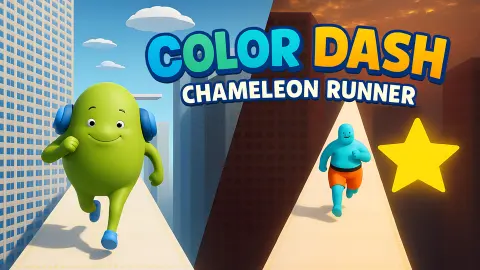
Most colour-switch games move the colours and leave you still. A ring spins, a wall slides, and you wait for your shade to come round. Color Dash - Chameleon Runner keeps the floor still and moves you instead. Your runner sprints along narrow beams hung between skyscrapers at sunset, and the beams are painted in sections: blue, yellow, dark grey. Your job is to arrive on each one already wearing its colour.
That makes it a two-button game. One button jumps the gaps between beams. The other changes the runner's colour. The runner never stops or slows on its own, so both decisions come at running speed, and the second one has to be made before your feet touch down, not after.
The game is by Ample Games - Publishing, the studio listed for it and the one behind Circle Car Crash 3D. It was published in November 2025, and its rating there.
The listing says arrow keys. The game teaches a mouse
The listing's page for the game lists four arrow keys, to move forward, back, left and right, plus coins to collect and a finish line to reach. That is not what the game itself shows you. Its tutorial draws a mouse twice and nothing else: once with the word JUMP, once with CHANGE COLOR. The runner turns no corners and needs no steering; the beams run straight ahead.
We pressed all four arrows and got no response we could see or hear. So treat the mouse as the real control scheme. The game is also listed for phones and tablets, where the two mouse buttons would have to become taps; we only played on a computer, so we cannot say how the two actions split on a touch screen.
The same listing also promises themed worlds such as a jungle and a crystal cave. Everything we saw, from the tutorial to level 1, took place in one city at sunset.
A wall of padlocks and a 50-coin wallet
The Level Selection screen shows a page of tiles. On a fresh start only the first one is open, and every other tile carries a padlock. The arrow on the right flips to a second page that is locked from end to end, so there are at least 16 levels, and you open them one at a time.
Character Selection hints at a second layer. Gully is the runner you start with, the arrows either side lead to others, and the top right shows a coin counter next to a small plus button with a video icon, the usual sign of coins offered in return for an advert. We never earned a coin: the coin counter stayed at 50 through every attempt we made at level 1, so failed runs appear to pay nothing. We did not try the video button or switch runners.
What a real chameleon is doing when it changes colour
The game rests on the idea everyone learns as a child: a chameleon changes colour to blend into whatever it is standing on. Biologists have been chipping away at that for years.
In 2015 a team at the University of Geneva showed how panther chameleons actually do it. Under the outer skin sits a layer of cells packed with tiny crystals arranged in a regular lattice. When the animal relaxes or tightens that lattice, the spacing between the crystals changes, and so does the colour of light the skin reflects. It is closer to tilting a prism than to mixing paint.
And the reason is mostly not camouflage. Chameleons change colour to signal to each other, a male turning bright when he meets a rival, and to manage heat, darker to warm up and paler to cool down. Their everyday greens and browns already blend in with the branches they live on.
Color Dash plays the myth straight, and that is fine for a game: matching the floor is a clear, readable rule. But it is worth noticing that the runner does what a real chameleon rarely needs to, and does it in a fraction of a second, every few metres, at a sprint.
How far we got, and what we never saw
Our session lasted about ten minutes on a desktop, and it did not go well. We got through the JUMP card and stalled on the colour card. On level 1 proper, every attempt ended within seconds on the LEVEL FAILED screen, and we never set foot on the blue beam or reached the gold star.
So there is a lot we cannot vouch for. We never confirmed the colour change in play, never finished a level, never saw level 2, and do not know what landing on the wrong colour does, whether you fall through, bounce off or simply lose. We did not try another runner or play on a phone. What we can tell you is that the failure loop is short: CONTINUE, SELECT, tile 1, and you are running again.
Who it is for
Color Dash suits players who like a runner where the rule fits in one sentence and the difficulty comes from doing two things at once. There is nothing to read once the tutorial is over, which makes it workable for younger players, though the first level is less forgiving than its single open tile suggests. It is not an endless runner, whatever the listing says, and there is no steering or lane-changing: only the jump and the colour.
From the same studio, Circle Car Crash 3D is another two-input timing game, a car on a figure-eight track, and Santa Gift Delivery Christmas Game is a gentler run for children. If you want the jump without the colours, Stickman Jump is a one-button runner in black and white. Parkour Runner 3D takes running to a three-lane city street, and Neon Ball Slope swaps the runner for a ball on a glowing slope. More pick-up-and-play games are in arcade games.
Screenshots
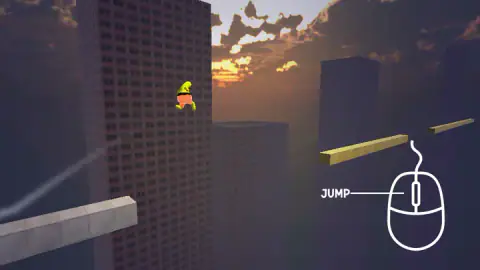
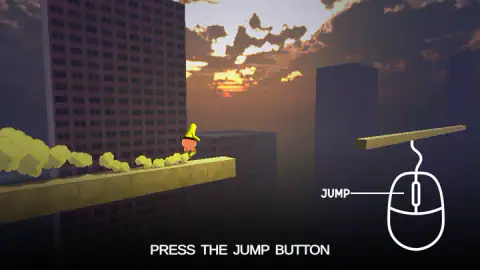
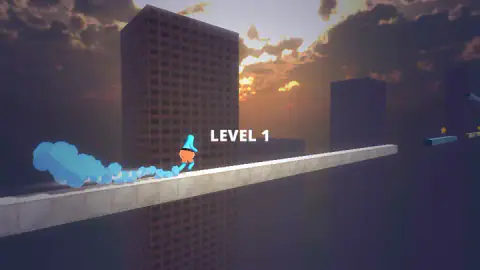
Taken by opening the game ourselves and letting it run — not supplied by the publisher, and not the same picture every other site shows.
How to play Color Dash - Chameleon Runner
- Press Let's Play on the start card. The first screen is Character Selection: Gully, a blue runner, sits in the middle with arrows either side. Press the yellow SELECT button.
- On Level Selection, press the tile marked 1. It is the only one without a padlock.
- The first time in, level 1 opens as a tutorial. A card with a drawn mouse and the word JUMP appears as you near a gap; press the left mouse button to jump.
- Next comes the CHANGE COLOR card, over a beam split into blue, dark grey and yellow. Press the colour change button, which the card draws on the right-hand side of the mouse, and match the section you are about to land on.
- Reach the end of the level without falling. Clear it and level 2 should unlock on the next tile.
Tips from our session
- Do not left-click through the colour card. We clicked the left button several times on CHANGE COLOR and the tutorial stayed frozen, the runner hanging in mid-air, for about a minute and a half. The card is waiting for the other button.
- Grey looks like safe ground. The first beam in both the tutorial and level 1 is plain grey, and we ran it as a yellow runner and as a blue one without trouble.
- Read the trail, not just the runner. The runner leaves a cloud of puffs behind it in its current colour. It is a bigger patch of colour than the runner itself, and easier to check out of the corner of your eye.
- Look past the first beam. In level 1 the long grey beam ends in a gap, and the next piece is a short blue beam with a gold star above it. Decide your jump and your colour while you are still on the grey.
Controls
| Left mouse button | Jump. The JUMP card on the tutorial points to this side of the mouse, and a left click took us past it |
|---|---|
| Right mouse button | Change colour, going by the CHANGE COLOR card, whose line runs to the right-hand side of the mouse. We did not confirm it in play |
| Arrows and SELECT on Character Selection | Browse the runners and pick one |
| Number tiles and arrows on Level Selection | Start an unlocked level and flip between pages of levels |
| CONTINUE on Level Failed | Takes you back to Character Selection, not straight into the level |
Features
- The runner moves by itself; your two inputs are a jump and a colour change
- Beams cut into coloured sections, so the colour you wear has to follow the floor under your feet
- A tutorial on the first visit to level 1 that waits on each card until you press the right button
- A puff trail behind the runner drawn in whatever colour the runner is wearing
- A Level Selection screen with pages of eight tiles; only level 1 is open at the start
- A Character Selection screen with Gully, a blue runner, and arrows to browse the others
- A coin counter that starts at 50, beside a plus button with a video icon
Game details
- Developer
- Ample Games - Publishing
- Release date
- November 2025
- Last updated
- August 10, 2026
- Added here
- September 2025
- Technology
- HTML5 (3D)
- Platforms
- Browser (desktop, mouse), Browser (mobile & tablet, touch)
- Classification
- Arcade
- Saved progress
- Saving, when available, is managed by this game. Mava cannot confirm your level.
FAQ
How do you play Color Dash - Chameleon Runner?
Your runner sprints forward along beams strung between skyscrapers without any input from you. You do two things: jump over the gaps and change colour so that you match the coloured section of beam you land on. Pick a runner, pick an unlocked level, and reach the end of it without falling.
What are the controls in Color Dash - Chameleon Runner?
The game teaches a mouse. Its tutorial card labels one side of the mouse JUMP and the other CHANGE COLOR, and a left click jumped for us, which leaves the right button for the colour change. The listing on the game's listing mentions arrow keys, but the arrows did nothing we could see or hear.
How do you change colour in Color Dash?
Use the colour change button the tutorial draws on the right-hand side of a mouse, which should be the right mouse button. Left clicks do not do it: we clicked the left button several times on the CHANGE COLOR card and the tutorial stayed frozen with the runner in mid-air.
How many levels does Color Dash - Chameleon Runner have?
The Level Selection screen shows eight tiles per page, and we counted at least two pages, so there are 16 levels or more. Only level 1 is open when you start; the rest carry a padlock until you clear the one before.
What happens when you fail a level in Color Dash?
A LEVEL FAILED card appears over a night-time city with a single CONTINUE button. CONTINUE does not restart the level: it takes you back to Character Selection, so a retry is three taps, SELECT, the level tile and then the run itself.
Can you get coins by failing in Color Dash - Chameleon Runner?
Not in our session. The counter on the Character Selection screen showed 50 coins at the start and still showed 50 after every failed attempt at level 1, so a run that ends in a fall seems to pay nothing.
Is Color Dash - Chameleon Runner an endless runner?
Its listing calls it one, but the game we played is built from numbered levels. Each run starts with a LEVEL banner, and new levels unlock one at a time from the Level Selection screen.
Who made Color Dash - Chameleon Runner?
Ample Games - Publishing is listed as the developer, the same studio behind Circle Car Crash 3D. The game was published in November 2025.