











About PolyBounce Tycoon
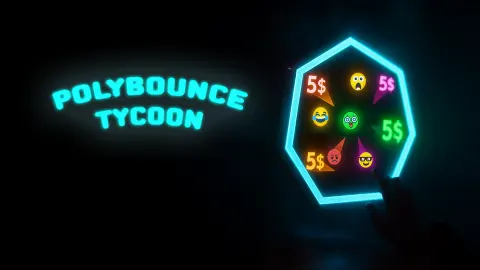
Most tycoon games give you a shop, a factory or a city to run. PolyBounce Tycoon gives you a shape. It is drawn as a thin line of cyan light on a dark screen, balls bounce around inside it, and each time one of them touches a wall a small green "1$" floats up from the spot.
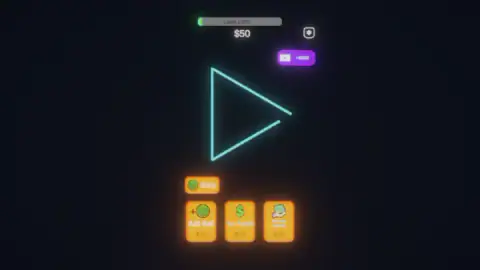
That is the whole business. Money buys more balls, more balls mean more bounces, and a bar along the top measures what you have earned against the end of the level. There is nothing to aim and nothing to dodge. Every decision sits in three orange cards under the arena.
The name promises polygons in the plural, and now we can say where the plural comes from. Fill the bar, press the button that appears, and the shape changes: our first arena was a triangle, our second a diamond, a square stood on its corner. Everything you bought goes back to its opening price in the same instant.
The game is credited to Monster Mitt. It was published in November 2025.
We played for about ten minutes on a desktop with a mouse. We finished the first level, spent the rest of the session on the second, and left with $2,800 and the bar nearly full again. This page is that run, and it says where it stops.
The bar counts what you earned, not what you have
There are two dollar figures at the top of the screen, and they are easy to confuse. The large one is your balance. The small one is printed on the bar itself, after the words "Level 1:".
They start out equal and then drift apart, and the gap is exactly what you have spent. The clearest look at it came at the start of the second arena, before anything could get complicated: the bar read $22, the balance $12, and the difference was the ball we had just bought. Buying never sets the bar back, which makes it the honest measure of progress.
It is also how you can tell that the levels get longer. The first bar filled at around $1,400 earned. The second was still short of full at $4,800, for an arena that looks no bigger.
Next Level changes the shape and takes your money
The button is not there at the start. It appears beside Shop the moment the bar is completely green, and it is the only way we found to leave the triangle.
Pressing it is expensive in a way nothing on screen warns you about. We had $917 in hand. The next screen was a diamond, the bar was back near empty, the balance read $12, and all three cards were at their opening prices again, the dearest two dimmed exactly as they had been in the first minute of the game.
So the upgrades are not an empire you build. They are a lap you run again on a new shape, and the money you are carrying when you press the button is money you threw away. Buy with it first, whatever the price has climbed to.
The arenas are open at one corner, and that is where the balls go
The thing nobody tells you at the start is that the balls leave. Buy four, come back a minute later, and there is one bouncing around on its own.
Look closely at the shape and you can see why. The triangle is not closed: its two long sides stop short of the right-hand tip, and the gap between them is wider than a ball. The diamond does exactly the same thing at its right-hand corner. Whatever polygon you are given, one corner of it is missing.
We caught one in the act. Four balls were still inside the triangle, and a fifth was outside it, just past the gap, dropping away into the dark with its grey trail stretched out behind it.
That single detail changes how the game is played. In most idle games you buy a producer once and it works forever. Here Add Ball is closer to rent than to property, and its price climbs every time you pay it: $10 for the first in the triangle, $42 by the end of the diamond. Leave the game running untended and you come back to an empty outline and a balance that has not moved.
The three cards, and which one is worth the money
| Card | Price at the start of a level | What we watched it do |
|---|---|---|
| Add Ball | $10 | One more ball in the arena. Price rose with every purchase, to $42 |
| Inc. Payout | $15 | Raises what one bounce pays. Untouched all through the first level, and every bounce there paid $1 |
| Passive Income | $18 | Climbs hardest of the three. It was asking $692 while the other two were still under $80 |
The useful discovery is what Inc. Payout is actually for. We ignored it for an entire level because it is the dull card between two interesting ones, and that is why our triangle never paid more than a dollar a bounce. In the diamond we bought it over and over, its price walked up past $20, past $40, and settled at $77 for the next one. By then the green numbers rising off the walls read "10$".
Ten times the money from the same bouncing ball, on a shape that leaks balls. That is the trade the game is quietly asking you to make, and the card explains none of it.
Passive Income is the opposite. It starts cheapest of the three and prices itself out of reach faster than anything else on screen: $18 to open, and $692 at a point where Add Ball was still asking $42. Whatever it pays, it stops being a choice very quickly.
The purple button, the Shop and the settings
Three more things are on screen from the first second. A Shop button sits above the cards with a green ball on it, which by all appearances is where ball skins live; we did not open it.
The gear in the top right corner opens a small blue card titled SETTINGS, with a switch for sound, a switch for music and a red X to close it. That is all it holds.
Under the gear is a purple button with a video icon and "+$250" on it. Next to a balance of $12 that is a large number: more than twenty first balls. We pressed it twice over the session. No advert ever played, a notice told us none was available and offered to carry on, and the $250 did not arrive. What we can say with confidence is that the game never asks. Over ten minutes, no screen appeared in front of the balls that we had not gone looking for.
Who it is for
Players who like to watch a number rise while they do something else with the other half of their attention, and who do not mind being called back every minute to replace what leaked out. There is no way to lose here, no timer and no enemy.
It is not for anyone who wants to play with their hands. You never touch a ball. If the first thing you look for in a game is something to steer, the arena will feel like a screensaver with a price list. And keep our limits in mind: we saw two of the shapes this game clearly has, and never reached the end of the second.
More games where the balls do the work
Money Ping Pong is the nearest relative: a ball earns cash by hitting blocks, and you decide where the blocks go. Idle Gravity Breakout 2 sends its balls falling towards a planet and lets them merge. Click That Button takes the same idea of buying your way to bigger numbers and strips it down to one red button. For bouncing balls you aim yourself, there is Balls: Ricochet!. The rest are in the clicker games category.
Screenshots

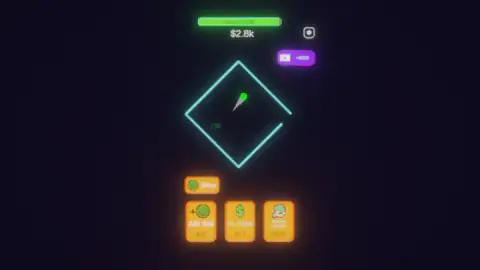
Taken by opening the game ourselves and letting it run — not supplied by the publisher, and not the same picture every other site shows.
How to play PolyBounce Tycoon
- Find your balance. It is the large white number under the bar at the top of the screen.
- Press Add Ball, the left of the three orange cards. A ball appears inside the shape and starts bouncing off the sides.
- Watch the walls. Every bounce pays, and the amount shows in green where the ball hit.
- Spend again when the balance allows it. A card you can afford glows; one you cannot is dimmed.
- When the bar above the arena is completely green, a Next Level button appears beside Shop. Press it for the next shape.
Tips from our session:
- Count the balls, not only the money. They do not stay. An arena you stopped feeding ends up empty, and the balance stops with it.
- Spend everything before you press Next Level. We pressed it holding $917 and started the next shape with $12.
- Inc. Payout is the slow one that counts. Left alone it does nothing at all, and every bounce keeps paying a single dollar for as long as you let it.
- There is no hurry once the bar is full. The figure on it keeps rising and the green stops moving. Nothing you earn after that gets you any closer to anything.
Controls
| Left click on Add Ball | Buys one more ball for the arena; the price on the card goes up after every purchase, from $10 to $42 in our run |
|---|---|
| Left click on Inc. Payout | Raises what each bounce pays; it sat at $15 until we started buying it, and then climbed to $77 |
| Left click on Passive Income | Starts at $18 and climbs hardest of the three; it had reached $692 while the other two were still under $80 |
| Left click on Next Level | Appears beside Shop once the bar at the top is full; changes the arena and puts your money and all three prices back to the start |
| Left click inside the arena | We clicked there many times and could not tell that it changed the balls, the money or anything else |
| Shop button | On screen above the cards the whole time, with a green ball on it; we did not open it |
| Purple button with the video icon | Offers +$250 in exchange for an advert; we pressed it and no advert ever came |
| Gear icon (top right) | Opens a SETTINGS card with a sound switch and a music switch, and a red X to close it |
Features
- One arena on screen at a time, drawn in neon on a dark background, a triangle in the first level and a diamond in the second
- Balls that pay for every bounce off a wall, with the amount shown in green where they hit
- Three upgrade cards, Add Ball, Inc. Payout and Passive Income, whose prices climb as you buy them
- A bar at the top that counts what you have earned in the level, not what you have left to spend
- A Next Level button that appears when the bar fills and wipes your balance and every price
- Arenas left open at one corner, which is how the balls you paid for get away
- A per-bounce payout that went from $1 to $10 once we had bought Inc. Payout enough times
Game details
- Developer
- Monster Mitt
- Release date
- November 2025
- Last updated
- August 10, 2026
- Added here
- September 2025
- Technology
- HTML5 (2D)
- Platforms
- Browser (desktop, mouse), Browser (mobile & tablet)
- Classification
- Arcade , Clicker , Simulation , Strategy
- Saved progress
- Saving, when available, is managed by this game. Mava cannot confirm your level.
FAQ
How do you play PolyBounce Tycoon?
Balls bounce around inside a neon shape, and each time one hits a wall you are paid. You spend that money on three orange cards at the bottom, starting with Add Ball, which puts one more ball in play. A bar at the top counts what you have earned in the level, not what you have left, and when it fills a Next Level button appears. The first level's bar filled at about $1,400 earned, the second was still not full at $4,800.
What happens when you press Next Level in PolyBounce Tycoon?
The arena changes shape and everything else goes back to the beginning. Our first level was a triangle and our second a diamond, a square stood on its corner. The press cost us a balance of $917, because the new level started us near zero, with the bar back at the bottom and all three upgrade prices at their opening figures. Spend your money before you press it.
Why do the balls disappear in PolyBounce Tycoon?
They leave through the corner. Both arenas we played were drawn with one corner left open, a gap wider than a ball, and we caught one mid-escape, with four balls still inside the triangle and a fifth outside it, dropping away. That is why an arena you stopped feeding goes quiet.
What does Inc. Payout do in PolyBounce Tycoon?
It raises what a single bounce is worth. Through the whole first level we left it alone at $15 and every bounce paid $1. Later in the second level, after buying it several times and watching its price reach $77, a bounce was paying $10.
How much does a ball cost in PolyBounce Tycoon?
The first one cost $10. The price on the card rises with every purchase, and by the end of our second level Add Ball read $42. Pressing Next Level put it back to $11.
Do you have to watch adverts in PolyBounce Tycoon?
Not in what we played. A purple button offers $250 for one, and small purple video tags sit on upgrades you cannot afford yet. We pressed the purple button twice and no advert ever ran. A notice said none was available and offered to carry on, and the $250 never arrived. Nothing else interrupted the game.
Can you play PolyBounce Tycoon on a phone?
It is listed for PC, Android and iOS, in both landscape and portrait. The whole game sits in a narrow column in the middle of the screen, which suits an upright phone. We played with a mouse on a desktop and did not try a phone ourselves.
Who made PolyBounce Tycoon?
The game is credited to Monster Mitt. It was published in November 2025 and last updated in August 2026.