








About Money Ping Pong
Most games with "ping pong" in the name give you a paddle and an opponent. Money Ping Pong has neither. The ball moves on its own, bouncing off the walls of a small green board, and nothing you do will ever touch it.
What you control is the board. You drag money blocks onto it, each with a price printed on its face, and every time the ball runs into one, that price lands in your cash. A 6$ block pays 6$ a hit. Fill the bar at the top of the screen and the next level opens.
So this is not a reflex game. It is a question of geometry: where should a block go so that a ball you cannot steer will hit it as often as possible? Once the blocks are down, the money comes in by itself, which puts Money Ping Pong in the family of idle games, the ones that keep earning while you watch.
It is made by MemorySharp, which also has the game on Google Play, and it reached the browser portals in early 2025. It is built for a tall phone screen, and on a computer it plays in a narrow column in the middle of the page.
Build a smaller box, not a better shot
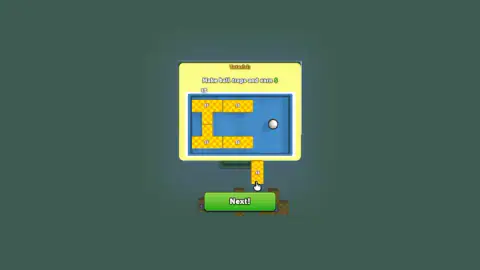
The first tutorial card says to earn money by hitting the balls on the blocks. That sounds like the whole game, until the second card appears as Level 2 opens. It says "Make ball traps and earn", and its picture shows the real idea: 1$ blocks laid out as walls around the ball, boxing it into one end of the board.
Here is why that works. The studio describes the ball as moving at a constant speed, so the number of hits you get depends on how far it travels between them. On an open board it spends most of its time crossing empty grass. Close it into a small box and it hits a block on nearly every bounce. Its listing on another big games site puts it in one line: the more compact the board, the more frequent the bounces.
That changes how you read each level. Every board is a different shape, a plain rectangle on Level 1 and a T on Level 2, with a wide top and a narrow stem. The question on each one is the same: where is the smallest space you can close with the pieces you have? On the T, the stem is already narrow on three sides.
Two counters, one for winning and one for buying
At the top of the screen there are two numbers, and it is easy to miss that they are different things.
- For win has a star and a slash: your cash against the level's target. This is the bar that decides when the level ends.
- For buys has a stack of cash next to it. This is the money you can spend in the shop.
On Level 1, where there is nothing to buy, the two rise together. In our captures they matched every time. On Level 2 both went back to zero, so the money from the first board did not carry over into the second.
The shop is where the game's longer plan shows. The three items on Level 2 each attack the problem from a different side:
| Item | Price | What it changes |
|---|---|---|
| +1 ball | 20$ | A second ball on the board, so twice the chances of a hit |
| +3 blocks | 20$ | Three more pieces to close the space with |
| Blocks +1$ | 50$ | Every block pays one dollar more per hit |
Which one to buy first depends on the board. If the upgrade does what its label says, a board of 1$ blocks earns double on every hit after it. The store page on Google Play also promises "functional" blocks that change how the game plays, and a range of maps with their own conditions; we did not get far enough to see them.
Breakout, turned inside out
The shape of this game is older than it looks. In 1972 Atari's Pong put a ball between two paddles. Four years later, in 1976, Atari's Breakout kept the ball and the paddle and added a wall of bricks. Each brick vanished when the ball touched it, and the job was to clear them all.
Money Ping Pong takes Breakout and flips each rule. The paddle is gone. The bricks stay where you put them, and instead of disappearing they pay you, every time. In Breakout you want the ball to escape into the space behind the bricks, where it rattles around clearing the wall for you. In Money Ping Pong you want the opposite: no open space at all, just a small box where the ball never stops hitting something.
If you have played idle brick games, the kind where balls break bricks automatically while you buy upgrades, this is their cousin with the destruction removed. Nothing breaks. The board only gets fuller.
Ads: where the game asks for one
On Level 1 we saw no ads and no shop. From Level 2, each shop card carries an Advertising label with a small clapperboard. When you do not have the cash for an item, its button changes to "Advertising" and offers the item for an ad instead.
In our session that button brought up the platform's own messages, "We skipped the ad this time" and, once, "No ads available right now". No ad played, and our counters stayed at zero. We cannot say how often the game offers ads once you have money to spend, because we did not get that far.
What we played, and what we did not
We played Money Ping Pong for about four minutes in a desktop browser. That covers the whole of Level 1, which our test player cleared in under three minutes from the first screen, and the opening of Level 2: its tutorial card, its T-shaped board and its shop.
We did not earn anything on Level 2, buy an item, see a second ball, or see any of the special blocks the store page mentions. There were no sounds in our recording. We never opened the menu button at the top left or the small "i" button next to the instructions, so we cannot tell you what is behind them.
More bouncing-ball idle games
If you like the idea of a board that earns while you watch, PolyBounce Tycoon bounces balls inside circles, triangles and hexagons for cash. Idle Gravity Breakout 2 keeps the breaking and adds gravity, and Bricks Balls Breaker is the classic version, where you aim the shot and the bricks disappear. More games that reward patience over reflexes are in our clicker category.
Screenshots
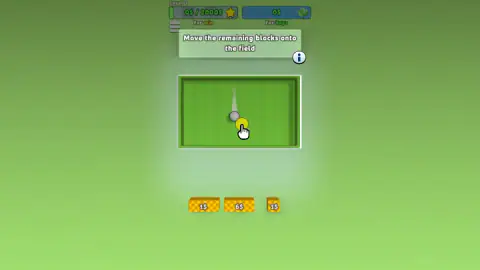
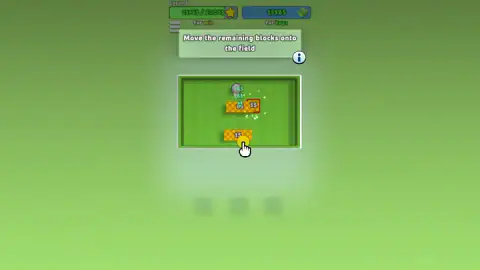
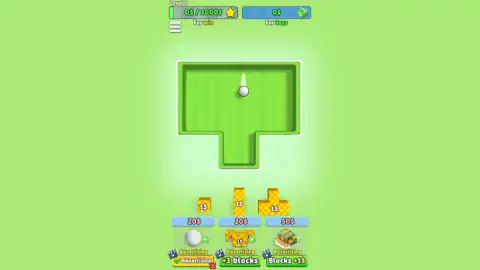
Taken by opening the game ourselves and letting it run — not supplied by the publisher, and not the same picture every other site shows.
How to play Money Ping Pong
- Read the card and press Next! The first level opens with one grey ball on a green rectangle and three blocks waiting in a tray below it: a 1$ bar, a 6$ bar and a small 1$ cube.
- Drag a block onto the board. Press on it, move it into the ball's path and let go. The game asks you to move all the remaining blocks onto the field, so use every piece.
- Watch the money rise. Each hit shows its value in green above the block. The bar marked For win fills towards the level's target, 2,000$ on Level 1.
- Go to the next board. When the bar is full, Level 2 opens with a new shape and a higher target of 3,000$.
- Spend in the shop. From Level 2 there are three buttons under the board: an extra ball, three more blocks, and +1$ on every block.
Tips from our session
- Put the expensive block where the ball goes most. On Level 1 the 6$ bar pays six times what a 1$ piece does. Our test player put it down first, in the middle of the ball's line, and the counter passed 1,000$ with the two cheap blocks still in the tray.
- Think in bounces, not in blocks. A block in open space gets hit now and then. A block with a wall close behind it gets hit on every return trip.
- On a new level, drag before you shop. Level 2 starts with both counters at zero and three new 1$ pieces waiting above the shop. Nothing is earned until they are on the board. Our test player pressed the shop buttons first and sat at 0$ for more than a minute.
Controls
| Drag (mouse or finger) | Pick up a money block from the tray and drop it on the board |
|---|---|
| Click or tap Next! | Close a tutorial card and carry on |
| Shop buttons (bottom, from Level 2) | Buy an extra ball, three extra blocks, or +1$ on every block; when you cannot afford one, the button offers it for an ad |
Features
- One ball that bounces around the board by itself - there is no paddle and no opponent
- Money blocks with a price on their face; every time the ball touches one, that amount is added to your cash
- A cash target per level - 2,000$ for Level 1 and 3,000$ for Level 2 - shown as a bar with a star
- A second counter, For buys, that holds the money you can spend in the shop
- A tutorial that teaches the real trick - build walls of blocks to trap the ball in a small space
- A new board shape per level; Level 2 is a T instead of a rectangle
- A shop with three items - an extra ball, three more blocks, and +1$ on every block
Game details
- Developer
- MemorySharp
- Release date
- February 2025
- Added here
- May 2025
- Technology
- HTML5 (Unity, WebGL)
- Platforms
- Browser (desktop, mouse), Browser (mobile & tablet, touch)
- Download size
- 15.9 MB
- Ad requests
- 0 (few)
- Has a save
- No
- Saved progress
- Saving, when available, is managed by this game. Mava cannot confirm your level.
Measured by opening the game ourselves on 2026-09-11, not taken from the feed. Twelve seconds on a phone-sized screen, with ad requests counted and blocked rather than loaded.
FAQ
What is Money Ping Pong?
Money Ping Pong is a free idle puzzle game by MemorySharp. A ball bounces around a board on its own, you drag money blocks onto that board, and each time the ball hits a block you earn the amount printed on it. Reach the level's cash target and the next board opens.
How do you play Money Ping Pong?
Drag the blocks from the tray at the bottom onto the board, in the ball's path. You do not hit the ball yourself; it keeps moving and pays out every time it touches a block. The tighter the space you leave it, the more often it hits something, and the faster the cash comes in.
Who made Money Ping Pong?
MemorySharp, the name on its listing and on its Android app, which is on Google Play. The browser version also appears on other big games sites. It came out in early 2025.
How do you win a level in Money Ping Pong?
Each level has a cash target shown at the top of the screen, 2,000$ for Level 1 and 3,000$ for Level 2. When the For win bar fills up, the next level opens with a new board shape. There is no way to lose that we saw; the ball simply keeps bouncing.
What is a ball trap in Money Ping Pong?
It is the game's own tip, shown on a tutorial card as Level 2 opens - "Make ball traps and earn". You build walls of blocks around the ball so it is boxed into a small corner of the board, where it hits a block on almost every bounce instead of crossing empty space.
Is Money Ping Pong an actual ping pong game?
No. There are no paddles, no net and no opponent. The name comes from the ball, which goes back and forth between the walls and your blocks on its own. It is an idle game about where you place blocks, not a table tennis game.
Does Money Ping Pong have ads?
Yes, in the shop. From Level 2, when you cannot afford an item, its button offers it in exchange for an ad. Pressing it brought up the platform's own message; in our session no ad was actually shown.
Can you play Money Ping Pong on a phone?
Yes. It is built for a tall, portrait screen and played by dragging, so a finger works as well as a mouse. It is listed for PC, Android and iOS browsers, and there is also an Android app by MemorySharp.