

About Yummy Shelf
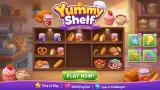
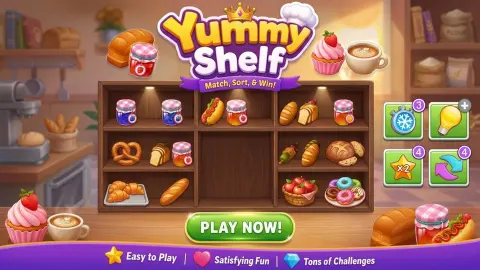
Yummy Shelf opens behind a shop shutter. A purple roller door comes down over the whole screen with the logo painted on it, and when it lifts, what is behind it is a narrow column the shape of a phone: a clock at the top, a few wooden shelf boxes in the middle, four buttons at the bottom. On a desktop monitor everything either side of that column is a painted supermarket aisle that never does anything.
The shelves hold food, and the banner over level 1 gives the whole rule: "Match 3 identical items to clear the shelf!" Every item on a level belongs to a set of three. Click the three, they go together, and when the shelves are empty the level is won.
What the banner leaves out is that the shelves are two items deep. A second row stands behind the first, drawn a shade darker, and part of each set is usually back there.
The game is credited to Natie. It was published in August 2026.
We should be plain about how far we have got. We have played level 1 three times across two sittings and won it twice. Once the clock beat us. Once we got down to the last three items and could not shift them, and the page dropped back to the title shutter before the countdown ran out. Level 2 we have only opened. This page is short because that is all we have seen.
Level 1 is not the same level twice
This is the thing that took us two sittings to notice. On our first visit, level 1 was twelve items in four kinds: pink spiral rolls, tan sacks with a sheep's face, Christmas puddings topped with holly, and dark wrapped peppers. On our second, the same level 1 was a wrap with lettuce, a bowl of soup, pale jars and stacks of pancakes — nine items in view instead of twelve. When the page reloaded and we started level 1 again, it was cocoa pods, apples and chocolate, and so few of them that we cleared the lot in under half a minute.
The shelves themselves stay put. The box on top with three in a row underneath is the same shape every time, and so is the three-minute clock. What changes is the stock on it, and with the stock, the size of the job. So the advice to count the sets before you click is not a flourish: you genuinely cannot carry a plan over from your last attempt, and a level you lost may be shorter the second time round.
The back row is the puzzle
Level 1 looks almost empty when it opens. Four boxes, a handful of items in view, several of them obviously alike. It reads like a ten-second job.
The rest are behind those. A sprig of holly poking up behind a roll is a pudding you cannot reach yet; a dark shape behind a loaf is another loaf. So some of the sets cannot be completed from what is in front. Something has to move first.
That changes how you read a level. The question is less "where are three alike" and more "which front item is standing on something I need". On level 1 the answer fits in a glance. On level 2 it does not: seven boxes arranged in a U with an empty middle, close to twenty items in the front row alone, and dark shapes behind a good half of them.
It also explains the only level we ever lost sight of. We came down to three wrapped items, two pale and one in shadow behind them, and clicked at them for the best part of a minute without a single one moving.
The freeze booster stops the clock, and the snow says so
Four buttons sit under the shelves, each showing three charges: a stopwatch with a snowflake, a light bulb, a star marked X2 and a pair of circling arrows. The instructions mention a freeze, a hint, a shuffle and an instant clear.
The stopwatch is the one we can now describe properly. Press it and the whole screen turns blue and fills with falling snowflakes — and the countdown stops. It sat on the same reading for a good twenty seconds before the snow cleared and it started moving again. That is a large slice of a three-minute level, and it is the booster to spend when you have found a set and need the time to click it out.
The light bulb does more than point. On two separate visits, with one set left on the shelves, we pressed it once and the next thing on screen was the victory card. The star and the arrows we have still never used.
The charges do not come back. We spent the freeze down to nothing on level 1, and it was still empty when level 2 opened, along with the bulb.
What a win pays, and what the plus buttons ask
The victory card shows a star and "x100". Under it runs a coloured strip from x2 up to x4 with a star sitting on it, then two buttons: a green one marked CLAIM 2X with a video icon, which doubles the stars if you watch an advert, and a blue NEXT that takes the hundred as they are. We pressed NEXT, and the star counter at the top of level 2 read 101.
The same offer is woven through the rest of the screen, and this is the part worth knowing before you start. When a booster runs out, its charge badge becomes a plus; press the button then and a GET BOOSTERS card slides up, naming the booster and offering it back behind a green button with a video icon on it. The star counter in the header has a small red plus with that same icon, and so does the lightning counter next to it. Nothing is blocked off behind any of this — we declined every offer and the game carried on each time — but the shop is never more than one press away. Once, when we did take the offer, the advert slot came back to say none was available and handed us a button to keep playing.
The lightning counter itself we still cannot explain. It read four when we started and two by the time level 2 opened, it has its own plus button, and we never found a screen that says what it is for. Losing has its own card too: when our clock ran out, a TIME'S UP card offered more time in exchange for an advert, with a Try Again button behind it.
Who it suits
It suits someone who likes tidying puzzles and does not mind a clock. The rule fits in one sentence, a level lasts three minutes at most, and the boosters will bail you out a few times before they want something in return.
It suits less a player who wants to think without pressure, because there is no untimed mode in anything we have seen. It is also not a swap-three game with a grid and falling pieces, whatever the "match 3" label suggests.
More shelf and triple-match games
Goods Sort 3D - Triple Puzzle and Fun Sorting Through The Shelves are the nearest relatives: shelves, hidden rows and sets of three. Snack Sort moves the idea into a vending machine with a tray, and Fresh Drop: Triple Match does it with fruit on a kitchen scale. The rest are under puzzle games.
Screenshots
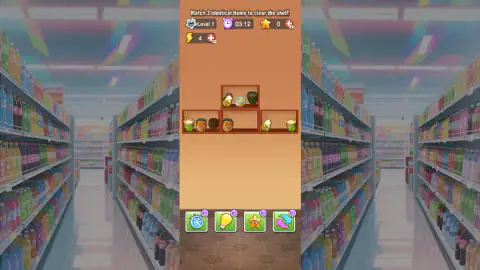
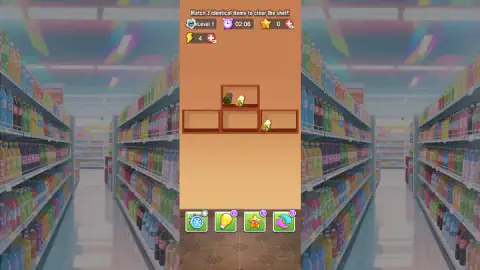
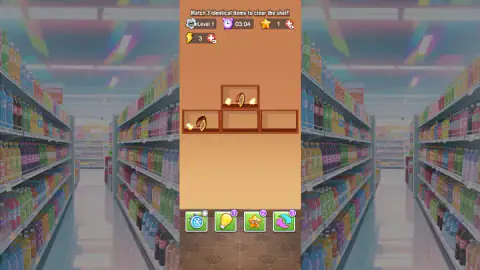
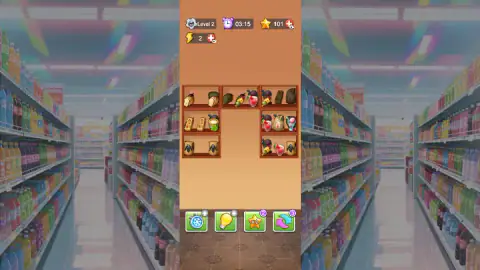
Taken by opening the game ourselves and letting it run — not supplied by the publisher, and not the same picture every other site shows.
How to play Yummy Shelf
- Close the daily reward card and press START GAME. The reward card holds five slots and a CLAIM ALL button; the level loads with the clock already running.
- Count the sets before you click. Work out which items repeat and where the third of each one is hiding, because the clock is the real opponent.
- Look behind the front row. An item drawn in shadow is standing in the back row, and you cannot reach it until the place in front of it clears.
- Click three identical items, one after another. They do not have to share a shelf. We watched six items leave three different boxes in about twenty seconds doing exactly this.
- Empty every shelf before the clock runs out. The victory card appears the instant the last set goes.
What we picked up while playing:
- Aim at the food, not the wood. The pieces are small and our clicks on the bare shelf did nothing at all. Several of the stretches where we thought the game was ignoring us were stretches where we were missing.
- Items change places. Early in one level a stack that had been in the middle of its box ended up in the free space to its left, and the item that had been hidden behind it came into view.
- Dragging did not help us. We tried dragging food from one shelf to another several times, across both sittings, and could never tie a single drag to a cleared set.
- The arrow keys do nothing. This is a mouse game; the keyboard never answered.
Controls
| Mouse click | Picks food items on the shelves and presses the buttons; the arrow keys got no response |
|---|---|
| Three clicks in a row | Click three identical items one after another and all three leave the shelves together |
| Stopwatch with a snowflake (bottom bar) | Stops the clock. The screen turns blue and snow falls across it while the countdown holds still |
| Light bulb (bottom bar) | Spends one charge; on two separate visits a single press cleared the last set and won the level |
| Star marked X2 and circling arrows (bottom bar) | Two more boosters with three charges each; we never pressed either |
| Red plus buttons (top bar) | Sit beside the star and lightning counters and carry a video icon: more of each in exchange for watching |
Features
- Food arranged two deep: the item at the back is drawn darker and only comes forward when the place in front is free
- Level 1 is drawn fresh each time — different food, and a different number of items, on all three of our visits
- A countdown per level that starts a little above three minutes, and a booster that stops it dead
- Four boosters on a bar under the shelves, three charges each, with no refill between levels
- When a booster runs out its badge turns into a plus that offers a restock for watching a video
- A win pays 100 stars, with an optional advert to double them
- Level 2 grows to seven shelf boxes in a U, with close to twenty items in the front row alone
- Made by Natie
Game details
- Developer
- Natie
- Release date
- August 2026
- Last updated
- August 21, 2026
- Added here
- July 2026
- Technology
- HTML5
- Platforms
- Browser (desktop, mouse), Browser (mobile & tablet, touch)
- Saved progress
- Saving, when available, is managed by this game. Mava cannot confirm your level.
FAQ
How do you play Yummy Shelf?
Each level is a set of wooden shelves holding food, and the banner on level 1 states the goal: match 3 identical items to clear the shelf. Click three identical items one after another and all three go together. A clock counts down from a little over three minutes, and the level is won when every shelf is empty.
Is there a time limit in Yummy Shelf?
Yes. Every level we opened started with a little over three minutes on a countdown at the top of the screen. One booster stops that clock: press it and the screen turns blue, snow falls, and the countdown holds on the same reading for twenty seconds or so before carrying on.
What do the boosters in Yummy Shelf do?
There are four buttons under the shelves, each starting with three charges: a stopwatch with a snowflake, a light bulb, a star marked X2 and a pair of circling arrows. The stopwatch freezes the clock. The light bulb does more than hint, because on two visits one press of it cleared the last set and won the level. We never pressed the other two.
Do the boosters refill between levels in Yummy Shelf?
No. Charges carry over exactly as you left them, and we started level 2 with two of the four already spent to zero. When a booster reaches zero its badge turns into a plus, and pressing it opens a card offering that booster back in exchange for watching a video.
Does Yummy Shelf show adverts?
It offers them in exchange for rewards rather than interrupting play. The victory card has a CLAIM 2X button with a video icon beside a plain NEXT button, the empty boosters offer a restock for a video, and the star and lightning counters each have a red plus with the same icon. On one of our presses the advert slot reported that none was available and gave us a button to carry on playing.
Is Yummy Shelf the same every time you play it?
No. We opened level 1 on three separate occasions and got three different boards: spiral rolls and Christmas puddings on one, wraps and stacks of pancakes on another, cocoa pods on the third, with a different number of items each time. The rule and the layout of the shelves stay put; the food on them does not.
How many levels does Yummy Shelf have?
We do not know. We have finished level 1 and opened level 2, which has seven shelf boxes arranged in a U and close to twenty items in the front row alone. We did not play it through, and we have seen no level map and no ending.
Who made Yummy Shelf?
It is credited to a developer named Natie. It was published in August 2026. It is listed for PC, Android and iOS, in portrait format.