






About Night Order: Pick & Pack
Most shelf games ask how fast you can spot something. Night Order: Pick & Pack has no clock on any screen we saw, and the thing it grades comes after the search: once you have found the items, it wants to know how well you put them in a box. Two objects in a grid of twenty cells sounds impossible to get wrong. We got it wrong, and the game told us so.
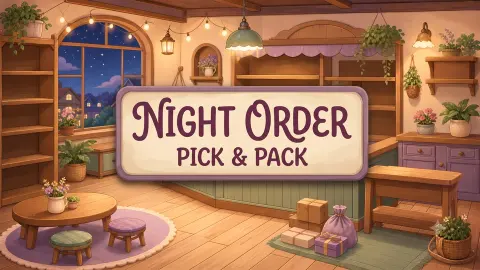
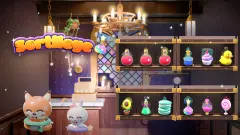
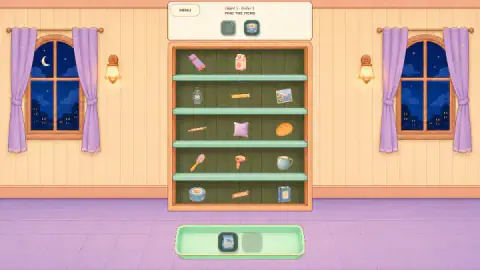
The setting does a lot of the work. A warm shop room at night, a moon in the arched windows, a wooden shelf in the middle and a green tray on the tiles below. Every order is a small errand with two halves, and the screen changes completely between them.
Our account is short. In one session on a computer with the mouse we completed Night 1 Order 1 with two stars out of three. Then we spent the rest of the session on Order 2 and did not complete it, so we have packed exactly one box. Everything below about later nights is unknown to us, and we say so where it matters.
The game comes from AbyssKitty Games, according to the game's listing. It was published in July 2026 and updated in October.
What the three stars actually ask for
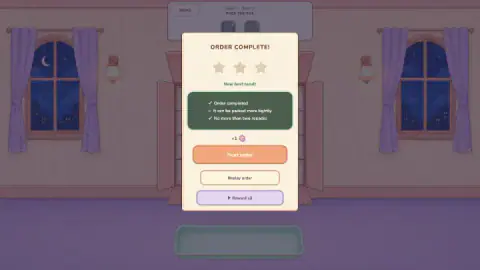
The panel at the end of an order is the most useful screen in the game, because it states the rules that the rest of the game leaves unspoken. Ours had three lines:
- Order completed, ticked
- It can be packed more tightly, left open
- No more than two repacks, ticked
We had two gold stars and one empty, so it looks as though each line is worth one star. That is a deduction from a single panel. A repack seems to mean taking an item out and placing it again, which the game's instructions also describe, though we never needed to.
The open line is the interesting one. Our first item went into the top-left corner of the box, and the panel then covered the grid, so we cannot show you where the second landed. Our drag ended close to the line between the second and third columns, so it may have left a gap. We do not know exactly what the game measures. The listing says only that a more compact box earns more stars.
Replay order is right there on the same panel, so the third star looks like an invitation to go again, even on the first order. We pressed Next order instead.
The trap on the second order
Order 2 is where we stopped, and it is the part of the game we can describe best, because we saw so much of it. The header asked for a blue book and a potted pink flower. The fish packet we had packed moments earlier was back on the shelf, and now it was the wrong answer. When we went for it, a small tag appeared underneath: Not in this order.
We fell for that more than once. The book, which had sat on the shelf unused through Order 1, went into the tray without trouble. The flower pot, on the bottom row at the far right, never did: most of our remaining moves went on the wrong objects and on the header icons, and the pot was still on its shelf when the session ended. That was our misreading and nothing unfair in the game.
It did show us how forgiving this stage is. Several minutes of mistakes cost us nothing that we could see: no lives, no timer, no end screen, only the tag. We cannot promise the same for later nights, and we do not know if wrong picks affect the result, because we never reached the panel for that order.
Why pick and pack is more than a theme
The title borrows a real warehouse term. Order picking is the job of collecting specific goods from storage to fill a customer's order, and packing follows it as a separate step. The game keeps that same split, and it is why the screen changes so sharply between halves: finding and fitting are different skills.
The fitting half has a real history too. Mathematicians call it the bin packing problem: fit items of different sizes into as few containers as possible. It is famous for being hard to solve perfectly once the number of items grows. A box with two items is nowhere near that point, but the listing mentions rotating items and trying other spots, which suggests that later orders bring larger shapes. We have to leave that as a deduction, because the packet we watched go in filled one cell and the box showed no rotate button.
What we did not get to see
More of this game is unseen than seen, so here is the list. We never saw a second box, a rotate button, a hint or a restart, all of which the game's instructions mention. The Style button joins the header from Order 2, and the title panel carries it too, along with a trophy and a gear, but we opened none of them.
The one order we completed paid a flower token, shown beside your stars on the title panel. Style is the obvious place to spend it, but that is a guess. The purple Reward x3 button has a play icon, which suggests an ad, and we left it alone, so we cannot tell you how often ads appear.
We also played with a mouse in a wide window, while the game is listed as portrait. The layout we describe may sit differently on your screen.
Who it suits
It suits someone who wants a quiet puzzle with no clock, and a child who can match pictures can manage the shelf half. The tighter-packing star gives a tidy-minded player a reason to replay. Its weakness, on the evidence of two orders, is how little the first ones ask of you, and how little they explain about what tight means.
If you want the same shop-shelf feeling with more pressure, Goods Sort 3D - Triple Puzzle has you clearing shelves in threes against a clock, and Fruit Lane Cafe is a timed card sorter built around orders. Tidydeck: Sort Puzzle goes the other way: its listing promises no timers and no losing.
More in our puzzle games.
Screenshots
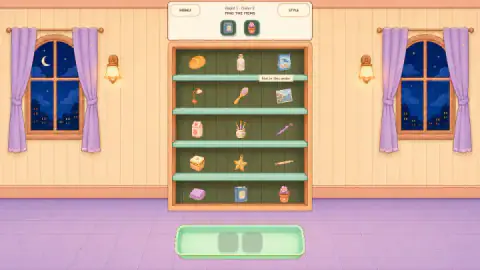
Taken by opening the game ourselves and letting it run — not supplied by the publisher, and not the same picture every other site shows.
How to play Night Order: Pick & Pack
- Read the two icons at the top. Under FIND THE ITEMS, the header shows what this order wants. In the orders we saw, that meant two objects.
- Swipe them into the tray. Find each one on the shelf and swipe it down. It leaves the shelf, lands in a slot of the tray, and its icon in the header gets a tick.
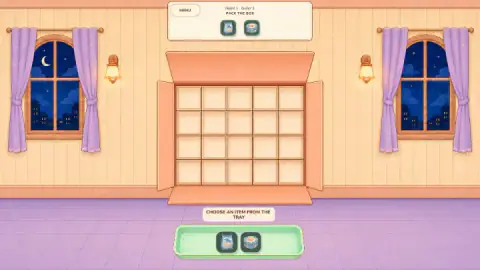
- Pack the box. When both are in the tray, the shelf is replaced by an open box with a grid, and the header changes to PACK THE BOX. Drag each item from the tray into a cell.
- Read the results panel. It shows your stars, the conditions you met and the ones you missed, then offers Next order and Replay order.
Tips from our run:
- Swipe, do not tap. The instructions on the listing talk about tapping, but the first order's own tip says to swipe. We tapped the round tin and it stayed where it was. A swipe moved it.
- Check the icons, not your memory. The objects repeat between orders, and what was right a minute ago may not be right now.
- Look at the whole shelf before you move. The shelf reshuffles between orders, so a position you remember means nothing.
- Plan the box before the first drag. Moving items again is limited if you want the third star, as the next section explains.
Controls
| Swipe an item on the shelf | Sends it to the tray. This is what the game's own tip asks for, and what worked for us |
|---|---|
| Drag an item from the tray | Places it in a cell of the box |
| Rotate button | Turns an item, according to the game's instructions. We never saw this button in the one box we packed |
| Replay order | Lets you try the same order again from the results panel. We did not use it |
Features
- Each order has two stages: find the items on the shelf, then pack them into a box
- The shelf we saw holds 15 objects in five rows, and the orders we saw asked for two
- The first box is a grid of five columns by four rows
- The results panel lists three conditions: completing the order, packing tightly, and no more than two repacks
- A wrong pick earns a Not in this order tag, and across several minutes of wrong picks we saw no penalty
- No clock on any screen we played
- After we reloaded the page, the title panel offered Continue at the order we had reached, with our stars and tokens intact
Game details
- Developer
- AbyssKitty Games
- Release date
- July 2026
- Last updated
- October 1, 2026
- Added here
- June 2026
- Technology
- HTML5 (2D)
- Platforms
- Browser (desktop, mouse), Browser (mobile & tablet, touch)
- Classification
- Puzzle
- Saved progress
- Saving, when available, is managed by this game. Mava cannot confirm your level.
FAQ
How do you play Night Order: Pick & Pack?
Each order starts with two small icons at the top of the screen showing what you need. You find those objects on the shelf and swipe them into the green tray at the bottom. The shelf then gives way to an open box with a grid, and you drag each item from the tray into a cell.
How do you get three stars in Night Order: Pick & Pack?
The results panel lists three conditions: order completed, packed tightly, and no more than two repacks. We ticked the first and third and received two stars, so it looks like one star per condition, though that rests on a single order. The line we missed read It can be packed more tightly, and the panel did not say what would have counted as tight enough.
Why will an item not go into the tray in Night Order: Pick & Pack?
There are two likely reasons. If a small tag says Not in this order, that object is not one the order wants, so check the icons at the top again. In our session a single tap on the right item also left it on the shelf, while swiping it worked, which matches the tip the game shows on its first order.
Can you lose in Night Order: Pick & Pack?
We never saw a fail screen, a lives counter or a clock in our session. We made many wrong picks on the second order and the game only showed its Not in this order tag. We played just two orders, so later nights may add pressure we did not meet.
What does Reward x3 mean in Night Order: Pick & Pack?
It is a purple button with a play icon on the results panel, below Next order and Replay order. The panel had just awarded us one flower token, so it appears to multiply that reward, and the play icon suggests an ad. That is our reading of the screen, because we never pressed the button.
How many levels does Night Order: Pick & Pack have?
We could not find a total. The game labels its stages by night and order, such as Night 1 - Order 2, and neither the screens we saw nor the game's listing gives a count. We completed only the first order and stopped during the second.
Does Night Order: Pick & Pack save your progress?
The order you have reached was kept when we reloaded the page in the same browser. The title panel offered Continue at Night 1 - order 2 and still showed our two stars and one token. Items already in the tray were not kept: the tray came back empty and the book had returned to the shelf.
Who made Night Order: Pick & Pack?
AbyssKitty Games and dates the release is credited to July 2026, with an update in October 2026. It is listed for PC, Android and iOS, in portrait, and in six languages including English and Spanish.