







About Place It Right
Most tidying games hand you a messy room and a hundred things to put away. Place It Right starts with three. Three framed pictures hang on a pale wall, all showing the same little landscape: two trees, a winding path, a couple of clouds. The two outer frames hang straight. The middle one does not.
That is the whole first level, and it is harder than it looks. In our run the crooked frame did not straighten when we tapped it, and when it did move, it went too far: the next time we looked, the picture was upside down. Straight is not the goal. The goal is to make the middle frame look exactly like its neighbours, trees on the left and path running the same way.
Place It Right is by Hikma Maulana. It appeared in July 2026, was updated in October. It is in English, made for landscape screens, and listed for PC and Android.
The key button shows you the answer
The key button in the top right corner opens a picture of the frame hanging straight. It sits on a white panel with an X in the corner, and closing it drops you straight back into the level. We opened it twice in our session and saw no cost and no timer attached to it.
That matters for who this game suits. Place It Right does not test whether you can guess the rule: the hint gives you the rule in one picture. What it tests is your hand, getting the object to match what you have seen. For a younger player, or anyone who just wants something calm to fiddle with, that is a gentle way in.
A small cousin of the tidying puzzle
Putting things in order became its own kind of game in the early 2020s. Unpacking, by Witch Beam, came out in 2021 and asked players to unpack moving boxes into a new home. A Little to the Left, by Max Inferno and Secret Mode, followed in November 2022 on PC and Mac, with a whole game built around sorting, lining up and straightening household objects.
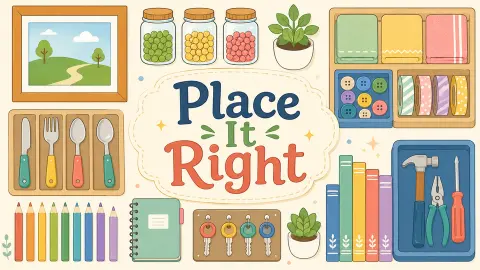
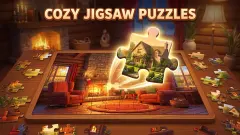
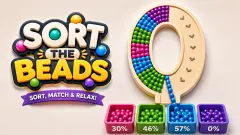
Place It Right borrows that idea and shrinks it to one scene at a time. The cover art for the game shows the kind of objects its description promises for later levels: jars of coloured balls, cutlery in a tray, a row of coloured pencils, keys on a board, a shelf of books, buttons in a box and a tray of tools. The description says those puzzles are built around colour, size, shape, symmetry or category. We did not reach any of them, so treat that list as the game's promise, not our report.
What we saw, and what we did not
We played one session of about ten minutes on a computer, with two reloads along the way. Every time, we came back to the first level with the middle frame at the same tilt. We turned the frame to several angles, including upside down and a sharp diagonal, and opened the hint twice, but we never got it to hang straight. So we saw no win screen, no second level and no level select screen, even though the pause panel offers one.
We cannot tell you how many levels there are, whether levels give stars or scores, or how hard the later ones get. The yellow star with a 1 on the loading screen suggests levels are counted, but we only ever saw the 1.
More tidying games
If the idea appeals, Tidy Up - Satisfeel ASMR starts with a stand of toppled pot plants and a clock against you, Satisroom - Perfectly Organized mixes packing, cleaning and organizing in short scenes, and Tidy Up the Dollhouse asks you to put a whole dollhouse back in order, rotating objects along the way. There is more in our puzzle games.
Screenshots
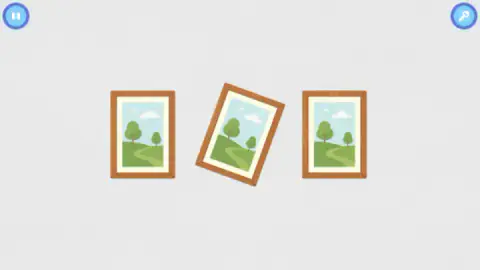
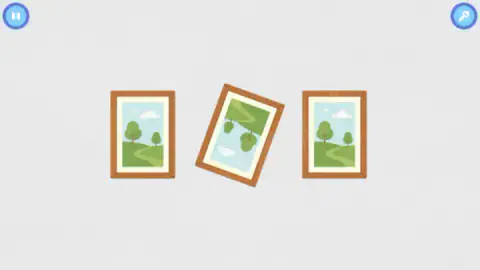
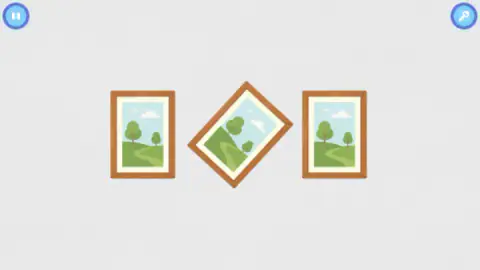
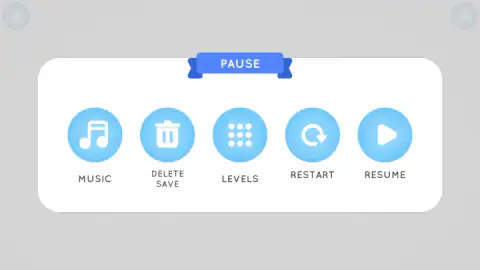
Taken by opening the game ourselves and letting it run — not supplied by the publisher, and not the same picture every other site shows.
How to play Place It Right
- Wait for the star. Before the level there is a blue screen with a yellow star showing the number 1 and a bar that fills to 8 MB. That is the whole download, about the size of a few phone photos.
- Look at what is already right. In the first level, the two outer frames are your reference. They show how the middle one should hang.
- Drag to move or turn an object. The game's instructions say you pick objects up by dragging with the mouse, or with a finger on a touchscreen, and drop them by letting go.
- Check the key button if you are stuck. The key in the top right corner opens a picture of the solution.
- Pause from the top left. The pause panel holds Music, Delete Save, Levels, Restart and Resume.
Tips from our session:
- A tap is not a turn. We tapped the middle frame about fifteen times without any change. The one time it moved a long way was after a long sideways drag across it.
- Watch the picture, not only the frame. After that drag the frame was tilted at roughly the angle it started, but the landscape inside was upside down. A frame can look nearly straight and still be wrong.
- Restart is in the pause panel. If the frame ends up somewhere awkward, the pause panel offers Restart; we did not need it, because a reload already brought the level back to its starting tilt.
Controls
| Mouse drag or tap and drag | Picks up and moves an object, according to the game's instructions; a long sideways drag turned the crooked frame in our run |
|---|---|
| Release the mouse button or your finger | Drops the object where it is |
| Key button (top right) | Opens a picture of how the frame should look, with an X to close it |
| Pause button (top left) | Opens the pause panel with Music, Delete Save, Levels, Restart and Resume |
Features
- The first level is three identical framed landscapes on a wall: the two outer frames hang straight and the middle one is crooked
- The crooked frame can end up upside down, so getting it straight is not enough: the picture has to be the right way up too
- A key button in the top right corner shows the frame hanging straight, as a picture of the goal
- The pause panel has Music, Delete Save, Levels, Restart and Resume, so progress is saved and levels can be picked again
- The game is about 8 MB, and a loading screen with a yellow star counts it down before each level
- The game's own description says later levels are built on colour, size, shape, symmetry or object category, with books, keys, pencils, buttons, tools and kitchen items
Game details
- Developer
- Hikma Maulana
- Release date
- July 2026
- Last updated
- October 1, 2026
- Added here
- May 2026
- Technology
- HTML5 (2D)
- Platforms
- Browser (desktop, mouse), Browser (mobile & tablet, touch)
- Classification
- Puzzle
- Saved progress
- Saving, when available, is managed by this game. Mava cannot confirm your level.
FAQ
How do you play Place It Right?
Each level shows a group of everyday objects that are out of place, and you drag them until the scene looks right. In the first level that means three framed pictures on a wall: the two outer ones hang straight, and you have to turn the middle one until it matches them. The game says later levels sort objects by colour, size, shape, symmetry or category.
How do you solve the first level of Place It Right?
The goal is to make the crooked middle frame hang like the two beside it: upright and with the picture the right way up. In our session plain taps on the frame did nothing, while a long sideways drag turned it a long way, at one point upside down. We did not get it straight in about ten minutes, so we cannot give the exact move that finishes it.
Is there a hint in Place It Right?
Yes. The blue button with a key in the top right corner opens a white panel showing a single frame hanging straight, which is how the crooked one should end up. An X in the corner closes it and puts you back in the level. We used it twice and it did not cost anything we could see.
Does Place It Right save your progress?
The pause panel has a Delete Save button and a Levels button, which means the game keeps your progress and lets you go back to levels you have reached. Every time we reloaded during our session, we came back to the same first level with the middle frame at the same tilt.
Who made Place It Right?
The developer is listed as Hikma Maulana. It came out in July 2026 and was last updated in October 2026.
Can you play Place It Right on a phone?
It is listed for PC and Android in landscape, and the controls are tap and drag on a touchscreen, according to the game's instructions. We played it on a computer with a mouse. Hold the phone sideways, because the levels are laid out in landscape.