


About Fix Pizza: Food Sorting
Fix Pizza: Food Sorting looks like a game about spotting what does not belong. The order says pepperoni, the pizza arrives with pineapple, bacon and artichokes on it, and you pick off the rest. Play it that way and you will lose markers on toppings that really are wrong.
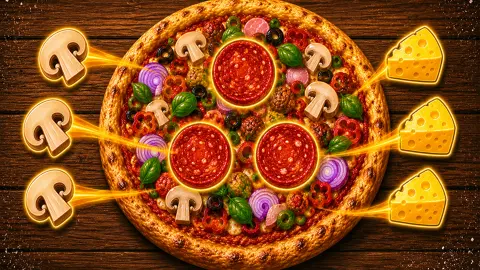
The catch is in the plates. Three of them sit on the right of the screen, each asking for one topping, and only those three toppings can be taken at that moment. A green pepper cost us a marker twice before a pepper plate existed. When one appeared, the same kind of pepper went across on the first click.
So the game is less about finding the odd one out and more about doing the job in the order the kitchen asks for it.
We played for about four minutes with a mouse and did not finish the first level. In that time we removed 15 toppings, filled four plates and used three of our five mistakes. We did not see the level end, a second pizza or what a fifth mistake does.
The game is credited to Superec Games. It has been available since June 2026.
The plates decide what counts as an extra
The first pizza carries pepperoni, cheese and, by our count, ten kinds of topping that should not be there: red onion, mushroom, green olive, pineapple, green pepper, bacon, artichoke, garlic, small caper berries and browned cubes that look like grilled chicken.
You cannot clear them in any order you like. Our first three plates asked for onion, mushroom and olive. When the onion plate filled, a pineapple plate replaced it. Garlic and artichoke came next, and the green pepper plate only arrived after the olives were done.
Every plate we saw asked for three pieces. We met seven of the ten toppings on plates before we stopped, and bacon, caper berries and the grilled cubes had not been called yet.
This is where our mistakes came from. With garlic, artichoke and olive on the plates, we clicked a green pepper. It was plainly an extra, and the note lost a marker anyway. We did the same thing again a few moves later with the same result. The lesson is simple: the pizza tells you what is wrong, and the plates tell you what is wrong right now.
A counter that runs from 10 down to the finished pizza
At the top of the screen, next to the level number, there is a small plate and a number. On level 1 it started at 10.
Nothing on screen says what it counts, but its behaviour was consistent. It showed 9 after we filled the onion plate, 7 after the pineapple and mushroom plates filled within a few clicks of each other, and 6 after the olives. We read it as plates left to fill.
That fits the pizza. Ten kinds of extra topping and ten plates would make the first level a job of about thirty clicks, if you make none you regret. We were four plates in when we stopped, with two artichokes and one pepper already on their way to the next two.
Five markers, and three buttons we did not press
Under the order note is a row labelled Mistakes with five round ticks. Each wrong click turns one into a red cross, starting from the left. Ours went on two green peppers and a cheese wedge.
We did not reach the fifth cross. The listing says that when every marker is used you have to restart the level, and the pause box has a Restart button for it.
Below the pizza are three help buttons: Highlight, Mistakes and Shuffle. We left all three alone, so we cannot tell you how many uses you get or whether they cost anything. The listing describes them as showing the toppings you can take, clearing used markers and rearranging the pizza.
There is one more offer on screen. Where a fourth plate would go, a grey panel reads "+1 plate" with the words "watch ad" under it. A fourth plate would open one more topping at a time, which is exactly the limit that caused our mistakes. We did not take it, and three plates were enough to keep moving.
Why the pepperoni stays and the peppers go
There is a small joke hidden in the first order, intended or not. In Italian, peperoni means bell peppers. The spiced sausage that English speakers call pepperoni is an Italian-American invention, and ordering a "pepperoni pizza" in Italy can get you a pizza covered in peppers.
The first level has you do the reverse. The sausage is the recipe and the green peppers are the mistake, to be lifted off three at a time once their plate comes up.
Who it is for
Anyone who likes tidying a busy picture at their own pace. We saw no clock on the first level, the rule fits in a sentence, and a child who can tell an olive from a caper berry can play it.
It is not a cooking game in the usual sense. You do not bake, serve customers or earn money in the part we saw; you take things off a pizza. It is not a match-three either, whatever the labels on some listings say. And with one unfinished level behind us, we cannot say how much harder later pizzas get or how often ads appear.
More sorting and finding games
Cook Soups: 3 in a Bowl is the closest relative we have: you tap ingredients out of a pot and serve them three to a plate. Snack Sort does three of a kind inside a vending machine, and Goods Sort 3D - Triple Puzzle moves the same idea onto shop shelves with a clock. For pure looking, Find the Frog - Hidden Objects hides its frogs in a black-and-white pond. The rest are under cooking games.
Screenshots
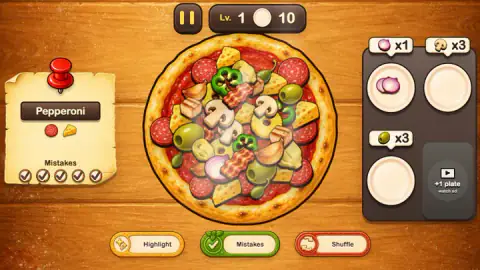
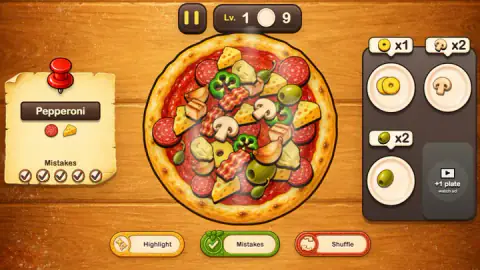
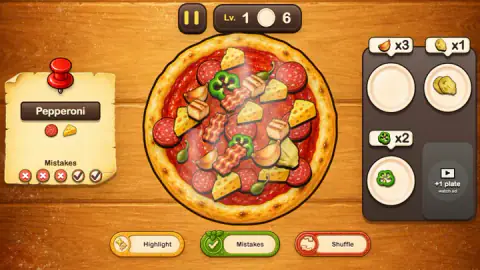
Taken by opening the game ourselves and letting it run — not supplied by the publisher, and not the same picture every other site shows.
How to play Fix Pizza: Food Sorting
- Start level 1 from the opening menu. A short tutorial called First order lights up one plate and asks you to click the topping shown on it.
- Read the order note pinned on the left. On the first level it says Pepperoni and shows two pictures: a slice of pepperoni and a wedge of cheese. Those two stay on the pizza.
- Look at the three plates on the right. Each has a label with one topping and a number, such as a red onion and x3.
- Click that topping on the pizza. It jumps to its plate and the number drops by one.
- When a plate is full it clears, and a new plate with a different topping takes its place. Keep going until the pizza matches the note.
What four minutes taught us:
- The plates are the to-do list. Before every click, check that the topping is on one of the three labels. Being an extra is not enough.
- Cheese is on the order. The wedges are large and sit on top of other things, so they are easy to hit by accident. One of our three mistakes was a cheese wedge.
- No dragging. A single click on the topping does the whole move. Clicking a plate does nothing.
- Toppings overlap. A mushroom can hide most of a pineapple ring. If a plate still needs one piece and you cannot see it, look under the bigger items.
- Mind the pause button. It sits directly above the pizza. We opened the pause box by accident more than once; the green Continue button closes it.
Controls
| Left click on a topping | Sends it to its plate if a plate is asking for that topping; otherwise it costs one mistake marker |
|---|---|
| Pause button, top centre | Opens a pizza box with a Sound switch and Restart, Continue and Main menu |
| Highlight, Mistakes and Shuffle | Three help buttons under the pizza; we did not press them |
| +1 plate | A fourth plate offered in exchange for watching an ad; we left it alone |
| Keyboard | Enter and the arrow keys did nothing we could see |
Features
- A pizza buried under ten kinds of extra topping, with an order note that names the two that stay
- Three plates open at once, each asking for three of one topping and counting down as you fill it
- A counter at the top that started at 10 and dropped by one for every plate we filled
- Five mistake markers on the order note that turn from ticks to red crosses
- Highlight, Mistakes and Shuffle buttons, plus a fourth plate behind an ad
- No timer on screen during the first level
Game details
- Developer
- Superec Games
- Release date
- June 2026
- Added here
- April 2026
- Technology
- HTML5
- Platforms
- Browser (desktop)
- Saved progress
- Saving, when available, is managed by this game. Mava cannot confirm your level.
FAQ
How do you play Fix Pizza: Food Sorting?
A note on the left names the order and shows the toppings that belong on it. On the right are three plates, each showing one topping and a number. Click that topping on the pizza and it moves to the plate. Fill a plate and a new one takes its place, until only the toppings on the note are left.
Why did I get a mistake for tapping an extra topping?
Because no plate was asking for it yet. On the first pizza a green pepper is an extra, but we lost a marker each of the two times we clicked one before a pepper plate appeared. Once that plate was open, the same kind of pepper went across without trouble. Only the toppings shown on the three open plates are safe to click.
How many mistakes can you make in Fix Pizza: Food Sorting?
The order note carries five markers. Each wrong click turns one from a tick into a red cross. We used three and did not reach the fifth. The game's listing says that using all of them means restarting the level.
What do Highlight, Mistakes and Shuffle do?
They are three help buttons under the pizza. We did not press them in our session. According to the listing, Highlight shows toppings you can take, Mistakes clears used markers and Shuffle rearranges the toppings on the pizza.
What does the number at the top of the screen mean?
It sits beside a small plate and started at 10 on level 1. It went down by one each time we filled a plate and stood at 6 after four plates. We read it as the number of plates still to fill.
Can you play Fix Pizza: Food Sorting on a phone?
It is listed for PC, Android and iOS. We played on a desktop with a mouse only, so the phone version is the listing's word and not something we tested.
Who made Fix Pizza: Food Sorting?
The game's listing credits Superec Games. The game was published in June 2026.