











About Cooking in the City of Winds
Most cooking games in the browser start with a stove and a clock. Cooking in the City of Winds starts with a glass. Before any milk or flour appears, you are at a wooden table with an empty footed dessert glass, a silver marker pen lying beside it, and a white cartoon hand pointing at the glass. There is no timer and no customer waiting. The game wants the glass ready first.
That tells you what kind of game it is. This is a dessert game about following steps and making the result look right, closer to a guided recipe card than to a restaurant rush. Each step is shown by the tutorial hand, and the game does not move on until you do what the hand asks.
Our session lasted about four minutes, at a computer, with a mouse. We picked the first recipe, got the glass through its first step and reached the tray of ingredients. We did not finish the dessert, and this page says plainly where our evidence stops.
The game comes from DL-Studio. It has been available since November 2025.
What the game shows, screen by screen
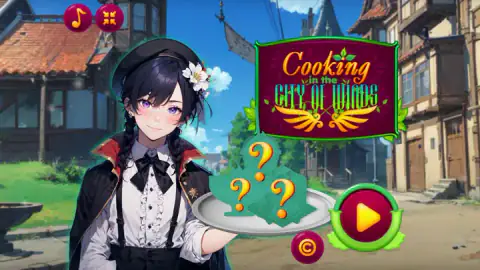
The title. A smiling waitress with dark braids, a black beret with a white flower and a black cape holds out a silver tray with three green dishes, each hidden under an orange question mark. Behind her is a street of half-timbered houses under a blue sky, with the game's name on a crimson sign. Those three hidden dishes match the three recipe slots that follow.
The recipe picker. After a purple shimmer, the game shows three slots side by side. For us, the first held a dessert in a glass surrounded by sparkles, and the other two were question marks. Only the open one can be picked.
The preview. Before you cook, the game shows you the goal: a pale lavender dessert in a footed glass, topped with a white flower whose purple-stemmed bells hang over the rim. Two chibi characters stand either side of it, a red-haired girl in a veil and a dark-haired boy in a green beret with a flower. They present the dish; they do not appear in the kitchen.
The kitchen. The table is dark polished wood, framed on both sides by blue and purple flowers, feathers and stars. A parchment work area with a gold border runs along the bottom. This is where the tools and ingredients sit.
Where we got stuck: the glass and the pen
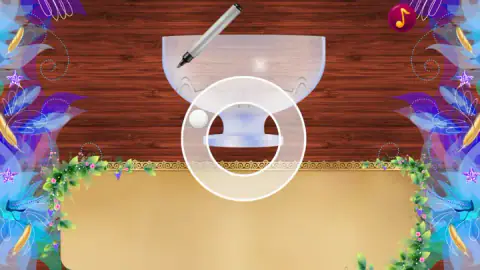
The first cooking step put the empty glass and the marker pen on the parchment. The hand pointed at the glass. Then the pen moved over the glass and a large white ring appeared around its base, with a small white ball sitting on the edge of the ring. It looked like a path to trace.
We spent more than two minutes here. We clicked, we dragged sideways, we dragged from the middle of the glass outward. After a long drag across the ring and a click in the middle of the glass, the table changed and the ingredients arrived. We cannot tell you which of those two moves the game was waiting for, and we did not find out what the pen draws.
If you get stuck on the same screen, our advice is to drag the small ball along the ring, the way the hand suggests, rather than clicking.
The ingredients, and what they suggest
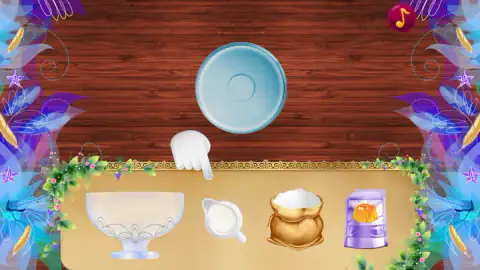
The next screen puts an empty blue plate on the table and four objects on the parchment tray:
- a large footed glass bowl,
- a small jug of milk,
- a cloth sack full of white powder, probably flour or sugar,
- a purple packet with a picture of a wobbly orange pudding on the front.
The hand pointed down at the tray. We dragged the sack and the jug up towards the plate, and our time ran out before we saw either one land. Looking at the screen again, the hand points between the glass bowl and the jug, so the bowl in the tray is probably where the milk goes first. We have not confirmed it.
Together, the packet and the milk tell you what this recipe is: a milk pudding made from a mix, set and served in a glass. That fits the preview, and it fits the first of the three dishes the provider lists, a smooth pudding.
The three recipes
The provider lists three dishes for the festival: the pudding, a tapioca bubble tea, and a marmalade dessert called Hocus-Pocus. The game's own description says presentation matters as much as taste, and that a finished dish can be saved as a picture. We only had the first slot open and did not finish it, so we saw neither the second recipe nor the save.
Bubble tea, if you reach it, is a real drink with a short history. It began in Taiwan in the 1980s, where two tea houses, one in Taichung and one in Tainan, both claim to have invented it. The chewy balls at the bottom, the pearls, are made from tapioca, which is the starch of the cassava root. That is why the drink needs a wide straw: the pearls are too big for a normal one.
Who it is for
Cooking in the City of Winds suits younger players and anyone who likes slow, tidy recipe games more than fast restaurant ones. There is almost nothing to read once you start, no timer, and no way to fail in what we played. The art is soft anime, the colours are pastel, and the whole game is about sweets.
The one warning is the tutorial. The hand shows where to act but not always how, and on the glass step that cost us minutes. A child who gets stuck there may need a grown-up to try dragging instead of clicking.
More from DL-Studio and other dessert games
DL-Studio also made Movie Star Daily Routine, a guided makeover that starts, like this one, with a choice of language. If the bubble tea is the recipe you came for, Doodle Boba Bubble Tea is built entirely around mixing one, and Dessert Maker covers ice cream, waffles and other sweets. Browse the rest of the cooking games.
Screenshots

Taken by opening the game ourselves and letting it run — not supplied by the publisher, and not the same picture every other site shows.
How to play Cooking in the City of Winds
- Press the play button on the intro card, then choose your language from the row of flags and confirm with the green tick.
- On the title screen, press the red and green play button at the bottom right.
- Pick the open recipe slot. Locked slots show a large question mark.
- Look at the preview of the finished dessert, then press play to go to the kitchen.
- At the table, find the white hand. Whatever it points at is the next thing to use. Click it or drag it, depending on the step.
Tips from our session
- The hand is the whole guide. There is no written instruction at the table. If you click around the scene, nothing breaks, but nothing moves on either.
- Do not hunt for buttons. The only button in the kitchen is the music note at the top right. Everything else is done on the objects themselves.
- Clicking is not always enough. On the glass step we clicked the pen and the glass several times with no result. It only cleared after a run of drags, so if a click does nothing, try a drag.
- Watch the tray, not the plate. Once the ingredients appear, the hand points down at the tray, not at the blue plate on the table.
Controls
| Click the play button | Starts the game from the intro card and again from the title screen |
|---|---|
| Click a flag, then the green tick | Chooses the language of the game |
| Click the open recipe slot | Picks the dish; locked slots show a question mark |
| Follow the white tutorial hand | It points at the object the current step needs, and nothing moves until you use that object |
| Drag an ingredient from the tray | The game's own instructions say clicks and drags do all the cooking; we did not see an ingredient land |
| Note button, top right | Music on and off |
Features
- Choose one of seven languages before the title screen
- Three recipe slots, with only the first open at the start
- A preview of the finished dessert before you cook, presented by two chibi characters
- A wooden kitchen table with a parchment work area and a white hand that shows each step
- A footed glass, a silver marker pen, a milk jug, a sack of white powder and a packet of pudding mix
- No timer, no score and no fail screen in the part we played
Game details
- Developer
- DL-Studio
- Release date
- November 2025
- Last updated
- August 10, 2026
- Added here
- September 2025
- Technology
- HTML5 (2D)
- Platforms
- Browser (desktop)
- Classification
- Casual , Cooking , Simulation
- Saved progress
- Saving, when available, is managed by this game. Mava cannot confirm your level.
FAQ
How do you play Cooking in the City of Winds?
Press play, choose a language and pick the open recipe. The game then moves to a wooden table, and a white tutorial hand points at the object you need for each step. You click or drag that object. Nothing happens if you use something else, so follow the hand.
What do you cook in Cooking in the City of Winds?
The first recipe is a dessert served in a footed glass, topped with a white flower. Its ingredients include a jug of milk, a sack of white powder and a packet with a picture of an orange pudding. The provider lists three dishes in all: pudding, tapioca bubble tea and a marmalade dessert called Hocus-Pocus. Only the first slot was open for us.
Who made Cooking in the City of Winds?
DL-Studio, the studio behind several dress-up and daily routine games, including Movie Star Daily Routine. The game has been available since November 2025.
Can you lose in Cooking in the City of Winds?
Not in the part we played. There was no timer, no score and no failure message. When we used the wrong object, the game simply waited until we did what the tutorial hand was pointing at.
How long does a recipe take in Cooking in the City of Winds?
Longer than four minutes if you are learning it, which is how long our session lasted. We reached the ingredients but did not finish the first dessert, so we cannot give a time for a full recipe.
What languages is Cooking in the City of Winds in?
Seven: English, Chinese, Spanish, Japanese, Portuguese, Russian and Turkish. You choose one from a row of flags before the title screen, and there is very little text to read once you are cooking.
Is Cooking in the City of Winds good for kids?
It is gentle: cartoon anime art, sweets, soft music and no way to fail in what we played. Younger children may need help at the start, because the tutorial hand does not always make clear whether to click, drag or trace, and it took us several tries to get past the first step.