













About Anime Girl High School Simulator
Games with "school simulator" in the name tend to promise a whole timetable: lessons, lunch, sports day, a crush. Anime Girl High School Simulator promises all of that in its description, and then starts with something much smaller. Your first job is to go and look at a notice board.
That turns out to be the honest shape of the game. It is a third-person walk around a 3D campus, cut into levels, and each level hands you one errand on a card before it lets you move. You are not managing grades or friendships. You are finding the right spot in the school grounds.
It is by CodesXpirit. This one was published in September 2026, so it is a new game with a small audience so far.
We should say how much of it we saw. We played for about four minutes, and half of that went on menus and tutorial cards. The other half was spent in the courtyard of the first level, which we did not finish. What follows covers the opening in detail and marks what we only read on screen or in the game's own description.
One errand per level, and a skip button that costs an ad
The structure is visible before you play a second of it. The level screen is a row of cards. The first reads 01. The second shows a padlock next to a small film clapper marked AD and the words SKIP LEVEL. After that come cards that just say LOCKED, at least three of them before the row runs off the screen.
So levels open in order, and the game offers to trade an ad for the one you are stuck on. The same offer follows you into the level, where a SKIP LEVEL button sits in the top right corner with the N key printed beside it and the same AD mark.
A coin counter stays in the top left corner through the menus and the level. It read zero for our whole session. We cannot say what earns coins or what they buy.
The mode screen makes a second promise. Its first card, SCHOOL, shows a chemistry lab with a microscope, coloured flasks and a blackboard full of molecules. Its second card, FAMILY, is greyed out behind the words COMING SOON. We did not reach a lab, or any room indoors.
What the campus looks like from the courtyard
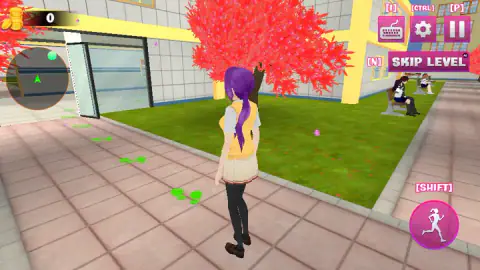
You stand behind a student with a long purple ponytail, a yellow knitted vest and a pleated skirt. Around her is a paved courtyard between yellow and white school buildings, with lawns on both sides and a line of trees in bright red-pink leaf. Pink petals drift across the screen.
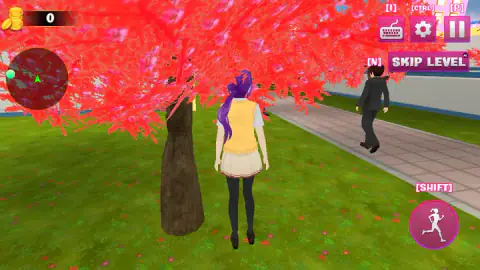
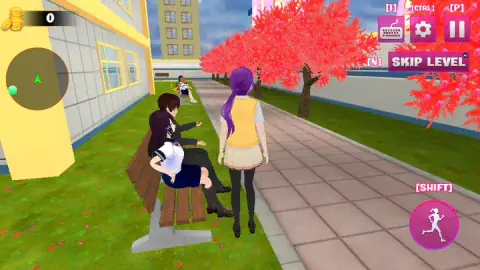
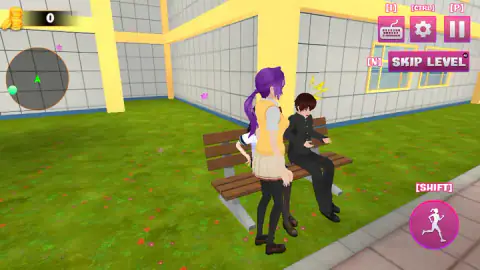
The grounds are not empty. A man in a dark suit walked along the path while we stood under a tree. Two students sat on a bench by the wall, with a third further along. When we stopped right against the bench, yellow startle marks appeared over the head of the boy sitting on it. That was the only reaction we got from anyone, and we cannot tell you what triggers it.
Every button on screen carries its key in square brackets. That is a small thing, and a useful one: you never have to guess how to pause or where the settings are.
The uniforms on that bench are a century old
The two students on the bench wear the two classic Japanese school uniforms, and both have a traceable history.
The girl wears a white blouse with a sailor collar over a navy skirt, the same outfit as the girl in the game's logo. That style entered Japanese schools around 1920. Fukuoka Jo Gakuin adopted it in 1921 under its principal, Elizabeth Lee, and one reason it spread is practical: it was easy to sew.
The boy wears a black tunic buttoned up to a standing collar. That is the gakuran, which became the standard for male students in the same period. Its cut comes from a Prussian army tunic.
The student you control wears neither. From the 1970s and 80s many Japanese schools moved to blazer-style uniforms, and the look loosened. A simulator set in a school like this one is, among other things, a small costume gallery, and this game puts three generations of it within a few steps of each other.
The parts we cannot vouch for
We did not reach the notice board, so we did not see a level end or a reward. We did not enter a building. The classes, quizzes, cafeteria, library, sports day, love-story missions and the sports car in the game's description are all beyond the point we reached, and we cannot confirm any of them. We did not open the outfit options, the settings or the controls card, and we did not test a phone. None of this is a judgement on the game. It is the limit of a short first session.
Who will get on with it
Players who like wandering a 3D school in an anime style and being told exactly where to go next. The tasks are small and the trail is drawn on the ground. If you want a life simulator with stats, schedules and choices that change the story, the first level shows no sign of that.
More from CodesXpirit, and more school uniforms
The studio uses the same green footprints in Mother Simulator Husband Wife Games, where the trail runs through a house instead of a campus. Its Flying Robot Transform Car Games is the opposite mood, a robot fight across a city. For the uniforms themselves, Back To School: Uniforms Edition is a dress-up game built around them, and Anime Avatar Maker: Anime Doll lets you design an anime character piece by piece. The rest are under girls games.
Screenshots
Taken by opening the game ourselves and letting it run — not supplied by the publisher, and not the same picture every other site shows.
How to play Anime Girl High School Simulator
- Press START on the character screen, then pick a mode. There are two cards, and only SCHOOL can be chosen.
- Pick a level. At the start only card 01 is open.
- Read the mission card and close it. Ours said to visit the main notice board. Two short cards follow, one for the camera and one for movement.
- Walk with W, A, S, D and turn the camera with the mouse. Hold Left Shift to run.
- Follow the green footprints on the paving and the green dot on the minimap until you reach the place the card named.
What our short session taught us:
- Start by looking down. The footprints are on the ground a few steps from where you appear, and in our session they led towards a glass door on the left. We walked the other way, onto the lawn, and lost them.
- The trees swallow the camera. Stand under one and the red foliage covers half the screen. We spent a good part of our two minutes behind a trunk. Stay on the paving.
- Read the minimap rim. A green arrow in the middle is you. A green dot sits on the edge of the circle and slides around it as you turn, so we take it to be the direction of the target.
- Run with the key, not the mouse. There is a pink run button in the bottom right corner labelled Shift. We clicked it with the mouse several times and saw no change. It looks made for thumbs on a phone.
- F is not a talk button everywhere. The game's instructions call F the action key. We held it next to two students on a bench and nothing happened.
Controls
| W A S D | Walk the student around the campus |
|---|---|
| Mouse | Turn the camera |
| Left Shift, or the pink run button | Sprint |
| F | Action key, according to the game's instructions; it did nothing where we tried it |
| N | Skip the level; the button carries an AD badge |
| P | Pause |
| Ctrl | Settings |
| I | Shows the controls |
Features
- Third-person 3D campus with paved paths, lawns, benches and trees in bright red-pink leaf
- One mission per level, announced on a card before you can move
- Green footprints on the ground and a round minimap with a green dot to follow
- A level row where only 01 is open at the start and the next card offers a skip for an ad
- Two modes on the menu, of which School is playable and Family is marked COMING SOON
- Every key printed next to its button on screen, from sprint to skip level
- Made by CodesXpirit
Game details
- Developer
- CodesXpirit
- Release date
- September 2026
- Last updated
- September 17, 2026
- Added here
- September 2026
- Technology
- HTML5 (3D)
- Platforms
- Browser (desktop, keyboard and mouse), Browser (mobile & tablet)
- Classification
- 3D , Simulation
- Saved progress
- Saving, when available, is managed by this game. Mava cannot confirm your level.
FAQ
How do you play Anime Girl High School Simulator?
You walk a student around a 3D school campus with W, A, S and D, turn the camera with the mouse and hold Left Shift to run. Each level opens with a card that names one task, and green footprints on the ground plus a green dot on the minimap point the way. The first task we were given was to visit the main notice board.
Who made Anime Girl High School Simulator?
It is by CodesXpirit. The game was published in September 2026.
Is Anime Girl High School Simulator free?
Yes. It runs free in the browser with no download and no account. Ads are part of the design: the skip level button and the second card on the level screen are both marked with an ad symbol.
Can you play Anime Girl High School Simulator on a phone?
It is listed for PC, Android and iOS in landscape, and the game's instructions say a joystick moves the student on mobile. We played on a computer with keyboard and mouse and did not test a phone ourselves.
How many levels does Anime Girl High School Simulator have?
We cannot give a total. The level screen shows card 01 open, a second card that offers a skip in exchange for an ad, and at least three locked cards before the row runs off the edge of the screen. We did not finish the first level, so we never saw the second one open.
What is Family mode in Anime Girl High School Simulator?
It is not playable yet. The mode screen has two cards, School and Family, and the Family card is greyed out behind the words COMING SOON. School is the only mode you can start today.
Can you change the outfit and hair in Anime Girl High School Simulator?
The game's description says you can change outfits, hairstyles and hair colours. We went straight into the first level with the default student, who has a purple ponytail and a yellow knitted vest, and did not open those options, so we cannot say how many there are or whether they cost coins.