

About Anime Avatar Maker: Anime Doll
Most dress-up games treat the face as one item. You pick "eyes", both change, and you move on to the wardrobe. Anime Avatar Maker: Anime Doll splits the face into more pieces than that. In its editor each eye has its own tab, and the first thing we managed to make was a girl with one red eye and one grey one.
That was not what we meant to do. We tapped a red eye, saw only half the face change, and assumed the game had missed the click. It had not. The tab we were on belongs to one eye, and the other eye lives on the next icon along.
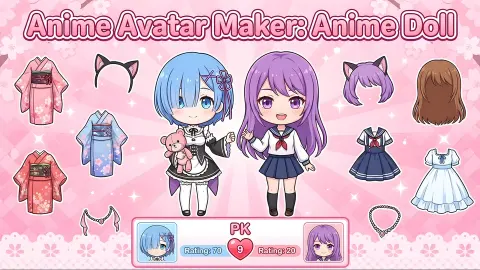
That detail says a lot about what kind of game this is. It is less a wardrobe than a character sheet: a row of small head icons, each one a single part of the doll, and under it a grid of options for that part. The game's description lists skin tones, hairstyles, hair colours, eye expressions, dresses and decorations. It also names two modes, Doll Maker and PK. The first is the editor. The second sends your finished doll into a contest.
Anime Avatar Maker: Anime Doll is by Bravestars. It was published at the end of June 2026.
Our session lasted about four minutes. It covered the editor's skin and eye tabs and the first screen of one battle. We say exactly where it stopped further down.
Why one eye changed and the other did not
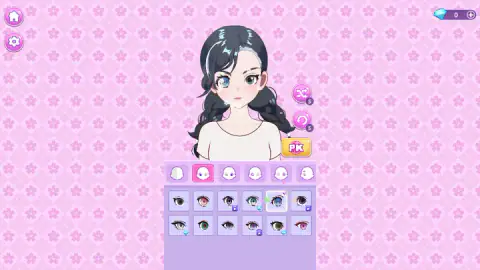
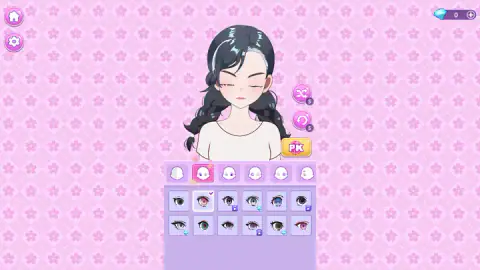
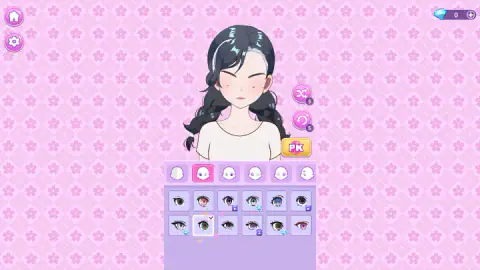
Here is the sequence as it happened. The doll starts with grey eyes. On the second tab we tapped a blue eye, and the eye on the left of the screen turned blue while the other stayed grey. We tapped a red one: left eye red, right eye grey. A green one later: left eye green, right eye still grey.
The icons explain it once you look closely. The second icon is a little head with only its left eye coloured in. The third is the same head with the right eye coloured. Two more icons after that repeat the left and right pattern for another part of the eye, and the sixth shows an eyebrow. We only opened the first two tabs, so we are reading the rest from their pictures.
For the player this is the game's most distinctive feature and its least explained one. Mismatched eyes are a familiar look in anime character design, and here they are the default result of a single tap. A matching pair takes two.
What is free and what is not
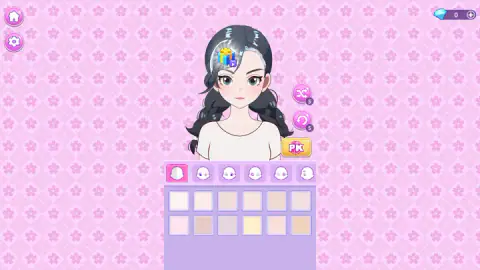
The skin tab is generous: twelve tones in two rows, none of them locked.
The eye tab is where the limits show. It also holds twelve options. Six are plain. Three carry the purple video mark and three carry a blue gem. So half of what you see on that tab is open, and the free half already covers grey, red, blue and green as well as a pink one we did not try.
We tapped one of the video-marked eyes to see what happens. The screen dimmed and a notice said that no ads were available right now, with a button to continue. The eye stayed locked and the doll kept what she had. On another day an advert would presumably play and the eye would open, but we did not see that.
Gems are the other currency. The counter sits in the top right with a plus button beside it, and it read 0 from start to finish. Nothing we did earned one.
Beside the doll are two round pink buttons, one with crossed arrows and one with a circular arrow, each with a small 5 on it. We take them to be shuffle and undo with five uses each, but we did not press either. A gift box with a video mark also floats over the doll's hair when the editor opens. We left it alone.
What our four minutes covered, and what they did not
We saw the skin palette, spent most of the session on the first eye tab, and pressed PK at the end. The panel vanished and two large letters, V and S, slid onto the pink background. That is the last thing we saw.
So we cannot tell you who or what you face in a battle, how a winner is chosen, or what winning pays. The game's description says you create looks for styling challenges and compete with other players. We did not get far enough to check whether those are live people or stored looks.
We also never opened the hair, clothes, decoration or background tabs, and we did not try saving a photo of the doll. All of those come from the description, not from our play.
Where the big eyes come from
It is no accident that an anime doll maker gives the eyes several tabs of their own. Large, detailed eyes are the signature of the style, and the habit is usually traced to one artist. Osamu Tezuka, who published New Treasure Island in 1947 and began Astro Boy in 1952, drew his characters with oversized eyes. He took the idea from the stage make-up of the Takarazuka Revue and from Western cartoon characters such as Betty Boop and Bambi.
A big eye is a big canvas. It has room for a coloured iris, a highlight, a second highlight and heavy lashes, and each of those can vary from one character to the next. That is exactly what the squares on the eye tab are: the same face, told apart by the eye alone.
PK did not start as a fashion word
The yellow button borrows its name from somewhere rougher. PK stands for player killing, a term from the text-based online games of the early 1990s, where one player's character could attack another's. One of those games, Genocide, dropped everything else in 1992 and became known as the first that was purely about players fighting players.
The letters have since come to mean any head-to-head contest. In this game the only thing at stake is an outfit.
Who it suits
Anyone who enjoys building a character more than playing one. The editor asks for no speed and no reading, and a change takes one tap, so it works for young players. It is a poor fit if you want a game with a clear goal in the first minutes: ours were spent entirely on a face.
More dress-up and avatar games
Bravestars has a second maker in our catalogue, Anime Couple: Avatar Maker, which puts two characters in the frame. Little Princess Dress Up also ends in fashion battles against other players. Fashion Princess - Dress Up for Girls is a more traditional wardrobe game, and Magical Fairy Fashion Look adds wings to the outfit. The rest are under girls games.
Screenshots
Taken by opening the game ourselves and letting it run — not supplied by the publisher, and not the same picture every other site shows.
How to play Anime Avatar Maker: Anime Doll
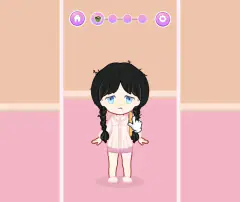
- Start the game and open the doll editor. A dark-haired doll in a plain white top stands above a lilac panel.
- Tap an icon in the row of small heads. Each one opens a different part of the doll. The first is skin.
- Tap a square in the grid below. The option goes onto the doll at once, and a small tick marks the square.
- Work along the row until the look is done. The row runs off the right edge of the panel, so there are more parts than the six icons you see at first.
- Press the yellow PK button to the right of the doll to take her into a battle.
Things worth knowing before the first tap:
- One tab, one eye. The second icon in the row changes the eye on the left of the screen and nothing else. The third icon shows the opposite eye. If you want a matching pair, you have to pick the same eye twice.
- Tapping the ticked square does nothing. We tapped the eye she was already wearing several times before noticing. A second tap does not take it off or cycle it.
- Read the corner of each square. A plain square is free. A purple video mark means an advert first. A blue gem means it costs gems.
- The change is animated. The doll shuts her eyes for a moment and stars pop around the square you chose. If the face looks wrong for a second, wait.
- The keyboard does nothing we could find. The game is taps and clicks only.
Controls
| Click or tap an icon in the row of small heads | Opens that part of the doll (skin, one eye, the other eye, eyebrows and more further along the row) |
|---|---|
| Click or tap a square in the panel below | Puts that option on the doll at once and marks the square with a tick |
| Click or tap a square with a small video mark | Asks for an advert before the option unlocks; when no advert was available to us, it stayed locked |
| Yellow PK button (right of the doll) | Leaves the editor and starts a battle, which opens on a VS screen |
| Home and cog buttons (top left) | Go back to the main menu and open the settings |
Features
- A doll editor where every choice shows on the character the moment you tap it, with no confirm button
- Twelve skin tones on the first tab, all open from the start
- Separate tabs for the left and the right eye, so the doll can wear two different eye colours
- Twelve eyes on the tab we used: six free, three behind a video and three priced in gems
- A shuffle button and an undo button beside the doll, each with a 5 on its badge
- A PK battle that starts from a yellow button inside the editor
- Made by Bravestars
Game details
- Developer
- Bravestars
- Release date
- June 2026
- Last updated
- June 30, 2026
- Added here
- May 2026
- Technology
- HTML5
- Platforms
- Browser (desktop, mouse), Browser (mobile & tablet)
- Classification
- Fashion & Beauty
- Saved progress
- Saving, when available, is managed by this game. Mava cannot confirm your level.
FAQ
How do you play Anime Avatar Maker: Anime Doll?
Pick a part of the doll from the row of small head icons, then tap one of the squares underneath to put that option on her. The change shows straight away and a tick marks what she is wearing. When the look is finished, the yellow PK button beside the doll sends her into a battle against another look.
What does PK mean in Anime Avatar Maker: Anime Doll?
PK is the game's name for its competitive mode. The letters come from player killing in early online games and are now used for any one-against-one contest. Here nobody is hurt: the game's description says you build a look for a styling challenge and compete with other players. In our session the battle opened on a VS screen and we did not see further than that.
Can you give the doll two different eye colours?
Yes. Each eye has its own tab. On the tab we used, every eye we picked changed only the eye on the left of the screen, and the other kept its grey colour. The next icon in the row shows the opposite eye, so that is where you match them or leave them different.
Is everything unlocked in Anime Avatar Maker: Anime Doll?
No. Of the twelve eyes on the tab we used, six were free, three carried a small video mark and three carried a blue gem. The twelve skin tones were all free. Our gem counter stayed at 0, so we could not buy a gem item, and the video item we tapped did not unlock because no advert was available.
How do you get gems in Anime Avatar Maker: Anime Doll?
We did not earn any, so we cannot say for certain. The counter sits in the top right corner with a plus button beside it and read 0 for our whole session. We only played the editor and the start of one battle, and neither paid gems.
Who made Anime Avatar Maker: Anime Doll?
The game is by Bravestars. It was published on 29 June 2026. The same studio name is behind Anime Couple: Avatar Maker.
Can you play Anime Avatar Maker: Anime Doll on a phone?
It is listed for PC, Android and iOS, and the game's own description talks about saving a photo to your phone. Every action is a single tap, which suits a touch screen. We played on a computer with the mouse and did not test a phone.
Is Anime Avatar Maker: Anime Doll free?
Yes. It runs in the browser with nothing to download and no account. Some options are marked with a video icon and ask for an advert before they open, and others are priced in gems, but the free options are enough to build a complete face.