





About Smash & Speed
Most driving games tell you within five seconds what they want: a lap, a rival, a clock. Smash & Speed puts a white car on an empty stretch of grey tarmac, with snowy mountains on the horizon, and says nothing at all. There is a dial in the corner and a row of icons. That is the whole brief.
What turns the silence into a game is the yard around you. In the map we drove, a ramp of yellow and orange squares rises out of the ground, wide enough for several cars side by side, and a yellow track climbs and bends over into an arch that makes the car look like a toy. You decide what to hit, and how fast.
The game is credited to lilfungame. It was published on 15 February 2026.
A warning about how far this page goes. Our session was short: about four minutes in one map, and not all of it moving. We drove, changed view, reached the checkered ramp and started up it. We did not wreck a car, tune one or try the slow motion, so this page is short too and stays with what we saw.
A sandbox with no scoreboard
We looked for a number to chase and did not find one. The dial shows gear and speed; the five icons along the top left are a pause marker labelled TAB, a camera, a pair of crossed tools, a blue car and a round symbol. No coins, no laps, no timer.
That changes who the game is for. If you want a race, this is the wrong tab. If you like setting your own dares, such as getting over the arch or finding out what the red blocks stacked beside the ramp are for, the lack of rules is the point.
The game's description promises a good deal more than we reached: three maps, paint and body kits, suspension tuning, presses and traps, moving traffic and slow-motion crashes. We met none of it in four minutes, so we pass it on as the game's own claim and nothing more.
The control list on screen is not the one on the store page
The instructions published with the game give R as repair. The control list the game itself shows reads differently: R rolls the car over, and a separate key, K, restores it. It also names B for slowing time, N for choosing a car and Shift for nitro.
We did not test those keys, so we cannot settle which list is right. If R does not fix your car after a crash, K is the one to try next.
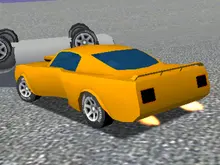
One thing did change under us without our being able to say which key did it. We started in a white saloon with the plate K424MP and, a couple of minutes later, were driving a low white sports car.
Why the ramps want a run-up
Climbing costs speed, in a game with weight to its cars as much as on a real road. A car that stops pushing at 34 km/h carries enough motion to lift itself about four and a half metres and no further. The engine adds to that, but the sum explains the feel.
Our own readings fit. We rolled onto the checkered ramp at 34 km/h in first gear, and the next reading we have, from the slope itself, is 25. The ramp goes on rising well beyond that point.
So give yourself room. The tarmac in front of the ramp is long and flat, and there is nothing to lose by backing off and arriving faster.
More car sandboxes and ramps
For the same idea from another studio, Car Smash Simulator: Crash & Tune is an open yard where the wrecking and the tuning are the game, and Car Crash Sandbox sends cars down long slopes into obstacles. If the ramps were what caught your eye, GT Cars Mega Ramps builds whole tracks out of them, and Stunt Simulator is about landing the jump. The rest are under driving games.
Screenshots
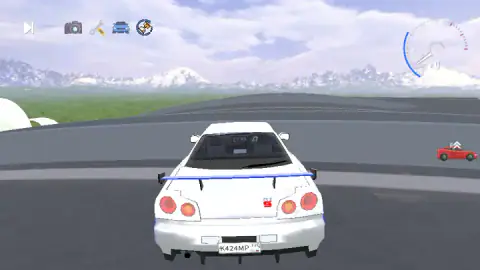
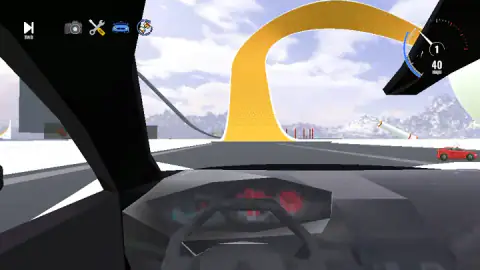
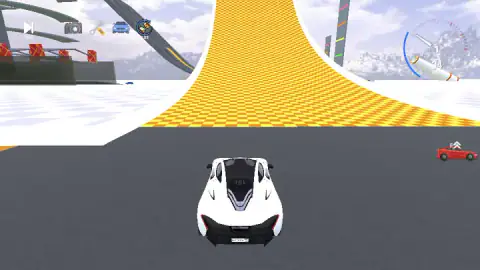
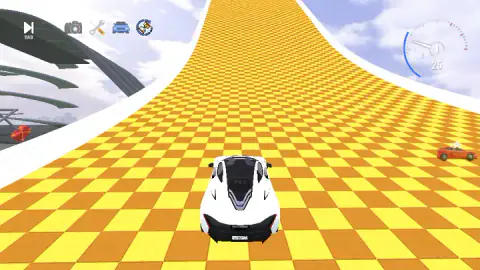
Taken by opening the game ourselves and letting it run — not supplied by the publisher, and not the same picture every other site shows.
How to play Smash & Speed
- Click PLAY. It is the black button in the middle of the title screen.
- Pick a map card. We saw two, labelled DEADLY DESCENT and DESTRUCTIVE TEST SITE, and chose the second.
- Hold W. The car starts from a standstill. We held the key for two seconds or so at a time and saw the dial reach 40 km/h.
- Choose a target. From the start point the yellow arch is straight ahead and the checkered ramp is close by.
- Press C if you want the other view. We drove from behind the car and from the driver's seat.
What we picked up while playing:
- Watch for the grey notice. More than once a small banner reading "Click to keep playing" appeared at the top and the keys went dead. One click on the game brought them back.
- The dial has two numbers. The one in the centre is the gear and the one below is km/h. In every reading we kept, the gear was 1.
- The cockpit view hides a lot. From the driver's seat a thick pillar covers most of the left third of the screen. The view from behind shows where the ramp edges are.
- The red car on the right is not traffic. It is a small icon with two arrows above it, and it sat in the same spot in every screenshot we took.
Controls
| W | Accelerate; the only driving key we leaned on, held for a couple of seconds at a time |
|---|---|
| A / D and S | Steer and brake, according to the game's control list |
| C | Changes the camera; we drove both from behind the car and from the driver's seat |
| Tab | Pauses and opens a panel with sensitivity and graphics settings |
| Space / Shift | Handbrake and boost, according to the control list; not tested by us |
| N / B / R / K | Listed in the game as car selection, slow motion, roll the car over and restore the car; not tested by us |
Features
- A sandbox with nothing to win: no score, no timer and no lap counter anywhere on screen
- A map screen with named cards; the two we saw read DEADLY DESCENT and DESTRUCTIVE TEST SITE
- A test site built around a ramp of yellow and orange squares, wide enough for several cars abreast, and a yellow arch that towers over the car
- Two views in our session: behind the car, and from the driver's seat with the wheel and dashboard in frame
- A dial in the top right corner that shows the gear in its centre and the speed in km/h under it
- Five icons along the top left, including a camera, a pair of tools and a car
- Made by lilfungame
Game details
- Developer
- lilfungame
- Release date
- February 2026
- Last updated
- June 26, 2026
- Added here
- December 2025
- Technology
- HTML5 (3D)
- Platforms
- Browser (desktop, keyboard), Browser (mobile & tablet, touch)
- Saved progress
- Saving, when available, is managed by this game. Mava cannot confirm your level.
FAQ
How do you play Smash & Speed?
Click PLAY, pick a map card, and drive. W accelerates and the game's control list gives A and D for steering and S for braking. Nothing tells you where to go: the map is a yard of ramps and obstacles and you choose what to point the car at.
What is the goal in Smash & Speed?
There is no goal the game keeps track of. In our session the screen showed a speed dial and a row of icons, and no score, timer, laps or mission text. It is filed as a car destruction sandbox, and that matches what we saw: you set your own challenge.
What are the controls in Smash & Speed on a computer?
The game lists WASD to drive, Shift for nitro, C to change camera, Tab to pause, B to slow time, N to choose a car, R to roll the car over and K to restore it. We held W to accelerate and saw two camera views. The other keys we did not put to the test.
Why does the car stop responding in Smash & Speed?
Check the top of the screen. More than once a grey notice reading 'Click to keep playing' appeared and the keys did nothing until we clicked on the game. Tab also pauses, and the pause panel asks for a click to continue.
How many maps does Smash & Speed have?
The game's description says three. The map screen we saw showed two named cards, DEADLY DESCENT and DESTRUCTIVE TEST SITE, and we drove the second one. We cannot confirm a third from our own session.
Can you play Smash & Speed on a phone?
It is listed for PC, Android and iOS, in landscape, and the instructions mention on-screen buttons for mobile. We only played it at a desktop keyboard, so we cannot say how those buttons feel.
Who made Smash & Speed?
It is credited to a developer named lilfungame. It was published on 15 February 2026.