








About Coffee Color Blocks
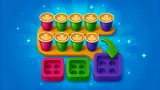
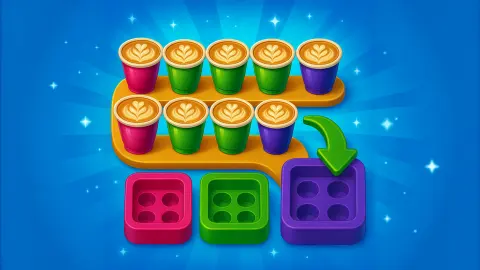
In most colour-gate puzzles the gate is an exit. You slide a block to the door of its colour, it leaves, and that is one block fewer to think about. Coffee Color Blocks turns the gate into a serving hatch. The block does not leave when it arrives. It parks there, and a queue of coffee cups waiting outside hops onto it one at a time.
Every block is covered in round studs, four to a square, and each stud is a seat for one cup. A block two squares long has eight studs and takes eight cups. Only when the last seat is taken does the block vanish from the board.
That would be decoration if every gate had enough cups. It does not. On the second level a red block with eight studs faces two red gates on opposite sides of the board, and each has only four cups waiting. So the block has to make two stops, carrying its first four cups across the board to collect the rest. That is the idea the whole game is built around.
The game is by Kleo Games. It was published in December 2025. We played for about four minutes: levels 1 and 2 finished, level 3 reached and not solved.
Every stud is a seat for one cup
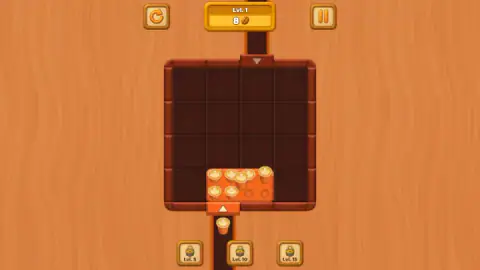
The number at the top of the screen sits next to a small coffee bean, and it is the plainest proof of how the game counts. On level 1 there are two blocks, a green one and an orange one, each two squares long. When the green block had been served and was gone, the counter read 8. At that same moment the orange block was parked at its gate at the bottom with six cups on board, one in the air and one still waiting in the lane. Eight studs, eight cups.
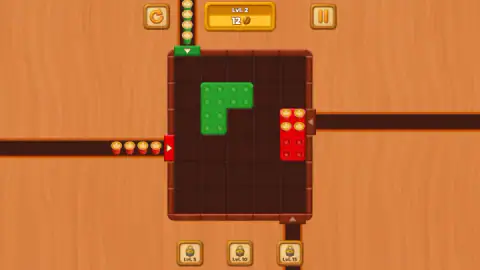
Level 2 confirmed it. A yellow block made of three squares, twelve studs, went first, and the counter read 12. The red block, with its eight studs, took it to 20. A bean per cup, paid when the block is complete and not before.
The counter went back to 0 when level 2 opened, and again on level 3. We saw nothing to spend beans on in our session, so for now treat it as a tally of the level and not as money.
The red block on level 2 needs two gates
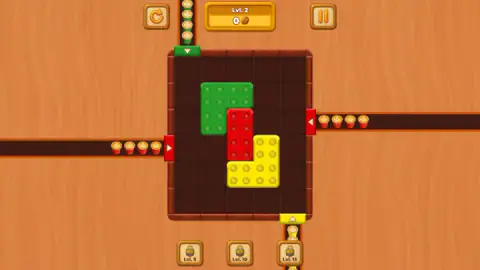
Level 2 is where the game shows its hand. The board grows to five squares wide and six tall, and it holds three blocks: a green L, a yellow L and a short red bar wedged between them. There are four gates. Green is on the top edge, yellow on the bottom, and red appears twice, once on the left edge and once on the right.
The yellow block sat between the red bar and the right-hand gate, so yellow had to go first. Once it had been filled and cleared, we slid the red bar against the right-hand gate. Four cups jumped on, the gate went dark, and the bar stayed where it was, half loaded. The counter did not move.
We then dragged it back across the board, cups and all, to the gate on the left. The other four cups came aboard and the bar disappeared. Only the green L was left, and it finished the level.
Nothing on screen explains this. We saw no tutorial card and no pointing hand on these levels. The first time a block reaches its gate and does not leave, it looks like a mistake. It is the rule.
Level 3 stopped us, and the board shows why
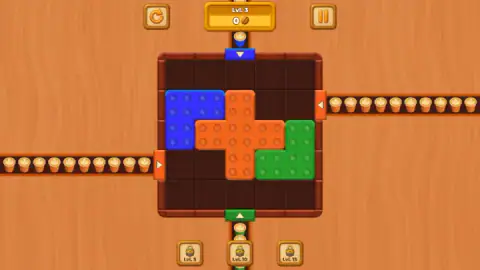
Level 3 is a five-by-five board with three blocks locked together: a blue L, a green L and, between them, an orange cross made of five squares. The cross has twenty studs. Orange gates sit on the left and right edges, with ten cups visible in each lane, so it is another block with two stops to make.
We had about half a minute left and made three drags. We pulled the blue block towards the cross, then pushed it at the left wall, then tried to lift the cross upwards into the blue block. Nothing moved, and looking at the board afterwards it is clear why: each drag pushed a block against a wall or a neighbour. The cross touches blue on one side and green on the other, and cannot move in any direction until one of them shifts.
Our reading of the opening position, which we did not get to test, is that the two L blocks go first. Blue has free squares above it and its gate is on the top edge. Green has free squares below it and its gate is on the bottom. With both gone, the cross has the board to itself for its two trips.
Three other things we did not see: the padlocked buttons under the board, marked Lvl. 5, Lvl. 10 and Lvl. 15; the restart button in use; and the game on a touch screen. We opened the pause panel once. It has a Sound switch, a Music switch and a Menu button, and nothing else.
As for who it suits: there is no clock and no move counter on these levels, so a wrong drag costs nothing. A child who can match colours can finish level 1. Level 3 already asks an adult to stop and look.
Even with two-square blocks, this kind of puzzle has no shortcut
Puzzles where pieces slide in a tray are old. The fifteen puzzle, with its numbered squares, dates from 1880. What took much longer was showing how hard they are.
In the early 2000s two computer scientists, Robert Hearn and Erik Demaine, proved that sliding-block puzzles belong to a class of problems for which no efficient general method is known. In plain words: as boards grow, nobody has a recipe that beats searching through positions. Their result holds even when every piece is a domino, a block of just two squares, which is exactly what level 1 of this game hands you.
Their proof is about the whole family of puzzles, not about this game, and three small levels are nowhere near that wall. But it explains what you feel on level 3. There is no trick to memorise. You work backwards from the gates, ask which block can reach its hatch right now, and move that one.
More colour-gate puzzles on Mava Games
Wood Blocks Jam is by the same studio and is the plain version of the idea: a block that reaches its gate simply leaves. ExitBlocks: Color Match Puzzle and Slide Block Jam are two more takes on blocks and matching gates, and Wood Color Block does it in wood. The rest are filed under puzzle games.
Screenshots
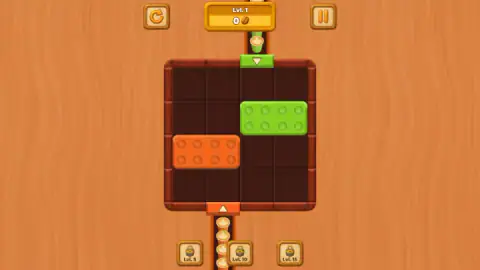
Taken by opening the game ourselves and letting it run — not supplied by the publisher, and not the same picture every other site shows.
How to play Coffee Color Blocks
- Before touching anything, look at the frame of the board. Each coloured strip with a small arrow is a gate, and the cups lined up outside it are what that gate has to give.
- Click and hold a block, then drag it across the dark squares towards the gate of the same colour.
- Leave the block resting against its gate. The cups jump on by themselves, one per stud.
- If the block is still showing empty studs when the queue runs out, find the second gate of that colour and take the block there.
- A full block disappears. Empty the board and the next level loads.
Some things we learned by doing:
- Count the cups against the studs. A gate with four cups cannot finish a block with eight studs. Seeing that early tells you the block has a second trip to make, and that you must keep a path open for it.
- A spent gate goes dark. Once its queue is empty the coloured strip turns brown. If a block of that colour still has empty studs, the answer is somewhere else on the frame.
- Half a block pays nothing. The counter only moves when a block is full, so a block that has been to one gate of two has earned nothing yet.
- The keyboard is not used. We tried the arrow keys, Enter and Escape and the blocks ignored all of them. It is a dragging game.
Controls
| Click and hold a block, then drag | Slide the block across the board; leave it against the gate of its own colour and the cups load themselves |
|---|---|
| Pause button (top right) | Opens a panel with a Sound switch, a Music switch and a Menu button; the red X closes it |
| Restart button (top left) | A round arrow next to the level number (not pressed by us) |
| Tap and slide | Phones and tablets play by touch, according to the game's listing |
Features
- Blocks covered in studs, four to a square, and every stud holds exactly one coffee cup
- Gates that work as serving hatches, where a block parks and fills up before it leaves the board
- A bean counter that pays one bean per cup, but only when a block is completely full
- Blocks that need two gates, such as the eight-stud red bar on level 2 with four cups waiting on each side
- A gate goes dark once its queue of cups is used up
- No clock and no move counter on the three levels we saw
- Three padlocked buttons under the board, marked Lvl. 5, Lvl. 10 and Lvl. 15
Game details
- Developer
- Kleo Games
- Release date
- December 2025
- Last updated
- August 1, 2026
- Added here
- October 2025
- Technology
- HTML5 (2D)
- Platforms
- Browser (desktop, mouse), Browser (mobile & tablet, touch)
- Saved progress
- Saving, when available, is managed by this game. Mava cannot confirm your level.
FAQ
How do you play Coffee Color Blocks?
Drag each block across the board until it rests against the gate of its own colour. The coffee cups queued outside that gate then hop onto the block, one cup per stud. When every stud is covered the block disappears, and the level ends when the board is empty.
Why does a block not disappear when it reaches its gate in Coffee Color Blocks?
Because it is not full yet. A block only leaves when every stud has a cup on it, and some gates do not have enough cups for the whole block. On level 2 the red block has eight studs and each red gate has four cups, so it has to visit both red gates.
How does the counter work in Coffee Color Blocks?
The counter at the top, marked with a coffee bean, goes up by one for every cup, but only when a block is completely filled. In our session it read 8 after the first block on level 1, then 12 and 20 on level 2. It went back to 0 at the start of each new level.
Is there a time limit in Coffee Color Blocks?
We saw no clock and no move counter on levels 1 to 3. The only things at the top of the screen are a restart button, the level number with the bean counter, and a pause button. We cannot speak for later levels.
What are the Lvl. 5, Lvl. 10 and Lvl. 15 buttons in Coffee Color Blocks?
They are three padlocked buttons under the board, each marked with a level number. We stopped on level 3, so we did not unlock any of them and cannot say what they do. The game's description says new mechanics appear as you progress.
Who made Coffee Color Blocks?
Coffee Color Blocks is by Kleo Games, a studio and also made Wood Blocks Jam. It was published in December 2025.
Can you play Coffee Color Blocks on a phone?
It is listed for PC, Android and iOS, in portrait, with tap and slide as the control. We played on a computer with the mouse, where the board sits in the middle of a wide screen, so we cannot tell you how it handles by touch.