




About Driftbound: Race in the Grip of Drift!
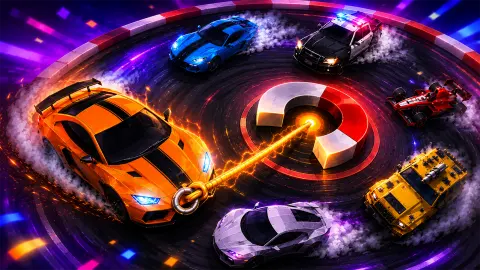
Most drift games hand you a steering wheel and a handbrake and ask you to slide the back of the car out. Driftbound takes both away. The car drives itself. What you get instead is a hook, and on every corner there is a glowing magnet to throw it at.
Hold the button and a line snaps from the car to the magnet. The car swings round the bend on that line like a stone on a string. Let go and it flies off down the next straight. That is the whole control scheme, and the whole game is in its timing: hold too briefly and the turn is not finished, hold through it and the car comes out where it should.
Driftbound is by MontePixel Studio. It was published in August 2026. We played one long session on a computer, seven runs in all, and we will be straight about how it went: most of our time was spent on one message.
The magnet is a pivot, and the release is the skill
Tie a ball to a string and swing it round your hand. The string pulls the ball towards the centre the whole time, which is the only reason it goes round. Cut the string and the ball does not fly outwards. It flies straight on, along the line it was travelling at that instant.
Driftbound's hook works the same way. While you hold, the magnet is the hand and the line is the string, so the car traces a neat arc round the corner. The moment you let go, the car carries on in whatever direction it was pointing. Release a fraction early and that direction is still half-way round the bend, which is why the game calls it early and makes you hook again. Release at the right point and the straight line the car wants to follow is the road.
That is also why the corners have names. A plain left turn is a quarter of a circle; a U-turn is half of one, so you hold for roughly twice as long.
What a run gives you
A run is measured in metres, and there is no finish line in Solo mode. You go until you crash. Our best run ended at 566 m on a green map, and two more passed 300 m. The last three were short, all under 200 m.
The crash card shows a run score and a record, and here is a detail that is not obvious. Our three longer runs each passed a large "2" painted on the asphalt and ended with a run score of 1. The three short ones crashed before any such marker and scored nothing.
Only the scoring runs paid out cash, 6 each time, and the crash card offered to multiply it. Distance on its own did not earn anything in our session, so the markers on the road are worth more than the metres.
The top-left of the race screen shows five hearts. In every run we played only the first one was lit, and on the crash card all five were dark. The map colour also changed every time: pink, blue, green, teal, light blue, then orange.
The Driver Hub and its three upgrades
Between runs, the right half of the menu is the Driver Hub: Garage, Missions, Bonus (marked with a red exclamation point on our first visit) and Stats. Under it sit the three upgrades.
| Upgrade | Level on our first visit | Price to raise it |
|---|---|---|
| Health | 1 | 360 |
| Stability | 0 | 316 |
| Rewards | 0 | 406 |
With the 600 cash you start with, you can afford any one of them straight away, but not two. We bought none, so we cannot tell you how much each one helps. The names suggest the obvious, and Health starting at level 1 next to a row of one lit heart out of five is suggestive, but we have not checked it.
Three buttons on the left of the menu carry padlocks: Control: Hook, Mode: Solo and Track Builder. We did not unlock any of them in our session, so the alternative controls, other modes and the track builder are things we have not seen.
What we played and what we did not
We played for about ten minutes on a computer with the mouse. We started seven runs, crashed six times and reached 566 m at best. We spent a large share of the session on Hold Again cards, because our presses were too short.
We did not buy an upgrade, revive, open the Garage, Missions, Bonus or Stats, or try the keyboard. We did not see a rival car or a finish line, and we did not play on a phone.
Who it is for
Driftbound suits anyone who likes one-button timing games: there is no steering to learn and no accelerator, just a press and a release per corner. It is forgiving at the start, since the race literally waits for you, which makes it a fair pick for younger players. If you want to throw a car sideways with a handbrake, it is not that.
For more cornering, Drifting Mania is built around sharp bends and skid marks, and Pocket Drift gives you a handful of cars and tracks to drift on. If the hook is what you liked, Hook King Runner swings you through obstacle courses on a rope. There are more in our driving games.
Screenshots
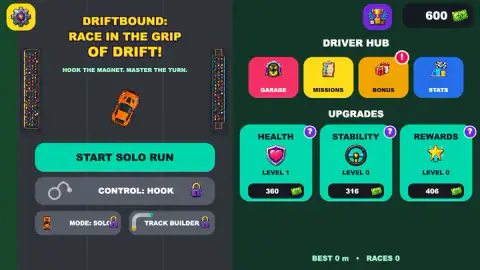
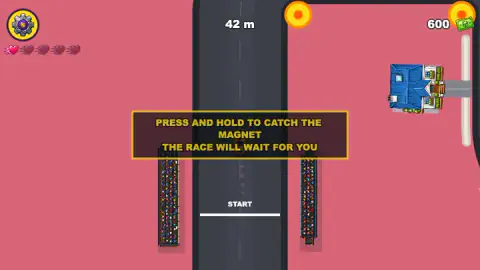
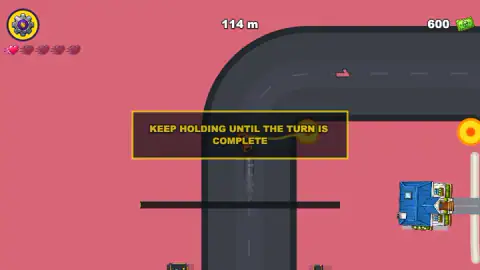
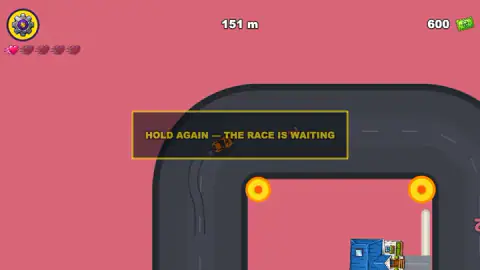
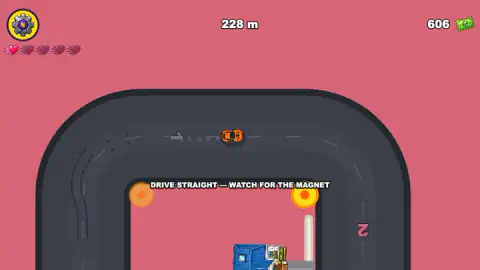
Taken by opening the game ourselves and letting it run — not supplied by the publisher, and not the same picture every other site shows.
How to play Driftbound: Race in the Grip of Drift!
- On the menu, press Start Solo Run. A countdown from 3 starts and the car rolls off the start line with the hint "Drive straight, watch for the magnet".
- As a corner comes up, a glowing orange magnet appears at its edge and the turn is named under the car: Turn Left, U-Turn Left, Bridge Loop Left.
- Press and hold. The car hooks onto the magnet. Keep holding until the car has come all the way round; the game says so in as many words, "Keep holding until the turn is complete".
- Release when the car points down the new road. Repeat at the next magnet.
- If you leave the road, a "CRASH!" card ends the run. From there you can pay 250 cash to revive, start a new run from 0 m, or go back to the menu.
Tips from our runs
- A tap is not a hold. We clicked briefly at first, and every time the game stopped and showed "Hold again, the race is waiting". The car then crept forward a few metres and stopped again at the same kind of prompt.
- Do not let go early. Releasing halfway round brings up "Early, hook again". The race waits for you, so it costs time, not the run.
- Watch the road, not the magnet. The right moment to release is when the car's nose lines up with the next straight. The magnet stays put; the car is what tells you.
- Pause is on the gear. The gear at the top left opens Resume, Sound and Exit Run. When the game lost focus it also paused itself with a "Click to keep playing" note.
Controls
| Press and hold the mouse button or a finger | Hooks the car to the glowing magnet next to the coming turn and swings it round the corner |
|---|---|
| Release | Lets go of the magnet so the car carries on down the new stretch of road |
| Gear, top left | Pauses the run (Resume, Sound on or off, Exit Run) |
Features
- The car drives itself; your only job is the hook, one press-and-hold per corner
- Each corner has a glowing magnet beside it, and turns are named on screen: Turn Left, U-Turn Left, Bridge Loop Left
- Let go too soon and the race freezes on an Early or Hold Again card until you hook again
- Runs are scored by distance in metres; our best ended in a crash at 566 m
- Cash from runs pays for three upgrades in the Driver Hub: Health, Stability and Rewards
- A revive after a crash costs 250 of your cash; otherwise you start a new run from 0 m
- The background colour changed on every run we played: pink, blue, green, teal, light blue and orange
Game details
- Developer
- MontePixel Studio
- Release date
- August 2026
- Last updated
- August 17, 2026
- Added here
- June 2026
- Technology
- HTML5 (2D)
- Platforms
- Browser (desktop, mouse), Browser (mobile & tablet, touch)
- Saved progress
- Saving, when available, is managed by this game. Mava cannot confirm your level.
FAQ
How do you play Driftbound: Race in the Grip of Drift?
Press Start Solo Run. The car drives forward on its own, and before each corner a glowing magnet appears beside the road. Press and hold to hook it, keep holding while the car swings round, and let go when it points down the next straight. A crash ends the run, and your distance in metres is what counts.
Why does Driftbound keep saying Hold Again, the race is waiting?
That card appears when the hook was not held long enough to finish the turn. The game stops and waits instead of crashing you, so nothing is lost. We saw it dozens of times because we were tapping: a quick click does not count as a hold. Press, keep the button down through the whole corner, then release.
What does the magnet do in Driftbound?
It is the pivot for every corner. While you hold, a line ties the car to the magnet and pulls it round the bend, a bit like a ball on a string. The skill is in the release: let go too early and you get an Early, Hook Again warning; hold through the turn and the car comes out on the new road.
What are the upgrades in Driftbound?
The Driver Hub sells three: Health, Stability and Rewards. On our first visit Health was at level 1 and cost 360 to raise, Stability cost 316 and Rewards 406. We did not buy any, so we cannot say how much each one changes.
How far can you get in Driftbound?
The run is open-ended and scored in metres. Our longest run ended at 566 m, and two others at 302 m and 352 m. We never saw a finish line in Solo mode, so the aim is to beat your own record.
Is Driftbound free and does it work on a phone?
It is free to play in the browser, and it is listed for touch screens, where you press and hold the screen instead of the mouse button. We played only on a computer.
Who made Driftbound: Race in the Grip of Drift?
It is by MontePixel Studio, the developer listed for it. It was published on 4 August 2026 and was last updated on 17 August 2026. In late October 2026.