

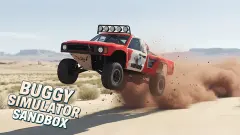
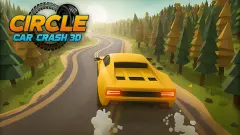


About Drive & Crash Sandbox
The publisher's notes for Drive & Crash Sandbox say there is nothing you have to do: drive about, wreck cars, please yourself. The game itself opens with an order. Before we had touched a key, a grey box at the top of the screen read "Speed up and push the green containers", and a green arrow hung in the air over the one it meant.
So the sandbox starts as a to-do list. That is worth knowing, because it changes what the first minutes are. You are not dropped onto a mountain road with a supercar. You are in a grassy yard the size of a small car park, fenced on every side by shipping containers in red and blue, with two vehicles and one instruction.
The vehicles are a white coupe with two blue stripes and a rear wing, and a red pickup with chunky tyres parked beside it. The camera begins behind the coupe. We clicked the round car icon at the top right and spent the rest of our time in the pickup's cab, looking out over a red bonnet.
Drive & Crash Sandbox is by KreizLand. It was published in June 2026 and updated at the end of September.
What we played: one yard, one container, no wood
Our session lasted about four minutes, and a good part of the first two went on waiting for an advert break to clear rather than on driving. What follows is everything we saw, and it is not much of the game.
The cab is the part that got the most attention from whoever built it. There is a steering wheel, two round dials behind it, a pair of air vents on the dash and a big wing mirror on the left pillar. The mirror shows nothing: it is a plain white slab. Over the top of the yard wall you can see grey blocks of flats and a line of power cables, so the yard sits at the edge of a town and not in a port.
We held W and the pickup rolled forward. The dial at the top right went from 0 to 18 and then 27, and a small digit above it changed from 0 to 1, which looks like the gear. The green container grew until it filled the windscreen. At that point the grey box and the Controls panel disappeared and a new line took their place: "Destroyed wooden props 0 / 3", with a red arrow pointing at it and a plate underneath that says "Complete mission".
We take that change to mean the first job counted. We cannot prove the container moved, because from the cab all we saw was green paint.
The counter never left 0 / 3. We kept pushing forward into the same container, the dial flickered between 0 and 2, and the session ended there. So we cannot tell you what a wooden prop looks like when it breaks, what finishing a mission pays, or what the third mission is.
A real container would win that argument
The yard wall is made of the most common steel box on Earth. A standard shipping container is 8 feet wide and comes in two usual lengths, 20 and 40 feet. The walls are corrugated steel, the same ribbed pattern you can see on the red and blue ones in the game.
Empty, the short one weighs about 2,200 kilograms. That is more than most cars. Loaded, the limit is many times that, and they are built to be stacked as many as ten high on a ship without the bottom one giving way.
Which is why the first mission is a small joke. The game asks a pickup to push one across the grass at the kind of speed you reach in a car park. In a real yard the box would not notice. Here it is the tutorial: the game's way of showing you that things which look fixed can be shoved, before it sends you after things that break.
What the publisher promises and we did not reach
The game's own notes list more than we saw: slopes to launch cars down, bodywork that bends and comes apart, several vehicles, an online multiplayer mode, and keys for nitro, slow motion, repair and a change of camera. None of that showed up in a flat yard at low speed, and our pickup looked the same at the end as at the start.
Two things on the edge of the screen went unexplored too. There is a button with a double arrow at the top left, which we never pressed. And when the game first opened, a ring like a phone's steering stick sat at the bottom of the picture, though we were on a computer.
The listing's page for the game also shows a daily leaderboard, with the top scores in the thousands. No score appeared on our screen, so the points come from somewhere past the first two missions.
Who it suits
Someone who likes a crash game to hand out small jobs, and who enjoys driving from inside the cab. It is less suited to anyone who wants the big jump in the first ten seconds: the opening is a slow push against a steel box, and the game does not say where to go once the arrows vanish.
More crash games on Mava Games
The same studio's Car Crash Sandbox is the closest relative: it was published a few weeks earlier and uses the same keys. Car Smash Simulator: Crash & Tune swaps the yard for an open world of hammers and presses, and Car Crash Test: Abandoned City lets doors and wheels fly off in empty streets. Realistic Car Crash King is the one built around ramps. More are filed under driving games.
Screenshots
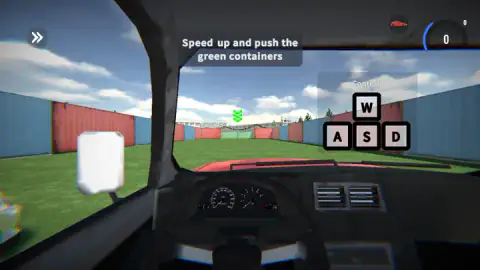
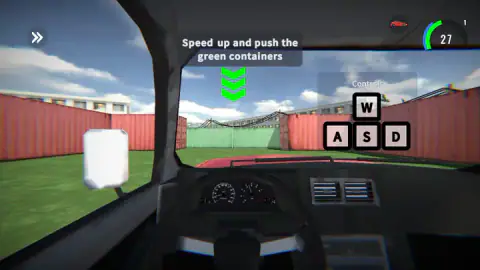
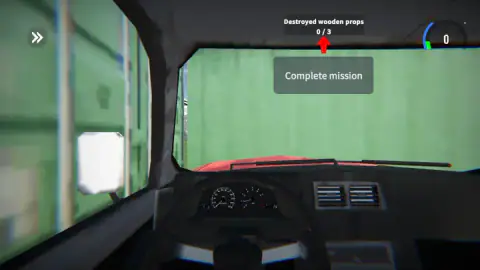
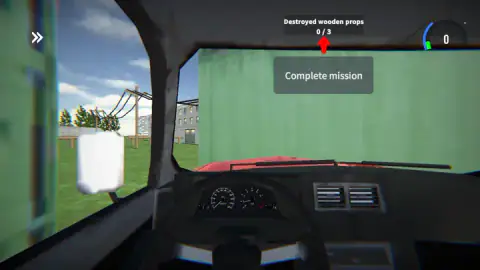
Taken by opening the game ourselves and letting it run — not supplied by the publisher, and not the same picture every other site shows.
How to play Drive & Crash Sandbox
- Wait for the yard to appear. If a dark bar reading AD IN with a countdown crosses the screen, let it run out.
- Pick your vehicle. The round icon with a red car, at the top right, swaps the one you are driving.
- Read the grey box at the top. It names the target, and a stack of green arrows floats over it in the distance.
- Hold W and steer with A and D until you hit what the box asks for.
- When the text changes to a counter, such as Destroyed wooden props 0 / 3, go and find those objects. The arrows are gone by then.
Things we would have liked to know first:
- The first target is at the far wall, dead ahead. Among the red containers that close off the yard there is one painted green. You do not need to steer much. You need room to build speed, so do not start your run from halfway.
- The pickup is not quick off the mark. Across the length of the yard our dial climbed to 27 and no higher. If the game's Shift key for nitro works as its instructions say, this is the place to try it. We did not.
- Do not stay parked against the container. We did, and it cost us the rest of the session. Once the nose is against that green wall, pressing W does nothing useful. Back out and turn towards the gap on the left.
- The second mission's targets are outside your windscreen. From the cab, the only wood we could see was through the side window: poles and a low rail on the grass beyond the containers.
Controls
| W, A, S, D | Drive. The game draws these four keys on screen during the first mission |
|---|---|
| Mouse | The round car icon at the top right, which changed our vehicle, and the other on-screen buttons |
| Space | Handbrake, according to the game's instructions |
| Shift | Nitro, according to the game's instructions |
| N | Next vehicle, according to the game's instructions |
| C | Change camera, according to the game's instructions |
| R | Repair the car, according to the game's instructions |
| V | Slow motion, according to the game's instructions |
| Tab | Pause, according to the game's instructions |
Features
- A walled yard of red and blue shipping containers as the first place you drive
- Two vehicles waiting at the start, a white coupe with blue stripes and a red pickup
- A full cab view with steering wheel, two dials, air vents and a wing mirror
- Missions written on the screen, the first one "Speed up and push the green containers"
- A second mission with a counter, "Destroyed wooden props 0 / 3"
- A speed dial at the top right with a small gear digit above it
- Made by KreizLand, with nine languages listed
Game details
- Developer
- KreizLand
- Release date
- June 2026
- Last updated
- September 30, 2026
- Added here
- May 2026
- Technology
- HTML5 (3D)
- Platforms
- Browser (desktop, keyboard & mouse), Browser (mobile & tablet, touch)
- Classification
- 3D , Driving , Multiplayer , Simulation
- Saved progress
- Saving, when available, is managed by this game. Mava cannot confirm your level.
FAQ
How do you play Drive & Crash Sandbox?
You start in a grassy yard walled with shipping containers, with a white coupe and a red pickup. Hold W to accelerate and steer with A and D; the game draws the keys on screen. A line of text at the top tells you what to hit, starting with the green container at the far wall, and a green arrow marks it.
What are the controls in Drive & Crash Sandbox?
W, A, S and D drive the car, and the game shows those four keys on a Controls panel. The game's instructions add Space for the handbrake, Shift for nitro, N for the next vehicle, C for the camera, R to repair, V for slow motion and Tab to pause. We only confirmed the driving keys and the car icon you click with the mouse.
Are there missions in Drive & Crash Sandbox, or is it free roam?
There are missions, at least at the start. Ours began with "Speed up and push the green containers" and moved on to "Destroyed wooden props 0 / 3", a counter with a plate under it reading "Complete mission". The publisher describes the game as driving around and smashing things as you like, so free roam may come later, but we did not get that far.
How do you change car in Drive & Crash Sandbox?
There is a round icon with a red car at the top right of the screen, next to the speed dial. We clicked it at the start, when the camera sat behind the white coupe, and from then on we were in the cab of the red pickup. The game's instructions also give N as the key for the next vehicle.
Who made Drive & Crash Sandbox?
It is by KreizLand. Drive & Crash Sandbox was published in June 2026 and updated in September 2026.
Is Drive & Crash Sandbox the same game as Car Crash Sandbox?
They are two separate listings from the same studio, KreizLand. Car Crash Sandbox was listed about five weeks earlier, and the two share the same list of keys. Drive & Crash Sandbox is the one tagged as multiplayer. We cannot tell you how much of the content they share beyond that.
Can you play Drive & Crash Sandbox on a phone?
It is listed for PC, Android and iOS, in landscape and portrait, and the game's instructions say phones use on-screen controls. We played on a computer with a keyboard. A ring like a touch stick did show at the bottom of our screen at the start, but we did not test touch.
Does Drive & Crash Sandbox have multiplayer?
The publisher lists an online multiplayer mode and the game is tagged as multiplayer. In our session there was no other player in the yard, no lobby and no name tag, so we cannot say how it works or where you find it.