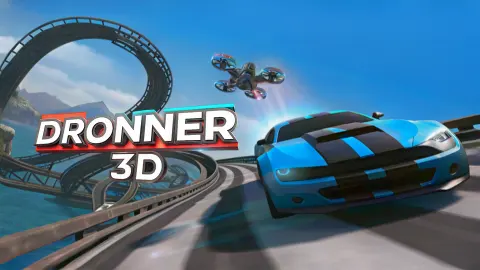



About Dronner 3D
Most flying-car games treat flight as a treat. Stay on the road if you like, take off if you fancy it. Dronner 3D does not offer the choice. On its second track the road ends before the first checkpoint, about seven seconds past the start line, and the next piece of ground is a small platform out on a lake.
The car is the answer to that. Press Space and it turns into a quadcopter, the four-rotor kind of drone. Press Space again and it is a car. Q climbs and E descends. The rest of the screen is built around that switch: a battery bar that runs down, a heart bar in three segments, and a count of checkpoints at the top.
We should be straight about our own run. We played for about four minutes, started the second track several times, and drove off the end of the road on every one of them. Our checkpoint counter never left zero. So this page covers what the game shows and does in its first minutes, which is where it trips people up. It is not a guide to the later tracks.
The game is credited to LEN Projekt and has been available since April 2025.
The tutorial comes in two halves, one per track
Dronner 3D does not explain itself all at once. The first track shows a CONTROL panel with only the driving keys: W and S for "forward and backward movement of the car (drone)", A and D for turning. Its counter reads "CHECKPOINTS 0 / 1". One checkpoint, four keys.
The second track swaps the panel. Now it shows Q and E, labelled "drone movement up and down", and Space, labelled "changing the car to the drone and vice versa". The counter reads "CHECKPOINTS 0 / 3".
That split matters because of what we did next. We failed the first track, pressed NEXT TRACK and arrived on the second one still thinking of the game as a driving game. The panel was on screen for a moment, we held W, and it was gone. If you skip ahead the way we did, stop on the start line and read it. The timer does not seem to start until you move: it read zero every time the panel was up.
Four gauges, and two of them fall while you watch
| Gauge | Where | What we saw it do |
|---|---|---|
| Hearts, three red segments | Top left | Emptied during every run, by different amounts |
| Battery, orange bar | Under the hearts | About half gone after seven seconds of driving |
| Cash, green number | Top right | Rose with pickups and with every failed attempt |
| Timer | Top centre | Counts to the thousandth of a second |
The battery is the one to plan around. On each attempt it started full and had dropped to roughly half by the end of the road, with the throttle held and the car still a car. At that rate a full bar is a matter of seconds, not minutes, and it explains why the first thing waiting past the gap is a battery.
The hearts puzzled us. The bar is drawn as three segments behind a heart, and it went down on every attempt: once we reached the end of the road with two segments left, once with less than half of one. We never worked out what was taking it. Treat that as an open question and watch the bar on your own first runs.
The road stops, and that is the lesson of track two
Here is the second track as far as we saw it. A wide grey road with blue barriers runs straight out over a lake, with snowy mountains behind. Past the chequered line sits a row of five green bundles. Then the road stops, with no ramp at the end of it.
Across the water is a small platform with a glowing blue column on it, which we take to be the first checkpoint. A second platform sits behind it. The battery hovers above them both, far higher than the road.
Nothing about that layout can be driven. The gap is open water and the pickup is in the air, so the track is asking for Space and then Q before the tarmac ends. We kept the throttle down and the car a car, went off the edge, and got the "TRACK NOT PASSED, TRY AGAIN" screen each time.
Failing still pays 100, and the next track is not locked
The result screen after a failure tells you that you have been credited with 100, and the counter agrees: ours went from 150 to 250 and later from 300 to 400. The bundles on the road are worth less. The first ones past the line added 50 between them on two separate starts.
So in our session a failed run paid twice what the pickups we collected did. That is generous, and it means cash builds up even while you are still learning the switch.
Under the three main buttons there is a GARAGE button. We did not open it, so we cannot tell you what the cash buys or what it costs.
After a restart the screen dims and a Continue playing button appears. That is the slot where an advert can run. Click it and the timer starts from zero.
Why a drone needs a battery bar and a car does not
A car that stops moving costs almost nothing to keep where it is. A quadcopter is the opposite. It has no wings, so its four rotors have to hold up the whole machine every second it is off the ground, and the motors never rest. That is why real camera drones are sold by flight time, typically somewhere around twenty to thirty minutes on a charge.
Dronner 3D turns that into its clock. The surprise is that the bar also falls on the road, so the battery works as a limit on the whole run and not only on the flying part. You cannot save power by driving slowly towards the edge and thinking about it.
Who it is for
Players who like a racing game with a second skill to learn on top of steering. Tracks are short, a restart is one click, and failing costs nothing but the attempt.
It is not a relaxed drive. The road gives out early and the battery does not wait. And we cannot tell you how far it goes: two start lines and one gap are all we saw. We met no rival cars either.
More cars that leave the road
Crazy Flying Car grows wings by itself when you leave a raised desert track, so every bend is a shortcut. Gravity Shift Sky Racers GT does the same over a beach, steered with the mouse. Ultimate Flying Car gives you an open city to fly over with no gap to clear. Shape Transform Race is the closest in idea: you switch form to suit the ground ahead, against three rivals. The rest are under driving games.
Screenshots
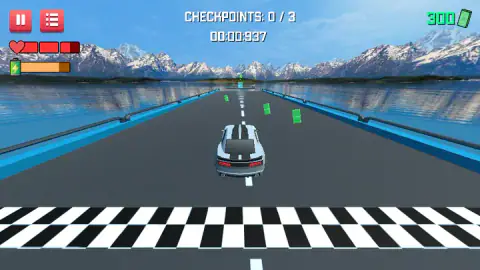
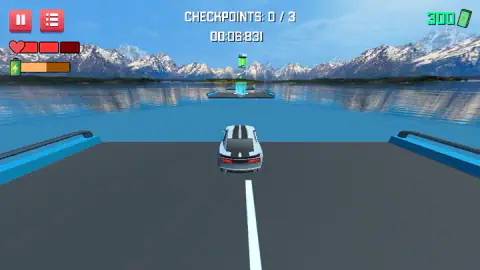
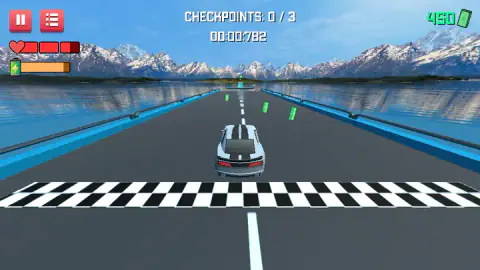
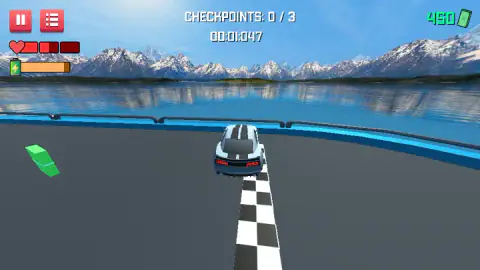
Taken by opening the game ourselves and letting it run — not supplied by the publisher, and not the same picture every other site shows.
How to play Dronner 3D
- Hold W or the Up arrow to drive. S or Down reverses, and A and D or the side arrows steer. The same keys move the drone.
- Read the CONTROL panel on the start line. It disappears as soon as you move, and it is different on each track.
- Drive through the green bundles of cash just past the chequered line. They go straight into the counter in the top right corner.
- Before the road runs out, press Space to change into the drone, then use Q to climb and E to come down. This is the step we never got to.
- Pass every checkpoint. The counter at the top reads "CHECKPOINTS 0 / 3" on the second track.
What four minutes taught us:
- The road is shorter than it looks. At full throttle the second track gave us about seven seconds of tarmac. After that there is water.
- The battery falls on wheels too. We expected it to drain only in the air. It was about half empty by the time we reached the end of the road, without ever leaving the ground.
- The battery pickup is not on the road. A large green battery floats high above the first platform. A car cannot reach it, and a drone has to climb for it.
- Failing pays. Every failed attempt added 100 to the cash counter.
- You can move on without winning. NEXT TRACK took us from the first track to the second after a failure.
Controls
| W or Up arrow | Forward, as a car or as a drone |
|---|---|
| S or Down arrow | Backward, as a car or as a drone |
| A / D or Left / Right arrows | Turn left and right, in both forms |
| Space | Changes the car into the drone and back, according to the on-screen panel; we did not use it during a run |
| Q / E | Drone up and down, according to the on-screen panel; we did not use them during a run |
| Left click | Buttons on the result screen, MENU, AGAIN, NEXT TRACK and GARAGE |
Features
- A car that becomes a quadcopter and back with one key, on tracks built over a mountain lake
- A checkpoint counter per track, one checkpoint on the first and three on the second
- A battery bar that falls while you drive, about half gone after seven seconds at full throttle
- A heart bar in three segments that empties during a run
- Green bundles of cash on the road, plus 100 credited when you fail a track
- A NEXT TRACK button that works even after a failed attempt
- A timer that counts to the thousandth of a second
Game details
- Developer
- LEN Projekt
- Release date
- April 2025
- Last updated
- August 10, 2026
- Added here
- May 2025
- Technology
- HTML5 (Unity WebGL)
- Platforms
- Browser (desktop)
- Saved progress
- Saving, when available, is managed by this game. Mava cannot confirm your level.
FAQ
How do you play Dronner 3D?
Hold W or the Up arrow to drive, steer with A and D or the side arrows, and pass every checkpoint on the track; the counter at the top shows how many are left. The car turns into a drone with the space bar, and Q and E move the drone up and down. You need that on the second track, where the road ends over a lake before the first checkpoint.
How do you turn the car into a drone in Dronner 3D?
The panel shown at the start of the second track gives the keys. Space changes the car to the drone and back, Q moves the drone up and E moves it down. W, S, A and D, or the arrow keys, work the same in both forms. We read those keys from the panel and did not get to fly during our own short session.
What is the battery bar for in Dronner 3D?
It is the orange bar under the hearts, and it runs down during a run. With the throttle held it was about half empty after seven seconds, while the car was still on its wheels. A large green battery floats above the first platform of the second track, well off the ground, which looks like the refill.
What happens when you fail a track in Dronner 3D?
A screen reads "TRACK NOT PASSED, TRY AGAIN" and tells you that you have been credited with 100. Three buttons follow, MENU, AGAIN and NEXT TRACK, with a GARAGE button below. NEXT TRACK worked for us after a failure, so a track you cannot pass does not lock the next one.
How many checkpoints are there in Dronner 3D?
The first track has one and the second has three, shown as "CHECKPOINTS 0 / 1" and "CHECKPOINTS 0 / 3" at the top of the screen. We did not pass any of them in about four minutes, and we did not see a third track, so we cannot say how the numbers grow.
Can you play Dronner 3D on a phone?
The game is listed for PC only, in landscape, and everything the game showed us was a keyboard key. We played on a desktop with a keyboard and did not try a phone or a tablet.
Who made Dronner 3D?
The game's listing credits LEN Projekt. The game was published on 21 April 2025 and last updated in August 2026.