






About BitBanda
Most browser music games are tests. A note slides down the screen, you press at the right moment, and you are told whether you were early or late. BitBanda does not test anything. What it puts in front of you is a mixing desk.
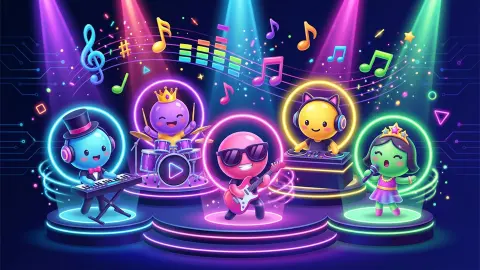
The stage sits in the middle of the screen, and each musician on it is a glowing ring with an icon inside: a flame for Trap, a bell for Bells, a cluster of notes for Pad, a rocket for Riser. Under each one, their name, three small buttons and a volume slider coloured to match. You are not playing the band. You are running it.
Beside the name of the world you are in, in a small grey pill, sits the number that governs everything: 90 BPM. That is the tempo of Hip-Hop Yard, the world you start in, and everything in it is cut to that count. There is no wrong button to press here, only a less interesting one.
The game is credited to Flagwin Studio and has been available since June 2026. Our own session ran about four minutes. We never published a track, never unlocked a second world and never heard a finished composition play through - so nothing below describes how BitBanda sounds. What it describes is how it is built, which turned out to be the more surprising half.
Everything in Hip-Hop Yard is cut to the same 90 beats per minute
This is the design decision that makes the whole game work, and it is printed on screen where almost nobody will notice it.
A loop is a short recording that repeats. Stack two recorded at different speeds and they drift apart within seconds; stack two in clashing keys and the result is unpleasant in a way that needs no training to hear. The whole craft of making music out of loops is keeping them compatible, and BitBanda removes that problem before you arrive. The game's listing states that the sounds in a world are matched in rhythm and key in advance, and the tempo badge beside the world's name is that promise made visible.
The consequence is what matters. Because no combination can be wrong, adding is never a decision - it costs nothing to try one more layer. The decisions have been moved somewhere else: to volume, to what you mute, to what you solo so you can hear it alone. That is why each musician gets a slider and three buttons, while adding one takes nothing but a tap. In a game where you cannot play a wrong note, taking something away is the only expression left.
Auto is the button that changed the band
We pressed Auto three times in one session, and the band was different every time.
The first press filled an empty stage with Trap, Bells and Pad. The second rebuilt it as four, adding Riser. The third threw out most of that and came back with Deep Bass and Vinyl in the mix - two names we had not seen until then.
Two things follow. First, Hip-Hop Yard holds more sounds than it can show at once - at least six by name, in the world that is free and that everybody starts in. Second, the size of a band is not fixed: three and four both happened.
Which makes Auto the most useful button on the screen for a new player, and not for the reason you would expect. It is not there to make a track for you. It is there to show you the cast.
Seven worlds, and a currency made of musical notes
Along the top of the Studio tab sit seven chips, each a genre. Hip-Hop Yard is where you begin. Cosmo-EDM sits beside it with no padlock and no price, which makes two worlds open from the start. The other five are locked, and each shows what it costs.
The prices are not flat. Lo-fi Cat Café is the cheapest at sixty notes, and the ladder climbs through 8-bit Arcade, Synthwave and Phonk to Drum & Bass at a hundred and sixty. You start with fifty, which is a deliberate and slightly cruel number: it buys nothing, and leaves you ten short of the cheapest door in the building.
That shortfall is the economy in one glance. Above the stage a bar tracks a daily task - publish one track to the Catalog - and beside it a yellow button offers twenty-five notes for watching an advert. Two of those would open the café. We never completed the task and never earned a note, so we cannot tell you what publishing pays. We can tell you the game is built so the first thing you want costs slightly more than the first thing you have.
The browser music toy started in France in 2009
Games like this one have a common ancestor, and it is specific enough to name.
In August 2009 a French studio called So Far So Good put a browser toy online named Incredibox, built by Allan Durand, Romain Delambily and Paul Malburet. You dragged sound icons onto a row of beatboxers and they sang in time with one another. Three of its rules have been inherited by nearly everything that followed: you build by adding voices rather than by performing, certain hidden combinations unlock a short bonus, and an automatic mode assembles a mix at random.
Set that beside BitBanda's screen and the resemblance is exact. Adding a musician is a tap, not a performance. The game's listing describes secret combinations that award bonus notes and start a party mode. And Auto does precisely what that automatic mode did.
BitBanda has no connection to Incredibox and shares nothing with it beyond a format that stopped belonging to anyone years ago. Where it goes further is everything around the music: a currency, locked genres, a daily task, a public catalogue of other people's tracks. The 2009 toy had no economy at all. This one is a studio wrapped around a progression system, and whether that counts as an improvement depends on whether you came to make something or to collect something.
More games by Flagwin Studio
Flagwin turns out to be one of those studios that builds tools and calls them games, and several of them are on our shelves. Copy the Drawing is the closest relative here - it shows you a picture and scores how accurately you redraw it, across hundreds of levels. Game Factory goes further in the same direction: you pick a genre, draw your own pixel sprites, choose the music and end up with a game you can share.
If it is building rather than making noise that appeals, Block Sculptor hides a coloured shape inside a block of grey cubes and asks you to chip away everything that is not it, and Dream Home hands you an empty house, walls, paint and furniture and leaves you alone with them. The rest is in casual games.
Screenshots
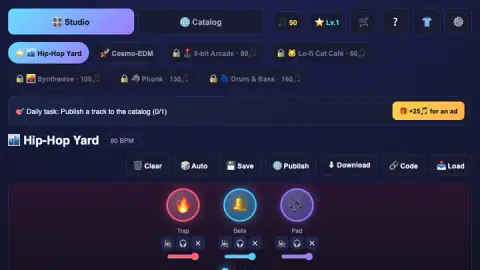
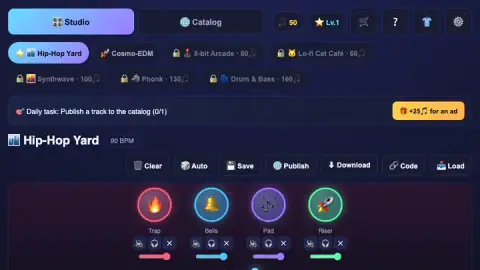
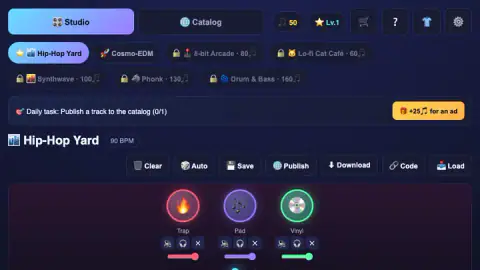
Taken by opening the game ourselves and letting it run — not supplied by the publisher, and not the same picture every other site shows.
How to play BitBanda
- Tap the sound cards to fill the stage. The game says so itself, in a line printed across the empty stage. Each card adds one more layer to a loop that is already running.
- Mix with the three buttons under each musician. A crossed-out speaker, a pair of headphones, an X. The listing's control notes give these as mute, solo and remove, in that order, with the slider beneath them for that musician's volume.
- Press Auto when you want a starting point. It assembles a band in one go, and it is the quickest way to find out which sounds a world contains.
- Spend notes on new worlds. The counter at the top is your balance. Seven worlds sit along the top of the Studio tab and five of them are padlocked behind a price.
- Publish a track to clear the daily task. The bar above the stage asks for one published track a day, and the Catalog tab is where everyone else's end up.
What the session taught us:
- On a wide screen, the cards are below the fold. The game is laid out tall - it is listed as portrait, and the stage plus the mixer alone fill a laptop screen. The row of sound cards you are told to tap sits under all of that. We lost most of four minutes tapping musicians who were already on stage before working that out.
- Tapping a musician's ring is not how you add sounds. The rings are the band you already have; the cards that recruit a new one are a separate row further down.
- Auto is not a shortcut, it is a tour. Three presses gave us three different bands, and six different named sounds, all inside the one free world.
- The counter does not move on its own. Ours read fifty when we started and fifty when we stopped, and the only visible way to top it up was a button offering notes for watching an advert.
Controls
| Tap or click a sound card | Puts that musician on the stage. The game's own on-screen line is "Tap the sounds below" |
|---|---|
| The slider under a musician | That musician's volume, drawn in that musician's colour |
| The three small buttons under a musician | A crossed-out speaker, a pair of headphones and an X. The listing's notes give them as mute, solo and remove |
| Auto | Rebuilds the whole band for you. Three presses gave us three different lineups |
| Clear, Save, Publish, Download, Code, Load | A row of actions above the stage. Publish is the one the daily task asks for |
Features
- A mixing desk rather than an instrument - every musician on stage gets a volume slider and three buttons of their own
- Seven worlds along the top, two of them open and five padlocked with a price in musical notes, from 60 up to 160
- A tempo printed beside the world's name - Hip-Hop Yard runs at 90 BPM, and every sound in it is cut to that count
- Named layers instead of numbered ones - Trap, Bells, Pad, Riser, Deep Bass and Vinyl all turned up in one world
- An Auto button that assembles a band for you, three or four members at a time, different every press
- A Catalog tab for other players' tracks, and a daily task that asks you to publish one of your own
- It has been available since June 2026
Game details
- Developer
- Flagwin Studio
- Release date
- June 2026
- Last updated
- June 10, 2026
- Added here
- April 2026
- Technology
- HTML5 (2D)
- Platforms
- Browser (desktop), Browser (mobile & tablet, touch)
- Classification
- Arcade , Simulation
- Saved progress
- Saving, when available, is managed by this game. Mava cannot confirm your level.
FAQ
How do you play BitBanda?
You tap sound cards and each one puts a musician on the stage, where they play together as a loop. Every musician you add gets their own volume slider and three small buttons underneath, which the listing's notes give as mute, solo and remove. There is no timing to hit and no score to beat while you build - the game is a mixing desk, not a test. When you are happy with a track you can save it or publish it to the game's Catalog.
Is BitBanda free, and do you need to know anything about music?
It is free to play in a browser and it asks for no musical skill at all. The game's listing says every sound in a world is pre-matched in rhythm and key, which is why the game lets you stack any combination without a wrong answer. The world we played, Hip-Hop Yard, has its tempo printed next to its name - 90 beats per minute - and everything in it is cut to that count.
How many worlds does BitBanda have and how do you unlock them?
Seven are listed across the top of the Studio tab. Two were open to us, Hip-Hop Yard and Cosmo-EDM, and five carried a padlock and a price in musical notes - Lo-fi Cat Café at sixty, 8-bit Arcade at eighty, then Synthwave, Phonk and Drum & Bass, the last at a hundred and sixty. We started on fifty notes and never earned another, so we cannot tell you how quickly they come in.
What does the Auto button do in BitBanda?
It builds a band for you. We pressed it three times and got three different lineups, sometimes three musicians and sometimes four, drawn from a pool that included Trap, Bells, Pad, Riser, Deep Bass and Vinyl. It is the fastest way to hear what a world holds, and it is also how you discover that one world has more sounds in it than fit on the stage at once.
Who made BitBanda?
The game is credited to Flagwin Studio. No studio name appears on screen while you play. It has been available since June 2026.
Does BitBanda work on a phone?
It is listed for PC, Android and iOS, and gives its orientation as portrait - the layout is built tall, with the stage above and the cards you tap below it. Our own session was on a desktop in a wide window, which pushed that card row below the bottom of the screen, so if you play on a computer, expect to scroll down to reach it.
What are the secret sound combos in BitBanda?
According to the game's listing, certain combinations of sounds are secret, and finding one awards bonus notes and starts a party mode on stage. We never found one, so that is the provider's account rather than ours. The idea is not new to this game - the format it belongs to has worked that way since 2009.
What does BitBanda actually sound like?
We cannot tell you, and we would rather say so than guess. Our session ran about four minutes, we spent most of it working out that the cards we were told to tap were below the visible area of the screen, and we never reached a finished track played from start to end. Everything on this page is about what the game puts in front of you and how it is arranged.