









About Tile Pair Jam: Mahjong Master
In most mahjong pair games the tiles stay where they were dealt, and all you do is find two that match. In Tile Pair Jam: Mahjong Master the tiles move. You can push one along its row or its column, and the tiles in its way go with it. A pair is not something you find. It is something you line up.
The rule that removes a pair is short. Two identical tiles go when they share a row or a column and nothing stands between them. They do not have to touch. An empty gap between them is as good as no gap at all.
The game is credited to ANYI. It was published on 6 September 2026.
Our session was short, and this page stays inside it. We played for about four minutes on a desktop computer, with the mouse. We saw the three tutorial cards and level 1, cleared six pairs and did not finish the board. We never had to slide a tile into a new place, because every pair we took was already lined up. The sliding is described here as the game's own tutorial shows it.
Level 1 is 48 tiles on one flat layer
There is no pile here. Classic mahjong solitaire stacks tiles in layers, and half the work is guessing what lies under the top one. This board is flat. Level 1 is six tiles across and eight down, inside a wooden frame, and every one of the 48 faces is visible from the first second.
That changes the kind of thinking the game asks for. Nothing is hidden, so nothing depends on luck or memory. The whole problem is on the table, the way it is in a sliding block puzzle.
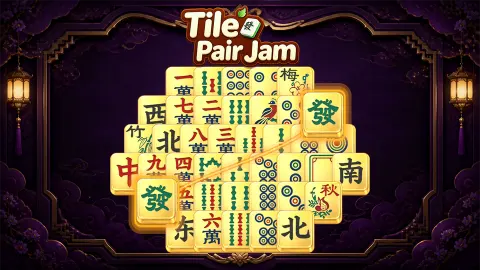
The faces are the traditional ones. There are number tiles written in Chinese characters, tiles of dots, tiles of bamboo sticks, the four winds, and the three dragons: the red character, the green one and the empty white frame. Two tiles show a blue and red bird. That is the one of bamboo, which mahjong sets have long drawn as a bird.
You do not need to read any of it. You only need to tell that two tiles are the same.
Our six pairs came out like layers of an onion
The pointing hand of the tutorial started us on the bottom row, where two identical number tiles sat side by side in the middle. We dragged one onto the other and they went. That is when the COMBO × 1 ribbon appeared under the clock for the first time.
What that pair left behind matters more than the pair. On each side of the new gap stood a West tile. A moment earlier they were four cells apart with two tiles in the way. Now nothing was between them, and they cleared as well.
The top row was built the same way. Two matching number tiles in the middle, a bird on each side of them. We removed the middle pair, and the birds went through the gap. The second row repeats the idea with two North tiles in the centre.
So level 1 teaches by its layout. Several rows are a pair wrapped inside another pair. Take the inner one and the outer one is free.
We stopped with 36 tiles left. Reading the last board by eye, and without having played these moves, four more pairs stood open. Two were in rows: the number tiles at both ends of the top row, and the white frames on the second row. Two were in columns, through the hole where the red tiles had been.
The ten-minute clock stayed at 10:00
A clock sits under the level number, and on level 1 it shows 10:00. We looked at it nine times over four minutes. It read 10:00 every time, including after the sixth pair.
We cannot explain that. It may wait for something we did not do. We also cannot tell you what happens at zero, because we never saw the clock move. Treat the ten minutes as the budget the game shows you for this board, and do not count on the pause we got.
The same goes for the combo ribbon. It lit up after a pair and faded again. We never saw it read anything but one.
Pause, Shuffle and Hint wait on the right
Three round buttons stand in a column on the right of the board. Pause has a snowflake on it, and it is a different button from the plain two-bar pause in the top left corner. Shuffle shows two tiles. Hint shows a light bulb.
Pause and Shuffle each carry a small green plus sign. Hint carries a red infinity sign. We did not press any of the three, so we will not tell you what they do or what they cost. On a board where every pair is visible, we did not miss them on level 1.
Flower tiles are the odd ones out in a real mahjong set
The third tutorial card reads «Eliminate Flower Tiles to remove an extra pair of Mahjong Tiles!». Under it are four yellow picture tiles and the name Four Arts.
Both ideas come from the real game. A full mahjong set has 144 tiles, and eight of them are bonus tiles: four flowers and four seasons. They are the only tiles in the box that come as single copies. Every ordinary tile exists four times. In the table game you do not play a flower at all. You lay it face up, draw another tile to replace it and collect extra points at the end.
The four arts are older than the tiles. They are the skills a Chinese scholar was expected to master: the qin, a seven-string zither; qi, the board game known in the West as Go; calligraphy; and painting. Some mahjong sets paint these four on their bonus tiles. The card in this game does the same, and one of its four pictures is plainly a zither on a low table.
The game keeps the spirit of the original rule. A flower is a bonus, and here the bonus is a free pair removed for you.
On our board, two tiles carried a red flower and the character for spring, and four yellow tiles stood at the edges with characters that belong to no standard mahjong face. We cleared none of them. We cannot say which of them the card means.
A planning puzzle more than a search
This one is for players who like to see the whole problem and work out an order. Level 1 is gentle: the first pairs are next to each other, and each clear points at the next. Nothing we did was punished.
It is less suited to someone who wants the hidden layers of classic mahjong solitaire, because there are none. We also cannot tell you how hard it gets. The developer says the boards grow more demanding, and the tutorial shows moves with several tiles at once that level 1 never asked of us.
The game is listed for phones as well as PC, in both portrait and landscape. We played in a wide desktop window, where the tall board stands in the middle with the clock on its left and the helpers on its right.
Other pair-matching boards to try
Mahjong Lines is the closest relative: the tiles stay still and you join two of them with a path of up to three straight lines. Mahjong Alchemy turns the tiles face down and makes pairs a matter of memory. For sets of three and a tray that fills up, there are Mahjong Match and Mahjong 3. The rest are under puzzle games.
Screenshots
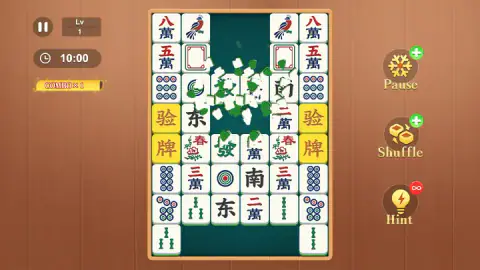
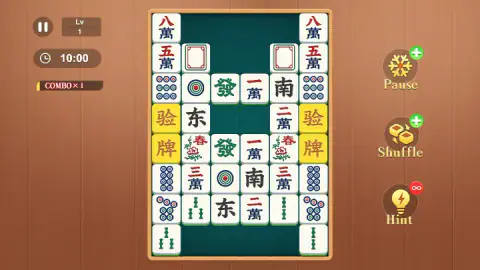
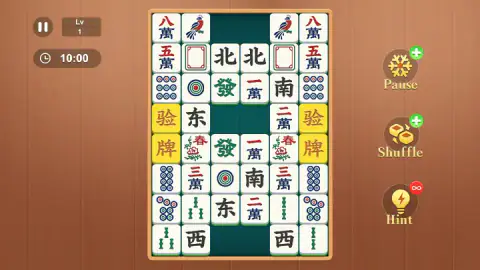
Taken by opening the game ourselves and letting it run — not supplied by the publisher, and not the same picture every other site shows.
How to play Tile Pair Jam: Mahjong Master
- Close the three cards. The game opens with a short tutorial. Each card has an OK button, numbered 1/3 to 3/3.
- Look along rows and columns. Find two identical tiles in the same line. Ignore diagonals; they do not count.
- Check the cells between them. If every cell between the two is empty, or the tiles are neighbours, the pair can go.
- Drag one tile toward the other. Hold the mouse button on a tile, pull it along the line to its twin and let go. Both break into pieces and leave a green gap.
- Slide when nothing is open. The tutorial shows a single tile pushed up its column until it faces its twin, and several tiles in a line pushed together for the same purpose.
What we picked up while playing:
- Start in the middle of a row. On level 1 the centre two tiles of several rows are a ready pair. Take them first.
- A cleared pair is a new corridor. The gap it leaves runs between other tiles. Look at what now faces what, across the gap and also up and down through it.
- Read columns as well as rows. After the two red tiles went from the middle of the board, two green tiles faced each other through the hole, one above and one below.
- The keyboard does nothing. We tried the arrow keys several times. The board did not react.
- One tile is enough. By our notes, the last pair went after a plain click on one of its tiles, once the line between the two was empty.
Controls
| Hold the left mouse button on a tile, drag along its row or column, release | Moves the tile toward its twin; if nothing stands between the two, both are removed |
|---|---|
| Click the round Hint, Shuffle or Pause button (right side) | The three helpers; we did not press any of them |
| Click the two-bar button (top left) | Pause button of the game |
| Click OK on each tutorial card | Closes the three opening cards, numbered 1/3 to 3/3 |
Features
- Pairs clear along a straight line: two identical tiles in the same row or column go when nothing stands between them
- Tiles that slide: one tile, or several at once, can be moved sideways or up and down to line a pair up
- A level 1 board of 48 tiles, six across and eight down, all on one flat layer with nothing stacked
- A clock that shows 10:00 on level 1, and a COMBO ribbon that appears when a pair goes
- Three helper buttons on the right: Pause, Shuffle and Hint
- Flower tiles, shown as a set called Four Arts, that take an extra pair of tiles off the board
- Made by ANYI
Game details
- Developer
- ANYI
- Release date
- September 2026
- Last updated
- September 7, 2026
- Added here
- August 2026
- Technology
- HTML5
- Platforms
- Browser (desktop, mouse), Browser (mobile & tablet, touch)
- Classification
- Cards & Board , Puzzle
- Saved progress
- Saving, when available, is managed by this game. Mava cannot confirm your level.
FAQ
How do you play Tile Pair Jam: Mahjong Master?
The board is a grid of mahjong tiles. Two identical tiles are removed when they sit in the same row or column with nothing between them. When a pair is blocked, you slide tiles sideways or up and down until the line is open. The level is finished when the board is empty.
What are the controls in Tile Pair Jam: Mahjong Master on a computer?
Only the mouse. Hold the left button on a tile and drag it along its row or column toward the matching tile. The arrow keys did nothing we could detect when we tried them. The Pause, Shuffle and Hint buttons on the right are clicked.
Do matching tiles have to touch each other?
No. In our run two West tiles were removed with two empty cells between them, and two bird tiles the same way. What matters is that the two tiles share a row or a column and that every cell between them is empty.
Is there a time limit in Tile Pair Jam: Mahjong Master?
Level 1 shows a clock set to 10:00. In our four-minute session the clock still read 10:00 every time we looked, even after six pairs were gone. We cannot say when it starts counting or what happens when it runs out.
What are the flower tiles and the Four Arts?
A tutorial card says that eliminating flower tiles removes an extra pair of mahjong tiles. It shows four yellow picture tiles under the name Four Arts. The four arts are the classical Chinese scholar's skills: the zither, the board game Go, calligraphy and painting. We did not clear a flower tile, so we did not see the bonus happen.
How many tiles are on level 1?
We counted 48: six columns and eight rows, all on a single layer. That makes 24 pairs. We cleared six of them and did not finish the level.
How many levels does Tile Pair Jam: Mahjong Master have?
We do not know. The screen shows only the level you are on, and we did not get past level 1. The developer describes boards that get harder as you go.
Who made Tile Pair Jam: Mahjong Master?
It is credited to ANYI. It was published on 6 September 2026. It is listed for PC, Android and iOS; we played it on a desktop computer with the mouse.