


About Kick Lucky Blocks Online
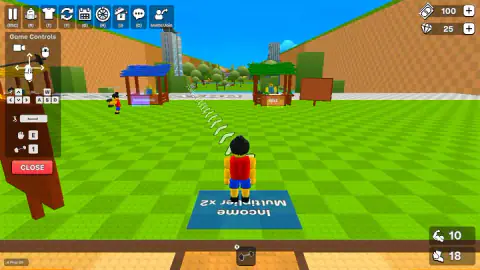
Most games with "kick" in the name hand you the kick in the first five seconds. Kick Lucky Blocks Online makes you earn it. You start on a green field with 100 money, 25 gems and a kick power of 10, and once the controls panel is closed, the first thing you see is not a block but a row of shops.
That tells you what kind of game this is. It is a simulator in the sense the word has taken on in online games: you train a number, spend what it earns on making the number grow faster, and then throw the number away for a bonus that makes the next climb quicker. The kicking is the action. The loop around it is the game.
It comes from Cursora Labs, a studio that also makes Cube Snake 2048. It was published in May 2026.
We should say up front how far we got. We spent our game in the starting hub: we closed the controls panel, opened the Rebirth window, walked to the selling stall and held the key there. We never kicked a lucky block, never sold anything and never left the first field. Everything below is what we saw, and where we are relying on the game's own notes we say so.
What is in the starting hub
You spawn standing on a blue mat that reads Income Multiplier x2, which is the game's way of showing you, before you have earned a coin, that multipliers are where the money is.
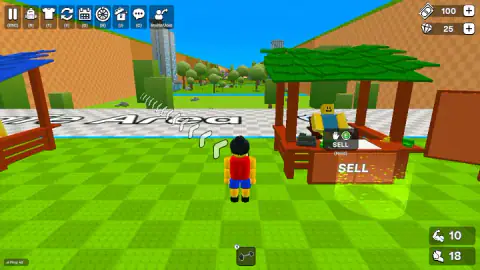
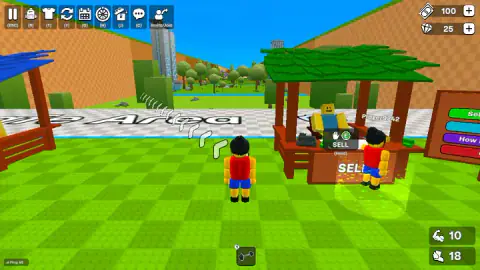
In front of you are three stalls under different coloured roofs. The blue one is Speed Upgrades. The green one, on the right, is the SELL stall, with a seated shopkeeper and a cash register on the counter. The yellow one on the left has a barbell lying on its roof and a sign that reads like Weights Shop; from where we stood, only its last letters were clear. A signboard beside the SELL stall carries coloured buttons, one starting with Sell and one with How, which look like a short guide to selling.
The top bar has nine buttons, each with its key underneath: pause, a bag, a T-shirt for outfits, the Rebirth arrows, a calendar, a wheel, a gift box, chat, and Invite/Join. We used pause, Rebirth and chat. We did not open the calendar, the wheel or the gift, so we cannot say what they hold.
In the bottom right are your two stats. The arm read 10 and the foot read 18 for our whole game. We take the foot to be how fast you move, since a whole stall sells speed, but we did not buy an upgrade to prove it.
Rebirth: why the game asks you to start again
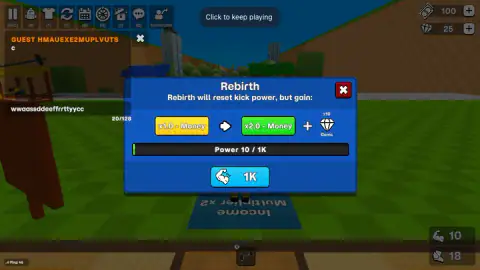
The Rebirth window is short and blunt. "Rebirth will reset kick power, but gain:" and then two boxes: a yellow x1.0 - Money with an arrow to a green x2.0 - Money, plus a handful of gems. Underneath, a bar shows your power against the target of 1K.
So the trade is this: the kick power you spent the run building goes back to the start, and from then on everything you earn is doubled. The multiplier stays; the power does not. That is why the first climb is the slowest one you will ever do.
This is an old idea with a well-known name. Players of incremental games call it prestige. Cookie Clicker, the 2013 browser game, calls it ascending and pays you in heavenly chips. AdVenture Capitalist calls it selling your company to angel investors. Each time, the game is betting that a permanent bonus feels better than the progress you give up, and that the second run going twice as fast is the hook.
The question every prestige game leaves you with is when. Rebirth too early and you throw away a climb you had barely started; too late and you spend a long time earning at half the rate you could have. We did not get far enough to see what the second Rebirth asks for.
Online, with other players on the field
Before the game lets you in, it shows a Connecting... screen, and once you are in, a small ping counter sits in the bottom left corner. In our game it read between 20 and 50.
Other characters walked the same field: one labelled Player5024 came and stood beside us at the stalls, and another, Player9242, was at the SELL counter later. We cannot tell you whether they were other people or characters the game adds, and the game does not say. You play as a guest; there was no sign-in to get through.
The game's notes also describe a local 2-player mode, with the second player on the arrow keys and J, K, L, U, I and O. We played only the online mode.
What the game promises that we did not see
The game's own notes describe much more than the hub. They talk about kicking lucky blocks as far as you can, chasing them into dangerous areas and getting back before a tsunami floods the map, and collecting a large set of characters the game calls Brainrots, spread across many areas and rarity tiers. They also mention weights to raise kick distance, bigger bases and live events.
We cannot confirm any of that. Our money stayed at 100 and our gems at 25 from start to finish, and we never stepped out of the first field. If the description is right, the hub is the quiet part, and the risk starts once you kick.
Who it is for
Kick Lucky Blocks Online suits players who like watching numbers climb and planning when to reset them, and who do not mind that the first stretch is about shopping, not kicking. It is not a football game and not a physics puzzle. Every system on screen, from the multiplier mat to the Rebirth bar, is about making the next run faster than the last.
More from Cursora Labs
The same studio made Cube Snake 2048, where you grow a snake by merging numbered cubes, and Eat Blobs Simulator, another online game about getting bigger. Basket Sport Stars is their basketball game for one or two players. If the upgrade loop is what you enjoy, Stickman Clicker is a simpler version of it. More games built on the same climb are in the clicker category.
Screenshots
Taken by opening the game ourselves and letting it run — not supplied by the publisher, and not the same picture every other site shows.
How to play Kick Lucky Blocks Online
- Click into the game and wait for Connecting... to finish. The game joins a server before it lets you in.
- Read the Game Controls panel on the left, then press CLOSE. W A S D or the arrow keys walk, the mouse turns the camera, Space jumps, E interacts and 1 takes out the item in your first slot.
- Build your kick power, the number next to the arm icon in the bottom right corner, and kick lucky blocks for rewards.
- Take what you win to the SELL stall and hold E at the counter to turn it into money.
- Spend money at the stalls, and when your power reaches 1K, press Y to rebirth for a money multiplier.
Tips from our run:
- Close the chat before you try to move. When the chat field has focus, every key you press goes into it. We pressed our movement keys and the result was a line of doubled letters in the chat box, with the character standing still.
- Selling is a hold, not a tap. The prompt over the SELL counter shows a hand, the E key and the word Hold underneath.
- Your power is the arm number. The Rebirth window's progress bar read Power 10, the same 10 as the arm counter. Watch that corner to know how close you are.
- Do not wait on the Rebirth button early. We pressed it several times at power 10 and nothing happened. It stays locked until the bar is full.
- Follow the footprints. A trail of white footprints on the grass runs from where you spawn towards the far side of the hub.
Controls
| W A S D or arrow keys | Walk around the field |
|---|---|
| Mouse | Turns the camera |
| Space | Jump |
| E (hold at a stall) | Interacts; hold it at the SELL stall to sell |
| 1 | Takes out the item in the first slot of the bar at the bottom |
| R / T / Y / C | Bag, outfits, Rebirth and chat buttons on the top bar |
| Esc | Pause |
Features
- A blocky 3D hub with three stalls side by side, Speed Upgrades, SELL and a weights shop, and a blue mat under your spawn that reads Income Multiplier x2
- Two counters in the corner track your character, an arm for kick power that starts at 10 and a foot that starts at 18
- Rebirth wipes your kick power in exchange for double money and 10 gems, and it unlocks only at 1K power
- Online by default, with a ping counter, a chat box and an Invite/Join button, and other named players walking the same field
- Money and gems are shown separately, starting at 100 and 25
- The game's notes describe a local 2-player mode on one keyboard; we did not try it
- Made by Cursora Labs, the studio behind Cube Snake 2048 and Eat Blobs Simulator
Game details
- Developer
- Cursora Labs
- Release date
- May 2026
- Last updated
- July 8, 2026
- Added here
- March 2026
- Technology
- HTML5 (3D)
- Platforms
- Browser (desktop, keyboard and mouse), Browser (mobile & tablet, touch)
- Classification
- Arcade , Casual , Multiplayer
- Saved progress
- Saving, when available, is managed by this game. Mava cannot confirm your level.
FAQ
How do you play Kick Lucky Blocks Online?
You walk a blocky character around a field with W A S D or the arrow keys and turn the camera with the mouse. You build up kick power, kick lucky blocks for rewards, and sell what you collect at the SELL stall by holding E. Money buys upgrades, and Rebirth trades your kick power for a permanent money multiplier.
What does Rebirth do in Kick Lucky Blocks Online?
Rebirth resets your kick power back to the start, and in return your money multiplier goes from x1.0 to x2.0 and you get 10 gems. The button only works once your power reaches 1K. When we opened it our power was 10, so it was out of reach.
How much kick power do you need to rebirth?
The first Rebirth needs 1K power, shown on a progress bar inside the Rebirth window. Your current power is the number next to the arm icon in the bottom right corner, which started at 10 in our game.
How do you sell in Kick Lucky Blocks Online?
Walk up to the green-roofed stall with SELL written on the front. A prompt with a hand and the E key appears over the counter, marked Hold, so you keep E pressed rather than tapping it.
Is Kick Lucky Blocks Online multiplayer?
Yes. It connects to a server before you play, shows a ping counter, a chat box and an Invite/Join button, and other named players walk the same field as you. The game's notes also describe a local 2-player mode on one keyboard, which we did not try.
Why can't I move in Kick Lucky Blocks Online?
Check that the chat box is closed. When the chat field has focus, your keys type into it instead of moving your character. In our game a whole row of movement keys ended up as a line of letters in the chat.
Who made Kick Lucky Blocks Online?
Cursora Labs. It was published in May 2026.
Is Kick Lucky Blocks Online free?
Yes, it is free to play in the browser. Money and gems both have a plus button next to them in the top right corner; we did not press either, so we cannot say what they offer.