








About Move Emoji
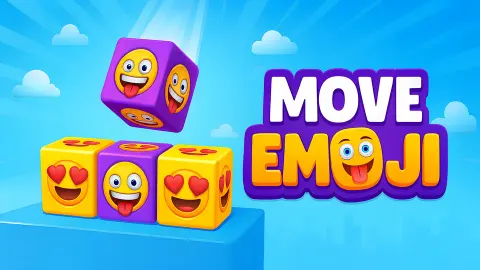
Most matching puzzles are about telling things apart. Three reds among the blues, a pair of cherries hiding in the corner. Move Emoji throws that part away. Every box on the first level carries the same thumbs-up emoji, and so does every box on the second, with a game controller instead. There is nothing to tell apart. The only question is where the boxes are.
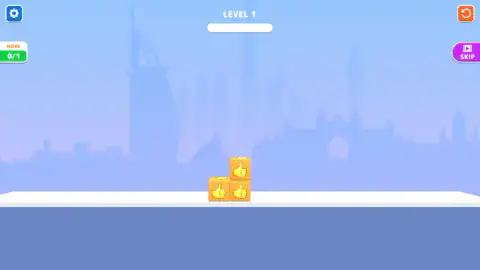
That turns it into a small puzzle about shape. The boxes sit in a tidy pile on a white ledge, and a level is solved when they stand in one straight row. You get a fixed number of swipes to get them there, and on the first two levels that number is one.
Move Emoji is published by Drivix Games, dated September 2025. Other portals carry it under a longer name, Move Emoji Match Puzzle. We played the first two levels.
One swipe, one square: how a box really moves
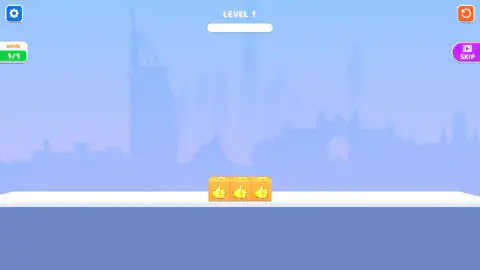
Here is the rule that is not obvious at first. A swiped box does not slide until it hits something. It moves exactly one square. On level 1 there was open floor all the way to the right, and the top box still stopped one box-width along, then fell straight down.
That matters more than it sounds. It means you can count a level out before touching it. Look at a box, picture it one square over, and ask what is under it there. If the answer is air, it falls, and the level is now a different shape.
It also explains why the counter is so strict. With one move allowed, there is no room to try an idea and fix it later. The game is less about quick fingers than about looking for a few seconds before you swipe.
Level 2, and what we did not see
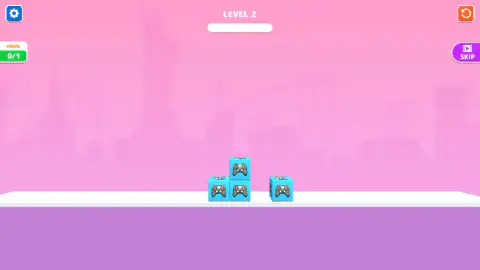
Level 2 moves from a Dubai skyline to a pink New York one, with the Statue of Liberty in the background. The boxes turn blue and carry a game-controller emoji. The pile is the same as on level 1, but a fourth box now sits on the floor to the right, with a gap exactly one box wide between it and the others. The counter again reads 0/1.
Our test player ran out of session time before it solved it, so we cannot show you the win. Our reading of the board is that the same swipe works again: the top box goes one square right, falls into the gap, and the row of four is complete. Treat that as a hint from the layout, not as something we watched happen.
We also did not see a level with two or more moves, a second emoji mixed in, or what the empty white bar under the level number fills up with. The game description on the game's listing promises that matching clears boxes from the board; on level 1 the next thing our player saw after the row was complete was the win screen, and we never saw a box vanish.
The buttons around the board
There are only four. The gear in the top-left corner opens the settings. The orange circular arrow in the top-right corner restarts the level, which is the quick way out of a wasted swipe. Under it sits a purple Skip button with a small film icon, the usual sign that skipping a level costs you an ad. We could not confirm what it does.
An ad break comes between levels. It turned up in our session after the lost attempt and again after the win, each time with a Continue playing button to get back to the board.
More emoji and block puzzles
Drivix Games also made Match Master, where you pick matching 3D objects in pairs to clear the ground. If you want emojis in a busier grid, Crazy Emoji Blast is a swap-and-match game, and Emoji Sort asks you to fill in the missing emoji in a pattern. For another puzzle about putting pieces in the right place, try Pixel Slide Puzzle. The rest of our logic games are in the puzzle category.
Screenshots
Taken by opening the game ourselves and letting it run — not supplied by the publisher, and not the same picture every other site shows.
How to play Move Emoji
- Read the counter first. The box in the top-left corner says MOVE and shows two numbers: moves used, then moves allowed. On level 1 it reads 0/1.
- Look at the pile. On level 1 there are two boxes on the floor and one sitting on top of the right-hand one.
- Swipe a box. Drag it with the mouse or your finger in the direction you want. It moves one box-width that way.
- Let it fall. A box that ends up with nothing underneath drops to the floor. That drop is usually the whole trick.
- Finish the row. When all the boxes stand in one straight line, the level is complete and the next one loads.
Tips from our session:
- Taps are free, and useless. Our test player clicked on the boxes twice before trying a swipe. Nothing moved and the counter stayed at 0/1, so a tap costs nothing, but it does nothing either.
- A swipe that goes nowhere still counts. Its first real swipe pushed the top box upward. The pile looked the same afterwards, yet the move was gone, and a failure screen with a Retry button came next.
- Sideways beats up. On level 1 the answer is to swipe the top box to the right. It slides off the pile, drops, and lands on the floor beside the others: three in a row.
Controls
| Swipe or drag a box | Move it one box-width in that direction; if it ends up with nothing underneath, it drops |
|---|---|
| Tap or click a box | Nothing - taps do not move boxes and do not spend a move |
| Orange circular-arrow button (top right) | Restart the level |
| Gear button (top left) | Settings |
Features
- Emoji boxes on a white ledge, and one aim per level - line them up in a single straight row
- A swipe moves a box one square and gravity does the rest, so a box pushed off a stack lands on the floor
- A move counter that shows moves used out of moves allowed, starting at 0/1 on the first two levels
- A wasted swipe still costs the move, and with only one to spend the level is over
- One emoji per level in what we played - thumbs up on level 1, a game controller on level 2
- A city skyline behind each level, Dubai on the first and New York on the second
- A purple Skip button with a film icon on every level
Game details
- Developer
- Drivix Games
- Release date
- September 2025
- Added here
- July 2025
- Technology
- HTML5
- Platforms
- Browser (desktop, mouse), Browser (mobile & tablet, touch)
- Classification
- Puzzle
- Saved progress
- Saving, when available, is managed by this game. Mava cannot confirm your level.
FAQ
What is Move Emoji?
Move Emoji is a free browser puzzle published by Drivix Games. Boxes carrying the same emoji sit in a small pile on a ledge, and you swipe them one square at a time until they form a single straight row. Each level gives you a fixed number of moves.
How do you play Move Emoji?
Swipe a box in the direction you want it to go. It moves one box-width, and if there is nothing under it, it falls to the floor. Tapping does nothing. On the first level one swipe to the right, on the top box, finishes the puzzle.
Is Move Emoji the same game as Move Emoji Match Puzzle?
Yes. Some portals list it as Move Emoji Match Puzzle, with the same swipe-to-match idea and the same move limit per level. Where we played it, the title is simply Move Emoji and the publisher is Drivix Games.
What does MOVE 0/1 mean in Move Emoji?
It is the move counter. The first number is how many moves you have used and the second is how many the level allows. On the first two levels the allowance is one, so the counter reads 0/1 until you swipe and 1/1 after.
What happens if you run out of moves in Move Emoji?
The level is lost and you start it again. Our test player spent its only move on level 1 pushing a box upward, which changed nothing on the ledge, and it next saw a failure screen with a Retry button. The retry put the boxes back where they started.
Who made Move Emoji?
Drivix Games is listed as the publisher, with a September 2025 date. Drivix Games also has the matching game Match Master. We found no studio website to point you to.
Can you play Move Emoji on a phone?
Yes. It is listed for PC, Android and iOS, and the whole game is played with swipes, which suit a touch screen. We played it in a desktop browser by dragging with the mouse; the arrow keys did nothing we could hear.