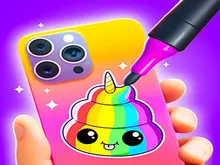













About DIY Phone Case Maker
Most games that hand you a paintbrush also hand you a picture to copy, and then mark you on how close you got. DIY Phone Case Maker does not. It puts a bare silver phone case on a wooden table, gives you a shelf of spray cans and lets you decide when the case is finished. Whatever you hand in, the game likes it.
We know that because of what happened to ours. We spent our first level choosing cans, white, then red, then black, and pressing on the case with short single clicks. When we pressed the green tick, the picture of our finished case showed no paint on it at all. The game still wrote AMAZING over it, lit three stars and paid the full reward.
So this is a craft table, with no puzzle and no test attached. That is worth knowing before you start, because it changes what you should expect: nothing here can be failed, and the only thing that makes one case better than another is whether you like it.
The game comes from Bravestars. It was published in January 2026.
Fourteen cans on the shelf, and six of them are yours
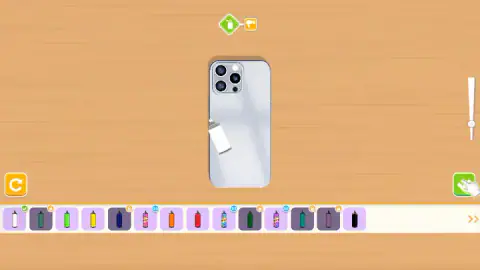
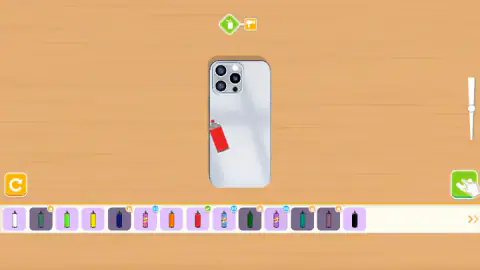
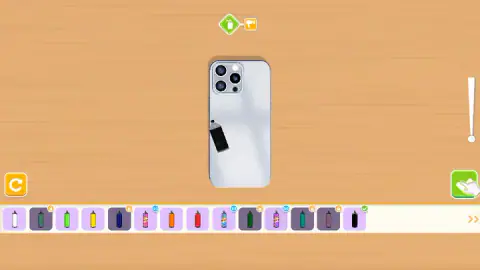
The first shelf holds fourteen spray cans. Count the ones without a badge and you get six: white, light green, yellow, orange, red and black. Those are free from the first second.
The other eight are marked. Five of them, all darker shades such as navy, teal and two deep greens, carry a small padlock. Three more are patterned cans, speckled with several colours at once, and they carry a small blue badge instead. We did not unlock a can of either kind, so we cannot tell you the price of a padlock or what the patterned cans look like on a case.
Two more things sit beside the shelf. At its right end, a double arrow points to more cans beyond the first fourteen. And at the right edge of the screen there is a wedge-shaped slider, wide at the top and thin at the bottom. We moved it to three different heights. Its shape suggests it sets how wide the spray is, but we did not paint enough to compare, so take that as our reading of the picture and not as a fact.
A bare case still earns three stars and 50 coins
The result screen is the same whatever you do, at least on the first level. Ours showed the case lying on the wooden table, unpainted, under three stars and the word AMAZING. Under it was the reward: 50 coins.
Below the coins, a green button offers to claim double, and it carries a small video badge, so the doubling is paid for by watching an advert. Under the button, in plain white text, is "No thanks". That is the choice that keeps the 50 without the video.
What this tells you is how the game thinks about its player. It is not checking coverage, colour choice or neatness. The stars are a thank you. They do not measure anything. For a young child that is a kindness, because nothing they make can be wrong. For an older player it means the game gives you no reason to try harder, so the reason has to be your own.
Our coin counter still read zero while that screen was up, and we did not get past it in our session. What coins buy is something we cannot report.
Two icons at the top tell you how long a level is
Above the case there are two small icons joined by a line: a spray can, then a dryer. That is the whole level. First you paint, then the paint is dried, then you are paid.
The dryer step passed quickly for us and we did not keep a picture of it, so we will not describe it beyond saying it is there. The paint step took us about two minutes, and most of that was us looking around the shelf. A player who knows what they want could finish a case in well under one.
The description lists five crafts, and we saw one
The game's description lists five ways to decorate a case: painting, acrylic art, stickers, pop it and keychains. Our session covered the first level only, and the first level is spray paint. We saw no sticker sheet, no pouring, no pop it and no keychain.
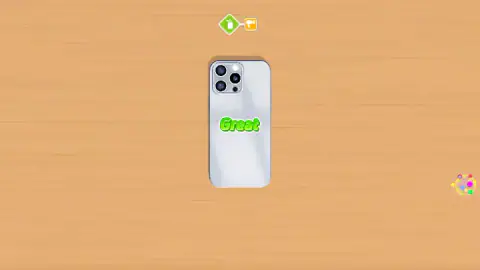
That does not mean they are missing. A first level that teaches one tool is normal for this kind of game, and the palette icon that appeared beside the case after we pressed the tick suggests more tools are near. But we played one case, for about four minutes, and we would rather tell you that than describe four crafts we did not touch.
Who it is for
DIY Phone Case Maker suits young children who like colouring and want to see a finished object at the end, and anyone who wants a few quiet minutes with nothing to lose. There is no reading needed beyond a couple of words on the result screen.
It is not for players who want a challenge, a score to beat or a design to match. It is listed for PC, Android and iOS. We played with a mouse, and every control was a single click.
More decorating games to try
Phone Case DIY is the closest match, another game about dressing up a phone. Christmas Nail Salon moves the paint from a case to a set of nails. Princess Glitter Coloring and Mermaid Coloring Book Glitter are colouring books with glitter in place of spray cans. The rest are in our girls games.
Screenshots
Taken by opening the game ourselves and letting it run — not supplied by the publisher, and not the same picture every other site shows.
How to play DIY Phone Case Maker
- Look at the shelf under the case. Click a spray can to choose its colour. A tick appears on the can you picked, and the can hovering over the case turns the same colour.
- Press on the case to spray. The can sits over the lower left of the case when the level opens.
- Change colour as often as you like. There is no limit on swaps and no clock running.
- When you are happy, press the green tick at the bottom right. The shelf disappears and the word "Great" shows on the case.
- The case goes through the drying step and lands on the result screen, where you collect your coins.
Tips from our session
- Short clicks are not enough. That is how we painted, and our finished case looked bare. The game's description talks about painting, so press and move over the case instead of tapping it once. We did not test that ourselves.
- The can you are holding is the one with the tick. If you are not sure which colour is loaded, look at the can floating over the case: it was white, then red, then black as we changed our pick.
- A pointing hand sits on the green tick from the very first second. It is a hint about where the exit is, not an order to leave. Nothing forces you to press it early.
- If a notice reading "Click to keep playing" appears at the top, the game has lost focus. One click anywhere brings it back.
- Leave the yellow button with the circular arrow alone unless you want to start over. We took it for a reset and did not press it.
Controls
| Click a spray can | Selects that colour; a tick marks it and the can over the case changes to match |
|---|---|
| Click or press on the case | Sprays the selected colour where the can is pointing |
| Slider (right edge) | Slides up and down next to the case; we moved it but did not paint enough to see what it changes |
| Green tick (bottom right) | Finishes the paint step and moves the case on |
| Double arrow (end of the shelf) | Points to more cans beyond the first fourteen |
Features
- A bare silver phone case on a wooden table, and a shelf of spray cans under it
- Fourteen cans on the first shelf, six free from the start, five behind a padlock and three patterned ones with a badge
- Each level is two steps, shown by two icons at the top, a spray can and then a dryer
- No timer, no lives and no score to beat while you paint
- Every finished case pays 50 coins, with an offer to double them by watching a video
- The game's description lists five crafts, painting, acrylic art, stickers, pop it and keychains
- Made by Bravestars
Game details
- Developer
- Bravestars
- Release date
- January 2026
- Last updated
- August 10, 2026
- Added here
- November 2025
- Technology
- HTML5
- Platforms
- Browser (desktop, mouse), Browser (mobile & tablet, touch)
- Classification
- Casual , Fashion & Beauty
- Saved progress
- Saving, when available, is managed by this game. Mava cannot confirm your level.
FAQ
How do you play DIY Phone Case Maker?
You get a plain silver phone case and a shelf of spray cans. Click a can to choose a colour, press on the case to spray it, then press the green tick at the bottom right when you are done. The case goes through a drying step and you are paid 50 coins for it.
Can you lose in DIY Phone Case Maker?
Not in what we played. There is no timer, no lives and no target design to copy. Our own case reached the result screen with no visible paint on it and still got the word AMAZING, three stars and the full 50 coins.
Are all the spray cans free?
No. Of the fourteen cans on the first shelf, six plain colours are free from the start, which are white, light green, yellow, orange, red and black. Five darker colours carry a padlock and three patterned cans carry a small blue badge. We did not unlock any of them.
What do the coins do in DIY Phone Case Maker?
Each finished case pays 50 coins, and a green button offers to double them if you watch a video. We did not get as far as spending any, so we cannot say what they buy. The padlocks on some of the cans are the most likely place for them, but that is a guess.
Does DIY Phone Case Maker have stickers, pop it and keychains?
The game's description lists five crafts, which are painting, acrylic art, stickers, pop it and keychains. In our session we only saw the first one, spray painting, on the first level. The other four must come later, and we did not reach them.
Who made DIY Phone Case Maker?
The game is published by Bravestars. It was published in January 2026 and updated in August 2026.
Can I play DIY Phone Case Maker on a phone?
The game is listed for PC, Android and iOS, in both landscape and portrait. We played it on a computer with a mouse, where every control is a click, so we cannot report on how the touch version feels.