



About Mermaid Coloring Pages
Most mermaid coloring pages online are pictures to print, and then you need crayons and a steady hand. The twelve in Mermaid Coloring Book Glitter stay on the screen, and the game takes the brush away as well. You never draw a single stroke: you pick a colour, tap a space between the lines, and the game fills it for you, right up to the edge. A small child cannot go over the lines, because there is nothing to go over them with.
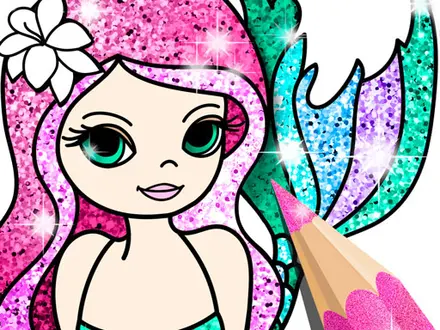
What you get instead is choice. The palette holds 95 shades, and each one comes twice: once flat, and once with a layer of glitter that sparkles over the colour. On top of that sit 83 stickers you can move, resize and flip, and a zoom slider for the tiny spaces, like the scales on a tail or the petals in a flower wreath.
It is a YYGGames release, first counted on the studio's own games site on 12 August 2021. It has been played more than 1.1 million times there, and 93 percent of its voters say they like it. There is no clock, no score and no way to fail. What there is, and what nobody tells you, is a button that closes the page for good.
Twelve mermaids, and three of them cost an advert
Every page is a single mermaid, but the scenes are more varied than the title suggests. The first in the menu hugs a spiral nautilus shell, with a crescent moon and a scatter of stars beside her: a page of big open spaces plus one fiddly corner. One mermaid rides a round, smiling unicorn. One soaks in a clawfoot bathtub with her tail sticking out of the bubbles. Another sits inside a thick wreath of hibiscus, fruit and palm leaves, by far the busiest page and the one where the zoom slider earns its place. In our last session the bodice and the tip of her tail took a flat pink in two taps, each filling exactly to its outline.
Three pages have a padlock: the mermaid between two seals, the bathtub, and the long-haired mermaid with the words "I love sea". Only one of them sits on the first menu page, so a child who never presses the arrows will meet just one lock. Tapping it asks you to watch a video advert, and the page opens afterwards. If no advert is available, a message asks you to try again. The other nine pages are always open.
The first mermaids in the Caribbean were manatees
The mermaids in this book have big eyes, long hair and neat, patterned tails. Christopher Columbus was expecting something like that. On 9 January 1493, sailing off what is now the Dominican Republic, he wrote in his journal that the day before he had seen three mermaids rise high out of the water. He was disappointed. They were not as beautiful as they are painted, he noted, and their faces looked rather like men's.
What he almost certainly saw were manatees, the slow, whiskered sea mammals sometimes called sea cows. Sailors' mermaid stories are thought to come from them and their relatives, the dugongs. Zoologists put manatees and dugongs together in a group called Sirenia, a name that still sounds like the mermaids sailors thought they saw.
This colouring book goes the other way. Its mermaids are exactly as they are painted, and real sea animals keep them company: two seals on one page, a dolphin on another, a sleeping fish so large the mermaid rests her arms on it. Among the stickers there are a crab, a turtle, a whale and a seahorse. If a child asks whether mermaids are real, Columbus makes a good answer.
What it does not do: print, save or undo
If you were looking for mermaid pages to print, it is better to say so up front: nothing here comes out on paper. The twelve drawings stay on screen, you colour them in the browser, and there is no print button, no download and no gallery of saved pictures. Leave a page and your colours are gone. If you want a copy, press the tick and take a screenshot of the finished page.
What the screen gives you in exchange is what paper cannot. The glitter is real sparkle rather than a crayon that promises it. A wrong colour is fixed with one more tap, and the zoom slider turns the smallest scale on a tail into a space big enough for a child's finger.
Is it right for young children?
For the colouring itself, yes. Nothing needs reading. The menus, colours, tick, bin and replay arrow are all pictures, and the only words are the title, a Play button, some sticker slogans and the "I love sea" page. It is played with a mouse or a finger only; the arrow keys and the space bar do nothing. The game is built upright, which suits a phone or tablet held normally.
Three things are worth knowing before handing it over. Adverts can appear at several points: after Play, when you choose a page, when you press the tick and when you go back to the menu, although how often they actually show is up to the advertising system. The game controller button in the top corner, like the studio's logo, opens other games on the studio's portal, so a curious tap can take a child out of the colouring book. And the tick sits right next to the sticker button, so a stray press can finish a page before its owner is ready. Showing a young child the tick first saves a few tears.
The same book with unicorns, and more colouring
YYGGames built a small series on one template. Unicorn Coloring Book Glitter came out three months earlier, in May 2021, with the same menu, the same two-row glitter palette, the same sticker strip and the same zoom slider, and unicorn pages instead of mermaids. If one of the two works for a child, the other will too.
Princess Glitter Coloring is a different design from the same portal, with dresses cut into dozens of areas, neon drawings on black and a fireworks sky. For a mermaid game with a puzzle instead of a palette, try Pull Mermaid Out, where you pull pins to open her route to the door. Every other mermaid game we have picked is in our mermaid games collection, and more games like this one are in the girls category.
Screenshots
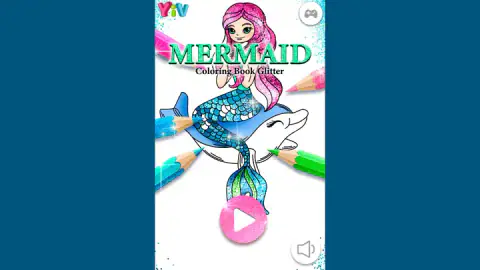
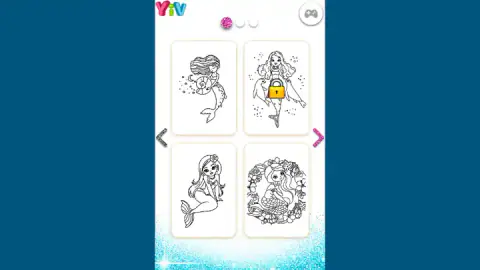
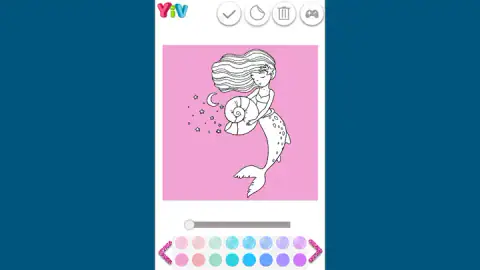
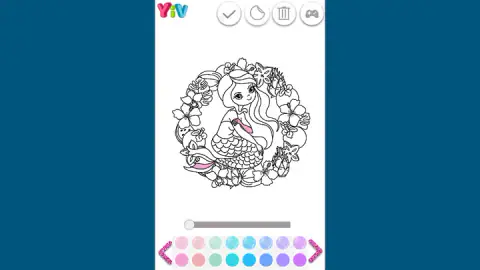
Taken by opening the game ourselves and letting it run — not supplied by the publisher, and not the same picture every other site shows.
How to play Mermaid Coloring Pages
- Press Play on the loading screen, then the big round play button on the title screen.
- Pick a page. The menu shows four at a time; the side arrows move between its three pages.
- Tap a colour in the strip at the bottom. The top button of each pair is glitter, the bottom one is flat. The pink arrows at each end scroll to more colours.
- Tap inside any area of the drawing to fill it. The background around the mermaid counts as an area too.
- Press the sticker button to swap the palette for stickers. Press the tick only when you are done: the round arrow on the final screen takes you back to the menu.
Tips from our sessions
- The tick is a one-way door. It asks for no confirmation. In our last session one press ended a half-coloured page, and about twenty taps on the finished picture afterwards changed nothing. The palette, the sticker button and the bin are gone from that screen.
- Tap, do not swipe. If your finger slides while pressing, the game reads it as a drag and fills nothing. Lift in the same spot you pressed.
- Do the background first. One tap outside the mermaid floods the whole square behind her. Doing it early shows you which colours will stand out.
- Zoom for the small spaces. Hair drawn in thin strands and scaled tails are much easier with the slider pushed up, and dragging moves the picture around.
- There is no undo. A wrong colour is fixed by tapping the same area again. The bin clears everything at once, stickers included.
- Stickers stay editable. A placed sticker keeps a frame with three corner buttons, to resize, flip or delete it.
- Take a screenshot. Nothing is saved. Once you leave the finished screen, the picture is gone.
Controls
| Click / tap a colour | Top button of each pair paints with glitter, bottom button paints a flat colour |
|---|---|
| Click / tap inside the picture | Fill that area up to the lines, background included |
| Slider under the picture | Zoom in to reach small areas; drag the picture to move around |
| Sticker button, then a sticker | Drop it in the middle; drag to move it, use its corners to resize, flip or delete it |
| Bin | Wipe every colour and sticker from the page |
| Tick | Finish the page for good and show the result; the round arrow goes back to the menu |
Features
- Twelve mermaid line drawings, from a nautilus shell and a unicorn ride to a flower wreath and two seals
- Three pages open only after a video advert; the other nine are always available
- 95 shades, each offered twice, once with a sparkle layer and once as a flat colour
- 83 stickers that can be moved, resized, flipped and deleted after you place them
- A zoom slider for the small spaces, such as the scales on a tail
- The tick ends the page at once, with no confirmation and no way back into that picture
- No timer, no score, no way to fail and no keyboard controls; everything is a click or a tap
Game details
- Developer
- YYGGames
- Release date
- August 2021
- Last updated
- November 12, 2021
- Added here
- September 2022
- Technology
- HTML5 (Cocos Creator, 504×800 portrait)
- Platforms
- Browser (desktop), Browser (mobile & tablet, touch)
- Classification
- Fashion & Beauty , Kids
- Download size
- 18 MB
- Ad requests
- 3 (few)
- Has a save
- Yes
- Saved progress
- Saving, when available, is managed by this game. Mava cannot confirm your level.
Measured by opening the game ourselves on 2026-09-10, not taken from the feed. Twelve seconds on a phone-sized screen, with ad requests counted and blocked rather than loaded.
FAQ
How do you play Mermaid Coloring Book Glitter?
Press Play, then pick one of twelve mermaid pages from the menu. Choose a colour at the bottom and tap an area of the drawing to fill it up to the lines. When you are finished, press the tick at the top to see the result, and the round arrow takes you back to the menu.
How many pages does Mermaid Coloring Book Glitter have?
Twelve, shown four at a time across three menu pages. Three of them, the mermaid between two seals, the mermaid in a bathtub and the one with the words I love sea, carry a padlock and open only after you watch a video advert.
How do you use glitter in Mermaid Coloring Book Glitter?
Every colour in the palette has two buttons. The top one fills the area with that colour plus a layer of sparkle, and the bottom one fills it flat. You can mix shiny and plain versions of the same colour on one mermaid.
What happens when you press the tick in Mermaid Coloring Book Glitter?
The page ends straight away. The palette, sticker button and bin disappear, and tapping the picture no longer changes anything. The only way on is the round arrow, which returns you to the menu, so press the tick only when the picture is done.
Can you undo a mistake in Mermaid Coloring Book Glitter?
There is no undo button. You fix a wrong colour by tapping the same area again with another one, which covers it completely. The bin wipes the whole page, colours and stickers together, so use it only to start again.
Can you save or print your picture in Mermaid Coloring Book Glitter?
No. The game has no save, download or print button, and the colours are lost when you leave the page. If you want to keep a picture, take a screenshot on the finished screen after pressing the tick, and print that.
Does Mermaid Coloring Book Glitter work with a keyboard?
No. It is played with a mouse or a finger only. We pressed the arrow keys and the space bar during a session and nothing responded; every action, from choosing a page to placing a sticker, is a click or a tap.
Who made Mermaid Coloring Book Glitter?
It comes from YYGGames and went live on the studio's own games site in August 2021, where it has been played more than 1.1 million times. It is credited to that site. Unicorn Coloring Book Glitter, from the same studio, works the same way with unicorn pages.