







About The long way home
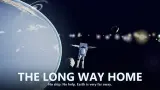
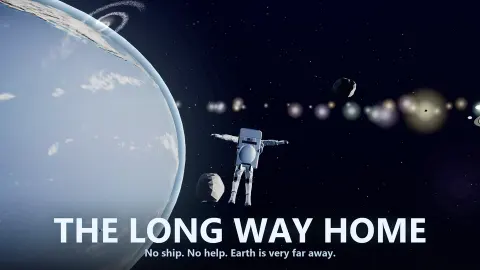
Most space games hand you a ship that stops when you let go of the key. The Long Way Home hands you no ship at all, and nothing in it stops by itself. You are an astronaut in a white suit, tumbling somewhere near Jupiter. The button marked STOP is not a brake. It turns you round and fires the engine the other way, and that costs fuel.
That is the whole game in one rule. Every push stays with you until you pay to cancel it. A panel called LIFE SUPPORT counts what you have left to pay with: fuel, oxygen, battery power and the suit. Under it, a line reads EARTH RANGE with a number in the thousands, and that number falling is the only progress the game gives you.
We have now played it twice. The longer go was ten minutes with a mouse and a few keys, and it got us to the tutorial step called LEARN TO STOP, the eighth of nine. We still did not pick up the fuel canister the sixth step asks for, although we got more than twice as close to it as we did the first time. We have never reached a station, opened the planning map or got anywhere near Earth. What follows is what those minutes showed, including how we kept getting it wrong.
The game is credited to Arnold Bobrinskii. It has been available since August 2026.
Nine steps, and the last one tells you what the game is about
The tutorial card sits at the top of the screen with a row of pips, a SKIP button and a green ring around whichever control it wants. Step one is LOOK AROUND. Step four is SCAN FOR SUPPLIES. Step five makes you press DRIFT before ION DRIVE and explains the order. Step six, COLLECT THE FUEL, is where most of our play happened.
Step eight is the one worth quoting, because it is the design in a sentence: "STOP or X flips you around and burns backwards. Nothing else slows you down out here."
Read that again and the rest falls into place. A game that waits until its eighth lesson to teach braking is telling you that braking is the hard part. Every other button adds something to your motion. One takes it away, and it charges you for the privilege.
The game talks to you from somewhere too. One line arrived unprompted while we were coasting: "CONTROL: You are drifting, and your air is not waiting for you. Push on."
Four bars, and the one that empties first
The panel in the top left is the real scoreboard: FUEL, OXYGEN, POWER and SUIT. Beside each is the word SPARES, a count of one and a USE button, and a note says one canister is worth half a bar. So you start with a single refill of everything, and we never found a second.
Here is the number that changed how we played. From a fresh start with every bar full, about two minutes of ordinary tutorial work on the ion drive left the fuel at 95% and the oxygen at 84%. The battery was at 8%.
That is the catch in the cheap engine. It does save your fuel, exactly as the game promises, but it spends a supply that drains far faster and that you also need for scanning. The POWER bar, not the fuel bar, is what decides how much you get done before you are coasting blind.
Oxygen does not care what you do. It fell at the same steady pace whatever we pressed, and the time control sat at x1 the whole time. Suit stayed full and its USE button stayed grey; there is a REPAIR button for it, and nothing ever hit us.
Below the bars the game states the job: RESUPPLY AT RELAY OUTPOST KEPLER. Markers pointed at two stations, roughly 1,400u and 2,800u out. The canister we were chasing was under 200u away and we did not get it.
How we failed to reach a canister 54u away
Step six is called COLLECT THE FUEL, and its short version is "ION DRIVE, then DRIFT IN". The long version is the clearest thing in the game: "Use the ION DRIVE to close in — it spends battery, not the fuel you are going to get. Arrive slow."
The pickup is labelled on screen as a fuel balloon with its distance beside it. We closed from 183u to 54u, which is near enough to see the thing, and then the speed box went red. The tutorial changed to TOO FAST — PRESS STOP and spelled out the consequence: "At this speed you will smash it. STOP flips him round and burns the speed off."
STOP did what it promised. A banner read RETROGRADE BURN — FLIPPING, the astronaut swung round, the engine fired against his motion and the speed came off. It also put us back out past 70u, because a brake in space is just a push in the other direction. Twice we braked our way further from the canister than we had been before we started closing.
The lesson we would give anyone coming to it cold: do not think of the ion drive as a throttle you hold. Light it, count, turn it off, and spend the rest of the approach doing nothing at all.
The ion drive is real, and it is just as weak in real life
An ion engine uses electricity to throw charged gas out of the back of a spacecraft. NASA's Dawn probe flew on three of them. Its engineers compared the push of one, at full power, to the weight of a sheet of paper resting on your hand. By NASA's own sum, Dawn needed four days to go from 0 to 60 miles per hour.
It is still worth having, because it uses almost no propellant and can stay on for months. The game keeps both halves of that bargain: the ion drive is the slow engine, and it is the one that does not touch your fuel.
STOP is real too. On Earth, air and the road slow you down for free. In space nothing does, so a moving object keeps moving. The only way to lose speed is to point the engine the way you are going and fire. Flight controllers call that a retrograde burn, which is the phrase the game puts on the screen.
Who it is for
People who like reading gauges and planning one move ahead. Nothing shot at us and nothing chased us. The danger is a bar running out while you are still coasting the wrong way.
It asks a lot at the start. There are nine round buttons on the left, three panels and two radars, and the text in the panels is small. If you want to be flying well inside a minute, this is not that game, and the tutorial is long enough that we have twice run out of patience before it ran out of steps. It is listed for phones as well, and we have not tried it on one.
More games about space and gravity
Golf Orbit is the light version of the same idea: one launch, and then physics decides how far the ball goes. Solar Smash lets you see what gravity does to planets when you interfere with them. Planet Blast: Rockets is about aiming rockets at whole worlds, and Space Cleaner has you clearing asteroid fields around a spacecraft. The rest are under strategy games.
Screenshots
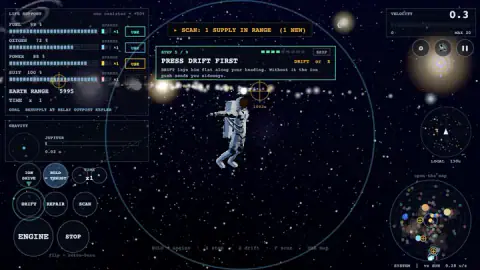
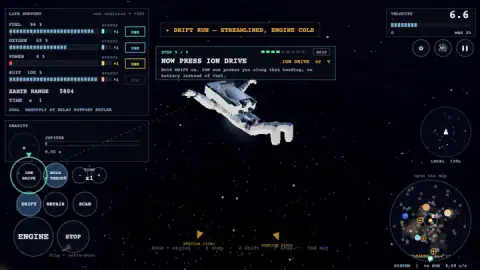
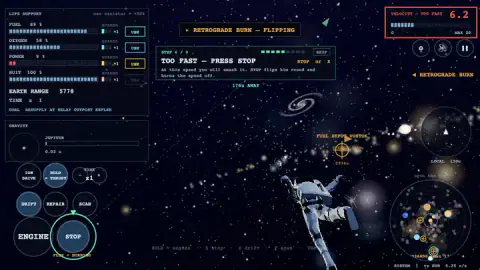
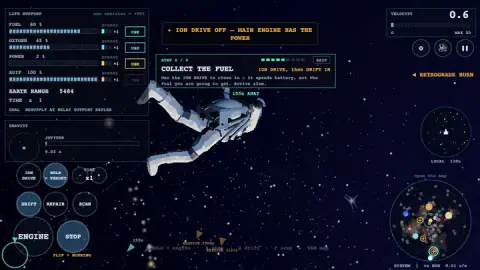
Taken by opening the game ourselves and letting it run — not supplied by the publisher, and not the same picture every other site shows.
How to play The long way home
- Drag anywhere to turn the view. You begin tumbling, and the first lesson says so in as many words: "You are tumbling in the dark. Get your bearings."
- Press SCAN, or F. The card explains the trade: "Costs battery. Lights up every canister within range." A marker appears with a distance on it.
- Press DRIFT, or Z. The astronaut lies flat along the way he is travelling and a banner reads DRIFT RUN — STREAMLINED, ENGINE COLD.
- Press ION DRIVE, or V, once. A yellow line confirms it: ION DRIVE LIT — PUSHES ALONG YOUR BODY AXIS, RUNS ON BATTERY.
- Watch the VELOCITY box top right. If it turns red and reads TOO FAST, press STOP, or X, and let the flip finish.
What ten minutes taught us:
- ION DRIVE is a switch, not a pedal. One press lights it and the next turns it off. Nothing obvious happens, so you press again, and half your presses are switching it off. Press once and read the banner.
- It keeps adding speed. There is no air to trim it back. If you want to arrive slowly, turn it off long before you arrive.
- The red line is around 7. With a pickup ahead we were warned at 6.8, and never at 5.2 or below.
- The battery is the clock that bites, not the fuel. See below.
- Scanning is refused when the battery is nearly flat, with the message BATTERY TOO LOW TO SCAN. Scan while you still can.
- Reloading does not rescue you. It restarts the run: the tutorial goes back to step one, and all four bars refill.
Controls
| Drag anywhere on the screen | Turns the view. The tutorial asks for this before it asks for anything else, because you start tumbling |
|---|---|
| ENGINE button, or hold Space | Burns the main thruster and spends fuel; about a second of it took us from a crawl to over 6 on the speed box |
| STOP button, or X | Turns the astronaut round and burns against his motion until the speed is gone; this also spends fuel |
| DRIFT button (the game labels it Z) | Lays the astronaut flat along the direction he is travelling, which the ion drive needs |
| ION DRIVE button (the game labels it V) | A switch; one press lights a weak push that runs on battery, the next press turns it off |
| SCAN button, or F | Looks for supplies nearby and marks them with a distance; it is refused when the battery is nearly flat |
| USE, beside each life-support bar | Spends a spare canister on that bar; we did not press it |
| SKIP, top right of the tutorial card | Jumps past the current lesson; the card also shows a row of pips for how far through the nine you are |
| TAB, or the small system map | The game says it opens the planning map; we did not open it |
Features
- You play an astronaut with no ship, and nothing slows him down unless you burn for it
- A nine-step tutorial that teaches looking around first and braking last
- Four life-support bars, fuel, oxygen, power and suit, each with one spare canister worth half a bar
- Two engines, a strong one that drinks fuel and a weak ion drive that runs on the battery
- A speed box that reads from 0 to MAX 20 and turns red at around 7 when you are closing on a pickup
- A local radar, a map of the whole system and a gravity panel that named Jupiter the whole time
- An EARTH RANGE counter in the thousands that falls as you make progress, and is the only score there is
Game details
- Developer
- Arnold Bobrinskii
- Release date
- August 2026
- Last updated
- August 6, 2026
- Added here
- June 2026
- Technology
- HTML5
- Platforms
- Browser (desktop)
- Classification
- Action , Adventure , Simulation
- Saved progress
- Saving, when available, is managed by this game. Mava cannot confirm your level.
FAQ
How do you play The Long Way Home?
You steer an astronaut who floats in open space with four supplies, fuel, oxygen, battery power and the suit. ENGINE pushes hard and spends fuel, ION DRIVE pushes gently and spends battery, and STOP turns you round and burns your speed away. A nine-step tutorial walks you through looking around, scanning, drifting, the ion drive, a fuel pickup and braking. Across two sessions we reached step 8 and did not finish it.
How do you slow down in The Long Way Home?
Press STOP or the X key. The astronaut flips to face backwards and fires the engine against his own motion, and the button reads FLIP + BURNING while it works. The tutorial step that teaches it is blunt about why it matters, saying that nothing else slows you down out here. It is the only brake we found, and it is paid for in fuel.
What does the ion drive do in The Long Way Home?
It is a second, much weaker engine that runs on the POWER bar and leaves the fuel alone. You press DRIFT first so the astronaut lies along his heading, then press ION DRIVE once to light it. It is a switch, so a second press turns it off, and it keeps adding speed for as long as it is lit. In one stretch of about two minutes it cost us almost the whole battery and five points of fuel.
How do you collect the fuel in the tutorial of The Long Way Home?
We still have not managed it, so this is what we learned from failing twice. Step 6 wants you to close in on the ion drive and arrive slowly, and the canister is marked on screen with its distance. Our best run brought it down to 54u before the speed box went red and the braking threw us back out. Light the drive once, switch it off early, and keep the speed under about 6.
How fast does the oxygen run out in The Long Way Home?
It falls on its own and nothing we pressed changed the pace. From a fresh start with every bar full, the oxygen was down to 84% a little over two minutes later, with time set to x1. You carry one spare oxygen canister worth half a bar; we did not use it and did not see what happens at zero.
What is the EARTH RANGE number in The Long Way Home?
It sits under the life-support bars and counts how far you still are from home, in the game's own units. It falls as you make ground, so it works as the score. A fresh run we watched from step one began at 5244 and we have seen readings above 6,200 in another, so it does not always start from the same number.
Can you play The Long Way Home on a phone?
It is listed for PC, Android and iOS, and every action has a round button on the screen as well as a key. We played on a desktop with a mouse and keyboard only, so we cannot tell you how it handles on a touchscreen. The interface is dense, with small text in the panels.
Who made The Long Way Home?
The game's listing credits Arnold Bobrinskii. The game was published on 5 August 2026. It shares its title with books, films, songs and at least one other video game; this page is only about this browser game.