








About Geometry Arrow 2
About Geometry Arrow 2
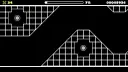
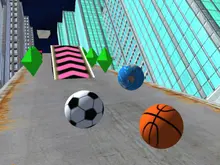
The game, as denoted by the number, is a sequel in a series. This sequel uses the same 2D format but updates things a little for fans of the first Geometry Arrow. It was even developed by the same person who developed the original, faraonovvit. Your goal is to make it to the portal at the end of each cave to proceed, which is a simple task on paper. This time, instead of one character, they have two, the Arrow and the new Wheel. The game is almost entirely void of colour, with black and white making up most of what you see on the screen.
What happened in our run
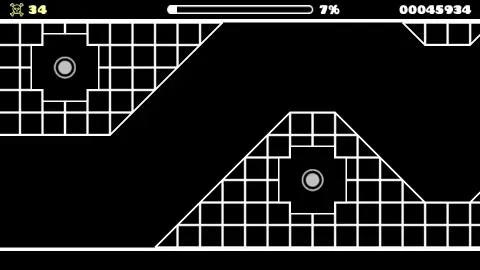
By the time we reached the menu for the last time, after just over four minutes of play, our death count stood at around 40. Try as we might, we couldn’t get past 7% of the level in question. The lack of checkpoints means dying will send you all the way back to the beginning of a level – and you will die… a lot. Luckily, each attempt is only a couple of seconds long, thus, another attempt is never far away. The player's first few attempts are guaranteed to yield miserable results, but there's still a compulsion to play again and again and watch that global score climb.
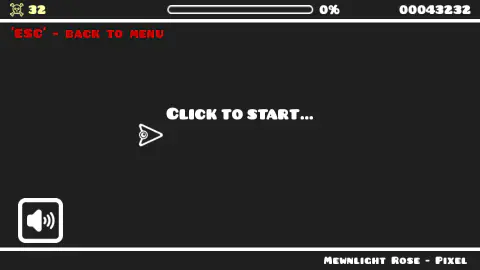
Every once in a while when playing, an ad will pop up to play a video, but then it never starts. When playing you run the risk of an ad popping up halfway through the session as well. These are abstract tunnels made up of white (and occasionally sloping) squares. One nice touch is that the name of the song currently being played, Mewnlight Rose, is listed in the lower right corner of the screen.
Geometry Arrow 2 levels and customization
There are 13 levels in all and each level gets increasingly difficult to complete meaning there's a fair challenge here. While the game is divided into levels, you wouldn’t know that without looking at the menu. There are different levels on the screen, and you click arrows to move around them. There is some minor customization where you can change the look of the ball and change the particles and blocks of your cave as well. The level of customisation here isn’t so deep to put you off.
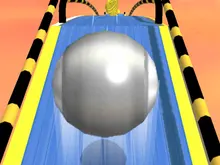
The Wheel in Geometry Arrow 2
At times it feels more like a mini-sequel, as a new set of sections is introduced. We just failed – a lot – because the skill ceiling is so high, and we flew and couldn’t quite reach it.
Geometry Dash Arrow 2
Geometry Dash’s gameplay is simple: tap to jump, or tap and hold to jump repeatedly. Taking on the role of a small arrow known as the wave in Geometry Dash, you’ll hold a button to ascend, and let go to descend. A lot of the mechanics are similar, but the two games are quite different.
Geometry Arrow 2 unblocked
If you don’t have a phone to play this on then it is also available to play in your browser directly on this website. It’s most definitely free to play and can be played anywhere the network allows, like in between breaks at school or work.
Compared with the first Geometry Arrow
This is no drastic shift, especially when compared to the first game, where, ultimately, every cave was painted in black and white. We have no qualms in admitting that we didn’t beat a single stage of the first game either, which speaks volumes about the general level of difficulty. It’s impossible not to try the game again and again since one attempt doesn’t last longer than a couple of seconds.
Screenshots
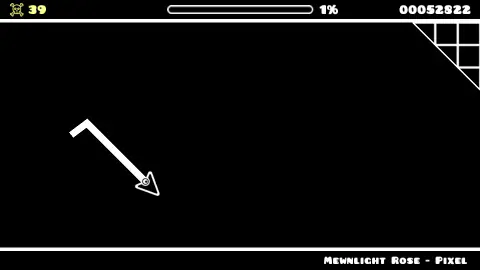
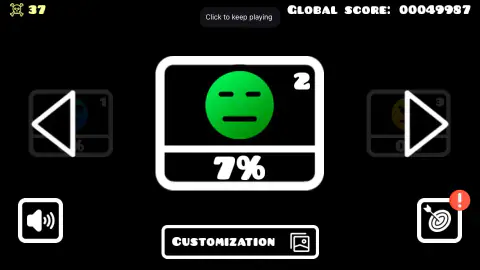
How to play Geometry Arrow 2
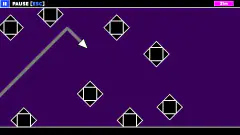
The gameplay, or player interaction, is intentionally very simple and only requires one button: the left mouse button or spacebar. Hold the button down and your arrow will climb, let go and it will fall. The arrow only moves on a strict diagonal, so every gap comes down to precise timing. Eventually you get the hang of it.
When you start a level you are greeted with a slightly greyed out window of the game, you click to start and then you are in the cave straight away. If you want another level, you’ll have to back out to the main menu with Escape and reenter the level from there—which is quick as well. If you’re playing in mobile mode, you can use the touch screen. There is a death counter and percentage also present on the screen to indicate how well/badly you are doing. There is a progress bar at the top of the screen showing how much of the level you have completed.
Controls
| Left mouse button or Space | Hold to climb, let go to fall. |
|---|---|
| Escape | Leave the level and go back to the menu. |
| Touch screen | On phones and tablets, touch the screen, according to the game's listing. |
Features
- 13 levels, each with Arrow sections and Wheel sections.
- A skull counts your deaths and a bar shows your progress in the level.
- Each level card in the menu keeps your best percentage.
- You can change the look of the arrow and the ball, the particles and the blocks.
Game details
- Developer
- faraonovvit
- Added here
- May 2025
- Technology
- HTML5 (2D)
- Platforms
- Browser (desktop, mobile, tablet)
- Classification
- Arcade
- Saved progress
- Saving, when available, is managed by this game. Mava cannot confirm your level.
FAQ
How do you play Geometry Arrow 2?
Hold the left mouse button or Space and the arrow climbs. Let go and it falls. It always moves at 45 degrees. Reach the portal at the end of the cave.
How many levels does Geometry Arrow 2 have?
Thirteen. You pick one from the menu, where each card shows your best percentage.
Is Geometry Arrow 2 the same as Geometry Dash?
No. Geometry Arrow 2 is by faraonovvit. The way the arrow climbs and falls looks like the wave in Geometry Dash, but it is a different game.