








About Colonora: Colony Survival
Most browser strategy games hand you something to drive. This one hands you a clock and three strangers who take no orders from a keyboard. Press a key, any key, and nothing on the grass so much as turns around. The only way to make anything happen in Colonora: Colony Survival is to draw a rectangle on the ground and wait for someone to notice.
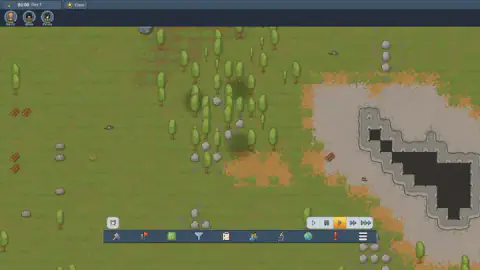
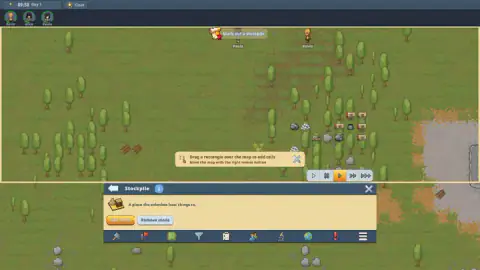
The screen explains the premise before you touch it. A card drops over the map with a ship breaking up in orbit and three short paragraphs: sirens, cryptosleep, escape pods, an unknown planet, burning wreckage still coming down. The last line is the brief for everything after it — gather what survived the fall and find a way to live here. Behind the card lies the result: grass, scattered trees, loose stones, and bundles of cut logs lying where they landed.
What makes it a game rather than a diorama is the division of labour. You mark, they work. A clock in the top corner reads the hour and the day, a weather pill beside it reads Clear, and three round portraits underneath carry names: Kevin, Alice and Paula. Not units, not a headcount. Click one and a panel slides up with their mood, their rest, their food and what they are carrying. Below sits a bar of ten order icons, and above it the thing that turns a management screen into a game — five buttons that set the speed of time, from slow through paused to two grades of fast forward.
One honest note before the rest. We never left day one. We marked the stockpile the game asked for and watched the colonists fill it, but we built no wall, door, bed or room, so the warning tag at the right of the screen was still glowing when we stopped.
The first thing the game wants is a rectangle, not a building
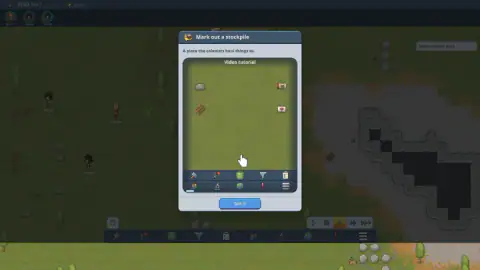
The opening task is a card headed Mark out a stockpile, and under the title it gives the plainest definition in the game: "A place the colonists haul things to." Inside, a looping animation shows a hand marking out a patch of green while crates and planks sit around it, and a blue Got it button closes the lesson.
That definition is doing more work than it looks. Nothing is stored until there is somewhere to store it, so the first act of settlement here is pure bookkeeping: you are not building a warehouse, you are declaring that a stretch of grass counts as one. Nothing is paid for and nothing is constructed. The ground changes status.
You can watch the consequence in the corner. Before our rectangle landed, the column of material icons ran to three lines; the moment the big one registered it ran to six, with stone reading in the four hundreds.
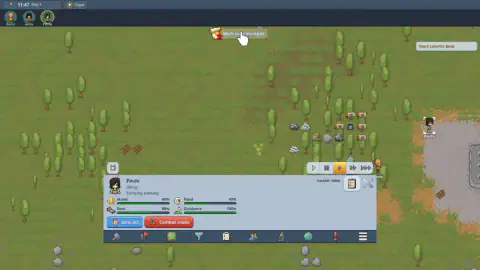
Then the slow part began, and it is the best thing here to watch: Paula and Alice walked out to the log bundles, picked one up each, carried them in, and went back for more. The wood line climbed from eighty to three hundred over the next stretch of colony time, without a further click from us.
The marking takes patience, mostly because the instructions change as you go. The panel offers Add mode and Remove mode, the floating hint tells you to drag a rectangle, and mid-drag the banner swaps to "Tap the cross to stop marking". Three messages, all correct, never on screen together.
A stockpile is a depot, and depots are older than any strategy game
The word the game uses is the right one, and it comes with real history attached. Any expedition that cannot carry everything at once solves the problem the same way: it lays depots. A depot is not a building either — it is a marked spot with supplies left in it, chosen because it sits on a route somebody will walk again.
The polar expeditions made the method famous, and both halves of it with it. Laying a depot was the easy part; finding it again was the part that killed people. Amundsen marked his southern depots with lines of flags running crosswise to his march, so a party drifting off course in a whiteout would still cross the line somewhere and be funnelled in. Scott's team, hauling home in 1912, died in their tent a short march from a depot they could not reach. The lesson Colonora teaches in its first ten minutes is the same one: a pile of supplies is worth what the route to it is worth.
Depots taught a second lesson: open ground is a slow thief. Grain in the damp sprouts, salt cakes, tins in the sun go off. That is why every store humans have bothered with — granary, root cellar, store tent — begins with a roof. Colonora shows its working here. Click a stack of dry rations lying in the open and the panel reads, in as many words, "Deteriorating: Unroofed, outdoors (0.25 / day)", with a button beside it to forbid the stack.
Which is where the tag at the edge of the screen comes in. Need colonist beds sits there from the first morning, and hovering it turns the nag into an instruction: "Not every colonist has a bed to sleep in. Build more beds from the Furniture group of the build menu." This is not furniture for its own sake. The card after the stockpile lesson makes the logic explicit — "A room is an enclosed space made of walls and doors. Colonists need to sleep in rooms, not outdoors." Your rations rot without a roof. So, in the game's accounting, do your people.
Three colonists, four bars each, and a food line already sinking
Open Paula and you get a person rather than a stat block. Her panel read Idling and Carrying nothing when we caught her, with Health at full and four bars underneath: Mood, Rest, Food and Outdoors. Food had slipped to forty-two per cent by late morning of day one. Outdoors was pegged at the maximum, a polite way of saying she had spent her whole life on this planet standing in a field.
Two buttons sit under the bars, and the pair tells you what is waiting further in. One is Interact. The other is Combat mode, in red.
That is as far as we can speak from experience. The game's own description promises a good deal more — colonists with individual skills, work priorities you set so they handle the daily round themselves, cooking, crafting weapons and armour, raids, random events, and survivors who break down if pushed too far. We saw the needs on the panel; we never saw a raid, and never pushed anyone far enough to find out what breaking down looks like. Take that list as the game's, not ours.
The loop underneath it does work, and works quietly. You mark, you wait, you look up, and a bundle of logs has crossed the map because somebody decided it should.
More colonies, camps and settlements
If the hauling caught you, Crown & Crafts is built almost entirely out of it: ore walks to the smelter, bread walks to the door, and nothing arrives without somebody carrying it. Cozy idle village keeps the named-villager idea and runs it for generations, while Desolate Isle: Survival swaps the overhead view for a survivor you move yourself. For the harder end of camp management, Survival Tycoon: City of Zombie puts a barrier between your people and the thing outside it. The rest are in strategy games.
Screenshots
How to play Colonora: Colony Survival
- Read the opening story card and press OK. The map underneath is already running, so the clock moves the moment you close it.
- Open the Zones menu from the green square on the order bar. Six tools live there: Stockpile, Dump, Growing zone, Home, Build roof and Remove roof.
- Choose Stockpile, then press Add mode in the panel that opens. Nothing you draw before that press registers.
- Drag a rectangle across the ground. The game prints the instruction for you — "Drag a rectangle over the map to add cells" — with "Move the map with the right mouse button" in smaller type underneath.
- Leave it alone. Put the clock on fast forward and let them walk; hauling is their job, and they start without being told which pile to take first.
What only sitting in front of it teaches:
- Add mode is the whole trick, and it is easy to miss. Selecting the Stockpile tool opens a panel but arms nothing. We dragged rectangles across clean grass for minutes before pressing the orange button, and not one of them registered.
- Mark over the mess, not around it. Hunting for empty ground is the wrong instinct — the rectangle that finally worked lay straight across trees, log bundles and rocks, and the counts in the corner jumped the moment it landed.
- Zoom in before you trust a number. The clock, the resource column and the order icons are all drawn small, and the material counts are the smallest thing on screen.
- The right mouse button is the camera. The left one draws zones, so to look elsewhere you need the other, exactly as the hint says.
- Watch the quest banner, not the map. When the stockpile finally took, the banner at the top burst into sparkles and changed its wording. That flash is the clearest confirmation the game gives you.
Controls
| Left click | Selects a colonist, a building or an item on the ground, and opens its panel along the bottom of the screen |
|---|---|
| Left drag | Draws the rectangle that marks a zone, once a zone tool is chosen and Add mode is on. The game prints the instruction itself: "Drag a rectangle over the map to add cells" |
| Right button drag | Moves the camera. The game prints this one on screen too, under the rectangle hint |
| Right click | Per the game's listed instructions, opens the orders menu for the colonists you have selected, or cancels the tool you are holding |
| Double click | Listed by the game as selecting every similar object on screen at once, which is how you order a whole copse felled rather than one tree |
| Mouse wheel | Zooms in and out. Worth using, because the interface is small and the item counts are smaller |
| Esc | Cancels the current tool or closes the open window, per the game's listed instructions |
| The five time buttons | Sit above the order bar and run the clock — slow, paused, normal and two speeds of fast forward, with the active one lit orange |
| Tap, double tap, one-finger drag, pinch | The touchscreen equivalents, per the game's own listing. We played with a mouse, so this is the listing's claim rather than ours |
Features
- The survivors have names and faces rather than unit counts: Kevin, Alice and Paula sit as portraits in the corner, and each one walks the map with their name printed under their feet
- The clock is a control, not a readout — five buttons set it to slow, paused, normal and two speeds of fast forward, so you can skip the walking you just ordered
- Zones come before buildings, and there are six of them in one menu: Stockpile, Dump, Growing zone, Home, Build roof and Remove roof
- Marking a stockpile changes the corner arithmetic at once: our resource column went from three lines to six the moment the big rectangle landed, with stone reading in the four hundreds
- Food in the open rots on a timer the game shows you: a stack of dry rations carries the line "Deteriorating: Unroofed, outdoors (0.25 / day)" and a button to forbid it
- Click a colonist and you get the whole person: Mood, Rest, Food and Outdoors bars, a health line, whether they are idling and what they are carrying, plus Interact and Combat mode buttons
- The tutorial is two cards deep before it asks for a building — Mark out a stockpile first, then Build a room, each with one plain sentence and a looping animation of the move
Game details
- Developer
- Partner studio
- Release date
- October 2026
- Last updated
- October 25, 2026
- Added here
- October 2026
- Technology
- HTML5 (2D)
- Platforms
- Browser (desktop, mouse strongly recommended), Browser (mobile & tablet, touch per the game's own listing — we did not test it)
- Classification
- Strategy
- Saved progress
- Saving, when available, is managed by this game. Mava cannot confirm your level.
FAQ
How do you play Colonora: Colony Survival?
You give orders and the colonists carry them out by themselves, so the job is deciding what should happen and where. You mark zones on the grass with a rectangle, queue work from the order bar at the bottom, and run the clock faster or slower while the three survivors walk, fell, carry and build. Clicking a colonist shows what they are doing and how they feel about it.
What is a stockpile in Colonora, and how do you mark one?
A stockpile is the yard your colonists carry loose material to, and the game defines it in five words of its own: "A place the colonists haul things to." You open the Zones menu, choose Stockpile, press Add mode, then drag a rectangle across the ground. A hint reading "Drag a rectangle over the map to add cells" stays on screen while you do it, and tapping the cross stops the marking.
Why does Colonora keep saying "Need colonist beds"?
Because your survivors landed with nowhere to sleep, and the tag sits at the right of the screen until you fix it. Hovering it spells out the problem and the cure: "Not every colonist has a bed to sleep in. Build more beds from the Furniture group of the build menu." A bed on open ground is not enough either, because the next tutorial card explains that colonists need to sleep in rooms, not outdoors.
Do you control the colonists directly in Colonora?
No, and that is the whole shape of the game. You never steer anyone with keys; you mark zones, queue work and set priorities, and the colonists choose their own route to the job. In our session we marked a stockpile and then simply watched two of them pick up log bundles and carry them in without another click from us.
Is there a tutorial in Colonora: Colony Survival?
Yes, and it arrives as cards rather than a wall of text. Each one carries a title, a single plain sentence and a small looping animation of the move it wants, labelled "Video tutorial", with a blue "Got it" button to dismiss it. That animation is part of the game, not an advert; the first two cards cover marking a stockpile and building a room.
Can you play Colonora: Colony Survival on a phone?
The game lists touch controls of its own — tap to select, double tap to select everything similar, drag one finger to move the map and pinch to zoom — and our catalogue records it as a mobile title. We played it with a mouse and keyboard and did not test a touchscreen. Be warned that the interface is small on any screen: the clock, the resource counts and the order icons are all tiny, and the game's own hints talk about the right mouse button.
Does Colonora: Colony Survival have raids or enemies?
Its own description promises raids and random events, and each colonist panel carries a "Combat mode" button, so the fighting is clearly built in. We cannot vouch for any of it, because our session never left the morning of day one and nothing attacked us. Treat the raids as the game's claim rather than ours until you have seen one yourself.
Who made Colonora: Colony Survival, and is it free?
It is free to play in a browser with nothing to install. The studio behind it is not recorded anywhere we can check, so this sheet names no author rather than guessing one, and we saw no shop, price or purchase prompt on screen during our session. It reached our catalogue on 24 October 2026, which makes it a new arrival rather than a back-catalogue title.